

设置 Kestrel 运行时绑定的端口
Kestrel 是一个跨平台的适用于 ASP.NET Core 的 Web 服务器。 Kestrel 是 Web 服务器,默认包括在 ASP.NET Core 项目模板中。
下面对配置端口的方式进行简单的实操。
1.使用配置文件方式
{
  "Logging": {
    "LogLevel": {
      "Default": "Information",
      "Microsoft": "Warning",
      "Microsoft.Hosting.Lifetime": "Information"
    }
  },
  "AllowedHosts": "*",
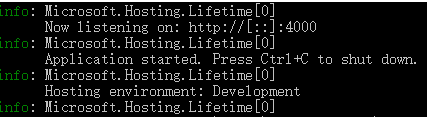
  "Urls": "http://*:4000"
}
运行如下:
2.使用硬编码方式
 .ConfigureWebHostDefaults(webBuilder =>
            {
                webBuilder.UseStartup<Startup>();
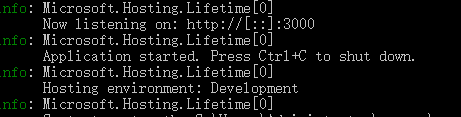
                webBuilder.UseUrls("http://*:3000");
            });
运行如下:
3.使用环境变量方式
"WebApplication1": {
      "commandName": "Project",
      "launchBrowser": true,
      "applicationUrl": "http://localhost:1000",
      "environmentVariables": {
        "ASPNETCORE_ENVIRONMENT": "Development",
        "ASPNETCORE_URLS": "http://*:2000"
      }
    }
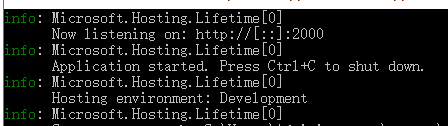
这里要说下的是applicationUrl的配置项不允许使用 "applicationUrl": "http://*:1000"形式
4.使用命令行形式
doenet WebApplication1.dll --urls "http://*:5000"
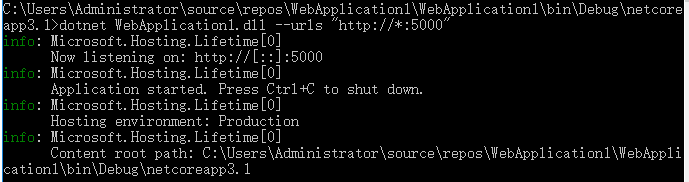
通过对上边的每个类型的配置方式进行分析 我们可以看到优先级为:命令行>配置文件>硬编码>环境变量
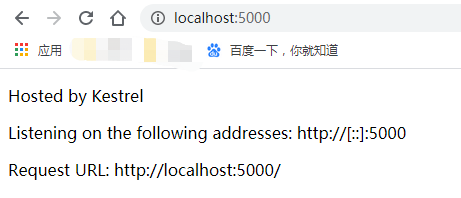
如果想查看Kestrel 在运行时实际绑定到的端口使用如下方法:
public void Configure(IApplicationBuilder app)
{
    var serverAddressesFeature =
        app.ServerFeatures.Get<IServerAddressesFeature>();

    app.UseStaticFiles();

    app.Run(async (context) =>
    {
        context.Response.ContentType = "text/html";
        await context.Response
            .WriteAsync("<!DOCTYPE html><html lang=\"en\"><head>" +
                "<title></title></head><body><p>Hosted by Kestrel</p>");

        if (serverAddressesFeature != null)
        {
            await context.Response
                .WriteAsync("<p>Listening on the following addresses: " +
                    string.Join(", ", serverAddressesFeature.Addresses) +
                    "</p>");
        }

        await context.Response.WriteAsync("<p>Request URL: " +
            $"{context.Request.GetDisplayUrl()}<p>");
    });
}
运行结果:

 浙公网安备 33010602011771号