
基于注册表实现右键新建菜单
WPF 工具类NewMenuUtility的实现,核心是读取 Windows 系统注册表中 “新建文件” 相关配置,在 WPF 应用中生成并绑定系统风格的右键新建文件菜单,支持创建对应类型文件。
核心点
- 注册表读取:从
HKEY_CLASSES_ROOT下的*\ShellNew键、文件扩展名子键(如.txt),获取新建文件的类型、图标、默认内容等配置; - 菜单数据处理:整理文件类型描述、图标路径、默认文件名,补充 “文件夹” 和 Office 文件(.docx等)特殊项,去重生成NewMenuItem列表;
- WPF 菜单绑定:将NewMenuItem转为 WPF 的MenuItem(加载图标),绑定到
ContextMenu; - 文件创建功能:点击菜单项时,在桌面生成唯一命名的文件(含内容或空文件),处理文件重名,提示创建结果。
一、添加NewMenuItem.cs 右键菜单类
点击查看代码
 /// <summary>
 /// 新建菜单项的类,包含文件的基本信息
 /// </summary>
 public class NewMenuItem : INotifyPropertyChanged
 {
     // INotifyPropertyChanged 实现
     public event PropertyChangedEventHandler PropertyChanged;

     protected void OnPropertyChanged(string propertyName)
     {
         PropertyChanged?.Invoke(this, new PropertyChangedEventArgs(propertyName));
     }

     private string _header;
     /// <summary>
     /// 菜单名称
     /// </summary>
     public string Header
     {
         get { return _header; }
         set
         {
             _header = value;
             OnPropertyChanged(nameof(Header));
         }
     }

     private string _extension;
     /// <summary>
     /// 文件扩展名
     /// </summary>
     public string Extension
     {
         get { return _extension; }
         set
         {
             _extension = value;
             OnPropertyChanged(nameof(Extension));
         }
     }

     private string _iconPath;
     /// <summary>
     /// 图标路径
     /// </summary>
     public string IconPath
     {
         get { return _iconPath; }
         set
         {
             _iconPath = value;
             OnPropertyChanged(nameof(IconPath));
         }
     }

     private string _fileName;
     /// <summary>
     /// 默认文件名
     /// </summary>
     public string FileName
     {
         get { return _fileName; }
         set
         {
             _fileName = value;
             OnPropertyChanged(nameof(FileName));
         }
     }

     private byte[] _fileContents;
     /// <summary>
     /// 文件内容
     /// </summary>
     public byte[] FileContents
     {
         get { return _fileContents; }
         set
         {
             _fileContents = value;
             OnPropertyChanged(nameof(FileContents));
         }
     }
 }
二、添加 NewMenuUtility 菜单工具类
点击查看代码
/// <summary>
 /// 工具类
 /// </summary>
 public class NewMenuUtility
 {
     /// <summary>
     /// 获取所有新建菜单项
     /// </summary>
     /// <returns></returns>
     public static List<NewMenuItem> GetNewMenuItems()
     {
         List<NewMenuItem> items = new List<NewMenuItem>();

         // 检查 HKEY_CLASSES_ROOT\* 下的 ShellNew 键
         using (RegistryKey shellNewKey = Registry.ClassesRoot.OpenSubKey(@"*\ShellNew"))
         {
             if (shellNewKey != null)
             {
                 foreach (string valueName in shellNewKey.GetValueNames())
                 {
                     if (valueName != "Classes")
                     {
                         AddNewMenuItem(items, valueName);
                     }
                 }
             }
         }
         // 检查 HKEY_CLASSES_ROOT 下所有以点开头的子键
         using (RegistryKey classesRoot = Registry.ClassesRoot)
         {
             foreach (string keyName in classesRoot.GetSubKeyNames().Where(k => k.StartsWith(".")))
             {
                 using (RegistryKey extensionKey = classesRoot.OpenSubKey(keyName + @"\ShellNew"))
                 {
                     if (extensionKey != null)
                     {
                         AddNewMenuItem(items, keyName);
                     }
                 }
             }
         }

         // 添加特殊项目,如文件夹
         items.Add(new NewMenuItem
         {
             Header = "文件夹",
             Extension = "",
             IconPath = @"%SystemRoot%\System32\shell32.dll,3"
         });

         // 处理 Office 文件类型
         HandleOfficeFileTypes(items);

         return items.Distinct(new NewMenuItemComparer()).ToList();
     }

     /// <summary>
     /// 从 ShellNew 键添加新菜单项
     /// </summary>
     /// <param name="items"></param>
     /// <param name="subKeyPath"></param>
     private static void AddShellNewItems(List<NewMenuItem> items, string subKeyPath)
     {
         // 打开指定的注册表子键
         using (RegistryKey shellNewKey = Registry.ClassesRoot.OpenSubKey(subKeyPath))
         {
             if (shellNewKey != null) // 若子键存在
             {
                 // 遍历子键中的所有值
                 foreach (string valueName in shellNewKey.GetValueNames())
                 {
                     // 排除 Classes 值
                     if (valueName != "Classes")
                     {
                         // 添加新菜单项
                         AddNewMenuItem(items, valueName);
                     }
                 }
             }
         }
     }

     /// <summary>
     /// 从扩展名添加新菜单项
     /// </summary>
     /// <param name="items"></param>
     private static void AddExtensionItems(List<NewMenuItem> items)
     {
         // 打开 HKEY_CLASSES_ROOT 注册表根
         using (RegistryKey classesRoot = Registry.ClassesRoot)
         {
             // 遍历所有以点开头的子键(即文件扩展名)
             foreach (string keyName in classesRoot.GetSubKeyNames().Where(k => k.StartsWith(".")))
             {
                 // 添加新菜单项
                 AddNewMenuItem(items, keyName);
             }
         }
     }

     /// <summary>
     /// 添加新菜单项
     /// </summary>
     /// <param name="items"></param>
     /// <param name="extension"></param>
     private static void AddNewMenuItem(List<NewMenuItem> items, string extension)
     {
         // 获取文件类型描述
         string fileTypeName = GetFileTypeDescription(extension);
         // 获取图标路径
         string iconPath = GetIconPath(extension);
         // 获取新建文件的内容
         byte[] fileContents = GetNewFileContents(extension);
         // 获取新建文件的默认名称
         string fileName = GetNewFileName(extension);

         // 创建新菜单项并添加到列表
         items.Add(new NewMenuItem
         {
             Header = fileTypeName, // 设置菜单项名称
             Extension = extension, // 设置文件扩展名
             IconPath = iconPath, // 设置图标路径
             FileName = fileName, // 设置默认文件名
             FileContents = fileContents // 设置文件内容
         });
     }

     /// <summary>
     /// 获取文件类型描述
     /// </summary>
     /// <param name="extension"></param>
     /// <returns></returns>
     private static string GetFileTypeDescription(string extension)
     {
         // 打开与扩展名对应的注册表子键
         using (RegistryKey extensionKey = Registry.ClassesRoot.OpenSubKey(extension))
         {
             if (extensionKey != null) // 若子键存在
             {
                 // 获取默认值(文件类型名称)
                 object defaultValue = extensionKey.GetValue("");
                 if (defaultValue != null)
                 {
                     // 打开文件类型对应的注册表子键
                     using (RegistryKey typeKey = Registry.ClassesRoot.OpenSubKey(defaultValue.ToString()))
                     {
                         // 若子键存在
                         if (typeKey != null)
                         {
                             // 获取文件类型的描述
                             object description = typeKey.GetValue("");
                             if (description != null)
                             {
                                 return description.ToString();
                             }
                         }
                     }
                 }
             }
         }
         // 若没有找到描述,返回默认格式
         return $"New {extension.TrimStart('.')} File";
     }

     /// <summary>
     /// 获取新建文件的内容
     /// </summary>
     /// <param name="extension"></param>
     /// <returns></returns>
     private static byte[] GetNewFileContents(string extension)
     {
         // 打开与扩展名对应的 ShellNew 注册表子键
         using (RegistryKey shellNewKey = Registry.ClassesRoot.OpenSubKey($@"{extension}\ShellNew"))
         {
             if (shellNewKey != null) // 若子键存在
             {
                 // 若存在 Data 值,返回其内容
                 if (shellNewKey.GetValue("Data") is byte[] data)
                 {
                     return data;
                 }
                 // 若存在 FileName 值,读取文件内容
                 else if (shellNewKey.GetValue("FileName") is string fileName)
                 {
                     // 扩展环境变量
                     string fullPath = Environment.ExpandEnvironmentVariables(fileName);
                     // 若文件存在
                     if (File.Exists(fullPath))
                     {
                         return File.ReadAllBytes(fullPath);
                     }
                 }
             }
         }
         return null; // 若没有内容,返回 null
     }

     /// <summary>
     /// 获取新建文件的默认名称
     /// </summary>
     /// <param name="extension"></param>
     /// <returns></returns>
     private static string GetNewFileName(string extension)
     {
         // 返回默认文件名
         return $"New File{extension}";
     }

     // 处理 Office 文件类型
     private static void HandleOfficeFileTypes(List<NewMenuItem> items)
     {
         // 定义 Office 文件类型及其名称
         Dictionary<string, string> officeApps = new Dictionary<string, string>
         {
             {".docx", "Microsoft Word 文档"},
             {".xlsx", "Microsoft Excel 工作表"},
             {".pptx", "Microsoft PowerPoint 演示文稿"}
         };

         // 遍历 Office 文件类型
         foreach (var app in officeApps)
         {
             // 获取图标路径
             string iconPath = GetIconPath(app.Key);
             // 添加新菜单项
             items.Add(new NewMenuItem
             {
                 Header = app.Value, // 设置菜单项名称
                 Extension = app.Key, // 设置文件扩展名
                 IconPath = iconPath, // 设置图标路径
                 FileName = app.Value,
             });
         }
     }

     /// <summary>
     /// 获取图标路径
     /// </summary>
     /// <param name="extension"></param>
     /// <returns></returns>
     private static string GetIconPath(string extension)
     {
         // 打开与扩展名对应的注册表子键
         using (RegistryKey extensionKey = Registry.ClassesRoot.OpenSubKey(extension))
         {
             if (extensionKey != null) // 若子键存在
             {
                 // 获取文件类型
                 string fileType = (string)extensionKey.GetValue("");
                 // 若文件类型存在
                 if (!string.IsNullOrEmpty(fileType))
                 {
                     // 打开文件类型的 DefaultIcon 子键
                     using (RegistryKey typeKey = Registry.ClassesRoot.OpenSubKey(fileType + @"\DefaultIcon"))
                     {
                         // 若子键存在
                         if (typeKey != null)
                         {
                             // 返回图标路径
                             return (string)typeKey.GetValue("");
                         }
                     }
                 }
             }
         }
         return null; // 若没有找到图标路径,返回 null
     }

     /// <summary>
     /// 比较器用于去重
     /// </summary>
     private class NewMenuItemComparer : IEqualityComparer<NewMenuItem>
     {
         // 判断两个菜单项是否相等
         public bool Equals(NewMenuItem x, NewMenuItem y)
         {
             // 根据扩展名判断
             return x.Extension == y.Extension;
         }

         // 获取菜单项的哈希码
         public int GetHashCode(NewMenuItem obj)
         {
             // 返回扩展名的哈希码
             return obj.Extension.GetHashCode();
         }
     }

     /// <summary>
     /// 绑定新菜单项到上下文菜单
     /// </summary>
     /// <param name="contextMenu"></param>
     public static void BindNewMenuItems(ContextMenu contextMenu)
     {
         // 获取新菜单项列表
         List<NewMenuItem> newMenuItems = GetNewMenuItems();

         // 遍历新菜单项
         foreach (var item in newMenuItems)
         {
             MenuItem menuItem = new MenuItem
             {
                 Header = item.Header // 设置菜单项标题
             };

             // 若图标路径不为空
             if (!string.IsNullOrEmpty(item.IconPath))
             {
                 try
                 {
                     // 分割图标路径和索引
                     string[] iconInfo = item.IconPath.Split(',');
                     // 扩展环境变量
                     string iconPath = Environment.ExpandEnvironmentVariables(iconInfo[0]);
                     // 获取图标索引
                     int iconIndex = iconInfo.Length > 1 ? int.Parse(iconInfo[1]) : 0;

                     // 加载图标为 BitmapSource
                     BitmapSource iconSource = LoadIconAsBitmapSource(iconPath, iconIndex);
                     // 若图标加载成功
                     if (iconSource != null)
                     {
                         // 设置菜单项图标
                         menuItem.Icon = new System.Windows.Controls.Image { Source = iconSource };
                     }
                 }
                 catch
                 {
                     // 若加载图标失败,忽略错误
                 }
             }

             // 为菜单项添加点击事件
             menuItem.Click += (sender, e) => CreateNewFile(item);
             // 将菜单项添加到上下文菜单
             contextMenu.Items.Add(menuItem);
         }
     }


     /// <summary>
     /// 加载图标为 BitmapSource
     /// </summary>
     /// <param name="filePath"></param>
     /// <param name="iconIndex"></param>
     /// <returns></returns>
     private static BitmapSource LoadIconAsBitmapSource(string filePath, int iconIndex)
     {
         // 初始化图标句柄
         IntPtr hIcon = IntPtr.Zero;
         try
         {
             // 从文件中提取图标
             hIcon = NativeMethods.ExtractIcon(IntPtr.Zero, filePath, iconIndex);
             // 若图标提取成功
             if (hIcon != IntPtr.Zero)
             {
                 // 创建 BitmapSource
                 return Imaging.CreateBitmapSourceFromHIcon(hIcon, Int32Rect.Empty, BitmapSizeOptions.FromEmptyOptions());
             }
         }
         finally
         {
             // 若图标句柄有效
             if (hIcon != IntPtr.Zero)
             {
                 // 销毁图标句柄
                 NativeMethods.DestroyIcon(hIcon);
             }
         }
         return null; // 若没有图标,返回 null
     }

     // 本地方法调用
     private static class NativeMethods
     {
         // 从指定文件提取图标
         [System.Runtime.InteropServices.DllImport("shell32.dll", CharSet = System.Runtime.InteropServices.CharSet.Auto)]
         public static extern IntPtr ExtractIcon(IntPtr hInst, string lpszExeFileName, int nIconIndex);

         // 销毁图标句柄
         [System.Runtime.InteropServices.DllImport("user32.dll", CharSet = System.Runtime.InteropServices.CharSet.Auto)]
         public static extern bool DestroyIcon(IntPtr handle);
     }


     /// <summary>
     /// 创建新文件
     /// </summary>
     /// <param name="item"></param>
     private static void CreateNewFile(NewMenuItem item)
     {
         try
         {
             // 获取桌面路径
             string desktopPath = Environment.GetFolderPath(Environment.SpecialFolder.Desktop);
             // 组合文件路径
             string filePath = Path.Combine(desktopPath, item.FileName);

             // 确保文件名是唯一的
             int counter = 1;
             // 若文件已存在
             while (File.Exists(filePath))
             {
                 // 生成新的文件名
                 string fileName = $"{Path.GetFileNameWithoutExtension(item.FileName)} ({counter}){item.Extension}";
                 // 更新文件路径
                 filePath = Path.Combine(desktopPath, fileName);
                 // 计数器递增
                 counter++;
             }

             // 创建新文件
             // 若文件内容不为空
             if (item.FileContents != null)
             {
                 // 写入文件内容
                 File.WriteAllBytes(filePath, item.FileContents);
             }
             else
             {
                 // 创建空文件并立即释放资源
                 File.Create($"{filePath}{item.Extension}").Dispose();
             }

             // 显示成功消息
             MessageBox.Show($"文件创建成功:{filePath}", "成功", MessageBoxButton.OK, MessageBoxImage.Information);
         }
         catch (Exception ex)
         {
             // 显示错误消息
             MessageBox.Show($"创建文件时发生错误: {ex.Message}", "错误", MessageBoxButton.OK, MessageBoxImage.Error);
         }
     }

 }
三、MainWindow.xaml 文件中添加右键菜单样式
点击查看代码
<Window
    x:Class="SystemNewFileMenuDemo.Views.MainWindow"
    xmlns="http://schemas.microsoft.com/winfx/2006/xaml/presentation"
    xmlns:x="http://schemas.microsoft.com/winfx/2006/xaml"
    xmlns:prism="http://prismlibrary.com/"
    Title="{Binding Title}"
    Width="525"
    Height="350"
    prism:ViewModelLocator.AutoWireViewModel="True">

    <Window.Resources>
        <!--  菜单项  -->
        <Style TargetType="{x:Type MenuItem}">
            <Setter Property="Template">
                <Setter.Value>
                    <ControlTemplate TargetType="{x:Type MenuItem}">
                        <Border
                            x:Name="Border"
                            Background="Transparent"
                            BorderBrush="Transparent"
                            BorderThickness="1">
                            <Grid>
                                <Grid.ColumnDefinitions>
                                    <ColumnDefinition Width="Auto" SharedSizeGroup="Icon" />
                                    <ColumnDefinition Width="*" />
                                </Grid.ColumnDefinitions>

                                <!--  图标  -->
                                <ContentPresenter
                                    x:Name="Icon"
                                    Width="16"
                                    MaxHeight="16"
                                    Margin="6,0,6,0"
                                    VerticalAlignment="Center"
                                    ContentSource="Icon" />

                                <!--  文本  -->
                                <ContentPresenter
                                    Grid.Column="1"
                                    MinWidth="80"
                                    Margin="0,6,6,6"
                                    VerticalAlignment="Center"
                                    ContentSource="Header" />
                            </Grid>
                        </Border>
                        <ControlTemplate.Triggers>
                            <!--  鼠标悬停效果  -->
                            <Trigger Property="IsMouseOver" Value="True">
                                <Setter TargetName="Border" Property="Background" Value="#F2F2F2" />
                                <Setter TargetName="Border" Property="BorderBrush" Value="#F2F2F2" />
                            </Trigger>
                            <!--  选中效果  -->
                            <Trigger Property="IsPressed" Value="True">
                                <Setter TargetName="Border" Property="Background" Value="#D0D0D0" />
                                <Setter TargetName="Border" Property="BorderBrush" Value="#CCCEDB" />
                            </Trigger>
                            <!--  禁用效果  -->
                            <Trigger Property="IsEnabled" Value="False">
                                <Setter Property="Foreground" Value="#888888" />
                            </Trigger>
                        </ControlTemplate.Triggers>
                    </ControlTemplate>
                </Setter.Value>
            </Setter>
        </Style>
        <!--  右键菜单样式  -->
        <SolidColorBrush x:Key="WindowBackgroundBrush" Color="#E7E8EC" />
        <SolidColorBrush x:Key="SolidBorderBrush" Color="#CCCEDB" />
        <Style TargetType="{x:Type ContextMenu}">
            <Setter Property="SnapsToDevicePixels" Value="True" />
            <Setter Property="OverridesDefaultStyle" Value="True" />
            <Setter Property="FontFamily" Value="Segoe UI" />
            <Setter Property="Template">
                <Setter.Value>
                    <ControlTemplate TargetType="{x:Type ContextMenu}">
                        <Border
                            Name="Border"
                            Margin="9"
                            Background="{StaticResource WindowBackgroundBrush}"
                            BorderBrush="{StaticResource SolidBorderBrush}"
                            BorderThickness="0">
                            <StackPanel IsItemsHost="True" KeyboardNavigation.DirectionalNavigation="Cycle" />
                            <Border.Effect>
                                <DropShadowEffect
                                    BlurRadius="8"
                                    ShadowDepth="1"
                                    Color="#E8E8E8" />
                            </Border.Effect>
                        </Border>
                    </ControlTemplate>
                </Setter.Value>
            </Setter>
        </Style>
    </Window.Resources>

    <!--  添加右键菜单交互  -->
    <Grid
        Width="500"
        Height="300"
        HorizontalAlignment="Center"
        VerticalAlignment="Center"
        Background="#F2F2F2">
        <TextBlock
            HorizontalAlignment="Center"
            VerticalAlignment="Center"
            Text="鼠标点击右键调用菜单" />
        <Grid.ContextMenu>
            <ContextMenu x:Name="myContextMenu" />
        </Grid.ContextMenu>
    </Grid>
</Window>
四、MainWindow.xaml.cs 文件中绑定右键菜单
点击查看代码
/// <summary>
 /// Interaction logic for MainWindow.xaml
 /// </summary>
 public partial class MainWindow : Window
 {

     public MainWindow()
     {
         InitializeComponent();

         // 绑定右键菜单
         NewMenuUtility.BindNewMenuItems(myContextMenu);
     }
 }
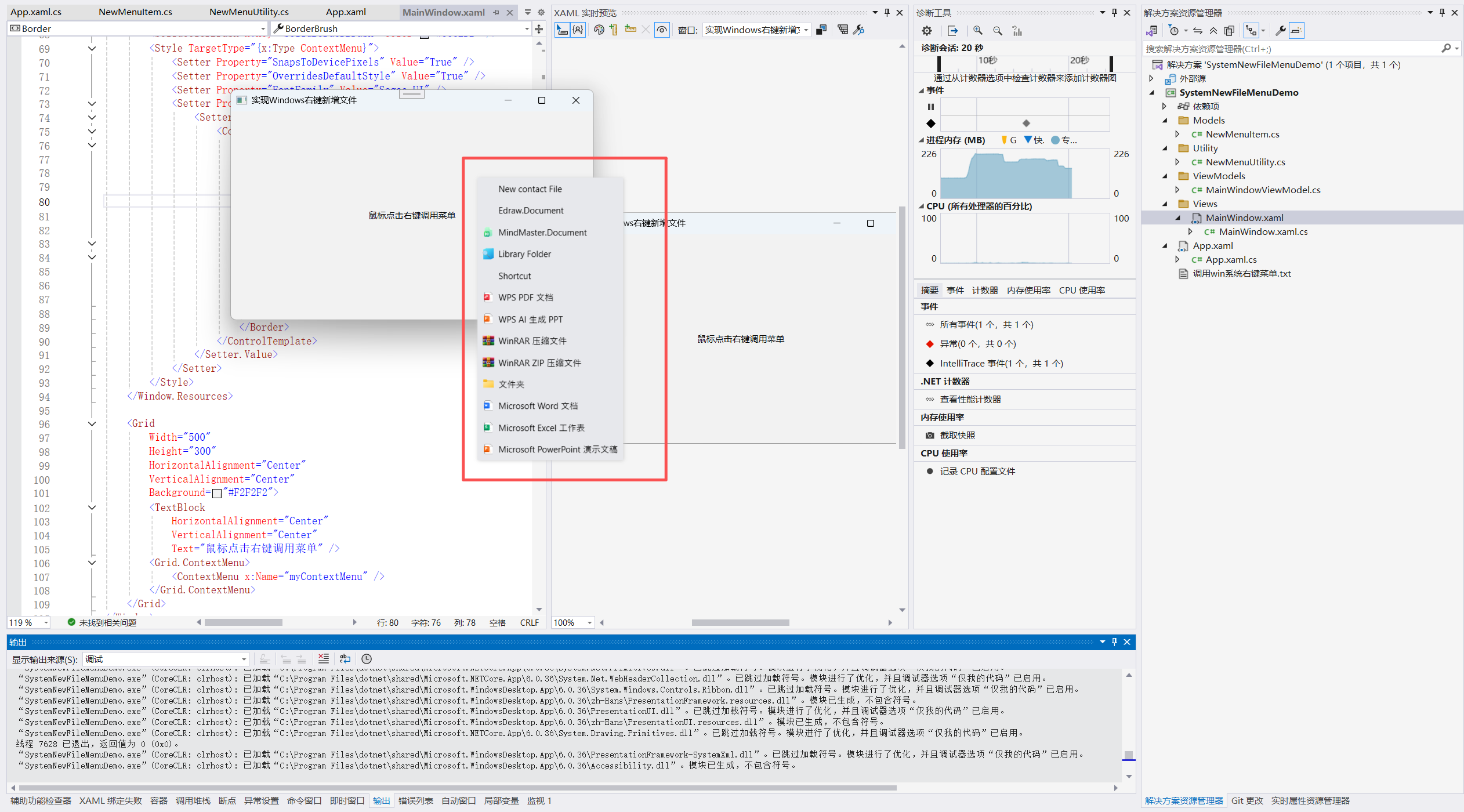
五、效果图展示

 浙公网安备 33010602011771号