
MAUI Android 平台应用自动更新升级
该代码是面向 Android 平台 的 MAUI(.NET Multi-platform App UI)应用更新服务实现,实现了IUpgradeService接口,核心功能涵盖版本检查、APK 下载与安装,整体设计兼顾异常处理、用户体验与 Android 版本兼容性。
一、添加 IUpgradeService.cs 接口
点击查看代码
/// <summary>
    /// 升级服务接口类
    /// </summary>
    public interface IUpgradeService
    {
        /// <summary>
        /// 检查更新
        /// </summary>
        /// <param name="latestVersion">最新版本</param>
        /// <returns></returns>
        bool CheckUpdatesAsync(string latestVersion);

        /// <summary>
        /// 下载安装文件
        /// </summary>
        /// <param name="url">下载URL</param>
        /// <param name="action">进度条处理方法</param>
        /// <returns></returns>
        Task DownloadFileAsync(string url, Action<long, long> action, CancellationToken cancellationToken = default);

        /// <summary>
        /// 安装APK的方法
        /// </summary>
        void InstallNewVersion();
    }
二、在 Platforms/Android 目录下创建 UpgradeService.cs 文件,实现 IUpgradeService 接口
点击查看代码
public class UpgradeService : IUpgradeService
    {
        readonly HttpClient _client;
        public UpgradeService()
        {
            _client = new HttpClient();
        }

        /// <summary>
        /// 检查当前应用版本是否需要更新
        /// </summary>
        /// <param name="latestVersion">服务器提供的最新版本号字符串(如 "1.2.3")</param>
        /// <returns>true表示需要更新,false表示不需要或版本相同</returns>
        public bool CheckUpdatesAsync(string latestVersion)
        {
            try
            {
                // 获取当前版本(MAUI 6+ 推荐方式)
                var currentVersionStr = VersionTracking.Default.CurrentVersion;

                // 使用Version类进行专业比较
                var current = ParseVersion(currentVersionStr);
                var latest = ParseVersion(latestVersion);

                return latest > current;
            }
            catch
            {
                // 出现任何异常时保守返回true(建议更新)
                return true;
            }
        }
        /// <summary>
        /// 安全解析版本字符串(支持不同长度和格式)
        /// </summary>
        private Version ParseVersion(string versionStr)
        {
            // 处理可能的null/empty
            if (string.IsNullOrWhiteSpace(versionStr))
                return new Version(0, 0);

            // 分割版本号组成部分
            var parts = versionStr.Split('.')
                        .Select(p => int.TryParse(p, out int num) ? num : 0)
                        .ToArray();

            // 根据长度创建Version对象
            return parts.Length switch
            {
                1 => new Version(parts[0], 0),
                2 => new Version(parts[0], parts[1]),
                3 => new Version(parts[0], parts[1], parts[2]),
                4 => new Version(parts[0], parts[1], parts[2], parts[3]),
                _ => new Version(0, 0)
            };
        }


        /// <summary>
        /// 下载并安装APK
        /// </summary>
        /// <param name="url"></param>
        /// <param name="progressAction"></param>
        /// <param name="cancellationToken"></param>
        /// <returns></returns>
        /// <exception cref="ArgumentNullException"></exception>
        public async Task DownloadFileAsync(string url, Action<long, long> progressAction, CancellationToken cancellationToken = default)
        {
            // 验证输入参数
            if (string.IsNullOrEmpty(url))
                throw new ArgumentNullException(nameof(url));
            if (progressAction == null)
                throw new ArgumentNullException(nameof(progressAction));

            // 生成唯一的临时文件名,避免冲突
            var fileName = "com.dosswy.apk";
            var tempFilePath = Path.Combine(FileSystem.AppDataDirectory, $"{fileName}.tmp");
            var finalFilePath = Path.Combine(FileSystem.AppDataDirectory, fileName);

            try
            {
                // 使用using确保HttpClient正确释放(如果不是全局单例的话)
                using var request = new HttpRequestMessage(HttpMethod.Get, url);

                // 异步获取响应,支持取消操作
                using var response = await _client.SendAsync(
                    request,
                    HttpCompletionOption.ResponseHeadersRead,
                    cancellationToken
                );

                // 确保请求成功
                response.EnsureSuccessStatusCode();

                // 获取文件总大小,处理可能为null的情况
                var totalLength = response.Content.Headers.ContentLength ?? -1;
                var downloadedLength = 0L;

                // 读取响应流并写入文件
                using var stream = await response.Content.ReadAsStreamAsync(cancellationToken);
                await using var fileStream = new FileStream(tempFilePath, FileMode.Create, FileAccess.Write, FileShare.None, 8192, true);

                var buffer = new byte[8192]; // 使用8KB缓冲区(更适合大多数场景)
                int bytesRead;

                // 循环读取流,支持取消操作
                while ((bytesRead = await stream.ReadAsync(buffer, 0, buffer.Length, cancellationToken).ConfigureAwait(false)) > 0)
                {
                    // 写入文件
                    await fileStream.WriteAsync(buffer, 0, bytesRead, cancellationToken).ConfigureAwait(false);

                    // 更新进度
                    downloadedLength += bytesRead;
                    progressAction(downloadedLength, totalLength);
                }

                // 确保所有数据都写入磁盘
                await fileStream.FlushAsync(cancellationToken).ConfigureAwait(false);

                // 下载完成后重命名临时文件(避免部分下载的文件被误认)
                if (File.Exists(finalFilePath))
                    File.Delete(finalFilePath);
                File.Move(tempFilePath, finalFilePath);
            }
            catch (Exception)
            {
                // 处理其他异常
                if (File.Exists(tempFilePath))
                    File.Delete(tempFilePath);
                throw;
            }
        }


        /// <summary>
        /// 安装新版本
        /// </summary>
        public void InstallNewVersion()
        {
            var file = $"{FileSystem.AppDataDirectory}/{"com.dosswy.apk"}";

            var apkFile = new Java.IO.File(file);

            var intent = new Intent(Intent.ActionView);
            // 判断Android版本
            if (Build.VERSION.SdkInt >= BuildVersionCodes.N)
            {
                //给临时读取权限
                intent.SetFlags(ActivityFlags.GrantReadUriPermission);
                var uri = FileProvider.GetUriForFile(AndroidApp.Application.Context, "com.dosswy.fileprovider", apkFile);
                // 设置显式 MIME 数据类型
                intent.SetDataAndType(uri, "application/vnd.android.package-archive");
            }
            else
            {
                intent.SetDataAndType(AndroidNet.Uri.FromFile(new Java.IO.File(file)), "application/vnd.android.package-archive");
            }
            //指定以新任务的方式启动Activity
            intent.AddFlags(ActivityFlags.NewTask);

            //激活一个新的Activity
            AndroidApp.Application.Context.StartActivity(intent);
        }

    }
三、修改 MauiProgram.cs 文件,注册升级服务
#if ANDROID 是必不可少的,该条件编译指令能确保相关逻辑只在 Android 环境中执行.
点击查看代码
public static class MauiProgram
{
    public static MauiApp CreateMauiApp()
    {

    #if ANDROID

        // Android 添加自定义升级服务
        builder.Services.AddSingleton<IUpgradeService, Platforms.Android.UpgradeService>();

    #endif

    }
}
四、添加检查更新方法
Razor页面
点击查看代码
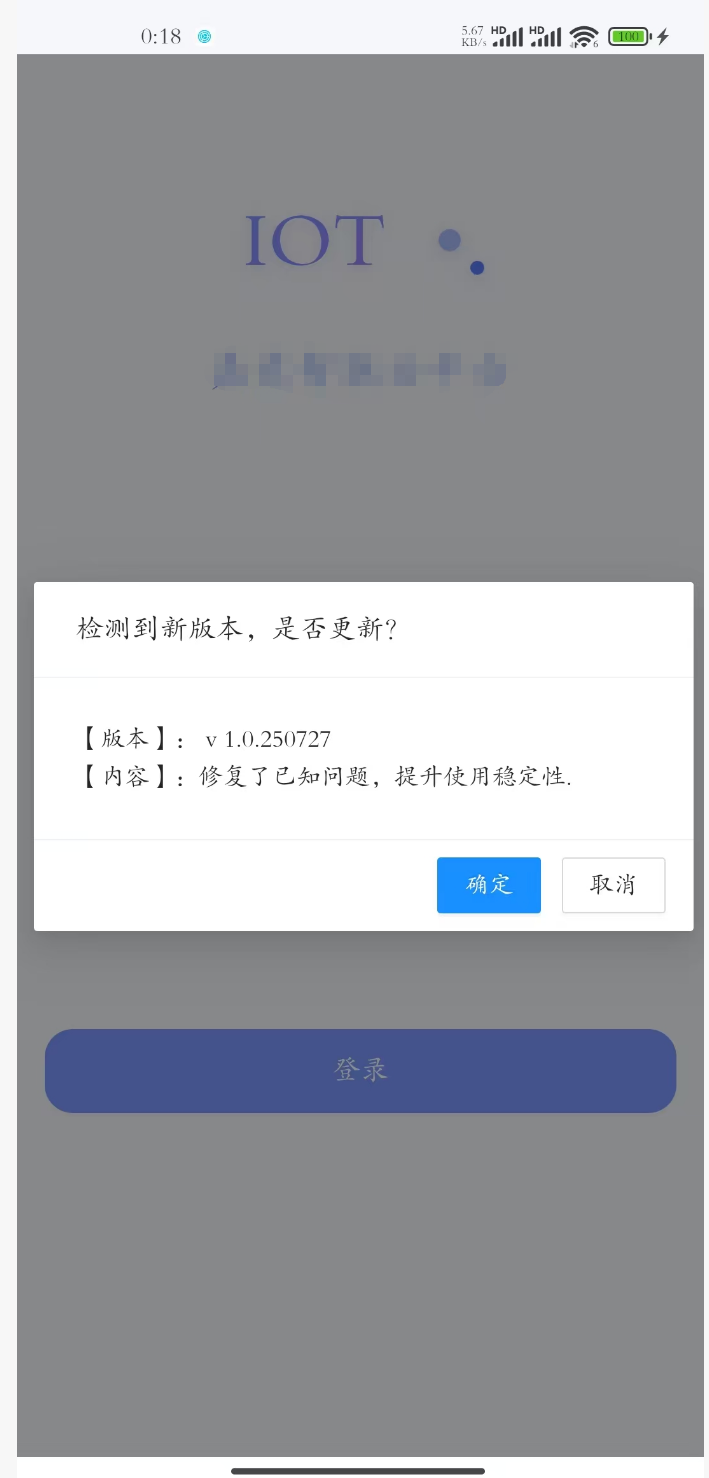
 <!--版本更新弹框-->
    <Modal Title="检测到新版本,是否更新?"
           @bind-Visible="@UpdateConfirm"
           Closable="false"
           Centered="true"
           OnOk="@OnConfirmUpdateAsync">
         <Space>【版本】: V @AppVersion.Version</Space>
         <Space>【内容】:@AppVersion.ReleaseNotes</Space>
    </Modal>
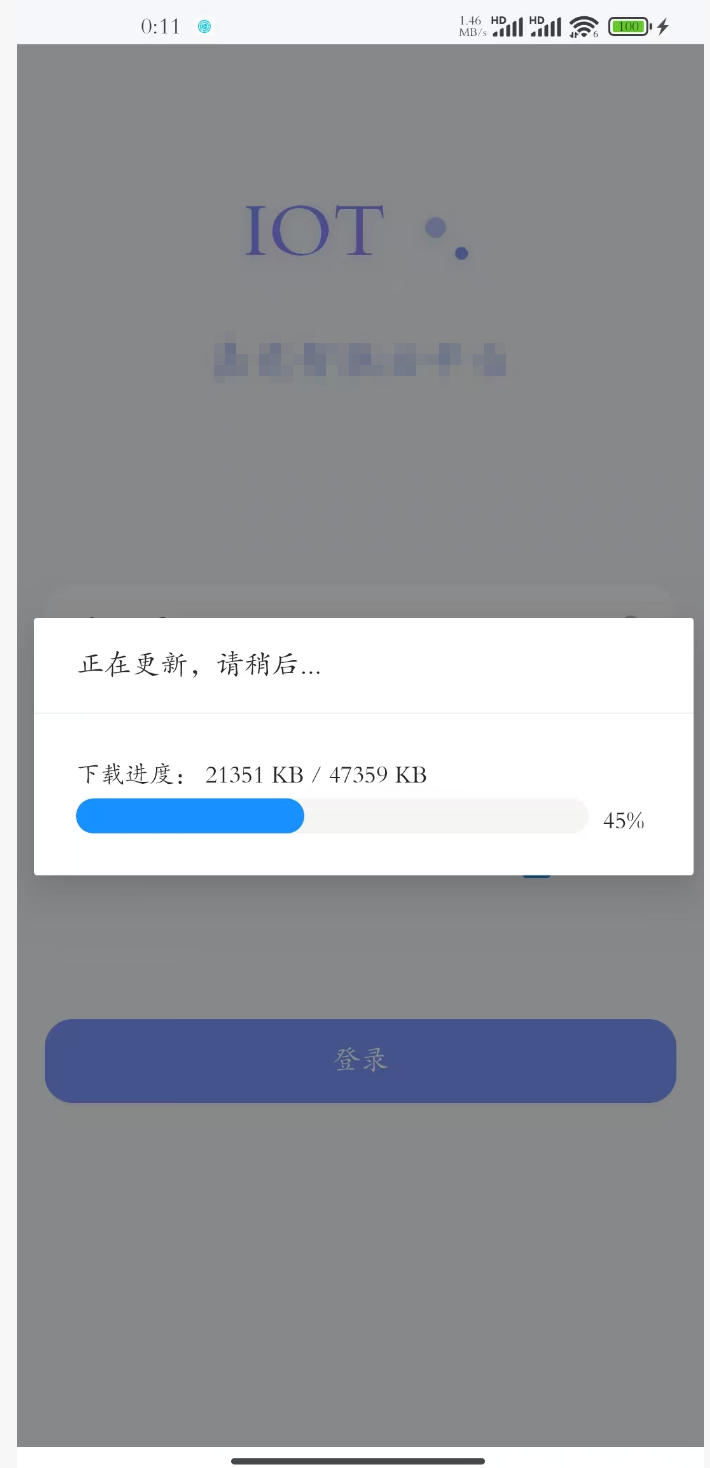
    <!--下载进度弹框-->
    <Modal Title="正在更新,请稍后..."
           @bind-Visible="@UpdateDialog"
           Closable="false"
           MaskClosable="false"
           Centered="true"
           Footer=null>
        <Space>下载进度: @BytesReceived KB / @TotalBytesToReceive KB </Space>
        <AntDesign.Progress StrokeWidth="20" Percent="@Percent" />
    </Modal>
检查更新,若存在新版本则提示用户更新
点击查看代码
/// <summary>
/// 最新版本信息
/// </summary>
public AppVersionInfo AppVersion = new();

/// <summary>
/// 进度百分比
/// </summary>
public int Percent { get; set; }

/// <summary>
/// 总字节数
/// </summary>
public long TotalBytesToReceive { get; set; }

/// <summary>
///  已下载字节数
/// </summary>
public long BytesReceived { get; set; }

/// <summary>
/// 是否显示进度框
/// </summary>
public bool UpdateDialog;

/// <summary>
/// 升级提示并确认框
/// </summary>
public bool UpdateConfirm;

/// <summary>
/// 检查是否软件是否为最新版本
/// </summary>
/// <returns></returns>
public async Task GetVersionNew()
{
    try
    {
        // 数据服务:调用编辑服务
        var response = await VersionService.GetVersionAsync();
        if (response != null && response.Code == ApiCode.Success)
        {
            AppVersion = response.Data;
            // 检查是否为最新版本,非最新版本则提示更新
            if (UpgradeService.CheckUpdatesAsync(AppVersion.Version))
            {
                UpdateConfirm = true;
            }
        }
    }
    catch (Exception e)
    {
        await dialogService.ErrorSnackbarAsync($"读取最新版本报错:{e.Message}");
    }
}

/// <summary>
/// 下载新版本并安装
/// </summary>
/// <returns></returns>
public async Task OnConfirmUpdateAsync()
{
    try
    {
        // 启动版本升级
        UpdateDialog = true;
        // 下载文件
        await UpgradeService.DownloadFileAsync(AppVersion.DownloadUrl, DownloadProgressChanged);
        // 安装新版本
        UpgradeService.InstallNewVersion();
    }
    catch (Exception e)
    {
        await dialogService.ErrorSnackbarAsync($"下载新版本及安装时报错:{e.Message}");
    }
    finally
    {
        UpdateDialog = false;
    }
}

/// <summary>
/// 下载进度
/// </summary>
/// <param name="readLength"></param>
/// <param name="allLength"></param>
private void DownloadProgressChanged(long readLength, long allLength)
{
    InvokeAsync(() =>
    {
        var c = (int)(readLength * 100 / allLength);
        // 刷新进度为每5%更新一次
        if (c > 0 && c % 5 == 0)
        {
            Percent = c; //下载完成百分比
            BytesReceived = readLength / 1024; //当前已经下载的Kb
            TotalBytesToReceive = allLength / 1024; //文件总大小Kb
            StateHasChanged();
        }
    });
}

#endregion
五、效果图

 浙公网安备 33010602011771号