
20222223 实验四 《Python程序设计》实验报告
20222223 2024-2025-2 《Python程序设计》实验四报告
课程:《Python程序设计》
班级: 2222
姓名: 李東霖
学号:20222223
实验教师:王志强
实验日期:2025年5月14日
必修/选修: 公选课
一、实验目的
作为计算机科学专业的学生,我在本学期的Python课程学习了必要的知识,是时候大展身手做一个小游戏了,那就先从复刻经典扫雷游戏开始吧。这个项目完全聚焦于Python在游戏开发中的应用,我将详细分享从游戏设计到最终实现的全过程,以及在开发过程中解决的技术挑战与获得的宝贵经验。
二、实验内容
1.游戏架构与核心技术
1.1游戏设计理念
扫雷游戏的核心设计理念围绕以下几个关键点:
简洁直观的界面设计,首次点击绝对安全提供游戏性,实时显示格子状态变化给予反馈,游戏失败后显示所有地雷位置验证判断是否正确。
1.2游戏核心组件
class Cell:
    def __init__(self):
        self.is_mine = False
        self.is_revealed = False
        self.is_flagged = False
        self.neighbor_mines = 0
        self.correctly_flagged = False  # 用于游戏结束时的正确标记检测

class Board:
    def __init__(self, width, height, mines):
        self.width = width
        self.height = height
        self.mines = mines
        self.cells = [[Cell() for _ in range(height)] for _ in range(width)]
        self.first_click = True
        self.game_over = False
        self.win = False
        self.mines_flagged = 0
1.3核心算法实现
安全布雷算法
def place_mines(self, first_x, first_y):
    # 创建安全区域(3×3方格)
    safe_cells = []
    for dx in range(-1, 2):
        for dy in range(-1, 2):
            nx, ny = first_x + dx, first_y + dy
            if 0 <= nx < self.width and 0 <= ny < self.height:
                safe_cells.append((nx, ny))

    # 在安全区域外随机布雷
    mines_placed = 0
    while mines_placed < self.mines:
        x = random.randint(0, self.width - 1)
        y = random.randint(0, self.height - 1)
        if (x, y) not in safe_cells and not self.cells[x][y].is_mine:
            self.cells[x][y].is_mine = True
            mines_placed += 1
            # 更新邻居的地雷计数
            self.update_neighbor_counts(x, y)

def update_neighbor_counts(self, x, y):
    for dx in range(-1, 2):
        for dy in range(-1, 2):
            nx, ny = x + dx, y + dy
            if 0 <= nx < self.width and 0 <= ny < self.height:
                self.cells[nx][ny].neighbor_mines += 1
区域展开算法(递归实现)
def reveal_neighbors(self, x, y):
    # 实现空白区域的连锁展开
    for dx in range(-1, 2):
        for dy in range(-1, 2):
            if dx == 0 and dy == 0:  # 跳过自身
                continue

            nx, ny = x + dx, y + dy
            if 0 <= nx < self.width and 0 <= ny < self.height:
                cell = self.cells[nx][ny]
                if not cell.is_revealed and not cell.is_flagged:
                    cell.is_revealed = True
                    if cell.neighbor_mines == 0:
                        self.reveal_neighbors(nx, ny)  # 递归调用
2.Pygame界面实现
2.1界面布局设计
def init_ui(self):
    # 创建游戏窗口
    self.screen = pygame.display.set_mode((WIDTH, HEIGHT))
    pygame.display.set_caption('扫雷游戏')

    # 创建游戏状态面板
    self.info_panel = pygame.Surface((WIDTH, 60))
    self.info_panel.fill((230, 230, 230))

    # 创建游戏网格区域
    self.grid_panel = pygame.Surface((GRID_WIDTH * GRID_SIZE, GRID_HEIGHT * GRID_SIZE))

    # 初始化字体
    self.font = pygame.font.SysFont('Microsoft YaHei', 24)
    self.title_font = pygame.font.SysFont('Microsoft YaHei', 32)
2.2状态信息展示
def draw_info_panel(self):
    # 绘制旗帜计数
    flags_text = self.font.render(f"旗帜: {self.mines_flagged}/{self.mines}", True, BLUE)
    self.info_panel.blit(flags_text, (20, 20))

    # 绘制游戏状态
    status_text = "游戏进行中"
    status_color = BLACK
    if self.game_over:
        status_text = "游戏结束!"
        status_color = RED
    elif self.win:
        status_text = "恭喜获胜!"
        status_color = GREEN

    status_render = self.font.render(status_text, True, status_color)
    self.info_panel.blit(status_render, (WIDTH - status_render.get_width() - 30, 20))

    # 绘制重置按钮
    pygame.draw.rect(self.info_panel, (180, 180, 180),
                   (WIDTH//2 - 50, 10, 100, 40))
    reset_text = self.font.render("重置", True, BLACK)
    self.info_panel.blit(reset_text, (WIDTH//2 - reset_text.get_width()//2, 20))
2.3游戏网格渲染
def draw_grid(self):
    for x in range(self.width):
        for y in range(self.height):
            cell = self.cells[x][y]
            rect_x = x * GRID_SIZE
            rect_y = y * GRID_SIZE

            # 绘制格子背景
            if cell.is_revealed:
                if self.game_over and cell.is_flagged and not cell.is_mine:
                    pygame.draw.rect(self.grid_panel, LIGHT_RED, (rect_x, rect_y, GRID_SIZE, GRID_SIZE))
                else:
                    pygame.draw.rect(self.grid_panel, WHITE, (rect_x, rect_y, GRID_SIZE, GRID_SIZE))
            else:
                pygame.draw.rect(self.grid_panel, GRAY, (rect_x, rect_y, GRID_SIZE, GRID_SIZE))

            # 绘制格子内容
            if cell.is_revealed:
                if cell.is_mine:
                    # 绘制地雷(核心位置)
                    pygame.draw.circle(self.grid_panel, BLACK,
                                      (rect_x + GRID_SIZE//2, rect_y + GRID_SIZE//2),
                                      GRID_SIZE//3)
                    # 错误标记提示
                    if self.game_over and not cell.is_flagged:
                        pygame.draw.circle(self.grid_panel, RED,
                                          (rect_x + GRID_SIZE//2, rect_y + GRID_SIZE//2),
                                          GRID_SIZE//4, 2)
                elif cell.neighbor_mines > 0:
                    # 绘制数字
                    text = self.font.render(str(cell.neighbor_mines), True,
                                          NUMBER_COLORS[cell.neighbor_mines])
                    self.grid_panel.blit(text,
                                       (rect_x + GRID_SIZE//2 - text.get_width()//2,
                                        rect_y + GRID_SIZE//2 - text.get_height()//2))

            # 绘制旗帜标记
            if cell.is_flagged:
                if self.game_over and cell.correctly_flagged:
                    color = GREEN
                else:
                    color = RED

                pygame.draw.polygon(self.grid_panel, color, [
                    (rect_x + 8, rect_y + 8),
                    (rect_x + GRID_SIZE - 8, rect_y + 15),
                    (rect_x + 8, rect_y + GRID_SIZE - 8)
                ])

            # 绘制格子边框
            pygame.draw.rect(self.grid_panel, DARK_GRAY,
                           (rect_x, rect_y, GRID_SIZE, GRID_SIZE), 1)
3.游戏交互设计
3.1鼠标事件处理
def handle_events(self):
    for event in pygame.event.get():
        if event.type == pygame.QUIT:
            pygame.quit()
            sys.exit()

        if event.type == pygame.MOUSEBUTTONDOWN:
            mouse_x, mouse_y = pygame.mouse.get_pos()

            # 检查重置按钮点击
            if WIDTH//2 - 50 <= mouse_x <= WIDTH//2 + 50 and 10 <= mouse_y <= 50:
                self.__init__(GRID_WIDTH, GRID_HEIGHT, MINES)
                continue

            # 转换到网格坐标
            grid_x = (mouse_x - GRID_OFFSET_X) // GRID_SIZE
            grid_y = (mouse_y - GRID_OFFSET_Y) // GRID_SIZE

            if 0 <= grid_x < self.width and 0 <= grid_y < self.height:
                if event.button == 1:  # 左键翻开格子
                    self.reveal(grid_x, grid_y)
                elif event.button == 3:  # 右键标记旗帜
                    self.toggle_flag(grid_x, grid_y)
3.2游戏状态转换
def reveal(self, x, y):
    cell = self.cells[x][y]

    # 跳过已翻开或已标记的格子
    if cell.is_revealed or cell.is_flagged or self.game_over or self.win:
        return

    # 首次点击处理
    if self.first_click:
        self.place_mines(x, y)
        self.first_click = False

    cell.is_revealed = True

    # 触雷处理
    if cell.is_mine:
        self.game_over = True
        self.reveal_all_mines()
        return

    # 展开空白区域
    if cell.neighbor_mines == 0:
        self.reveal_neighbors(x, y)

    # 检查胜利条件
    self.check_win()
3.3游戏结束处理
def reveal_all_mines(self):
    """揭示所有地雷位置并检测错误标记"""
    for x in range(self.width):
        for y in range(self.height):
            cell = self.cells[x][y]

            if cell.is_mine and not cell.is_flagged:
                cell.is_revealed = True  # 显示未标记的地雷
            elif cell.is_flagged and not cell.is_mine:
                cell.is_revealed = True  # 显示错误的标记
            elif cell.is_flagged and cell.is_mine:
                cell.correctly_flagged = True  # 正确标记的旗帜

def check_win(self):
    """检查是否满足胜利条件"""
    for x in range(self.width):
        for y in range(self.height):
            cell = self.cells[x][y]

            # 所有非地雷格子都已翻开
            if not cell.is_mine and not cell.is_revealed:
                return

            # 所有地雷都已正确标记
            if cell.is_mine and not cell.is_flagged:
                return

    self.win = True
三、实验结果
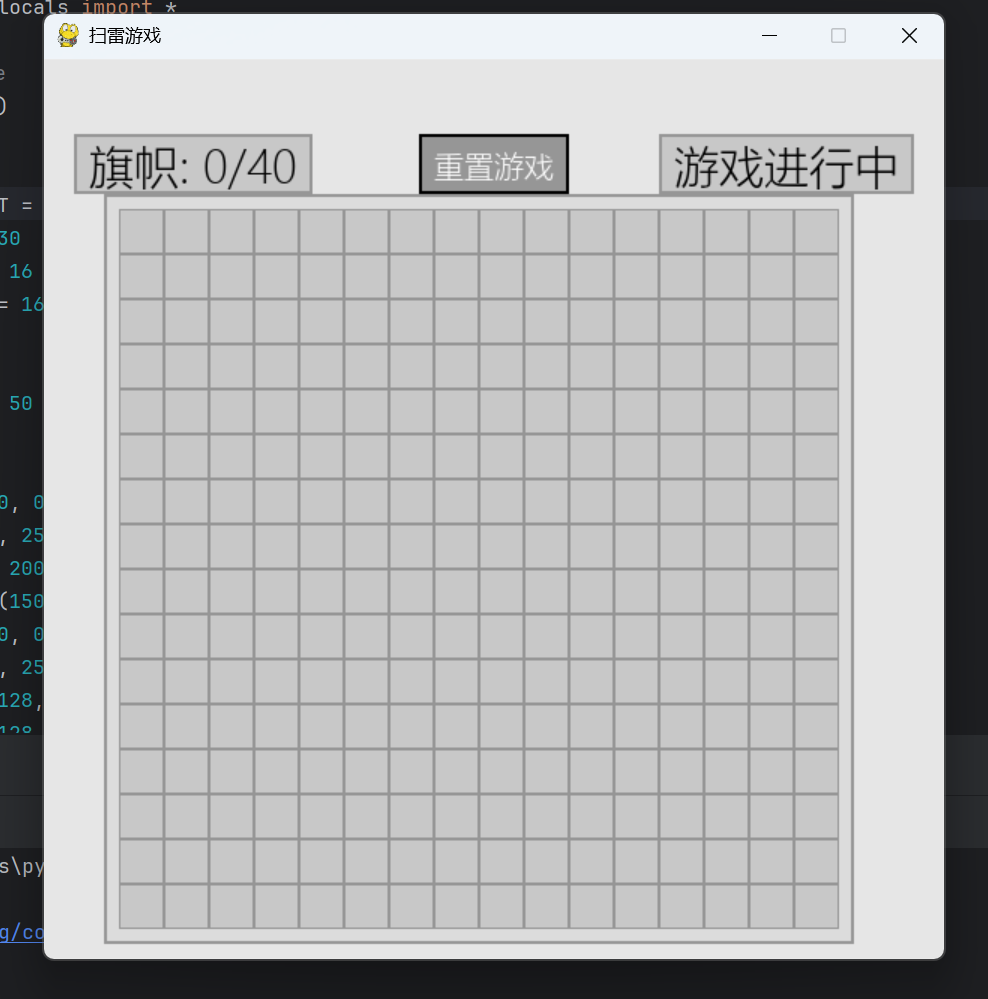
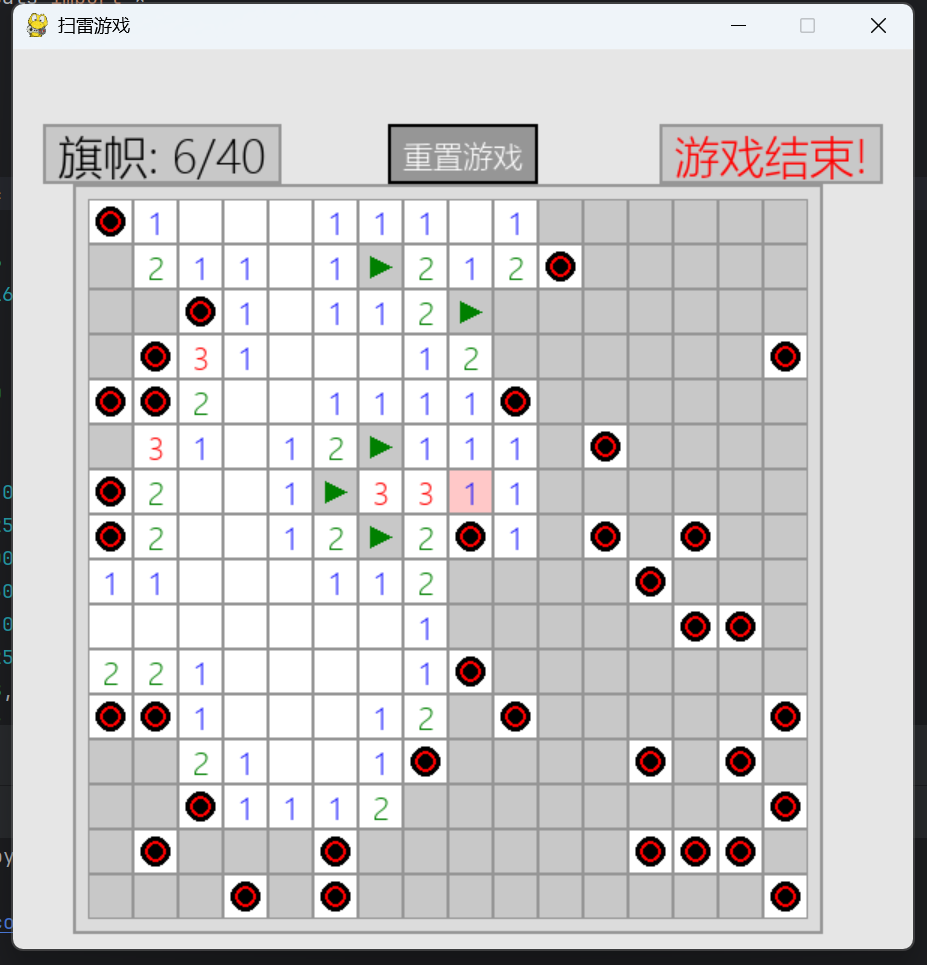
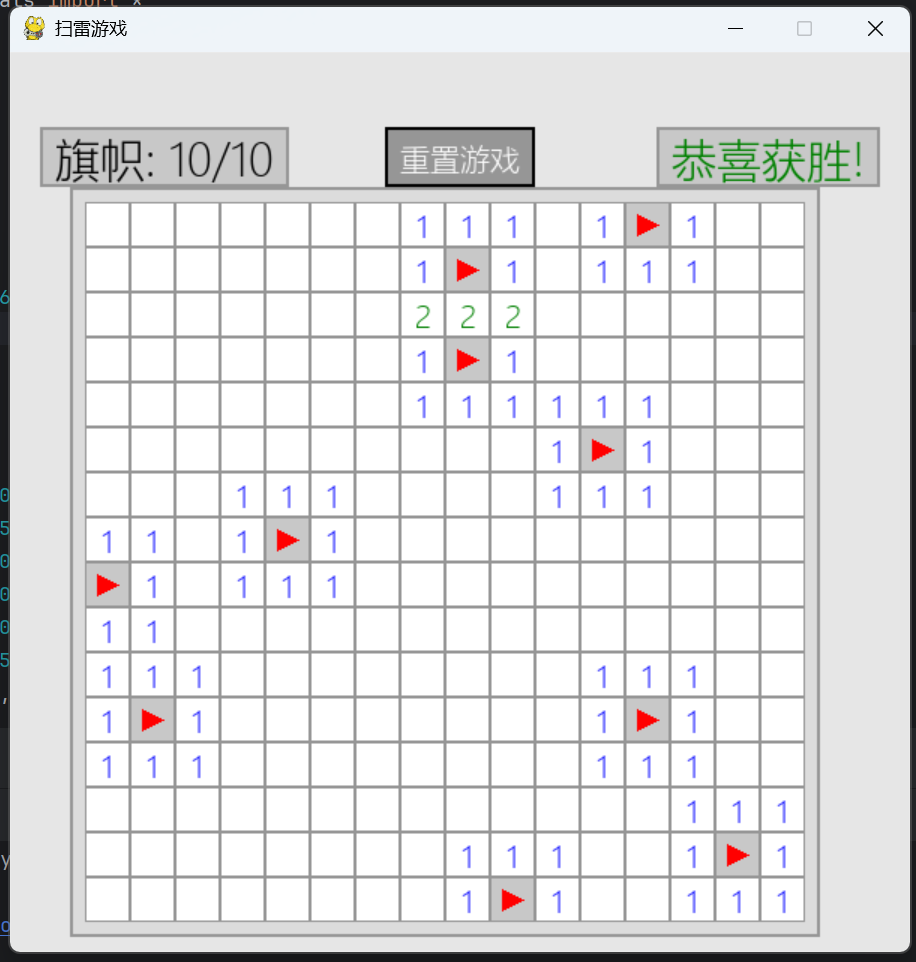
(40个雷我是真的赢不了啊,我知道自己菜,别喷我)
四、实验总结
1.遇到的问题
1.1递归展开导致的堆栈溢出问题
问题描述:
当玩家点击空白区域时,游戏需要自动展开相邻的所有空白格子。最初我使用递归算法实现这一功能:
def reveal_neighbors(x, y):
    for dx, dy in [(0,1), (1,0), (0,-1), (-1,0)]:
        nx, ny = x+dx, y+dy
        if 0 <= nx < width and 0 <= ny < height:
            if not cells[nx][ny].revealed and cells[nx][ny].value == 0:
                cells[nx][ny].revealed = True
                reveal_neighbors(nx, ny)  # 递归调用
但在大型网格上测试时,游戏经常崩溃,Python抛出"RecursionError: maximum recursion depth exceeded"错误。
解决方案:
使用队列替代递归,实现迭代式区域展开:
from collections import deque

def reveal_neighbors_iterative(start_x, start_y):
    queue = deque([(start_x, start_y)])

    while queue:
        x, y = queue.popleft()
        for dx, dy in [(0,1), (1,0), (0,-1), (-1,0)]:
            nx, ny = x+dx, y+dy
            if 0 <= nx < width and 0 <= ny < height:
                cell = cells[nx][ny]
                if not cell.revealed and not cell.flagged:
                    cell.revealed = True
                    if cell.value == 0:  # 空白格子
                        queue.append((nx, ny))  # 添加到队列
这种方法完全避免了递归深度限制,即使在最大尺寸的网格上也能稳定运行。
1.2游戏界面渲染性能问题
问题描述:
在游戏网格较大时(如24×24),每次刷新都重绘整个界面导致帧率明显下降,游戏体验卡顿。
借助AI工具后,发现pygame.draw.rect()和pygame.draw.circle()是主要性能瓶颈。
解决方案:
实现脏矩形渲染技术,只重绘发生变化的区域:
class RenderOptimizer:
    def __init__(self):
        self.dirty_cells = set()  # 记录需要重绘的格子

    def mark_dirty(self, x, y):
        """标记需要重绘的格子"""
        self.dirty_cells.add((x, y))

    def optimized_render(self):
        """只重绘标记过的格子"""
        for (x, y) in self.dirty_cells:
            # 计算格子位置
            rect_x = x * CELL_SIZE + MARGIN_X
            rect_y = y * CELL_SIZE + MARGIN_Y

            # 绘制单个格子
            self.draw_single_cell(x, y, rect_x, rect_y)

        self.dirty_cells.clear()  # 清空标记

    def draw_single_cell(self, x, y, rect_x, rect_y):
        """高效绘制单个格子"""
        cell = self.cells[x][y]
1.3首次点击踩雷问题
问题描述:
传统扫雷游戏中,第一次点击永远不会是地雷。但我的初始实现在某些情况下,首次点击仍可能触雷。
布雷算法在游戏初始化时就放置了所有地雷,而不是在第一次点击后。
解决方案:
重构布雷逻辑,延迟到第一次点击后执行:
def on_first_click(self, x, y):
    """处理第一次点击"""
    # 在点击位置周围创建安全区
    safe_zone = set()
    for dx in range(-1, 2):
        for dy in range(-1, 2):
            safe_zone.add((x+dx, y+dy))

    # 放置地雷(避开安全区)
    mines_placed = 0
    while mines_placed < self.total_mines:
        mx = random.randint(0, self.width-1)
        my = random.randint(0, self.height-1)

        # 跳过安全区内的位置
        if (mx, my) in safe_zone:
            continue

        if not self.cells[mx][my].is_mine:
            self.cells[mx][my].is_mine = True
            mines_placed += 1
            self.update_neighbor_counts(mx, my)  # 更新周围格子数字

    # 揭示点击的格子
    self.reveal(x, y)
这种方法保证了玩家第一次点击绝对安全,符合扫雷游戏的传统规则。
2.实验总结
这次开发扫雷游戏的经历,像是一场充满惊喜的探险。最初搭建游戏框架时,我怎么也想不到自己会为一堆小小方块的展开效果如此费神。当递归算法在大地图上频繁崩溃时,望着满屏的错误提示,那种挫败感至今难忘。但正是这种困境教会了我重要一课:解决问题不仅需要技术,更需要灵活的思维。改用队列算法后,看着方块流畅展开的样子,比什么都更有成就感。
调试过程中的煎熬与突破同样记忆犹新。记得有个周末,我为了找出布雷位置随机的bug,在屏幕前坐了整整六个小时。反复追踪代码路径,添加日志,最终发现是个不起眼的循环边界错误。那一刻的欣喜若狂,恐怕只有经历过的人才会懂。
整个项目做下来,最深切的体会就是要给思考留够空间。开始时埋头就写的习惯让我吃了不少苦头,后期的设计先行策略反而事半功倍。当看到玩家们在各种设备上体验游戏时,那些绞尽脑汁的日夜都化作了满足的笑容。这段经历就像是编程世界给我的一封信:写代码不仅要用脑,更要用心;技术不仅是解决难题的工具,更是创造连接的艺术。
五、课程总结
《python程序设计》这门课对我来说真的很实在。最开始感觉就像学一门新语言的手册,明白了那些基础的词汇和句子怎么写——像怎么存个数字、名字,怎么决定电脑执行不同的动作。学完这些,心里就有点底了,起码能写点能跑起来的小玩意儿了。
最实用的就是学了那些“容器”——列表、字典啥的。以前要是整理一堆数据,我可能会很头大,现在知道怎么用它们来装不同类型的信息,找起来也方便多了。还有“函数”这个东西,简直是救星。学会了把常用的操作打包成一个命令,需要的时候直接调出来用就行,不用一遍遍重复写同样的代码,真的大大提高了效率,代码看着也清爽多了。
后面学着怎么让程序跟文件打交道,比如读取一个文本文件或者存点数据进去。虽然简单,但感觉一下子把程序变活了,能处理点实际东西了。学面向对象那块儿(就是类和对象),说实话开始有点抽象,但后来慢慢理解了,觉得这是一种更好的组织代码的方式,尤其是模仿现实世界的东西,让大点的程序写起来思路更清晰了。
总的来看,这门课最大的收获不是只记住了那些概念和规则(当然这些也很重要),而是感觉自己真的学到了一种新能力。从开始的磕磕绊绊,连个符号打错都找半天(调试真的很磨练耐心!),到现在能独立用Python解决一些小问题,尤其是处理数据和自动化一些简单任务。虽然跟复杂的项目还有距离,但它让我明白了编程没那么神秘,就是解决问题的另一种工具,Python在这方面特别友好也特别强大。

 浙公网安备 33010602011771号