
#Pytest系列--fixture的详细应用
fixture的优势
- 命名方式灵活,不局限于 setup 和teardown 这几个命名
- conftest.py 配置里可以实现数据共享,不需要 import 就能自动找到fixture
- scope="module" 可以实现多个.py 跨文件共享前置
- scope="session" 以实现多个.py 跨文件使用一个 session 来完成多个用例
fixture参数列表
@pytest.fixture(scope="function", params=None, autouse=False, ids=None, name=None)
def test():
    print("fixture初始化的参数列表")
参数列表
- scope:可以理解成fixture的作用域,默认:function,还有class、module、package、session四个【常用】
- autouse:默认:False,需要用例手动调用该fixture;如果是True,所有作用域内的测试用例都会自动调用该fixture
- name:默认:装饰器的名称,同一模块的fixture相互调用建议写个不同的name
注意
session的作用域:是整个测试会话,即开始执行pytest到结束测试
测试用例如何调用fixture
- 将fixture名称作为测试用例函数的输入参数
- 测试用例加上装饰器:@pytest.mark.usefixtures(fixture_name)
- fixture设置autouse=True
import pytest

# 调用方式一
@pytest.fixture
def login():
    print("输入账号,密码先登录")


def test_s1(login):
    print("用例 1:登录之后其它动作 111")


def test_s2():  # 不传 login
    print("用例 2:不需要登录,操作 222")


# 调用方式二
@pytest.fixture
def login2():
    print("please输入账号,密码先登录")


@pytest.mark.usefixtures("login2", "login")
def test_s11():
    print("用例 11:登录之后其它动作 111")


# 调用方式三
@pytest.fixture(autouse=True)
def login3():
    print("====auto===")


# 不是test开头,加了装饰器也不会执行fixture
@pytest.mark.usefixtures("login2")
def loginss():
    print(123)

def loginyy():
    print(456)
执行结果
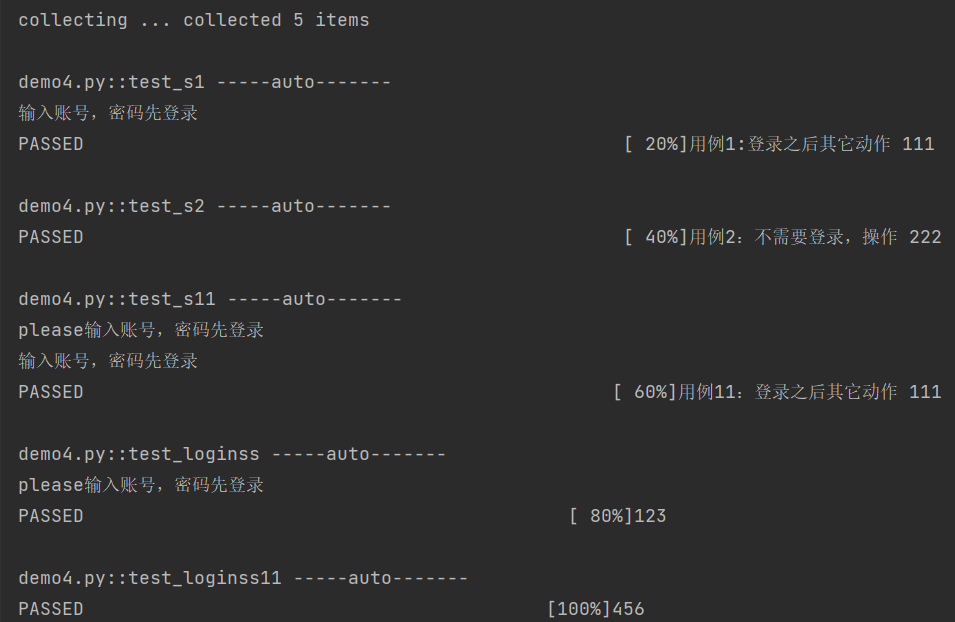
知识点
- 在类声明上面加 @pytest.mark.usefixtures() ,代表这个类里面所有测试用例都会调用该fixture
- 可以叠加多个 @pytest.mark.usefixtures() ,先执行的放底层,后执行的放上层
- 可以传多个fixture参数,先执行的放前面,后执行的放后面
- 如果fixture有返回值,用 @pytest.mark.usefixtures() 是无法获取到返回值的,必须用传参的方式(方式一)
实例化顺序
- 较高 scope 范围的fixture(session)在较低 scope 范围的fixture( function 、 class )之前实例化【session > package > module > class > function】
- 具有相同作用域的fixture遵循测试函数中声明的顺序,并遵循fixture之间的依赖关系【在fixture_A里面依赖的fixture_B优先实例化,然后到fixture_A实例化】
- 自动使用(autouse=True)的fixture将在显式使用(传参或装饰器)的fixture之前实例化
import pytest
order = []

@pytest.fixture(scope="session")
def s1():
    order.append("s1")

@pytest.fixture(scope="module")
def m1():
    order.append("m1")

@pytest.fixture
def f1(f3, a1):
    # 先实例化f3, 再实例化a1, 最后实例化f1
    order.append("f1")
    assert f3 == 123

@pytest.fixture
def f3():
    order.append("f3")
    a = 123
    yield a

@pytest.fixture
def a1():
    order.append("a1")

@pytest.fixture
def f2():
    order.append("f2")

def test_order(f1, m1, f2, s1):
    # m1、s1在f1后,但因为scope范围大,所以会优先实例化
    assert order == ["s1", "m1", "f3", "a1", "f1", "f2"]
执行结果
断言成功
关于fixture的注意点
- 添加了 @pytest.fixture ,如果fixture还想依赖其他fixture,需要用函数传参的方式,不能用 @pytest.mark.usefixtures() 的方式,否则会不生效

 浙公网安备 33010602011771号