

SSM
整合SSM框架
项目结构
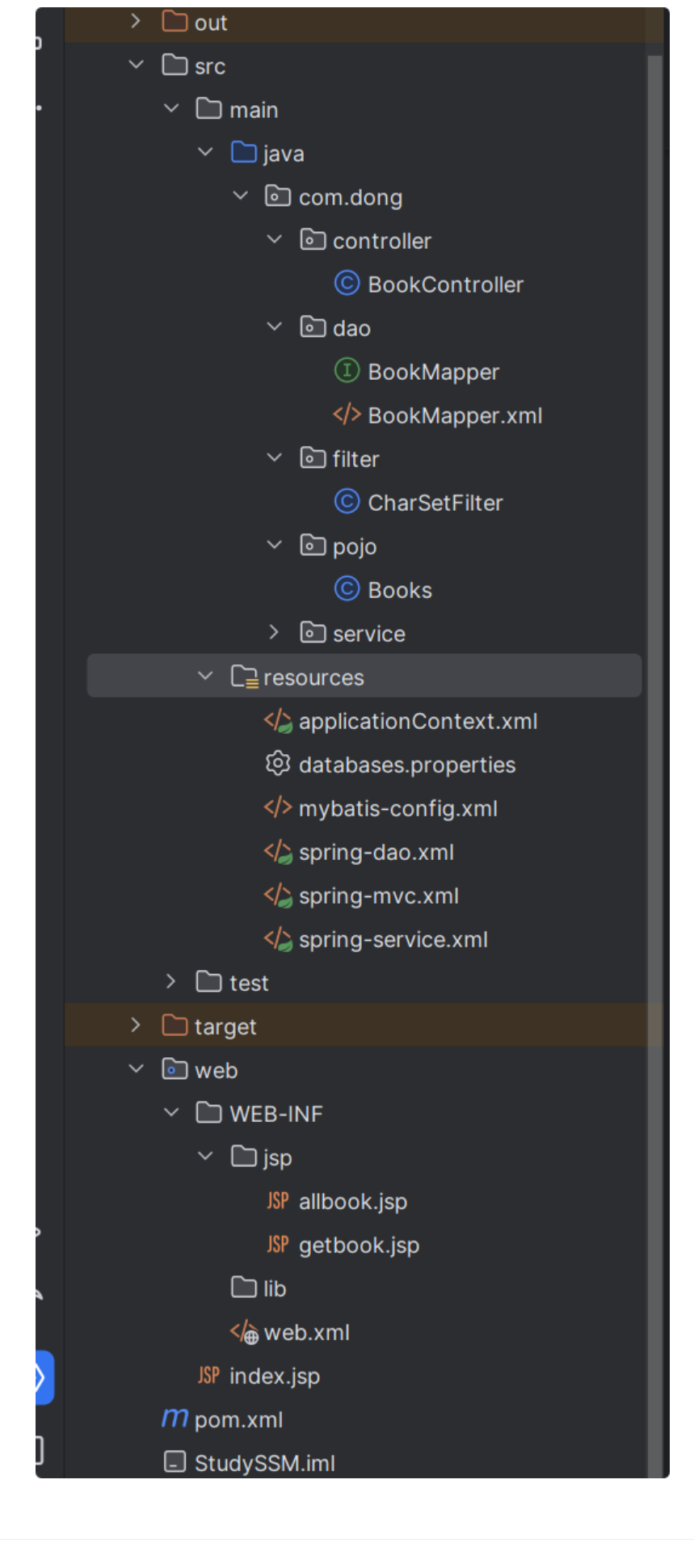
配置文件
database.properties
jdbc.driver=com.mysql.jdbc.Driver
jdbc.url=jdbc:mysql://localhost:3306/ssmbuild?useUnicode=true&characterEncoding=UTF-8&serverTimezone=Asia/Shanghai
jdbc.user=root
jdbc.password=123456

#在mysql8.0中的url要加入时区配置&serverTimezone=Asia/Shanghai
mybatis-config.xml
<?xml version="1.0" encoding="UTF-8" ?>
<!DOCTYPE configuration
        PUBLIC "-//mybatis.org//DTD Config 3.0//EN"
        "https://mybatis.org/dtd/mybatis-3-config.dtd">
<configuration>
    <!--设置 -->
    <settings>
        <!--标准日志 -->
        <setting name="logImpl" value="STDOUT_LOGGING"/>
    </settings>

    <!--别名    -->
    <typeAliases>
        <package name="com.dong.pojo"/>
    </typeAliases>


    <!--注册Mapper    -->
    <mappers>
        <mapper class="com.dong.dao.BookMapper"/>
    </mappers>
</configuration>
spring-dao.xml
<?xml version="1.0" encoding="UTF-8"?>
<beans xmlns="http://www.springframework.org/schema/beans"
       xmlns:xsi="http://www.w3.org/2001/XMLSchema-instance"
       xmlns:context="http://www.springframework.org/schema/context"
       xmlns:aop="http://www.springframework.org/schema/aop"
       xmlns:tx="http://www.springframework.org/schema/tx"
       xsi:schemaLocation="http://www.springframework.org/schema/beans
       http://www.springframework.org/schema/beans/spring-beans.xsd
       http://www.springframework.org/schema/context
       http://www.springframework.org/schema/context/spring-context.xsd
       http://www.springframework.org/schema/aop
       http://www.springframework.org/schema/aop/spring-aop.xsd
       http://www.springframework.org/schema/tx
       http://www.springframework.org/schema/tx/spring-tx.xsd">


    <!--关联数据库配置文件    -->
    <context:property-placeholder location="classpath:databases.properties"/>


    <!--连接池    -->
    <bean id="dataSource" class="com.mchange.v2.c3p0.ComboPooledDataSource">
        <property name="driverClass" value="${jdbc.driver}"/>
        <property name="jdbcUrl" value="${jdbc.url}"/>
        <property name="user" value="${jdbc.user}"/>
        <property name="password" value="${jdbc.password}"/>

        <!--c3p0的私有属性        -->
        <property name="maxPoolSize" value="20"/>
        <property name="minPoolSize" value="10"/>
        <!--关闭连接后不自动commit        -->
        <property name="autoCommitOnClose" value="false"/>
        <!--获取连接超时时间        -->
        <property name="checkoutTimeout" value="10000"/>
        <!--获取连接失败重试次数        -->
        <property name="acquireRetryAttempts" value="2"/>
    </bean>


    <!--SQLSessionFactory    -->
    <bean id="sqlSessionFactory" class="org.mybatis.spring.SqlSessionFactoryBean">
        <property name="dataSource" ref="dataSource"/>

        <!--绑定Mybatis的配置文件        -->
        <property name="configLocation" value="classpath:mybatis-config.xml"/>
    </bean>


    <!--配置dao接口扫描包    -->
    <bean class="org.mybatis.spring.mapper.MapperScannerConfigurer">
        <property name="sqlSessionFactoryBeanName" value="sqlSessionFactory"/>
        <property name="basePackage" value="com.dong.dao"/>
    </bean>

</beans>
spring-service.xml
<?xml version="1.0" encoding="UTF-8"?>
<beans xmlns="http://www.springframework.org/schema/beans"
       xmlns:xsi="http://www.w3.org/2001/XMLSchema-instance"
       xmlns:context="http://www.springframework.org/schema/context"
       xmlns:aop="http://www.springframework.org/schema/aop"
       xmlns:tx="http://www.springframework.org/schema/tx"
       xsi:schemaLocation="http://www.springframework.org/schema/beans
       http://www.springframework.org/schema/beans/spring-beans.xsd
       http://www.springframework.org/schema/context
       http://www.springframework.org/schema/context/spring-context.xsd
       http://www.springframework.org/schema/aop
       http://www.springframework.org/schema/aop/spring-aop.xsd
       http://www.springframework.org/schema/tx
       http://www.springframework.org/schema/tx/spring-tx.xsd">


    <import resource="classpath:spring-dao.xml"/>

    <!--扫描service下的包    -->
    <context:component-scan base-package="com.dong.service"/>

    <!--将我们所有的业务类注入到spring    -->
    <bean id="BookServiceImpl" class="com.dong.service.BookServiceImpl">
        <property name="bookMapper" ref="bookMapper"/>
    </bean>

    <!--声明式事物    -->
    <bean id="transactionManager" class="org.springframework.jdbc.datasource.DataSourceTransactionManager">
        <property name="dataSource" ref="dataSource"/>
    </bean>
</beans>
spring-mvc.xml
<?xml version="1.0" encoding="UTF-8"?>
<beans xmlns="http://www.springframework.org/schema/beans"
       xmlns:xsi="http://www.w3.org/2001/XMLSchema-instance"
       xmlns:context="http://www.springframework.org/schema/context"
       xmlns:aop="http://www.springframework.org/schema/aop"
       xmlns:tx="http://www.springframework.org/schema/tx"
       xmlns:mvc="http://www.springframework.org/schema/mvc"
       xsi:schemaLocation="http://www.springframework.org/schema/beans
       http://www.springframework.org/schema/beans/spring-beans.xsd
       http://www.springframework.org/schema/context
       http://www.springframework.org/schema/context/spring-context.xsd
       http://www.springframework.org/schema/aop
       http://www.springframework.org/schema/aop/spring-aop.xsd
       http://www.springframework.org/schema/tx
       http://www.springframework.org/schema/tx/spring-tx.xsd
       http://www.springframework.org/schema/mvc
       http://www.springframework.org/schema/mvc/spring-mvc.xsd">

    <!--注解驱动    -->
    <mvc:annotation-driven/>
    <!--静态资源过滤    -->
    <mvc:default-servlet-handler/>
    <!--扫描包    -->
    <context:component-scan base-package="com.dong.controller"/>

    <!--视图解析器    -->
    <bean class="org.springframework.web.servlet.view.InternalResourceViewResolver">
        <property name="prefix" value="/WEB-INF/jsp/"/>
        <property name="suffix" value=".jsp"/>
    </bean>

</beans>
applicationContext.xml
<?xml version="1.0" encoding="UTF-8"?>
<beans xmlns="http://www.springframework.org/schema/beans"
       xmlns:xsi="http://www.w3.org/2001/XMLSchema-instance"
       xmlns:context="http://www.springframework.org/schema/context"
       xmlns:aop="http://www.springframework.org/schema/aop"
       xmlns:tx="http://www.springframework.org/schema/tx"
       xsi:schemaLocation="http://www.springframework.org/schema/beans
       http://www.springframework.org/schema/beans/spring-beans.xsd
       http://www.springframework.org/schema/context
       http://www.springframework.org/schema/context/spring-context.xsd
       http://www.springframework.org/schema/aop
       http://www.springframework.org/schema/aop/spring-aop.xsd
       http://www.springframework.org/schema/tx
       http://www.springframework.org/schema/tx/spring-tx.xsd">

    <import resource="classpath:spring-dao.xml"/>
    <import resource="classpath:spring-service.xml"/>
    <import resource="classpath:spring-mvc.xml"/>


</beans>
业务
pojo
@AllArgsConstructor
@NoArgsConstructor
@Data
public class Books {
    private int bookID;
    private String bookName;
    private int bookCounts;
    private String detail;
}
dao
public interface BookMapper {
    int addBook(Books book);

    int deleteBook(int id);

    int updateBook(Books book);

    Books getBookById(int id);

    List<Books> getAllBook();


}
<?xml version="1.0" encoding="UTF-8" ?>
<!DOCTYPE mapper
        PUBLIC "-//mybatis.org//DTD Config 3.0//EN"
        "https://mybatis.org/dtd/mybatis-3-mapper.dtd">

<mapper namespace="com.dong.dao.BookMapper">
    <insert id="addBook" parameterType="Books">
        insert into books
        values (#{id}, #{bookName}, #{bookCounts}, #{detail})
    </insert>

    <delete id="deleteBook" parameterType="_int">
        delete from books where BookId = #{id}
    </delete>

    <update id="updateBook" parameterType="Books">
        update books
        set bookId = #{id}, bookName = #{bookName}, bookCounts = #{bookCounts}, detail = #{detail}
    </update>

    <select id="getBookById" resultType="Books">
        select * from books where bookId = #{id}
    </select>

    <select id="getAllBook" resultType="Books">
        select * from books
    </select>
</mapper>
service
public interface BookService {
    int addBook(Books book);

    int deleteBook(int id);

    int updateBook(Books book);

    Books getBookById(int id);

    List<Books> getAllBook();

}
public class BookServiceImpl implements BookService {
    private BookMapper bookMapper;

    public BookMapper getBookMapper() {
        return bookMapper;
    }

    public void setBookMapper(BookMapper bookMapper) {
        this.bookMapper = bookMapper;
    }

    @Override
    public int addBook(Books book) {
        return bookMapper.addBook(book);
    }

    @Override
    public int deleteBook(int id) {
        return bookMapper.deleteBook(id);
    }

    @Override
    public int updateBook(Books book) {
        return bookMapper.updateBook(book);
    }

    @Override
    public Books getBookById(int id) {
        return bookMapper.getBookById(id);
    }

    @Override
    public List<Books> getAllBook() {
        return bookMapper.getAllBook();
    }
}
controller
@RequestMapping("/book")
@Controller
public class BookController {
    @Autowired
    @Qualifier("BookServiceImpl")
    private BookService bookService;

    @RequestMapping("/allbook")
    public String allBook(Model model){
        List<Books> list = bookService.getAllBook();
        model.addAttribute("list", list);
        return "allbook";
    }


    @RequestMapping("/getbook")
    public String getBookById(Model model){
        Books book = bookService.getBookById(1);
        String msg = book.toString();
        model.addAttribute("msg", msg);
        return "getbook";
    }
}
展示
index.jsp
<%@ page contentType="text/html;charset=UTF-8" language="java" %>
<html>
<head>
    <title>首页</title>
</head>
<body>

<h4>
    <a href="${pageContext.request.contextPath}/book/allbook">进入查询所有书籍页面</a>
</h4>

<h4>
    <a href="${pageContext.request.contextPath}/book/toaddbokpage">进入增添书籍页面</a>
</h4>

<h4>
    <a href="${pageContext.request.contextPath}/book/updatebook">进入修改书籍页面</a>
</h4>

</body>
</html>
书籍展示页面
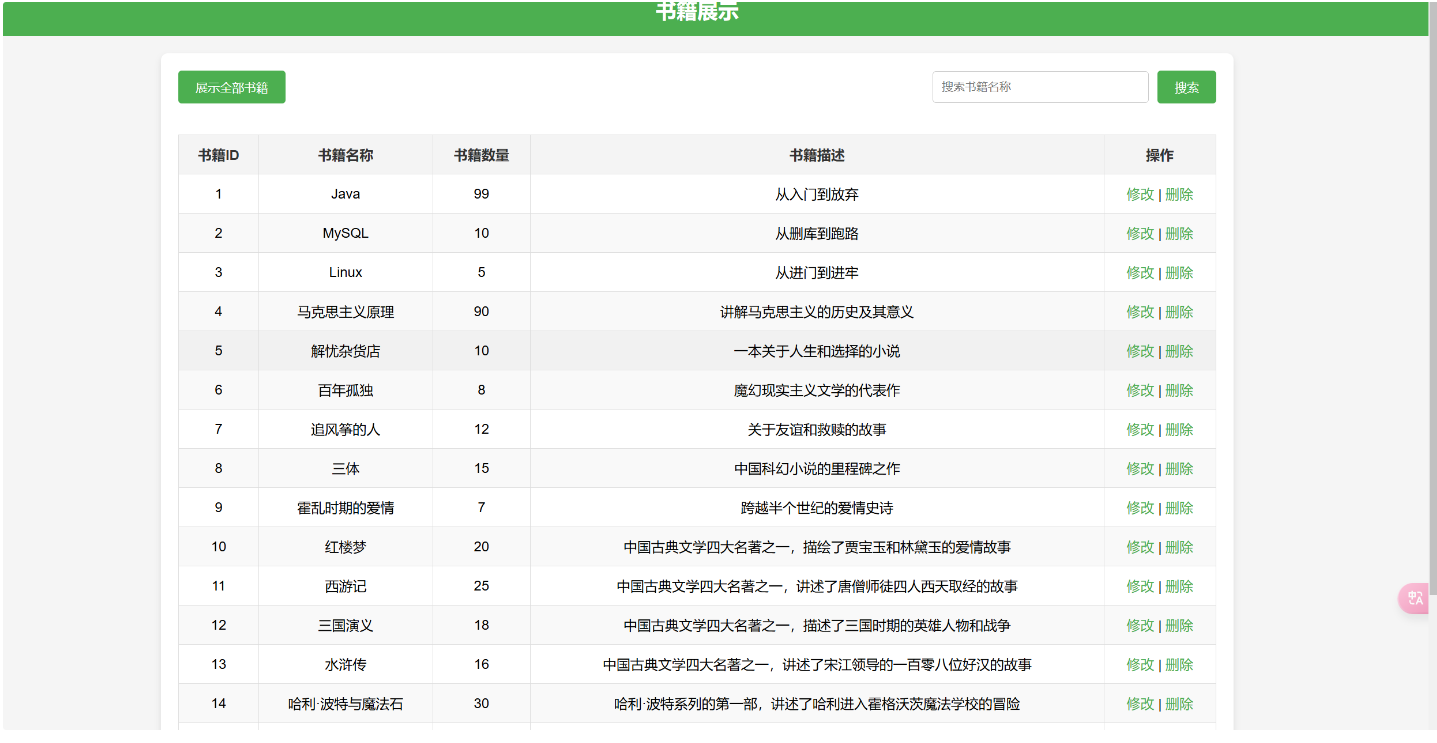
<%@ taglib prefix="c" uri="http://java.sun.com/jsp/jstl/core" %>
<%@ page contentType="text/html;charset=UTF-8" language="java" %>
<html>
<head>
    <title>查询所有书籍</title>
    <style>
        body {
            font-family: 'Arial', sans-serif;
            background-color: #f5f5f5;
            margin: 0;
            padding: 0;
        }

        header {
            background-color: #4CAF50;
            color: white;
            padding: 15px 20px;
            text-align: center;
        }

        header h1 {
            margin: 0;
            font-size: 24px;
        }

        .container {
            max-width: 1200px;
            margin: 20px auto;
            background-color: white;
            padding: 20px;
            box-shadow: 0 4px 8px rgba(0, 0, 0, 0.1);
            border-radius: 8px;
        }

        .action-buttons {
            display: flex;
            justify-content: space-between;
            margin-bottom: 20px;
        }

        .action-buttons form {
            display: inline-flex;
            align-items: center;
            gap: 10px;
        }

        .action-buttons input[type="text"] {
            padding: 10px;
            border: 1px solid #ccc;
            border-radius: 4px;
            width: 250px;
        }

        .action-buttons button {
            background-color: #4CAF50;
            color: white;
            border: none;
            padding: 10px 20px;
            border-radius: 4px;
            cursor: pointer;
            font-size: 14px;
        }

        .action-buttons button:hover {
            background-color: #45a049;
        }

        table {
            width: 100%;
            border-collapse: collapse;
            margin-top: 20px;
        }

        th, td {
            text-align: center;
            padding: 12px;
            border: 1px solid #ddd;
        }

        th {
            background-color: #f4f4f4;
            color: #333;
            font-weight: bold;
        }

        tr:nth-child(even) {
            background-color: #f9f9f9;
        }

        tr:hover {
            background-color: #f1f1f1;
        }

        .empty-message {
            text-align: center;
            color: #888;
            margin: 20px 0;
            font-size: 16px;
        }

        a {
            color: #4CAF50;
            text-decoration: none;
        }

        a:hover {
            text-decoration: underline;
        }
    </style>
</head>
<body>

<header>
    <h1>书籍展示</h1>
</header>

<div class="container">
    <div class="action-buttons">
        <form action="${pageContext.request.contextPath}/book/allbook">
            <button type="submit">展示全部书籍</button>
        </form>

        <form action="${pageContext.request.contextPath}/book/search" method="post">
            <input type="text" name="bookName" placeholder="搜索书籍名称">
            <button type="submit">搜索</button>
        </form>
    </div>

    <div>
        <c:choose>
            <c:when test="${not empty list}">
                <table>
                    <thead>
                    <tr>
                        <th>书籍ID</th>
                        <th>书籍名称</th>
                        <th>书籍数量</th>
                        <th>书籍描述</th>
                        <th>操作</th>
                    </tr>
                    </thead>
                    <tbody>
                    <c:forEach items="${list}" var="book">
                        <tr>
                            <td>${book.bookID}</td>
                            <td>${book.bookName}</td>
                            <td>${book.bookCounts}</td>
                            <td>${book.detail}</td>
                            <td>
                                <a href="${pageContext.request.contextPath}/book/touupdatepage?id=${book.bookID}">修改</a> |
                                <a href="${pageContext.request.contextPath}/book/deletebook?id=${book.bookID}">删除</a>
                            </td>
                        </tr>
                    </c:forEach>
                    </tbody>
                </table>
            </c:when>
            <c:otherwise>
                <p class="empty-message">当前没有书籍信息。</p>
            </c:otherwise>
        </c:choose>
    </div>
</div>

</body>
</html>
增添书籍页面
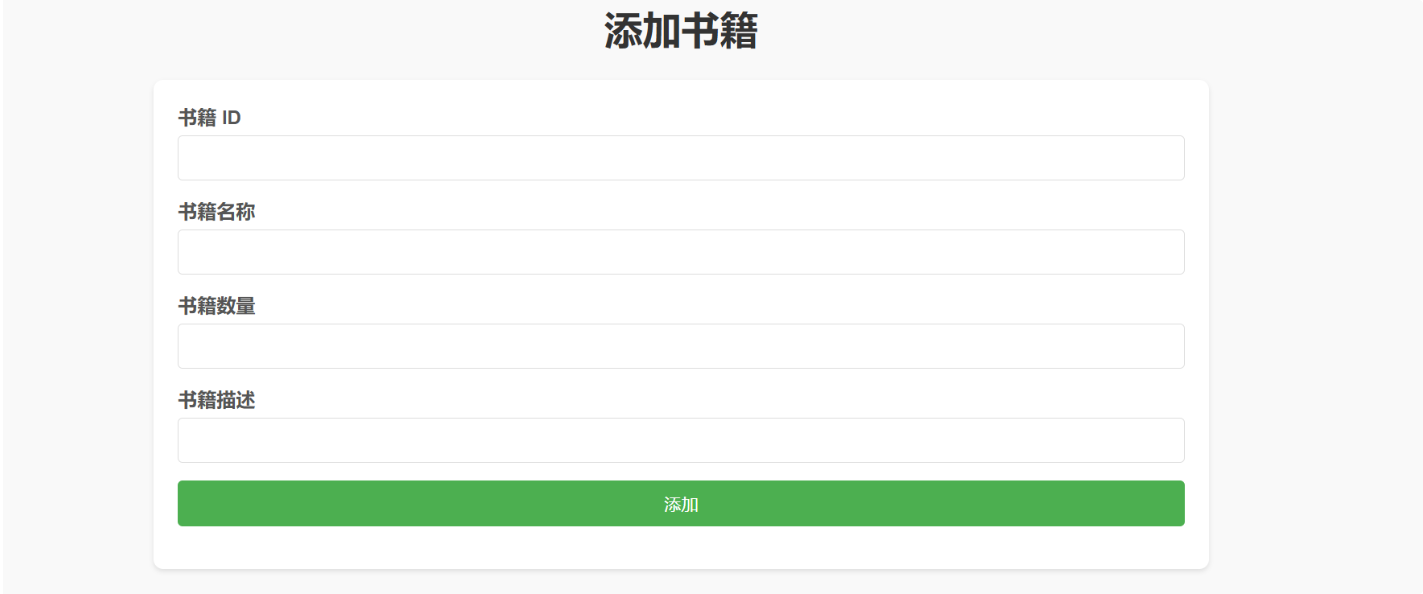
<%@ page contentType="text/html;charset=UTF-8" language="java" %>
<html>
<head>
    <title>添加书籍页面</title>
    <style>
        body {
            font-family: Arial, sans-serif;
            background-color: #f9f9f9;
            margin: 20px;
        }
        h1 {
            text-align: center;
            color: #333;
        }
        form {
            width: 50%;
            margin: 0 auto;
            background: #fff;
            padding: 20px;
            border-radius: 8px;
            box-shadow: 0 2px 4px rgba(0, 0, 0, 0.1);
        }
        form div {
            margin-bottom: 15px;
        }
        label {
            display: block;
            font-weight: bold;
            margin-bottom: 5px;
            color: #555;
        }
        input[type="text"], input[type="submit"] {
            width: 100%;
            padding: 10px;
            border: 1px solid #ddd;
            border-radius: 4px;
            font-size: 14px;
        }
        input[type="submit"] {
            background-color: #4CAF50;
            color: white;
            cursor: pointer;
            border: none;
            transition: background-color 0.3s;
        }
        input[type="submit"]:hover {
            background-color: #45a049;
        }
    </style>
</head>
<body>

<h1>添加书籍</h1>

<form action="${pageContext.request.contextPath}/book/addbook" method="post" onsubmit="return confirmSubmit()">
    <div>
        <label>书籍 ID</label>
        <input type="text" name="bookID" required>
    </div>
    <div>
        <label>书籍名称</label>
        <input type="text" name="bookName" required>
    </div>
    <div>
        <label>书籍数量</label>
        <input type="text" name="bookCounts" required>
    </div>
    <div>
        <label>书籍描述</label>
        <input type="text" name="detail" required>
    </div>
    <div>
        <input type="submit" value="添加">
    </div>
</form>

<script>
    function confirmSubmit() {
        return confirm("确定要添加这本书籍吗?");
    }
</script>

</body>
</html>
修改书籍页面
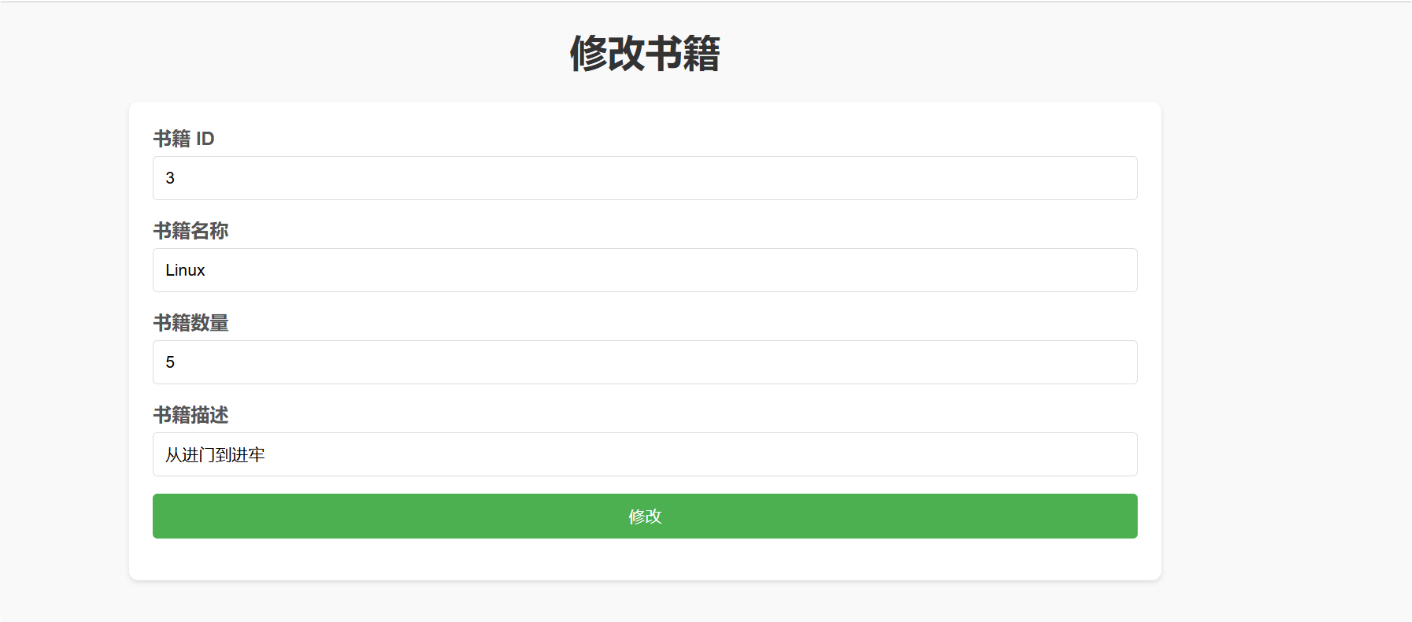
<%@ page contentType="text/html;charset=UTF-8" language="java" %>
<html>
<head>
    <title>修改书籍</title>
    <style>
        body {
            font-family: Arial, sans-serif;
            background-color: #f9f9f9;
            margin: 20px;
        }
        h1 {
            text-align: center;
            color: #333;
        }
        form {
            width: 50%;
            margin: 0 auto;
            background: #fff;
            padding: 20px;
            border-radius: 8px;
            box-shadow: 0 2px 4px rgba(0, 0, 0, 0.1);
        }
        form div {
            margin-bottom: 15px;
        }
        label {
            display: block;
            font-weight: bold;
            margin-bottom: 5px;
            color: #555;
        }
        input[type="text"], input[type="submit"] {
            width: 100%;
            padding: 10px;
            border: 1px solid #ddd;
            border-radius: 4px;
            font-size: 14px;
        }
        input[type="submit"] {
            background-color: #4CAF50;
            color: white;
            cursor: pointer;
            border: none;
            transition: background-color 0.3s;
        }
        input[type="submit"]:hover {
            background-color: #45a049;
        }
    </style>
</head>
<body>

<h1>修改书籍</h1>

<form action="${pageContext.request.contextPath}/book/updatebook" method="post">
    <div>
        <label>书籍 ID</label>
        <input type="text" name="bookID" value="${book.bookID}" required>
    </div>
    <div>
        <label>书籍名称</label>
        <input type="text" name="bookName" value="${book.bookName}" required>
    </div>
    <div>
        <label>书籍数量</label>
        <input type="text" name="bookCounts" value="${book.bookCounts}" required>
    </div>
    <div>
        <label>书籍描述</label>
        <input type="text" name="detail" value="${book.detail}" required>
    </div>
    <div>
        <input type="submit" value="修改">
    </div>
</form>

<script>
    function confirmSubmit() {
        return confirm("确定要修改这本书籍吗?");
    }
</script>

</body>
</html>

 浙公网安备 33010602011771号