
SpringBootAdmin_监控
监控的意义
- 监控服务状态是否宕机
- 监控服务运行指标(内存、虚拟机、线程、请求等)
- 监控日志
- 管理服务(服务下线)
监控的实施方式
大部分监控平台都是主动拉取监控信息,而不是被动地等待应用程序传递信息
应用程序要设置:是否能被监控、开放那些信息给显示监控信息的服务器(监控平台)
可视化监控平台
Spring Boot Admin :开源社区项目,用于监督和管理SpringBoot应用程序,
客户端注册到服务端后,通过HTTP请求方式,服务端定期从客户端获取对应信息,
并通过UI界面展示对应信息
服务端
- 坐标↓(可以在创建时在Ops中勾选)
<properties>
    <java.version>1.8</java.version>
    <spring-boot-admin.version>2.7.4</spring-boot-admin.version>
</properties>

<dependency>
<groupId>de.codecentric</groupId>
<artifactId>spring-boot-admin-starter-server</artifactId>
</dependency>

<dependencyManagement>
<dependencies>
    <dependency>
        <groupId>de.codecentric</groupId>
        <artifactId>spring-boot-admin-dependencies</artifactId>
        <version>${spring-boot-admin.version}</version>
        <type>pom</type>
        <scope>import</scope>
    </dependency>
</dependencies>
</dependencyManagement>
- 将程序配成一个web服务↓
<dependency>
    <groupId>org.springframework.boot</groupId>
    <artifactId>spring-boot-starter-web</artifactId>
</dependency>
- 配置端口,使用时要防止与本机的其他应用程序的端口冲突
server:
  port: 8080
- 在主启动类开启AdminServer:
@EnableAdminServer
客户端
-
客户端创建时要勾选Ops下的Client,而且必须是web程序
-
要在配置文件中设置被哪个服务端监控
server:
  port: 80

spring:
  boot:
    admin:
      client:
        url: http://localhost:8080
- 在客户端配置哪些信息可以被监控↓
spring:
  boot:
    admin:
      client:
        url: http://localhost:8080

management:
  endpoint: # 这里设置对外开放是否开放对应功能
    health:
      enabled: true  # health端点必须开放
      show-details: always
    info:
      enabled: true
  endpoints:
    web:
      exposure:
        include: "*"  # 配在web端能不能看到,默认是health
    enabled-by-default: true   # 开放所有端点
监控原理
Actuator
actuator提供了SpringBoot生产就绪功能,通过端点的配置与访问,获取端点信息
端点描述了一组监控信息,SpringBoot提供了多个内置端点,也可以根据需要自定义端点信息
访问当前应用的所有端点信息:/actuator
访问端点详细信息:/actuator/端点名称
info端点指标控制
management:
  endpoint: # 这里设置对外开放是否开放对应功能
    health:
      show-details: always
      enabled: true
    info:
      enabled: true
  endpoints:
    web:
      exposure:
        include: "*"  # 配在web端能不能看到,默认是health
    enabled-by-default: true

info:
  appName: @project.artifactId@
  version: @project.version@
  author: 王东林   # 在info中配置一个值叫:author,具体值是:王东林
-
如果yml中的info信息不显示,请将boot和admin版本降至2.6一下
-
SpringBoot配置文件和返回值中文变问号:https://blog.csdn.net/u010285974/article/details/107102644
复杂的info信息(在Client端设置)
@Component
public class InfoConfig implements InfoContributor {
    @Override
    public void contribute(Info.Builder builder) {
        builder.withDetail("runTime", System.currentTimeMillis());

        Map infoMap = new HashMap();
        infoMap.put("buildTime", "2006");
        builder.withDetails(infoMap);  //支持链式编程
    }
}
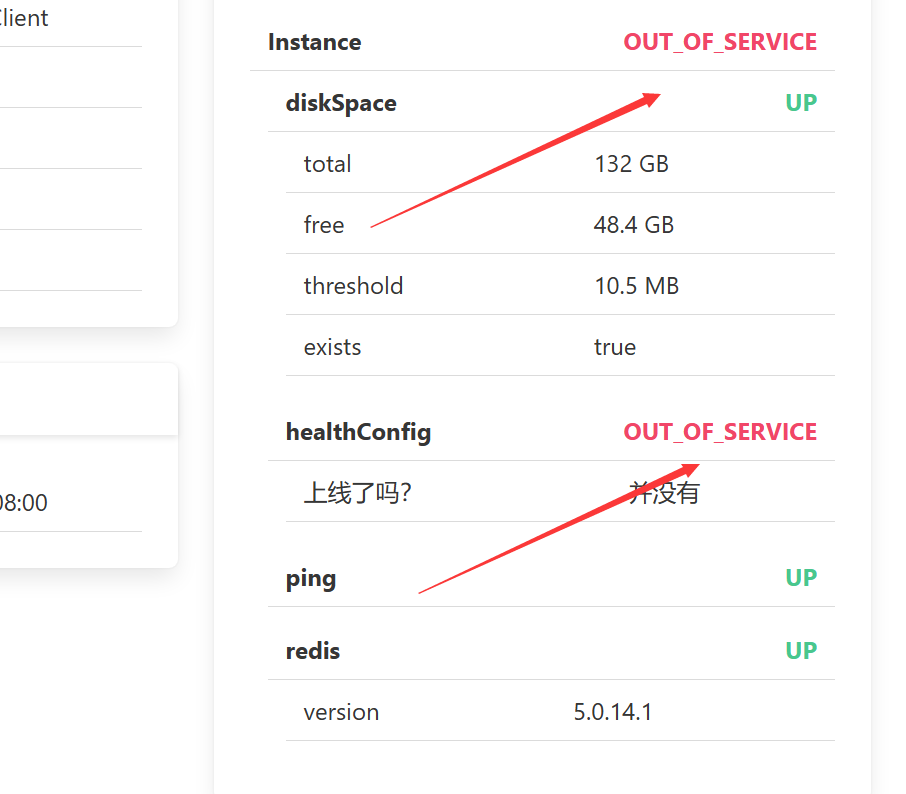
health端点指标控制
- 自定义健康指标↓
@Component
public class HealthConfig extends AbstractHealthIndicator {
    @Override
    protected void doHealthCheck(Health.Builder builder) throws Exception {
        boolean condition = false;
        if (condition) {
            builder.status(Status.UP);
            builder.withDetail("haha1", "哈哈1");
            builder.withDetail("haha2", "哈哈2");
            builder.withDetail("haha3", "哈哈3");
        } else {
            builder.status(Status.OUT_OF_SERVICE);
            builder.withDetail("上线了吗?", "并没有");
        }

    }
}
metrics端点指标控制
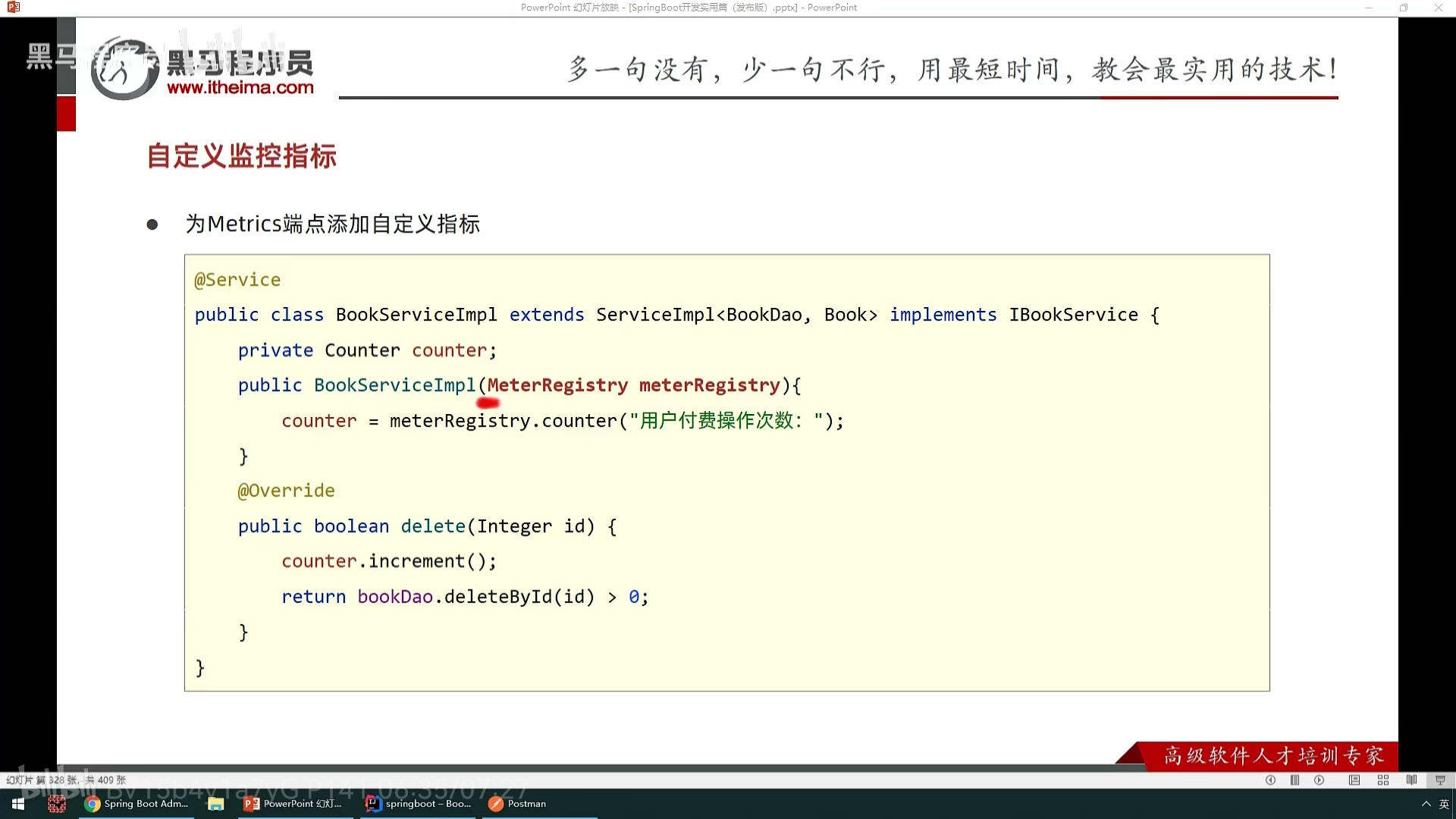
- metrics 即性能指标
- 自定义metrics端点↓
自定义监控
@Component
//声明该类是端点,id是访问名称,第二个参数是是否默认开启
@Endpoint(id = "pay", enableByDefault = true)
public class PayEndpoint {

    @ReadOperation    //声明当读取该端点调用该方法
    public Object pay() {
        Map payMap = new HashMap();
        payMap.put("level", 600);
        payMap.put("level2", 1000);
        payMap.put("level5", 9999);
        return payMap;
    }
}

 浙公网安备 33010602011771号