
U9网页提示Base-64字符数组或字符串的长度无效
GoogleChrome打开U9网页突然出现错误
Base-64 字符数组或字符串的长度无效。
说明:Base-64 字符数组或字符串的长度无效。

Page URL: /U9/mvc/login/index?ReturnUrl=%2fU9%2fmvc%2fmain%2findex
堆栈信息

   在 System.Convert.FromBase64_Decode(Char* startInputPtr, Int32 inputLength, Byte* startDestPtr, Int32 destLength)
   在 System.Convert.FromBase64CharPtr(Char* inputPtr, Int32 inputLength)
   在 System.Convert.FromBase64String(String s)
   在 UFSoft.UBF.MVC.LoginController.Index(String message)
   在 lambda_method(Closure , ControllerBase , Object[] )
   在 System.Web.Mvc.ReflectedActionDescriptor.Execute(ControllerContext controllerContext, IDictionary`2 parameters)
   在 System.Web.Mvc.ControllerActionInvoker.InvokeActionMethod(ControllerContext controllerContext, ActionDescriptor actionDescriptor, IDictionary`2 parameters)
   在 System.Web.Mvc.Async.AsyncControllerActionInvoker.b__39(IAsyncResult asyncResult, ActionInvocation innerInvokeState)
   在 System.Web.Mvc.Async.AsyncResultWrapper.WrappedAsyncResult`2.CallEndDelegate(IAsyncResult asyncResult)
   在 System.Web.Mvc.Async.AsyncControllerActionInvoker.EndInvokeActionMethod(IAsyncResult asyncResult)
   在 System.Web.Mvc.Async.AsyncControllerActionInvoker.AsyncInvocationWithFilters.b__3d()
   在 System.Web.Mvc.Async.AsyncControllerActionInvoker.AsyncInvocationWithFilters.<>c__DisplayClass46.b__3f()
   在 System.Web.Mvc.Async.AsyncControllerActionInvoker.AsyncInvocationWithFilters.<>c__DisplayClass46.b__3f()
   在 System.Web.Mvc.Async.AsyncControllerActionInvoker.AsyncInvocationWithFilters.<>c__DisplayClass46.b__3f()
   在 System.Web.Mvc.Async.AsyncControllerActionInvoker.EndInvokeActionMethodWithFilters(IAsyncResult asyncResult)
   在 System.Web.Mvc.Async.AsyncControllerActionInvoker.<>c__DisplayClass21.<>c__DisplayClass2b.b__1c()
   在 System.Web.Mvc.Async.AsyncControllerActionInvoker.<>c__DisplayClass21.b__1e(IAsyncResult asyncResult)
   在 System.Web.Mvc.Async.AsyncControllerActionInvoker.EndInvokeAction(IAsyncResult asyncResult)
   在 System.Web.Mvc.Controller.b__1d(IAsyncResult asyncResult, ExecuteCoreState innerState)
   在 System.Web.Mvc.Async.AsyncResultWrapper.WrappedAsyncVoid`1.CallEndDelegate(IAsyncResult asyncResult)
   在 System.Web.Mvc.Controller.EndExecuteCore(IAsyncResult asyncResult)
   在 System.Web.Mvc.Async.AsyncResultWrapper.WrappedAsyncVoid`1.CallEndDelegate(IAsyncResult asyncResult)
   在 System.Web.Mvc.Controller.EndExecute(IAsyncResult asyncResult)
   在 System.Web.Mvc.MvcHandler.b__5(IAsyncResult asyncResult, ProcessRequestState innerState)
   在 System.Web.Mvc.Async.AsyncResultWrapper.WrappedAsyncVoid`1.CallEndDelegate(IAsyncResult asyncResult)
   在 System.Web.Mvc.MvcHandler.EndProcessRequest(IAsyncResult asyncResult)
   在 System.Web.HttpApplication.CallHandlerExecutionStep.System.Web.HttpApplication.IExecutionStep.Execute()
   在 System.Web.HttpApplication.ExecuteStepImpl(IExecutionStep step)
   在 System.Web.HttpApplication.ExecuteStep(IExecutionStep step, Boolean& completedSynchronously)
复制到剪贴板 搜索解决方案
换Edge浏览器发现正常打开
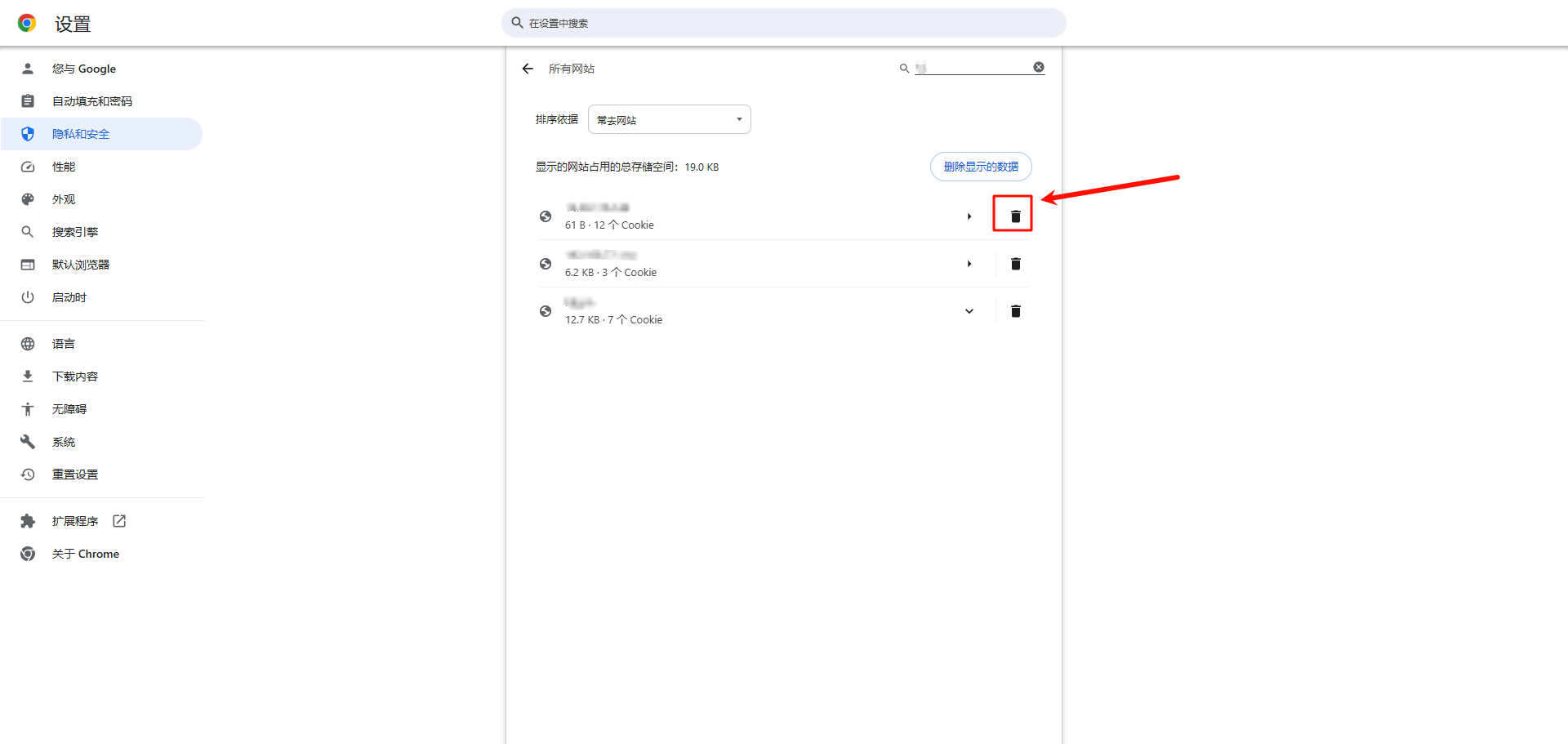
清除GoogleChrome的cookie
-
设置找到第三方cookie

-
点击查看所有网站数据和权限

-
在里面搜索U9地址然后删除cookie重启浏览器

 浙公网安备 33010602011771号