
Specimens: sudo: cd: command not found
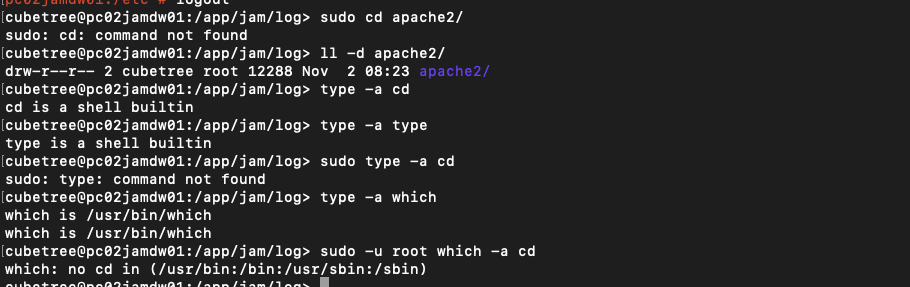
cd在suse上仅是shell builtin, sudo仅仅执行的executable(外部命令), 路径由 /etc/sudoers 的Defaults secure_path = /path1:/path2 指定


There are two ways that it "won't work", depending on your OS:
-
If your OS follows POSIX, then running
sudo cdwill cause the external command "cd" (usually located at/usr/bin/cd) to execute in a forked process as the root user. That process changes directories successfully. Once that process is done, you will be returned to your regular shell, which is still in the directory where it started.So
sudo cdruns without error, but does not change the current working directory of your current shell.(reference: this answer)
-
Otherwise, running
sudo cdwill cause the following to happen. Your computer will look through your PATH, trying to find an executable named "cd". It will not find one. (only the shell built-in command "cd" exists, and that is not an executable file). Hence, you get an error. (On Ubuntu, I get the error messagesudo: cd: command not found.)So
sudo cdruns with error.


 浙公网安备 33010602011771号