
通过css美化Typora
最近自学了一些前端的知识, 学习目标是可以看懂基本的前端代码, 还有可以对一些项目进行修改, 所以就拿Typora练练手.
大家看看就好
基本设置
建议先下载scoop,然后在scoop上安装PicGo(上传图片)和Pandoc(导出);
有一些在偏好设置里更改的内容参考其他的资料, 这里就不赘述了
这里只说一点, 需要在偏好设置中开启调试模式, 这样可以在页面中通过"检查元素"调试代码
css文件修改的位置
我之前使用的主题是Newsprint, 所以我将直接以这个主题为例进行修改
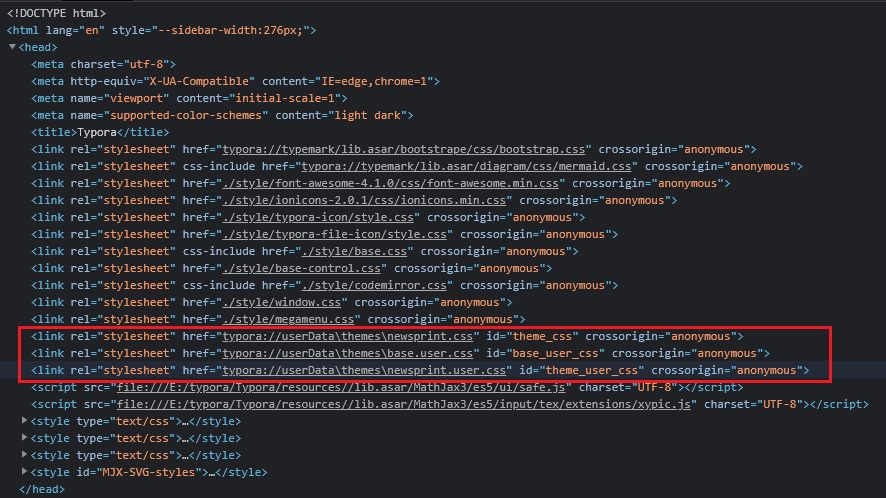
- 可以在themes目录下的newsprint.css中直接修改
- 可以自己新建base.user.css或者newsprint.user.css进行添加
修改的一个思路是, 先在“检查元素”中调试代码, 然后在css文件中修改
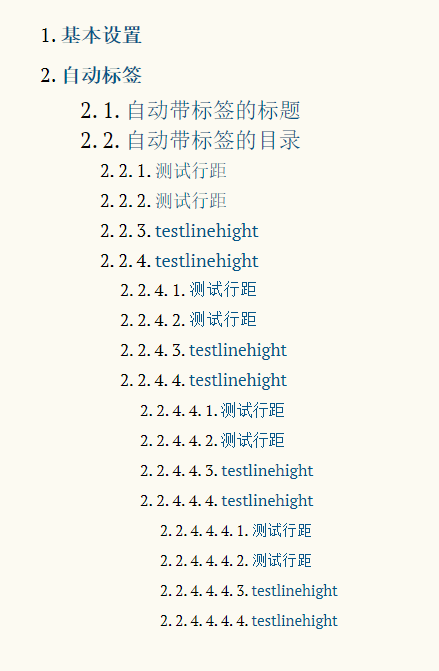
几个自动标签
个人认为加上数字标签之后, 整洁了不少
自动带标签的标题
/** initialize css counter */
#write {
    counter-reset: h1
}

h1 {
    counter-reset: h2
}

h2 {
    counter-reset: h3
}

h3 {
    counter-reset: h4
}

h4 {
    counter-reset: h5
}

h5 {
    counter-reset: h6
}

/** put counter result into headings */
#write h1:before {
    counter-increment: h1;
    content: counter(h1) ". "
}

#write h2:before {
    counter-increment: h2;
    content: counter(h1) "." counter(h2) ". "
}

#write h3:before,
h3.md-focus.md-heading:before /** override the default style for focused headings */ {
    counter-increment: h3;
    content: counter(h1) "." counter(h2) "." counter(h3) ". "
}

#write h4:before,
h4.md-focus.md-heading:before {
    counter-increment: h4;
    content: counter(h1) "." counter(h2) "." counter(h3) "." counter(h4) ". "
}

#write h5:before,
h5.md-focus.md-heading:before {
    counter-increment: h5;
    content: counter(h1) "." counter(h2) "." counter(h3) "." counter(h4) "." counter(h5) ". "
}

#write h6:before,
h6.md-focus.md-heading:before {
    counter-increment: h6;
    content: counter(h1) "." counter(h2) "." counter(h3) "." counter(h4) "." counter(h5) "." counter(h6) ". "
}

/** override the default style for focused headings */
#write>h3.md-focus:before,
#write>h4.md-focus:before,
#write>h5.md-focus:before,
#write>h6.md-focus:before,
h3.md-focus:before,
h4.md-focus:before,
h5.md-focus:before,
h6.md-focus:before {
    color: inherit;
    border: inherit;
    border-radius: inherit;
    position: inherit;
    left:initial;
    float: none;
    top:initial;
    font-size: inherit;
    padding-left: inherit;
    padding-right: inherit;
    vertical-align: inherit;
    font-weight: inherit;
    line-height: inherit;
}
代码来源: https://support.typora.io/Auto-Numbering/
自动带标签的目录
/**************************************
 * Header Counters in TOC
 **************************************/

/* No link underlines in TOC */
.md-toc-inner {
    text-decoration: none;
}

.md-toc-content {
    counter-reset: h1toc
}

 /* 这里对字体进行了一些修改 */
.md-toc-h1 {
    margin-left: 0;
    font-size: 1.2rem;
	line-height: 2em;
    counter-reset: h2toc

}

.md-toc-h2 {
    font-size: 1.1rem;
    margin-left: 2rem;
    counter-reset: h3toc
}

.md-toc-h3 {
    margin-left: 3rem;
    font-size: .9rem;
    counter-reset: h4toc
}

.md-toc-h4 {
    margin-left: 4rem;
    font-size: .85rem;
    counter-reset: h5toc
}

.md-toc-h5 {
    margin-left: 5rem;
    font-size: .8rem;
    counter-reset: h6toc
}

.md-toc-h6 {
    margin-left: 6rem;
    font-size: .75rem;
}

.md-toc-h1:before {
    color: black;
    counter-increment: h1toc;
    content: counter(h1toc) ". "
}

.md-toc-h1 .md-toc-inner {
    margin-left: 0;
}

.md-toc-h2:before {
    color: black;
    counter-increment: h2toc;
    content: counter(h1toc) ". " counter(h2toc) ". "
}

.md-toc-h2 .md-toc-inner {
    margin-left: 0;
}

.md-toc-h3:before {
    color: black;
    counter-increment: h3toc;
    content: counter(h1toc) ". " counter(h2toc) ". " counter(h3toc) ". "
}

.md-toc-h3 .md-toc-inner {
    margin-left: 0;
}

.md-toc-h4:before {
    color: black;
    counter-increment: h4toc;
    content: counter(h1toc) ". " counter(h2toc) ". " counter(h3toc) ". " counter(h4toc) ". "
}

.md-toc-h4 .md-toc-inner {
    margin-left: 0;
}

.md-toc-h5:before {
    color: black;
    counter-increment: h5toc;
    content: counter(h1toc) ". " counter(h2toc) ". " counter(h3toc) ". " counter(h4toc) ". " counter(h5toc) ". "
}

.md-toc-h5 .md-toc-inner {
    margin-left: 0;
}

.md-toc-h6:before {
    color: black;
    counter-increment: h6toc;
    content: counter(h1toc) ". " counter(h2toc) ". " counter(h3toc) ". " counter(h4toc) ". " counter(h5toc) ". " counter(h6toc) ". "
}

.md-toc-h6 .md-toc-inner {
    margin-left: 0;
}

/**************************************
 * Header Counters in Content
 **************************************/

/** initialize css counter */
#write {
    counter-reset: h1
}

h1 {
    counter-reset: h2
}

h2 {
    counter-reset: h3
}

h3 {
    counter-reset: h4
}

h4 {
    counter-reset: h5
}

h5 {
    counter-reset: h6
}

/** put counter result into headings */
#write h1:before {
    counter-increment: h1;
    content: counter(h1) ". "
}

#write h2:before {
    counter-increment: h2;
    content: counter(h1) "." counter(h2) ". "
}

#write h3:before, h3.md-focus.md-heading:before { /*override the default style for focused headings */
    counter-increment: h3;
    content: counter(h1) "." counter(h2) "." counter(h3) ". "
}

#write h4:before, h4.md-focus.md-heading:before {
    counter-increment: h4;
    content: counter(h1) "." counter(h2) "." counter(h3) "." counter(h4) ". "
}

#write h5:before, h5.md-focus.md-heading:before {
    counter-increment: h5;
    content: counter(h1) "." counter(h2) "." counter(h3) "." counter(h4) "." counter(h5) ". "
}

#write h6:before, h6.md-focus.md-heading:before {
    counter-increment: h6;
    content: counter(h1) "." counter(h2) "." counter(h3) "." counter(h4) "." counter(h5) "." counter(h6) ". "
}

/** override the default style for focused headings */
/* inherit元素获取其父元素的计算值 */
#write>h3.md-focus:before, #write>h4.md-focus:before, #write>h5.md-focus:before, #write>h6.md-focus:before, h3.md-focus:before, h4.md-focus:before, h5.md-focus:before, h6.md-focus:before {
    color: inherit;
    border: inherit;
    border-radius: inherit;
    position: inherit;
    left: initial;
    float: none;
    top: initial;
    font-size: inherit;
    padding-left: inherit;
    padding-right: inherit;
    vertical-align: inherit;
    font-weight: inherit;
    line-height: inherit;
}
代码来源: https://pastebin.com/NYugSbXk
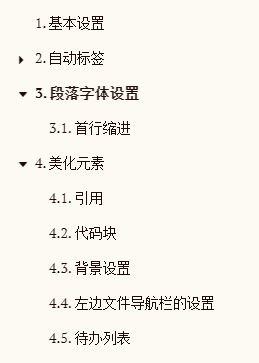
自动带标签的大纲
.sidebar-content {
    counter-reset: h1
}

.outline-h1 {
    counter-reset: h2
}

.outline-h2 {
    counter-reset: h3
}

.outline-h3 {
    counter-reset: h4
}

.outline-h4 {
    counter-reset: h5
}

.outline-h5 {
    counter-reset: h6
}

.outline-h1>.outline-item>.outline-label:before {
    counter-increment: h1;
    content: counter(h1) ". "
}

.outline-h2>.outline-item>.outline-label:before {
    counter-increment: h2;
    content: counter(h1) "." counter(h2) ". "
}

.outline-h3>.outline-item>.outline-label:before {
    counter-increment: h3;
    content: counter(h1) "." counter(h2) "." counter(h3) ". "
}

.outline-h4>.outline-item>.outline-label:before {
    counter-increment: h4;
    content: counter(h1) "." counter(h2) "." counter(h3) "." counter(h4) ". "
}

.outline-h5>.outline-item>.outline-label:before {
    counter-increment: h5;
    content: counter(h1) "." counter(h2) "." counter(h3) "." counter(h4) "." counter(h5) ". "
}

.outline-h6>.outline-item>.outline-label:before {
    counter-increment: h6;
    content: counter(h1) "." counter(h2) "." counter(h3) "." counter(h4) "." counter(h5) "." counter(h6) ". "
}
代码来源:https://pastebin.com/XmYgBbaz
效果展示
自定义段落
首行缩进
找到段落的class
.md-p{
	/* text-indent:50px; */
	text-indent:2em;
}
但是我觉得这样不如在打字的过程按Tab好
因为这样改的话, 貌似没有办法取消, 只能首行缩进, 不能顶格写东西
美化元素
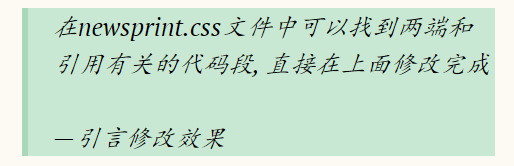
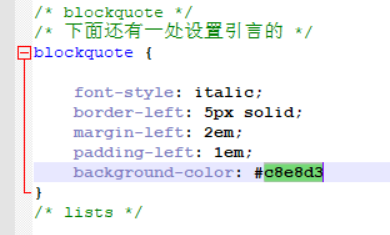
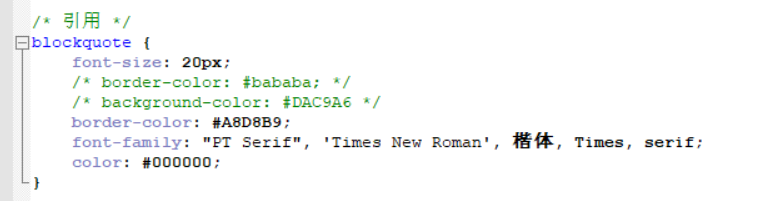
引用
截图为引言修改之后的效果
自定义代码块
自定义其中的每个元素
在newsprint.user.css中添加
.cm-s-inner {
  background-color: #263238;
  /* background-color: #A5DEE4; */
  color: rgba(233, 237, 237, 1);
}
.cm-s-inner .CodeMirror-gutters {
  background: #263238;
  /* background: #A5DEE4; */
  color: rgb(83,127,126);
  border: none;
}
.cm-s-inner .CodeMirror-guttermarker, .cm-s-inner .CodeMirror-guttermarker-subtle, .cm-s-inner .CodeMirror-linenumber { color: rgb(83,127,126); }
.cm-s-inner .CodeMirror-cursor { border-left: 1px solid #f8f8f0; }
.cm-s-inner div.CodeMirror-selected { background: rgba(255, 255, 255, 0.15); }
.cm-s-inner.CodeMirror-focused div.CodeMirror-selected { background: rgba(255, 255, 255, 0.10); }
.cm-s-inner .CodeMirror-line::selection, .cm-s-inner .CodeMirror-line > span::selection, .cm-s-inner .CodeMirror-line > span > span::selection { background: rgba(255, 255, 255, 0.10); }
.cm-s-inner .CodeMirror-line::-moz-selection, .cm-s-inner .CodeMirror-line > span::-moz-selection, .cm-s-inner .CodeMirror-line > span > span::-moz-selection { background: rgba(255, 255, 255, 0.10); }

.cm-s-inner .CodeMirror-activeline-background { background: rgba(0, 0, 0, 0); }
.cm-s-inner .cm-keyword { color: rgba(199, 146, 234, 1); }
.cm-s-inner .cm-operator { color: rgba(233, 237, 237, 1); }
.cm-s-inner .cm-variable-2 { color: #80CBC4; }
.cm-s-inner .cm-variable-3 { color: #82B1FF; }
.cm-s-inner .cm-builtin { color: #DECB6B; }
.cm-s-inner .cm-atom { color: #F77669; }
.cm-s-inner .cm-number { color: #F77669; }
.cm-s-inner .cm-def { color: rgba(233, 237, 237, 1); }
.cm-s-inner .cm-string { color: #C3E88D; }
.cm-s-inner .cm-string-2 { color: #80CBC4; }
.cm-s-inner .cm-comment { color: #546E7A; }
.cm-s-inner .cm-variable { color: #82B1FF; }
.cm-s-inner .cm-tag { color: #80CBC4; }
.cm-s-inner .cm-meta { color: #80CBC4; }
.cm-s-inner .cm-attribute { color: #FFCB6B; }
.cm-s-inner .cm-property { color: #80CBAE; }
.cm-s-inner .cm-qualifier { color: #DECB6B; }
.cm-s-inner .cm-variable-3 { color: #DECB6B; }
.cm-s-inner .cm-tag { color: rgba(255, 83, 112, 1); }
.cm-s-inner .cm-error {
  color: rgba(255, 255, 255, 1.0);
  background-color: #EC5F67;
}
.cm-s-inner .CodeMirror-matchingbracket {
  text-decoration: underline;
  color: white !important;
}

/**apply to code fences with plan text**/
.md-fences {
  background-color: #263238;
  /* background-color: #26453D; */
  color: rgba(233, 237, 237, 1);
  border: none;
}


.md-fences .code-tooltip {
  background-color: #263238;
  /* background-color: #A5DEE4; */
}
自定义背景
有个方法可以添加背景图片
content {
  background: url(./fzm-seamless.notebook.texture-14.png);
  background-repeat: repeat;
}

#write {
  padding-left: 120px; /*adjust writing area position*/
}

body {
  background: #F3F3F3;
  /*Please set this background color as close to the background image as possible.
  titlebar for seamless window on macOS will use this background color.
  typora for Win/Linux will use this to judge whether typora is in dark mode or light mode*/
}

/**Other css may needed to adjust UI components**/
但是我没用, 我还是喜欢简单一点的背景, 只是调整了一下背景的颜色
在newsprint.css中找到该段进行修改
html, body {
	/* background-color: #f3f2ee; */
	background-color: #FCFAF2;
	font-family: "PT Serif", 'Times New Roman', 宋体, Times, serif;
	color: #1f0909;
	line-height: 1.5em;
}
左边文件导航栏的设置
可以现在在当前主题的css文件中调试, 然后在newsprint.css中修改
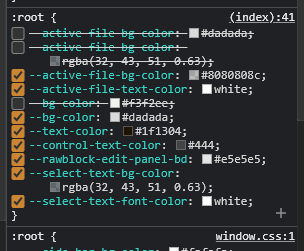
/* 文件导航栏菜单选项 */
:root {
	/* --active-file-bg-color: #dadada; */
	/* --active-file-bg-color: rgba(32, 43, 51, 0.63); */
	/* 当前选中的文档的背景颜色 */
	--active-file-bg-color: #8080808c;
	/* 当前选中的文档的字体颜色 */
	--active-file-text-color: white;
	/* --bg-color: #f3f2ee; */
	/* 右键菜单的背景颜色 */
	/* 更改此项, 偏好设置里面的背景颜色也会改变 */
	--bg-color: #dadada;
	/* 鼠标移动到文件名上显示的颜色 */
	/* 更改此项, 偏好设置里面的字体颜色也会改变 */
	--text-color: #1f1304;
	/* 文件字体颜色 */
	--control-text-color: #444;
	--rawblock-edit-panel-bd: #e5e5e5;

	--select-text-bg-color: rgba(32, 43, 51, 0.63);
  --select-text-font-color: white;
}
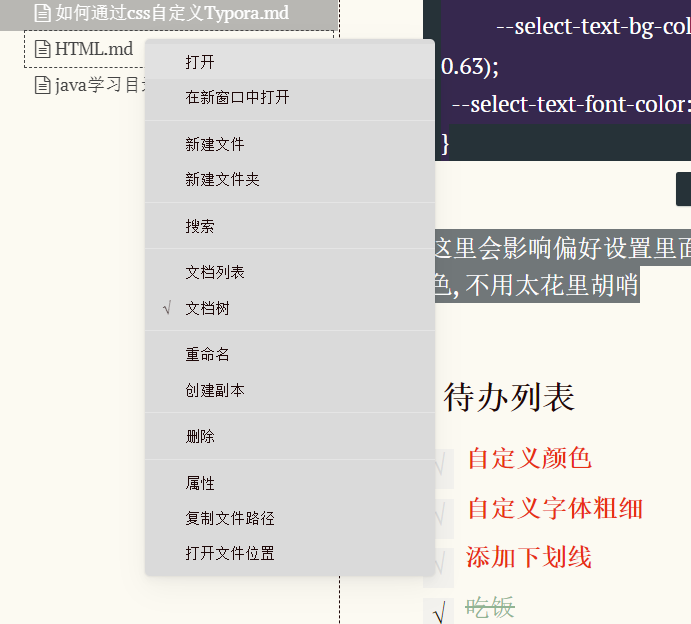
注意这里会影响偏好设置里面的字体颜色和背景颜色, 不用太花里胡哨
修改之后感觉好看了一些:
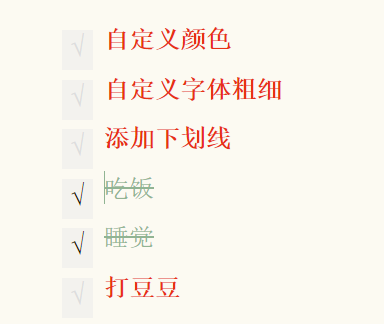
待办列表
在newsprint.user.css中添加
.task-list-done {
    /* styles for completed tasks */
    text-decoration: line-through;
    /*顺便更改一下颜色*/
    /* color: #777 */
	color: #91B493
}
.task-list-not-done {
	color: #E83015;
	font-weight: bold;
    /* styles for incomplete tasks */
}
加了一些元素, 效果如下:

 浙公网安备 33010602011771号