
nsw与mock 模拟分页接口
安装依赖
项目中使用到一下依赖,请提前安装
npm install msw lodash axios mockjs
然后执行初始化命令
npx msw init public/
开启mock
定义mock,创建 src/mock/index.ts
import _ from "lodash";
import Mock from "mockjs";
import { http, HttpResponse } from "msw";
import { setupWorker } from "msw/browser";

/**
 * 处理数组,以便于模拟分页
 * @param {Array} dataSource - 数据源数组
 * @param {Object} params - 分页参数
 * @param {number} params.current - 当前页码
 * @param {number} params.pageSize - 每页条数
 * @returns {Object} 包含分页数据和分页信息的对象
 */
const paginate = (dataSourceTemp, { current = 1, pageSize = 10 } = {}) => {
  const dataSource = _.cloneDeep(dataSourceTemp);

  // 确保 current 和 pageSize 是有效的数字
  current = Math.max(1, parseInt(current) || 1);
  pageSize = Math.max(1, parseInt(pageSize) || 10);

  // 计算起始索引和结束索引
  const startIndex = (current - 1) * pageSize;
  const endIndex = startIndex + pageSize;

  // 获取当前页数据
  const data = dataSource.slice(startIndex, endIndex);

  return {
    data,
    pagination: {
      current,
      pageSize,
      total: dataSourceTemp.length,
      pages: Math.ceil(dataSource.length / pageSize),
    },
  };
};

// 模拟数据库
const dataBase = Mock.mock({
  "user|20-30": [
    {
      "id|+1": 1, // 自增ID
      name: "@cname", // 中文姓名
      "age|18-60": 1, // 18-60岁的随机年龄
      "salary|1000-5000": 1, // 随机薪资
      address: "@county(true)", // 随机地址
    },
  ],
});

// 定义统一返回格式(对,就像你真的在写接口一样)
const JsonResult = {
  error(msg: string) {
    return HttpResponse.json({
      code: 0,
      msg,
    });
  },
  sucess(data) {
    return HttpResponse.json({
      code: 1,
      data,
    });
  },
};

// 处理器
const handlers = [
  http.get("/api/user", ({ request }) => {
    const url = new URL(request.url);
    // 获取特定的查询参数
    const current = Number(url.searchParams.get("current"));
    const pageSize = Number(url.searchParams.get("pageSize"));
    return JsonResult.sucess({
      total: dataBase.user.length,
      list: paginate(dataBase.user, { current, pageSize }).data,
    });
  }),
];

export const enableMocking = async () => {
  if (process.env.NODE_ENV !== "development") return;
  const worker = setupWorker(...handlers);
  await worker.start({
    onUnhandledRequest(request, print) {
      // 决定如何对未处理的请求做出反应: 如果url不包含/api的内容 就返回,否则就警告
      if (request.url.indexOf("/api") === -1) return;
      print.warning();
    },
  });
};
并在项目入口中启用,以 (vite 创建的 )vue 项目为例
import { createApp } from "vue";
import App from "./App.vue";
import { enableMocking } from "./mock";

enableMocking().then(() => {
  const app = createApp(App);
  app.use(ArcoVue);
  app.mount("#app");
});
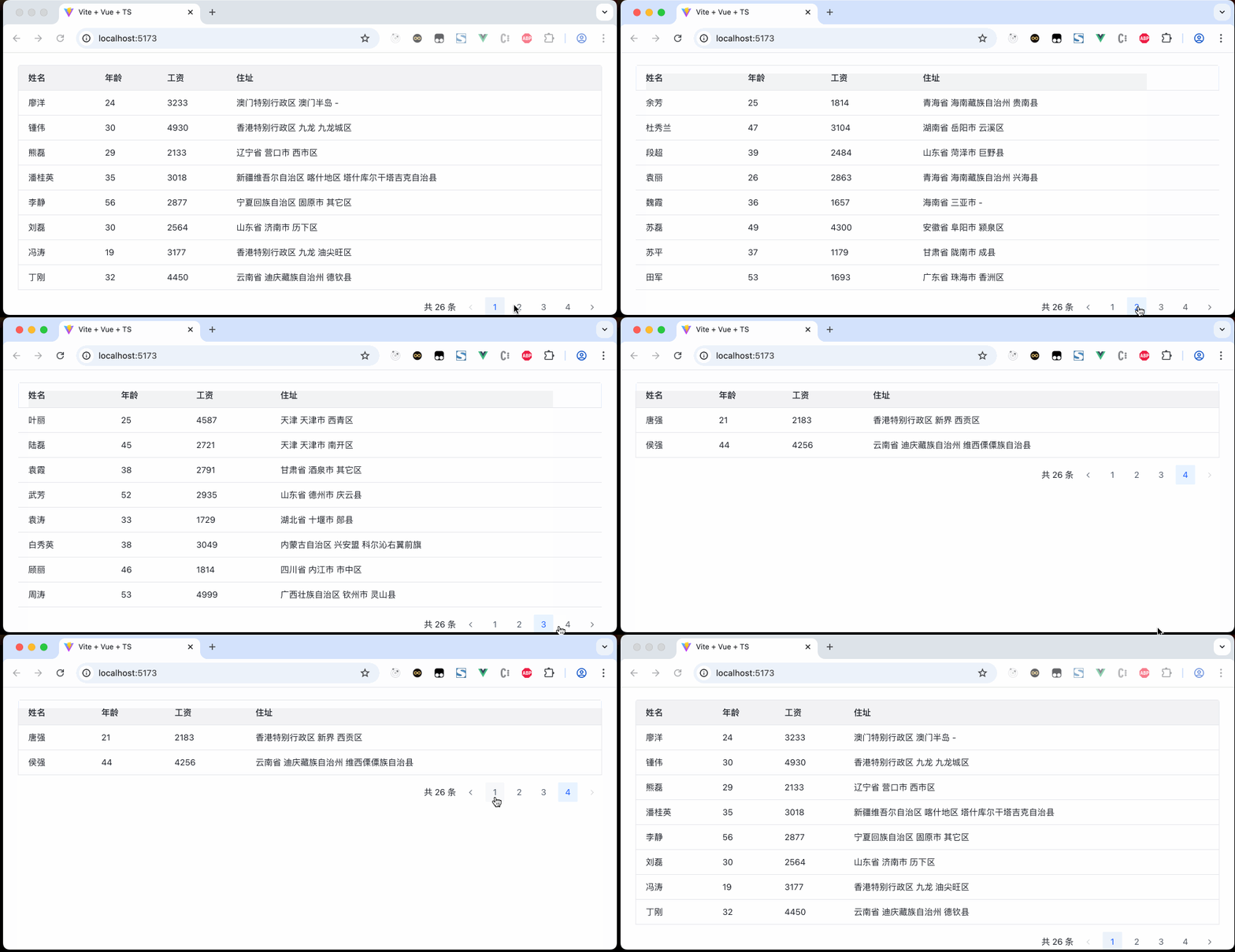
页面使用
同样在 vue 项目的基础上,使用了arco design
home.vue
<template>
  <a-table
    :columns="columns"
    :data="dataRender"
    :pagination="pagination"
    @page-change="onPageChange"
  />
</template>

<script setup lang="ts">
import { reactive, ref } from "vue";
import axios from "axios";

// 分页信息
const pagination = reactive({
  current: 1,
  pageSize: 8,
  total: 5,
  showTotal: true,
});

// 表头
const columns = [
  {
    title: "姓名",
    dataIndex: "name",
  },
  {
    title: "年龄",
    dataIndex: "age",
  },
  {
    title: "工资",
    dataIndex: "salary",
  },
  {
    title: "住址",
    dataIndex: "address",
  },
];

// 请求接口
const dataRender = ref([]);
const syncDataRender = async () => {
  const {
    data: { data },
  } = await axios.get("/api/user", {
    params: {
      current: pagination.current,
      pageSize: pagination.pageSize,
    },
  });
  dataRender.value = data.list;
  pagination.total = data.total;
};
syncDataRender();

// 监听翻页
const onPageChange = async (current) => {
  pagination.current = current;
  syncDataRender();
};
</script>

 浙公网安备 33010602011771号