
手把手教你逆向高德车机8.5.0制作共存版
前言
很多车机上自带的高德都比较老,而且不允许更新和卸载。
这就需要一个制作另一个高德。
在安卓上,所有app并不是根据名字来区分唯一性的,而是包名package。
也就是说我们把app安装包(apk)里的package设置成一个新的即可达到成功安装与官方版并存。
那怎么改apk呢?
这就用到了反编译也叫做逆向工程技术。
正好借此契机,大家跟着我学习一下安卓的反逆向工程技术,以后自己给软件换个图标、改个名称、破解个vip起步手到擒来。
准备工具
电脑下载并安装好一下几个软件
apktool
apktool用于对apk进行反编译及重新打包的工具
官方地址:https://apktool.org
打开终端,输入apktool -version出现版本号,既为成功
apktool -version
2.12.1
Press any key to continue . . .
dex-tools
apktool反编译后,安卓的所有代码逻辑文件都在编译文件夹里的classes.dex中。
此文件原本为java或kotlin所编写,后被打包加密而成,很难直接读取里边的代码逻辑。
dex-tools工具则用于将此dex文件转换为可读的 jar 格式。
终端执行它 d2j-dex2jar出现以下,既为成功
d2j-dex2jar
d2j-dex2jar -- convert dex to jar
usage: d2j-dex2jar [options] <file0> [file1 ... fileN]
options:
 --skip-exceptions            skip-exceptions
 ...
jd-gui
jd-gui,用于读取dex-tools生成jar文件的工具,以便于分析安卓的代码逻辑。
开始反编译
去官网下载车机版本的高德,为方便好记 我将其改名为 gaode.apk
对其执行反编译的命令 apktool d .\gaode.apk
D:\app> apktool d .\gaode.apk
I: Using Apktool 2.12.1 on gaode.apk
I: Loading resource table...
I: Decoding file-resources...
I: Loading resource table from file: C:\Users\Administrator\AppData\Local\apktool\framework\1.apk
S: Could not decode file, replacing by FALSE value: anim/abc_slide_in_top.xml
S: Could not decode file, replacing by FALSE value: anim/activity_enter.xml
S: Could not decode file, replacing by FALSE value: anim/abc_slide_out_bottom.xml
S: Could not decode file, replacing by FALSE value: anim/abc_slide_out_top.xml
S: Could not decode file, replacing by FALSE value: anim/activity_exit.xml
S: Could not decode file, replacing by FALSE value: anim/abc_slide_in_bottom.xml
S: Could not decode file, replacing by FALSE value: anim/abc_fade_in.xml
S: Could not decode file, replacing by FALSE value: anim/abc_fade_out.xml
I: Decoding values */* XMLs...
I: Decoding AndroidManifest.xml with resources...
I: Regular manifest package...
I: Baksmaling classes.dex...
I: Copying assets and libs...
I: Copying unknown files...
I: Copying original files...
Press any key to continue . . .
若仅是替换下静态资源(如icon),而不修改代码逻辑,可
apktool -r d .\gaode.apk进行反编译!这样就报某些资源丢失的警告了。
重新打包
在不做任何修改情况下尝试一下在打包回去 apktool b .\gaode\
D:\app> apktool b .\gaode\
I: Using Apktool 2.12.1
I: Checking whether sources has changed...
I: Smaling smali folder into classes.dex...
I: Checking whether resources has changed...
I: Building resources...
W: D:\app\.\gaode\res\values\anims.xml:3: error: invalid value for type 'anim'. Expected a reference.
W: D:\app\.\gaode\res\values\anims.xml:4: error: invalid value for type 'anim'. Expected a reference.
W: D:\app\.\gaode\res\values\anims.xml:5: error: invalid value for type 'anim'. Expected a reference.
W: D:\app\.\gaode\res\values\anims.xml:6: error: invalid value for type 'anim'. Expected a reference.
W: D:\app\.\gaode\res\values\anims.xml:7: error: invalid value for type 'anim'. Expected a reference.
W: D:\app\.\gaode\res\values\anims.xml:8: error: invalid value for type 'anim'. Expected a reference.
W: D:\app\.\gaode\res\values\anims.xml:9: error: invalid value for type 'anim'. Expected a reference.
W: D:\app\.\gaode\res\values\anims.xml:10: error: invalid value for type 'anim'. Expected a reference.
W: D:\app\.\gaode\res\values\anims.xml: error: file failed to compile.
brut.androlib.exceptions.AndrolibException: brut.common.BrutException: could not exec (exit code = 1): [C:\Users\ADMINI~1\AppData\Local\Temp\brut_util_Jar_12222067369825036268574268945791329902.tmp, compile, --dir, D:\app\.\gaode\res, --legacy, -o, D:\app\.\gaode\build\resources.zip]
Press any key to continue . . .
会提示资源丢失,这是因为新版 apktool 默认使用了aapt2进行的反编译,而这个高德车机版本目前还不支持,所以我们只需指定aapt1重新打包即可 apktool b --use-aapt1 .\gaode.apk!
修改代码
修改app名称
这个是可选的
修改目录文件/gaode/res/values-zh/strings.xml,里的<string name="app_name">高德地图</string>
修改包名
若车机上已经有了高德车机版本的地图app,我们必须起一个和它不同的,否则冲突装不上!
另外如果你想安装后还想在车机上卸载,就必须是它认可那几个包名的才可以!
修改目录文件/gaode/AndroidManifest.xml,搜索 package="com.autonavi.amapauto" 讲起替换为包名即可 比如package="xxx"
修复启动报错
将打包好的apk 签名(签名在后边讲)后安装到车机,会发现无法使用

这个是高德地图启动的时候做了相关的校验,我们修改了包名及签名,所以无法通过校验。 我们来定位和分析下 这个猥琐的检验检查在代码哪儿!
通过解读AndroidManifest.xml,在其中搜索 android.intent.category.LAUNCHER,其所在 Activity 就是启动界面。
<activity android:configChanges="mcc|mnc|locale|keyboard|keyboardHidden|orientation|screenLayout|uiMode|screenSize|smallestScreenSize|layoutDirection|fontScale" android:exported="true" android:icon="@drawable/v3_icon" android:launchMode="singleTask" android:name="com.autonavi.auto.remote.fill.UsbFillActivity" android:relinquishTaskIdentity="false" android:screenOrientation="user">
    <intent-filter>
        <action android:name="android.intent.action.MAIN"/>
        <category android:name="android.intent.category.LAUNCHER"/>
        <category android:name="android.intent.category.APP_MAPS"/>
        <category android:name="android.intent.category.DEFAULT"/>
    </intent-filter>
</activity>
通过此代码我们可以得知,这个启动页面对应的包逻辑代码文件为 com.autonavi.auto.remote.fill.UsbFillActivity
然后我们就可以按照这个包路径,通过以下步骤查看启动也里边的逻辑
1、将安装包 gaode.apk改为gaode.apk.zip并作为压缩包解压,拿到里边的classes.dex。
2、使用dex-tools将classes.dex转换为能看懂的jar文件: d2j-dex2jar .\classes.dex
3、打开jd-gui,将转换的jar文件拖入其中查看并分析代码
结合错误错误提示文字搜索,很快就能定位到 校验逻辑处
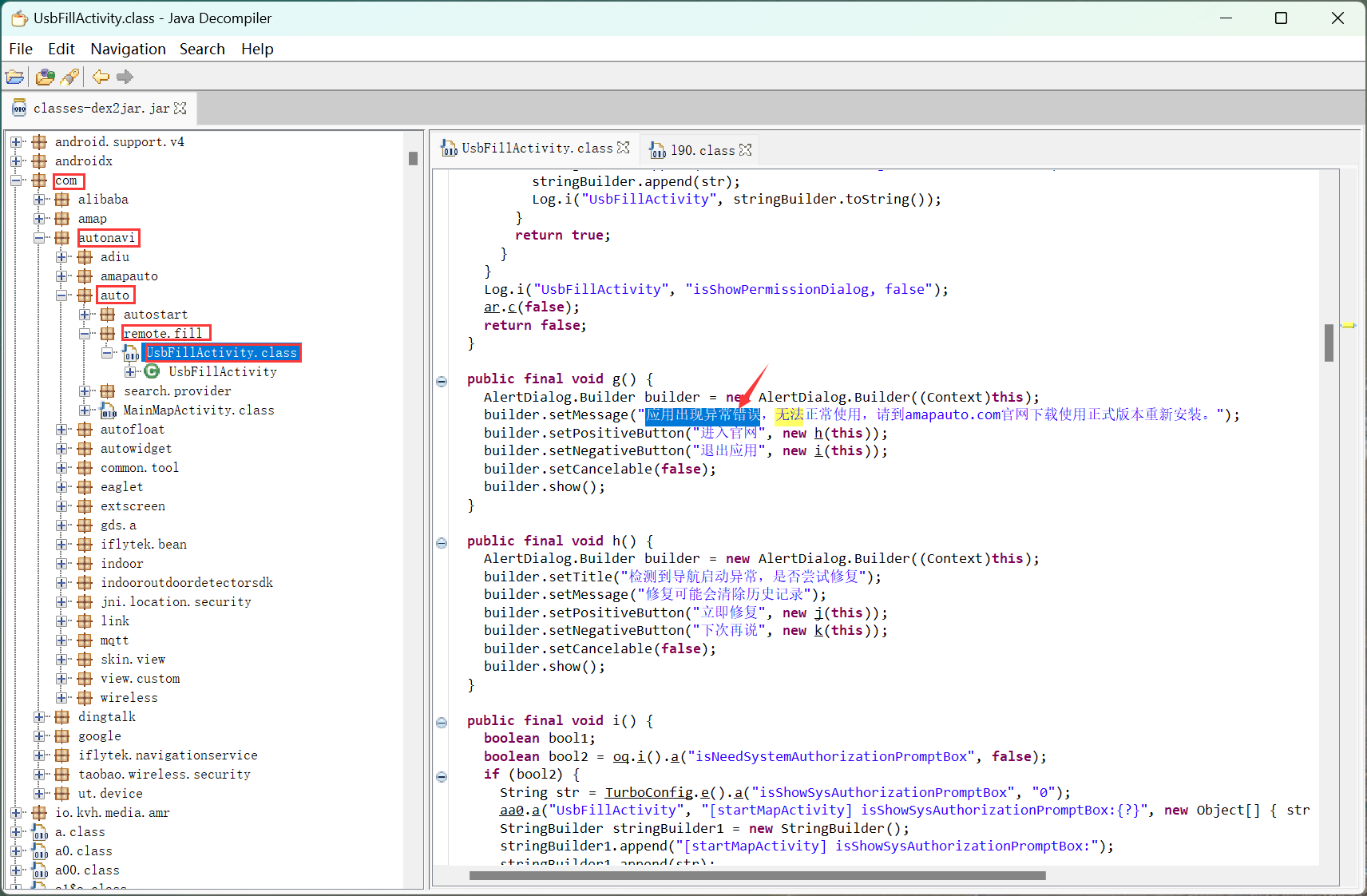
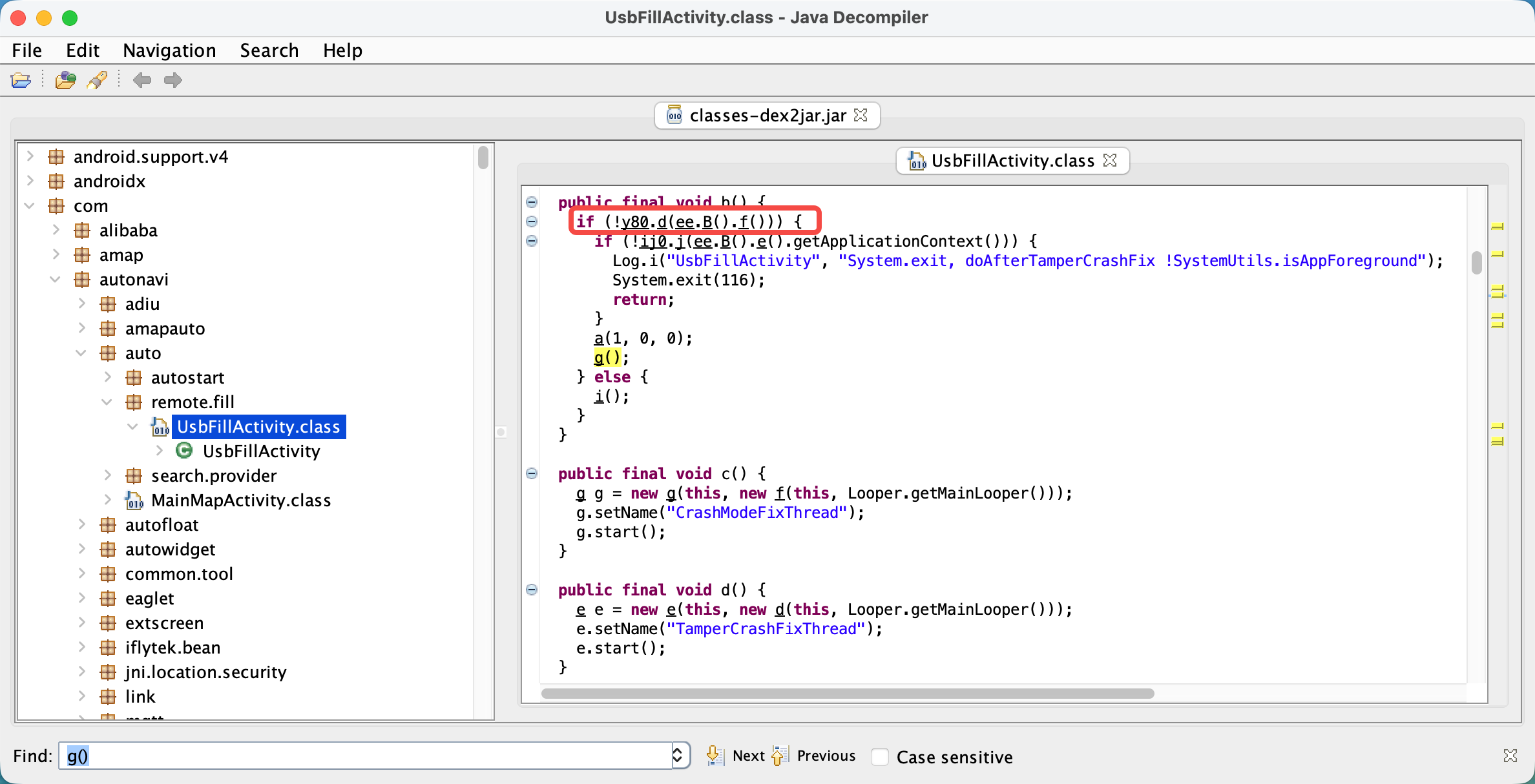
找到方法 g() 的调用地点,可以看到当y80.d(ee.B().f()),也就是说y80的d方法若返回为false则会弹出异常提示,并阻止进入程序。
点击y80方法,会跳转到一个y80.class的java文件,在安卓中class文件都会被编译成同名的 smali文件!
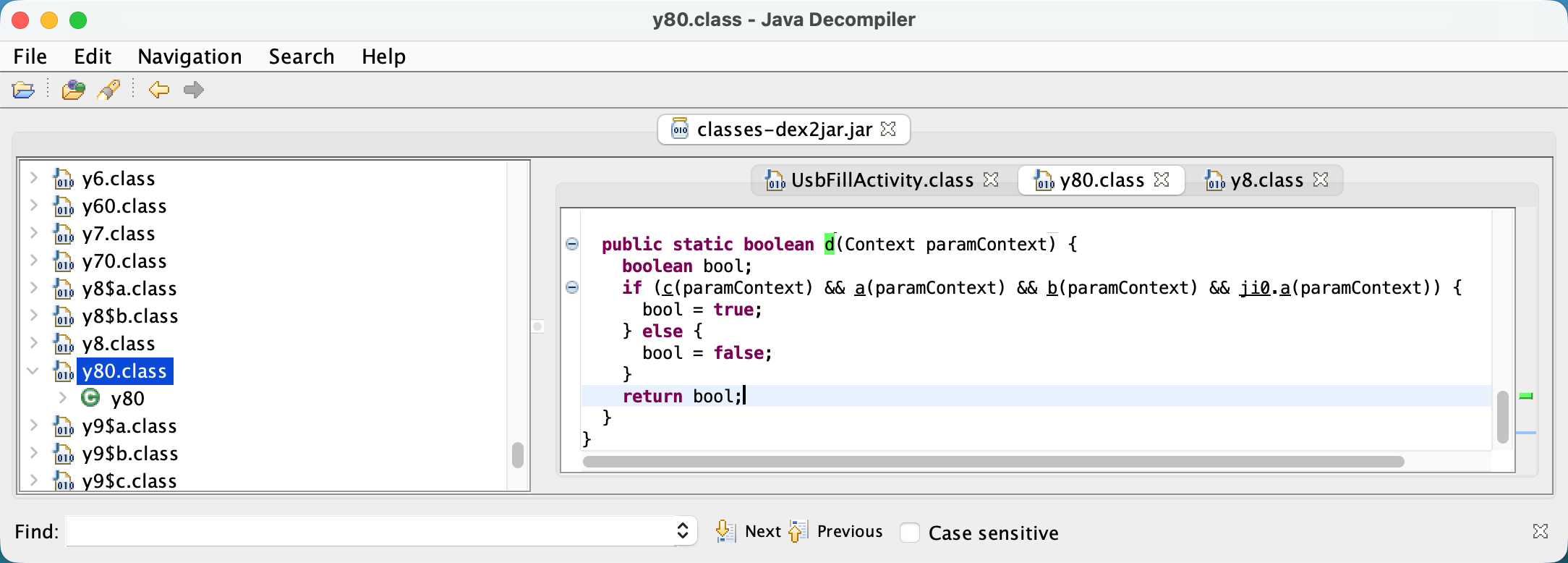
好了,截止目前,我们已经知道了 只要让y80.smali的d方法返回true即可。
我们找到进入编译后的文件 gaode\smali\y80.smali,编辑此文件的d方法,将返回值改为true
smali 语法和 Java 还是有很大差别的,但是我们不需要精通,对应这个校验方法看上去很复杂,但是我们的需求只不过是让这个方法返回 true 即可,因此修改如下:
...
.method public static d(Landroid/content/Context;)Z
    .locals 1

    .line 1
    const/4 p0, 0x1

    return p0
.end method
修改应用图标
非必须
使用图标生成网站,生成应用图标(安卓app图标自己做的话麻烦 需要适配不同分辨率,此网站可以帮你做),复制到res目录中。

打开安卓的项目配置文件 AndroidManifest.xml
搜索 android:icon=@drawable/v3_icon全部替换为android:icon="@mipmap/ic_launcher"。
签名
修改完,还要对apk进行签名,方可安装,有单独教程!
安装
有单独教程
其它
更多请加群


 浙公网安备 33010602011771号