
使用PHP+HTML集成DeepSeek API,实现一个简单的聊天对话项目
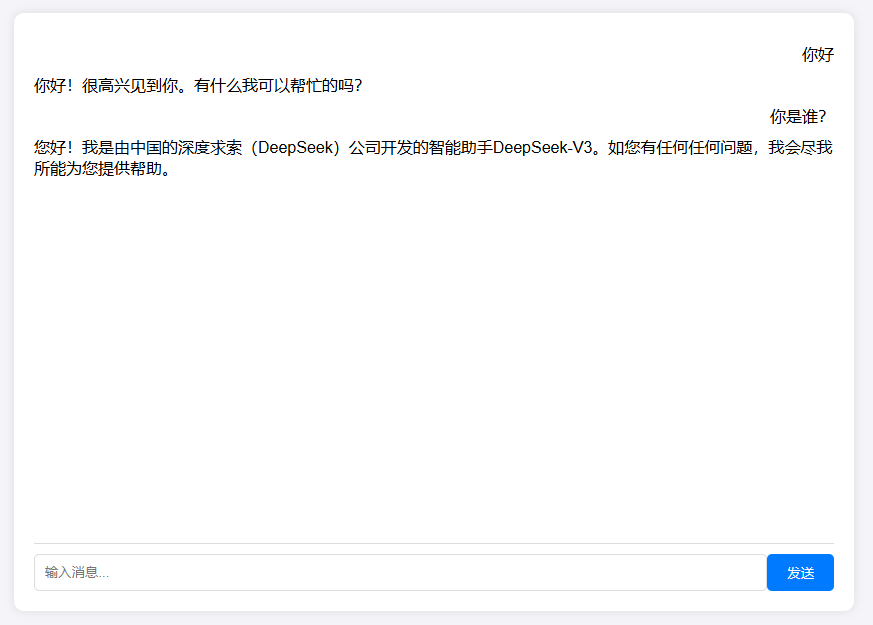
项目效果预览
1. 准备工作
- PHP环境:确保你的开发环境中安装了PHP。
- DeepSeek API密钥:注册并获取DeepSeek API的访问密钥。
2. 创建PHP文件,编写API调用脚本
创建一个PHP脚本(api.php),用于调用DeepSeek API。假设API密钥为YOUR_API_KEY。
<?php
header('Content-Type: application/json');

function callDeepSeekAPI($message) {
    $apiKey = 'YOUR_API_KEY';
    $url = 'https://api.deepseek.com/chat/completions';

    $data = [
        "model" => "deepseek-chat",
        'messages' => [
            ["role" => "system", "content" => "You are a helpful assistant."],
            ["role" => "user", "content" => $message]
        ],
        'stream'=>false
    ];

    $ch = curl_init($url);
    curl_setopt($ch, CURLOPT_RETURNTRANSFER, true);
    curl_setopt($ch, CURLOPT_POST, true);
    curl_setopt($ch, CURLOPT_POSTFIELDS, json_encode($data));
    curl_setopt($ch, CURLOPT_HTTPHEADER, [
        'Content-Type: application/json',
        'Authorization: Bearer ' . $apiKey
    ]);

    $response = curl_exec($ch);
    if (curl_errno($ch)) {
        $error_msg = curl_error($ch);
        curl_close($ch);
        return json_encode(['error' => $error_msg]);
    }
    curl_close($ch);

    $response = json_decode($response, true);
    return json_encode(['content'=>$response['choices'][0]['message']['content']]);
}

if ($_SERVER['REQUEST_METHOD'] === 'POST') {
    if (isset($_POST['message'])) {
        echo callDeepSeekAPI($_POST['message']);
    } else {
        echo json_encode(['error' => '参数错误']);
    }
}
3. 创建HTML文件,构建Web界面
创建一个简单的HTML文件(index.html),用于显示聊天界面。
<!DOCTYPE html>
<html lang="en">
<head>
    <meta charset="UTF-8">
    <meta name="viewport" content="width=device-width, initial-scale=1.0">
    <title>智能客服系统</title>
    <style>
        body {
            font-family: Arial, sans-serif;
            display: flex;
            justify-content: center;
            align-items: center;
            height: 100vh;
            margin: 0;
            background-color: #f4f4f9;
        }
        .chat-container {
            width: 400px;
            background-color: #fff;
            border-radius: 10px;
            box-shadow: 0 0 10px rgba(0, 0, 0, 0.1);
            padding: 20px;
        }
        .messages {
            height: 300px;
            overflow-y: auto;
            border-bottom: 1px solid #ddd;
            padding-bottom: 10px;
        }
        .message {
            margin: 10px 0;
        }
        .user {
            text-align: right;
        }
        .bot {
            text-align: left;
        }
        .input-container {
            display: flex;
            margin-top: 10px;
        }
        .input-container input {
            flex: 1;
            padding: 10px;
            border: 1px solid #ddd;
            border-radius: 5px;
        }
        .input-container button {
            padding: 10px 20px;
            border: none;
            background-color: #007bff;
            color: #fff;
            border-radius: 5px;
            cursor: pointer;
        }
        .input-container button:hover {
            background-color: #0056b3;
        }
    </style>
</head>
<body>
    <div class="chat-container">
        <div class="messages" id="messages"></div>
        <div class="input-container">
            <input type="text" id="userInput" placeholder="输入消息...">
            <button onclick="sendMessage()">发送</button>
        </div>
    </div>

    <script>
        function sendMessage() {
            const userInput = document.getElementById('userInput').value;
            if (userInput.trim() === '') return;

            const messagesContainer = document.getElementById('messages');
            const userMessage = document.createElement('div');
            userMessage.className = 'message user';
            userMessage.textContent = userInput;
            messagesContainer.appendChild(userMessage);

            fetch('index.php', {
                method: 'POST',
                headers: {
                    'Content-Type': 'application/json'
                },
                body: JSON.stringify({ message: userInput })
            })
            .then(response => response.json())
            .then(data => {
                const botMessage = document.createElement('div');
                botMessage.className = 'message bot';
                botMessage.textContent = data.response || '无法获取回复';
                messagesContainer.appendChild(botMessage);
            })
            .catch(error => {
                console.error('Error:', error);
                const botMessage = document.createElement('div');
                botMessage.className = 'message bot';
                botMessage.textContent = '发生错误,请重试';
                messagesContainer.appendChild(botMessage);
            });

            document.getElementById('userInput').value = '';
            messagesContainer.scrollTop = messagesContainer.scrollHeight;
        }
    </script>
</body>
</html>
4. 部署与测试
- 运行项目的两种方式:
- 使用 php -S 127.0.0.1:6789 命令启动一个PHP内置的开发服务器。
- 将代码部署到服务器
- 测试功能:打开浏览器,访问Web界面,测试对话系统的功能。

 浙公网安备 33010602011771号