
路飞学城之多方式登录、短信验证码、课程
一、多方式登录
1、思路分析
# 分析
	前端携带的数据:{username:用户名 或手机号 或邮箱,password:md5(密码)}
    注册的时候:密码也是md5加密后带过来的
    我们登录的时候,带的密码是md5加密的---》后端校验通不过

# 后端:
	-request.data中取出来
    -校验用户名密码是否正确---》逻辑写到 序列类中
    -配合序列化类---》全局钩子中写逻辑,签发token
    -返回给前端

# 总结:
 1 序列化类实例化得到对象时要ser=UserLoginSerializer(data=request.data)    data=request.data  不能传给第一个位置
 2 被 APIResponse 序列化的数据类型,必须是 数字,字符串,列表,字典,不能是其他对象类型
 3 配置文件中写了个 后台项目地址
2、
from .models import User
from rest_framework import serializers
import re
from rest_framework.exceptions import ValidationError
from rest_framework_jwt.serializers import jwt_payload_handler, jwt_encode_handler
from django.conf import settings


# 只用来做校验
class UserLoginSerializer(serializers.Serializer):
    # 字段自己的校验规则会限制,不通过,因为是unique的
    username = serializers.CharField()
    password = serializers.CharField()

    def validate(self, attrs):
        # 1 校验用户名密码是否正确
        user = self._get_user(attrs)

        # 2 签发token
        token = self._get_token(user)

        # 3 把签发的token和username放到context中
        self.context['username'] = user.username
        self.context['token'] = token
        self.context['icon'] = settings.BACKEND_URL + '/media/' + str(user.icon)

        # 4 返回attrs
        return attrs

    def _get_user(self, attrs):
        username = attrs.get('username')
        password = attrs.get('password')

        # 手机号码
        if re.match(r'^1[3-9][0-9]{9}$', username):
            # 因为这个password是明文---》在数据库中存了密文,必须要使用  user.check_password校验用户秘钥
            # user=User.objects.filter(mobile=username,password=password)
            user = User.objects.filter(mobile=username).first()

        # 邮箱
        elif re.match(r'^[a-zA-Z0-9_-]+@[a-zA-Z0-9_-]+(.[a-zA-Z0-9_-]+)+$', username):
            user = User.objects.filter(email=username).first()

        # 用户名
        else:
            user = User.objects.filter(username=username).first()

        if user and user.check_password(password):
            return user
        else:
            raise ValidationError('用户名或密码错误')

    def _get_token(self, user):
        payload = jwt_payload_handler(user)
        token = jwt_encode_handler(payload)
        return token
3、视图类
class UserLoginView(GenericViewSet):
    serializer_class = UserLoginSerializer

    # 没有用,就不需要写
    # queryset = None
    @action(methods=['POST'], detail=False)
    def mul_login(self, request, *args, **kwargs):
        ser = self.get_serializer(data=request.data)
        # ser=UserLoginSerializer(data=request.data)
        ser.is_valid(raise_exception=True)
        username = ser.context.get('username')
        token = ser.context.get('token')
        icon = ser.context.get('icon')
        # icon 必须是字符串形式,不能是对象相似
        # {code:100,msg:成功,token:asdfasf,icon:asdfasdf,username:asdfasd}
        return APIResponse(username=username, token=token, icon=icon)
        # {code:100,msg:成功,token:asdfasf,user:{id:1,username:xxx,icon:ssss}}
        # return APIResponse(token=token, user=ser.data) # 如果执行ser.data,就会走序列化
4、路由
# 127.0.0.1:8000/api/v1/user/login/mul_login/   ---post 请求
router.register('login', UserLoginView, 'login')
二、腾讯云短信申请
1、申请腾讯云短信服务
# 发送短信功能
	-网上会有第三方短信平台,为我们提供api,花钱,向它的某个地址发送请求,携带手机号,内容---》它替我们发送短信

    -腾讯云短信---》以这个为例
    -阿里 大于短信
    -容联云通信

#1 申请一个公众号---》自行百度---》个人账号

#2  如何申请腾讯云短信
    -1 地址:https://cloud.tencent.com/act/pro/csms
    -2 登录后,进入控制台,搜短信https://console.cloud.tencent.com/smsv2
    -3 创建签名:使用公众号
    	-身份证,照片
    -4 模板创建
    -5 发送短信
    	- 使用腾讯提供的sdk发送
        - https://cloud.tencent.com/document/product/382/43196
2、API和sdk的区别
短信 Python SDK-SDK 文档-文档中心-腾讯云 (tencent.com)
-API: 网络地址,有请求方式,向这个地址按照规则发送请求,就能完成某些操作---》以后只要使用第三方服务,大概率会提供给你api

-sdk:集成开发工具包,第三方平台,用不同语言对api接口进行封装---》只要按照它的使用规则---》直接导入使用接口
    	- 可能没提供所有语言的sdk,不同语言要单独写
        - python的形式就是一个包,把包下载下来

    -以后使用第三方,如果有sdk,优先用sdk,如果没有,只能用api

# 下载sdk
pip install --upgrade tencentcloud-sdk-python
发送短信代码:
# -*- coding: utf-8 -*-
from tencentcloud.common import credential
from tencentcloud.common.exception.tencent_cloud_sdk_exception import TencentCloudSDKException
# 导入对应产品模块的client models。
from tencentcloud.sms.v20210111 import sms_client, models

# 导入可选配置类
from tencentcloud.common.profile.client_profile import ClientProfile
from tencentcloud.common.profile.http_profile import HttpProfile
try:
    # 必要步骤:
    # 实例化一个认证对象,入参需要传入腾讯云账户密钥对secretId,secretKey。
    # 这里采用的是从环境变量读取的方式,需要在环境变量中先设置这两个值。
    # 您也可以直接在代码中写死密钥对,但是小心不要将代码复制、上传或者分享给他人,
    # 以免泄露密钥对危及您的财产安全。
    # SecretId、SecretKey 查询: https://console.cloud.tencent.com/cam/capi
    cred = credential.Credential("secretId", "secretKey")
    # cred = credential.Credential(
    #     os.environ.get(""),
    #     os.environ.get("")
    # )

    # 实例化一个http选项,可选的,没有特殊需求可以跳过。
    httpProfile = HttpProfile()
    # 如果需要指定proxy访问接口,可以按照如下方式初始化hp(无需要直接忽略)
    # httpProfile = HttpProfile(proxy="http://用户名:密码@代理IP:代理端口")
    httpProfile.reqMethod = "POST"  # post请求(默认为post请求)
    httpProfile.reqTimeout = 30    # 请求超时时间,单位为秒(默认60秒)
    httpProfile.endpoint = "sms.tencentcloudapi.com"  # 指定接入地域域名(默认就近接入)

    # 非必要步骤:
    # 实例化一个客户端配置对象,可以指定超时时间等配置
    clientProfile = ClientProfile()
    clientProfile.signMethod = "TC3-HMAC-SHA256"  # 指定签名算法
    clientProfile.language = "en-US"
    clientProfile.httpProfile = httpProfile

    # 实例化要请求产品(以sms为例)的client对象
    # 第二个参数是地域信息,可以直接填写字符串ap-guangzhou,支持的地域列表参考 https://cloud.tencent.com/document/api/382/52071#.E5.9C.B0.E5.9F.9F.E5.88.97.E8.A1.A8
    client = sms_client.SmsClient(cred, "ap-guangzhou", clientProfile)

    # 实例化一个请求对象,根据调用的接口和实际情况,可以进一步设置请求参数
    # 您可以直接查询SDK源码确定SendSmsRequest有哪些属性可以设置
    # 属性可能是基本类型,也可能引用了另一个数据结构
    # 推荐使用IDE进行开发,可以方便的跳转查阅各个接口和数据结构的文档说明
    req = models.SendSmsRequest()

    # 基本类型的设置:
    # SDK采用的是指针风格指定参数,即使对于基本类型您也需要用指针来对参数赋值。
    # SDK提供对基本类型的指针引用封装函数
    # 帮助链接:
    # 短信控制台: https://console.cloud.tencent.com/smsv2
    # 腾讯云短信小助手: https://cloud.tencent.com/document/product/382/3773#.E6.8A.80.E6.9C.AF.E4.BA.A4.E6.B5.81

    # 短信应用ID: 短信SdkAppId在 [短信控制台] 添加应用后生成的实际SdkAppId,示例如1400006666
    # 应用 ID 可前往 [短信控制台](https://console.cloud.tencent.com/smsv2/app-manage) 查看
    req.SmsSdkAppId = "1400787878"
    # 短信签名内容: 使用 UTF-8 编码,必须填写已审核通过的签名
    # 签名信息可前往 [国内短信](https://console.cloud.tencent.com/smsv2/csms-sign) 或 [国际/港澳台短信](https://console.cloud.tencent.com/smsv2/isms-sign) 的签名管理查看
    req.SignName = "腾讯云"
    # 模板 ID: 必须填写已审核通过的模板 ID
    # 模板 ID 可前往 [国内短信](https://console.cloud.tencent.com/smsv2/csms-template) 或 [国际/港澳台短信](https://console.cloud.tencent.com/smsv2/isms-template) 的正文模板管理查看
    req.TemplateId = "449739"
    # 模板参数: 模板参数的个数需要与 TemplateId 对应模板的变量个数保持一致,,若无模板参数,则设置为空
    req.TemplateParamSet = ["1234"]
    # 下发手机号码,采用 E.164 标准,+[国家或地区码][手机号]
    # 示例如:+8613711112222, 其中前面有一个+号 ,86为国家码,13711112222为手机号,最多不要超过200个手机号
    req.PhoneNumberSet = ["+8613711112222"]
    # 用户的 session 内容(无需要可忽略): 可以携带用户侧 ID 等上下文信息,server 会原样返回
    req.SessionContext = ""
    # 短信码号扩展号(无需要可忽略): 默认未开通,如需开通请联系 [腾讯云短信小助手]
    req.ExtendCode = ""
    # 国内短信无需填写该项;国际/港澳台短信已申请独立 SenderId 需要填写该字段,默认使用公共 SenderId,无需填写该字段。注:月度使用量达到指定量级可申请独立 SenderId 使用,详情请联系 [腾讯云短信小助手](https://cloud.tencent.com/document/product/382/3773#.E6.8A.80.E6.9C.AF.E4.BA.A4.E6.B5.81)。
    req.SenderId = ""

    resp = client.SendSms(req)

    # 输出json格式的字符串回包
    print(resp.to_json_string(indent=2))

    # 当出现以下错误码时,快速解决方案参考
    # - [FailedOperation.SignatureIncorrectOrUnapproved](https://cloud.tencent.com/document/product/382/9558#.E7.9F.AD.E4.BF.A1.E5.8F.91.E9.80.81.E6.8F.90.E7.A4.BA.EF.BC.9Afailedoperation.signatureincorrectorunapproved-.E5.A6.82.E4.BD.95.E5.A4.84.E7.90.86.EF.BC.9F)
    # - [FailedOperation.TemplateIncorrectOrUnapproved](https://cloud.tencent.com/document/product/382/9558#.E7.9F.AD.E4.BF.A1.E5.8F.91.E9.80.81.E6.8F.90.E7.A4.BA.EF.BC.9Afailedoperation.templateincorrectorunapproved-.E5.A6.82.E4.BD.95.E5.A4.84.E7.90.86.EF.BC.9F)
    # - [UnauthorizedOperation.SmsSdkAppIdVerifyFail](https://cloud.tencent.com/document/product/382/9558#.E7.9F.AD.E4.BF.A1.E5.8F.91.E9.80.81.E6.8F.90.E7.A4.BA.EF.BC.9Aunauthorizedoperation.smssdkappidverifyfail-.E5.A6.82.E4.BD.95.E5.A4.84.E7.90.86.EF.BC.9F)
    # - [UnsupportedOperation.ContainDomesticAndInternationalPhoneNumber](https://cloud.tencent.com/document/product/382/9558#.E7.9F.AD.E4.BF.A1.E5.8F.91.E9.80.81.E6.8F.90.E7.A4.BA.EF.BC.9Aunsupportedoperation.containdomesticandinternationalphonenumber-.E5.A6.82.E4.BD.95.E5.A4.84.E7.90.86.EF.BC.9F)
    # - 更多错误,可咨询[腾讯云助手](https://tccc.qcloud.com/web/im/index.html#/chat?webAppId=8fa15978f85cb41f7e2ea36920cb3ae1&title=Sms)

except TencentCloudSDKException as err:
    print(err)
3、
3.1 目录结构
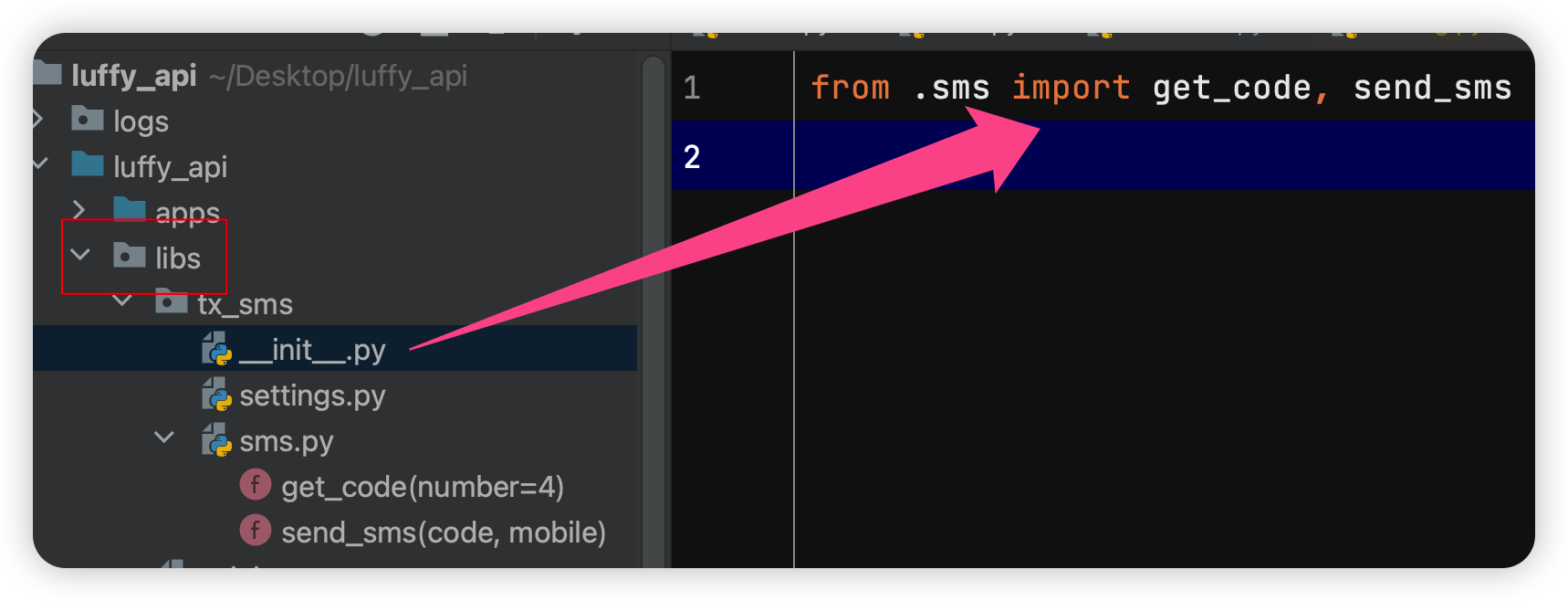
SECRET_ID = 'xxxFF6rRr8Qd'
SECRET_KEY = 'xxxG3kHcjnfbQ'

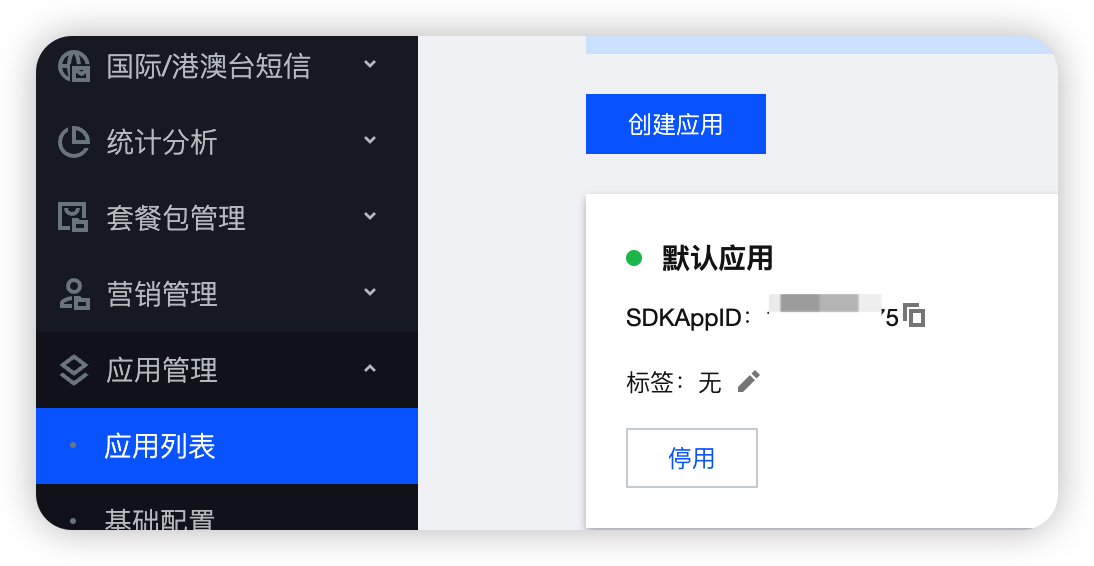
APPID = 'xxx1075'
SIGN_NAME = '爱瞌睡的老头公众号'
TEMPLATE_ID = 'xxx36'
注意
APPID在应用管理里面,需要自己创建一个应用
3.2 sms.py
import random
from tencentcloud.common import credential
from tencentcloud.common.exception.tencent_cloud_sdk_exception import TencentCloudSDKException
from tencentcloud.sms.v20210111 import sms_client, models
from tencentcloud.common.profile.client_profile import ClientProfile
from tencentcloud.common.profile.http_profile import HttpProfile
from . import settings

import json


# 1 生成一个 固定长度的随机验证码(数字)
def get_code(number=4):
    code = ''
    for i in range(number):
        r = random.randint(0, 9)
        code += str(r)
    return code

# 2 传入手机号和验证,发送短信功能函数
def send_sms(code, mobile):
    try:
        cred = credential.Credential(settings.SECRET_ID, settings.SECRET_KEY)
        httpProfile = HttpProfile()
        httpProfile.reqMethod = "POST"  # post请求(默认为post请求)
        httpProfile.reqTimeout = 30  # 请求超时时间,单位为秒(默认60秒)
        httpProfile.endpoint = "sms.tencentcloudapi.com"  # 指定接入地域域名(默认就近接入)
        clientProfile = ClientProfile()
        client = sms_client.SmsClient(cred, "ap-guangzhou", clientProfile)
        req = models.SendSmsRequest()

        req.SmsSdkAppId = settings.APPID
        req.SignName = settings.SIGN_NAME
        req.TemplateId = settings.TEMPLATE_ID
        req.TemplateParamSet = [code, '1']
        req.PhoneNumberSet = ["+86" + mobile]
        resp = client.SendSms(req)
        print(resp.to_json_string(indent=2))
        response_data_dict = json.loads(resp.to_json_string(indent=2))
        if response_data_dict.get('SendStatusSet')[0].get('Code')=='Ok':
            return True
        else:
            # 失败了,可以拿出message---》正常发送失败
            return False
    except Exception as err:
        # 发送过程中出了错误,失败
        return False
3.3
class MobileView(ViewSet):

    @action(methods=['POST'], detail=False)
    def send_sms(self, request, *args, **kwargs):
        # 1 给谁发,手机号是从前端传入的,{mobile:18923434,code:'验证码'}  ---》我们的:{mobile:18923434}
        mobile = request.data.get('mobile')
        # 2 生成数字验证码
        code = get_code()
        # 3 数字验证码保存---》保存到哪?后续还能拿到---》放到缓存中---》默认放在内存中
        cache.set('cache_mobile_%s' % mobile, code)  # key 一定要唯一,后续还能取出来,就用手机号
        # 4 同步 发送短信---》同步发送--》可能前端会一直等待,耗时
        # res = send_sms_mobile(code, mobile)
        # if res:
        #     return APIResponse(msg='发送成功')
        # else:
        #     return APIResponse(code=101, msg='发送失败,请稍后再试')
        #
        # 5 发送短信--》异步操作,使用多线程,无法知道短信是否成功了,不需要关注是否成功
        t=Thread(target=send_sms_mobile,args=[code,mobile])
        t.start()
        return APIResponse(msg='发送已发送')
4、
4.1 分析
# 分析:
	前端携带的数据---》{mobile:11111,code:8888}
	后端:
    	-取出手机号验证码,验证验证码是否正确,如果正确
        -签发token
        -返回给前端
4.2 视图类
class UserLoginView(GenericViewSet):
    serializer_class = UserLoginSerializer

    # 没有用,就不需要写
    # queryset = None
    @action(methods=['POST'], detail=False)
    def mul_login(self, request, *args, **kwargs):
        return self._login(request, *args, **kwargs)

    @action(methods=['POST'], detail=False)
    def sms_login(self, request, *args, **kwargs):
        return self._login(request, *args, **kwargs)

    def get_serializer_class(self):
        # 判断,如果是sms_login,返回  短信登录的序列化类,其他情况就返回UserLoginSerializer
        if self.action == 'sms_login':
            return SMSLoginSerializer
        elif self.action == 'mul_login':
            return UserLoginSerializer
        else:
            return super().get_serializer_class()


    def _login(self, request, *args, **kwargs):
        ser = self.get_serializer(data=request.data)  # 序列化类不一样,重写某个方法,实现,不同的请求action,返回的序列化类不一样
        ser.is_valid(raise_exception=True)
        username = ser.context.get('username')
        token = ser.context.get('token')
        icon = ser.context.get('icon')
        return APIResponse(username=username, token=token, icon=icon)
4.3 序列化类
class LoginSerializer(serializers.Serializer):
    def validate(self, attrs):
        # 1 校验用户名密码是否正确
        user = self._get_user(attrs)
        # 2 签发token
        token = self._get_token(user)
        # 3 把签发的token和username放到context中
        self.context['username'] = user.username
        self.context['token'] = token
        self.context['icon'] = settings.BACKEND_URL + '/media/' + str(user.icon)
        # 4 返回attrs
        return attrs

    def _get_user(self, attrs):
        pass

    def _get_token(self, user):
        payload = jwt_payload_handler(user)
        token = jwt_encode_handler(payload)
        return token


# 只用来做校验
class UserLoginSerializer(LoginSerializer):
    # 字段自己的校验规则会限制,不通过,因为是unique的
    username = serializers.CharField()
    password = serializers.CharField()

    def _get_user(self, attrs):
        username = attrs.get('username')
        password = attrs.get('password')
        if re.match(r'^1[3-9][0-9]{9}$', username):
            # 因为这个password是明文---》在数据库中存了密文,必须要使用  user.check_password校验用户秘钥
            # user=User.objects.filter(mobile=username,password=password)
            user = User.objects.filter(mobile=username).first()
        elif re.match(r'^[a-zA-Z0-9_-]+@[a-zA-Z0-9_-]+(.[a-zA-Z0-9_-]+)+$', username):
            user = User.objects.filter(email=username).first()
        else:
            user = User.objects.filter(username=username).first()

        if user and user.check_password(password):
            return user
        else:
            raise ValidationError('用户名或密码错误')


class SMSLoginSerializer(LoginSerializer):
    mobile = serializers.CharField()
    code = serializers.CharField()

    def _get_user(self, attrs):
        mobile = attrs.get('mobile')
        code = attrs.get('code')
        # 1 校验code是否正确
        old_code = cache.get('cache_mobile_%s' % mobile)
        if old_code == code:
            # 2 根据手机号,取到用户
            user = User.objects.filter(mobile=mobile).first()
            if user:
                return user
            else:
                raise ValidationError('手机号不存在')
        else:
            raise ValidationError('验证码错误')
遗留:如果项目中配了,优先用项目中的,如果没配,用自己的
参照:
libs/lqz_jwt · liuqingzheng/rbac_manager - 码云 - 开源中国 (gitee.com)
三、注册功能
1、分析
前端:携带数据格式 {mobile:,code:,password}
    后端:
    	-1 视图类---》注册方法
        -2 序列化类---》校验,保存(表中字段多,传的少---》随机,按某种格式生成---》后期修改)
2、视图类
class UserRegisterView(GenericViewSet, CreateModelMixin):
    serializer_class = UserRegisterSerializer

    # @action(methods=['POST'], detail=False)
    # def register(self, request, *args, **kwargs):
    #     ser = self.get_serializer(data=request.data)
    #     ser.is_valid(raise_exception=True)
    #     ser.save()
    #     return APIResponse(msg='恭喜您注册成功')
    @action(methods=['POST'], detail=False)
    def register(self, request, *args, **kwargs):
        # 内部执行了它:serializer.data---》走序列化---》基于create返回的user做序列化---》按照'mobile', 'code', 'password' 做序列化---》code不是表中字段,就报错了
        res = super().create(request, *args, **kwargs)
        return APIResponse(msg='注册成功')
3、序列化类
class UserRegisterSerializer(serializers.ModelSerializer):
    # code 不是表中字段
    code = serializers.CharField(max_length=4, min_length=4, write_only=True)

    class Meta:
        model = User
        fields = ['mobile', 'code', 'password']

    def validate(self, attrs):
        # 1 校验验证码是否正确
        mobile = attrs.get('mobile')
        code = attrs.get('code')
        old_code = cache.get('cache_mobile_%s' % mobile)
        if code == old_code or code == '8888':  # 测试阶段,万能验证码
            # 2 组装数据 :username必填,但是没有,code不是表的字段
            attrs['username'] = mobile
            attrs.pop('code')
        # 3 返回
        return attrs

    def create(self, validated_data):  # 密码是加密的,如果重写,密码是明文的  validated_data=mobile,password,username
        user = User.objects.create_user(**validated_data)
        return user
补充:
#1 为什么要写这个media才能访问
    -django 默认是不允许前端直接访问项目某个文件夹的
    -有个static文件夹例外,需要额外配置
    -如果想让用户访问,必须配置路由,使用serve函数放开
    	path('media/<path:path>', serve, {'document_root': settings.MEDIA_ROOT})
    -浏览器中访问 meida/icon/1.png--->能把settings.MEDIA_ROOT对应的文件夹下的icon/1.png返回给前端
        path('lqz/<path:path>', serve, {'document_root':os.path.join(BASE_DIR, 'lqz')})
        浏览器中访问 lqz/a.txt----->能把项目根路径下lqz对应的文件夹下的a.txt返回给前端


# 2 配置文件中 debug作用
	-开发阶段,都是debug为True,信息显示更丰富
    	-你访问的路由如果不存在,会把所有能访问到的路由都显示出来
        -程序出了异常,错误信息直接显示在浏览器上
        -自动重启,只要改了代码,会自动重启
        -上线阶段,肯定要改成False


#3  ALLOWED_HOSTS 的作用
	-只有debug 为Flase时,这个必须填
    -限制后端项目(django项目 )能够部署在哪个ip的机器上,写个 *  表示所有地址都可以


#4 咱们的项目中,为了知道是在调试模式还是在上线模式,所以才用的debug这个字段
	-判断,如果是开发阶段,可以有个万能验证码


# 5 短信登录或注册接口
	-app 只需要输入手机号和验证码,如果账号不存在,直接注册成功,并且登录成功,如果账号存在,就是登录
	-前端传入:{mobiel,code}--->验证验证码是否正确---》拿着mobile去数据库查询,如果能查到,说明它注册过了,直接签发token返回----》如果查不到,没有注册过---》走注册逻辑完成注册---》再签发token,返回给前端

    -这个接口,随机生成一个6位密码,以短信形式通知用户
    -这个接口,密码为空,下次他用账号密码登录,不允许登录
    -后续改密码:user.set_password(new_password)
4、前端注册页面
# 登录,注册,都写成组件----》在任意页面中,都能点击显示登录模态框

# 写好的组件,应该放在那个组件中----》不是页面组件(小组件)

# 点击登录按钮,把Login.vue 通过定位,占满全屏,透明度设为 0.5 ,纯黑色悲剧,覆盖在组件上

# 在Login.vue点关闭,要把Login.vue隐藏起来,父子通信之子传父,自定义事件
<template>
  <div class="header">
    <div class="slogan">
      <p>老男孩IT教育 | 帮助有志向的年轻人通过努力学习获得体面的工作和生活</p>
    </div>
    <div class="nav">
      <ul class="left-part">
        <li class="logo">
          <router-link to="/">
            <img src="../assets/img/head-logo.svg" alt="">
          </router-link>
        </li>
        <li class="ele">
          <span @click="goPage('/free-course')" :class="{active: url_path === '/free-course'}">免费课</span>
        </li>
        <li class="ele">
          <span @click="goPage('/actual-course')" :class="{active: url_path === '/actual-course'}">实战课</span>
        </li>
        <li class="ele">
          <span @click="goPage('/light-course')" :class="{active: url_path === '/light-course'}">轻课</span>
        </li>
      </ul>

      <div class="right-part">
        <div v-if="!username">
          <span @click="handleLogin">登录</span>
          <span class="line">|</span>
          <span @click="handleRegister">注册</span>
        </div>
        <div v-else>
          <span>{{ username }}</span>
          <span class="line">|</span>
          <span @click="logOut">注销</span>
        </div>
      </div>
      <Login v-if="loginShow" @close="handleClose" @success="success_login" @go="go_register"></Login>
      <Register v-if="registerShow" @close="handleRegisterClose" @success="success_register"
                @go="success_register"></Register>
    </div>
  </div>

</template>
<script>
import Login from "@/components/Login.vue";
import Register from "@/components/Register.vue";

export default {
  name: "Header",
  data() {
    return {
      url_path: sessionStorage.url_path || '/',
      loginShow: false,
      registerShow: false,
      username: '',
      token: ''
    }
  },
  methods: {
    handleRegister() {
      this.registerShow = true
    },
    handleRegisterClose() {
      this.registerShow = false
    },
    success_register() {
      this.registerShow = false
      this.loginShow = true
    },
    go_register() {
      this.registerShow = true
      this.loginShow = false
    },
    logOut() {
      this.username = ''
      this.token = ''
      this.$cookies.remove('username')
      this.$cookies.remove('token')
    },
    goPage(url_path) {
      // 已经是当前路由就没有必要重新跳转
      if (this.url_path !== url_path) {
        this.$router.push(url_path);
      }
      sessionStorage.url_path = url_path;
    },
    handleLogin() {
      this.loginShow = true
    },
    handleClose() {
      this.loginShow = false

    },
    success_login(data) {
      this.loginShow = false;  // 模态框消耗
      this.username = data.username;
      this.token = data.token;
    }
  },
  created() {
    sessionStorage.url_path = this.$route.path;
    this.url_path = this.$route.path;
    this.username = this.$cookies.get('username')
  },
  components: {
    Register,
    Login
  }
}
</script>


<style scoped>
.header {
  background-color: white;
  box-shadow: 0 0 5px 0 #aaa;
}

.header:after {
  content: "";
  display: block;
  clear: both;
}

.slogan {
  background-color: #eee;
  height: 40px;
}

.slogan p {
  width: 1200px;
  margin: 0 auto;
  color: #aaa;
  font-size: 13px;
  line-height: 40px;
}

.nav {
  background-color: white;
  user-select: none;
  width: 1200px;
  margin: 0 auto;

}

.nav ul {
  padding: 15px 0;
  float: left;
}

.nav ul:after {
  clear: both;
  content: '';
  display: block;
}

.nav ul li {
  float: left;
}

.logo {
  margin-right: 20px;
}

.ele {
  margin: 0 20px;
}

.ele span {
  display: block;
  font: 15px/36px '微软雅黑';
  border-bottom: 2px solid transparent;
  cursor: pointer;
}

.ele span:hover {
  border-bottom-color: orange;
}

.ele span.active {
  color: orange;
  border-bottom-color: orange;
}

.right-part {
  float: right;
}

.right-part .line {
  margin: 0 10px;
}

.right-part span {
  line-height: 68px;
  cursor: pointer;
}
</style>
<template>
  <div class="login">
    <div class="box">
      <i class="el-icon-close" @click="close_login"></i>
      <div class="content">
        <div class="nav">
          <span :class="{active: login_method === 'is_pwd'}" @click="change_login_method('is_pwd')">密码登录</span>
          <span :class="{active: login_method === 'is_sms'}" @click="change_login_method('is_sms')">短信登录</span>
        </div>

        <el-form v-if="login_method === 'is_pwd'">
          <el-input
              placeholder="用户名/手机号/邮箱"
              prefix-icon="el-icon-user"
              v-model="username"
              clearable>
          </el-input>
          <el-input
              placeholder="密码"
              prefix-icon="el-icon-key"
              v-model="password"
              clearable
              show-password>
          </el-input>
          <el-button type="primary" @click="login">登录</el-button>
        </el-form>

        <el-form v-if="login_method === 'is_sms'">
          <el-input
              placeholder="手机号"
              prefix-icon="el-icon-phone-outline"
              v-model="mobile"
              clearable
              @blur="check_mobile">
          </el-input>
          <el-input
              placeholder="验证码"
              prefix-icon="el-icon-chat-line-round"
              v-model="sms"
              clearable>
            <template slot="append">
              <span class="sms" @click="send_sms">{{ sms_interval }}</span>
            </template>
          </el-input>
          <el-button @click="mobile_login" type="primary">登录</el-button>
        </el-form>

        <div class="foot">
          <span @click="go_register">立即注册</span>
        </div>
      </div>
    </div>
  </div>
</template>

<script>
export default {
  name: "Login",
  data() {
    return {
      username: '',
      password: '',
      mobile: '',
      sms: '',  // 验证码
      login_method: 'is_pwd',
      sms_interval: '获取验证码',
      is_send: false,
    }
  },
  methods: {
    close_login() {
      this.$emit('close')
    },
    go_register() {
      this.$emit('go')
    },
    change_login_method(method) {
      this.login_method = method;
    },
    check_mobile() {
      if (!this.mobile) return;
      // js正则:/正则语法/
      // '字符串'.match(/正则语法/)
      if (!this.mobile.match(/^1[3-9][0-9]{9}$/)) {
        this.$message({
          message: '手机号有误',
          type: 'warning',
          duration: 1000,
          onClose: () => {
            this.mobile = '';
          }
        });
        return false;
      }
      // 后台校验手机号是否已存在
      this.$axios({
        url: this.$settings.BASE_URL + 'user/mobile/check_mobile/?mobile=' + this.mobile,
        method: 'get',
      }).then(response => {
        if (response.data.code == 100) {
          this.$message({
            message: '账号正常,可以发送短信',
            type: 'success',
            duration: 1000,
          });
          // 发生验证码按钮才可以被点击
          this.is_send = true;
        } else {
          this.$message({
            message: '账号不存在',
            type: 'warning',
            duration: 1000,
            onClose: () => {
              this.mobile = '';
            }
          })
        }
      }).catch(() => {
      });
    },
    send_sms() {
      // this.is_send必须允许发生验证码,才可以往下执行逻辑
      if (!this.is_send) return;
      // 按钮点一次立即禁用
      this.is_send = false;

      let sms_interval_time = 60;
      this.sms_interval = "发送中...";

      // 定时器: setInterval(fn, time, args)
      // 往后台发送验证码
      this.$axios({
        url: this.$settings.BASE_URL + 'user/mobile/send_sms/',
        method: 'post',
        data: {
          mobile: this.mobile
        }
      }).then(response => {
        if (response.data.code == 100) { // 发送成功
          let timer = setInterval(() => {
            if (sms_interval_time <= 1) {
              clearInterval(timer);
              this.sms_interval = "获取验证码";
              this.is_send = true; // 重新回复点击发送功能的条件
            } else {
              sms_interval_time -= 1;
              this.sms_interval = `${sms_interval_time}秒后再发`;
            }
          }, 1000);
        } else {  // 发送失败
          this.sms_interval = "重新获取";
          this.is_send = true;
          this.$message({
            message: '短信发送失败',
            type: 'warning',
            duration: 3000
          });
        }
      }).catch(() => {
        this.sms_interval = "频率过快";
        this.is_send = true;
      })


    },
    login() {
      if (!(this.username && this.password)) {
        this.$message({
          message: '请填好账号密码',
          type: 'warning',
          duration: 1500
        });
        return false  // 直接结束逻辑
      }

      this.$axios({
        url: this.$settings.BASE_URL + 'user/login/mul_login/',
        method: 'post',
        data: {
          username: this.username,
          password: this.password,
        }
      }).then(response => {
        let username = response.data.username;
        let token = response.data.token;
        this.$cookies.set('username', username, '7d');
        this.$cookies.set('token', token, '7d');
        this.$emit('success', response.data);
      }).catch(error => {
        console.log(error.response.data)
      })
    },
    mobile_login() {
      if (!(this.mobile && this.sms)) {
        this.$message({
          message: '请填好手机与验证码',
          type: 'warning',
          duration: 1500
        });
        return false  // 直接结束逻辑
      }

      this.$axios({
        url: this.$settings.BASE_URL + 'user/login/sms_login/',
        method: 'post',
        data: {
          mobile: this.mobile,
          code: this.sms,
        }
      }).then(response => {
        if (response.data.code == 100) {
          let username = response.data.username;
          let token = response.data.token;
          this.$cookies.set('username', username, '7d');
          this.$cookies.set('token', token, '7d');
          this.$emit('success', response.data);
        } else {
          this.$message({
            message: '登录失败',
            type: 'warning',
            duration: 1500
          });
        }

      }).catch(error => {
        console.log(error.response.data)
      })
    }
  }
}
</script>

<style scoped>
.login {
  width: 100vw;
  height: 100vh;
  position: fixed;
  top: 0;
  left: 0;
  z-index: 10;
  background-color: rgba(0, 0, 0, 0.5);
}

.box {
  width: 400px;
  height: 420px;
  background-color: white;
  border-radius: 10px;
  position: relative;
  top: calc(50vh - 210px);
  left: calc(50vw - 200px);
}

.el-icon-close {
  position: absolute;
  font-weight: bold;
  font-size: 20px;
  top: 10px;
  right: 10px;
  cursor: pointer;
}

.el-icon-close:hover {
  color: darkred;
}

.content {
  position: absolute;
  top: 40px;
  width: 280px;
  left: 60px;
}

.nav {
  font-size: 20px;
  height: 38px;
  border-bottom: 2px solid darkgrey;
}

.nav > span {
  margin: 0 20px 0 35px;
  color: darkgrey;
  user-select: none;
  cursor: pointer;
  padding-bottom: 10px;
  border-bottom: 2px solid darkgrey;
}

.nav > span.active {
  color: black;
  border-bottom: 3px solid black;
  padding-bottom: 9px;
}

.el-input, .el-button {
  margin-top: 40px;
}

.el-button {
  width: 100%;
  font-size: 18px;
}

.foot > span {
  float: right;
  margin-top: 20px;
  color: orange;
  cursor: pointer;
}

.sms {
  color: orange;
  cursor: pointer;
  display: inline-block;
  width: 70px;
  text-align: center;
  user-select: none;
}
</style>
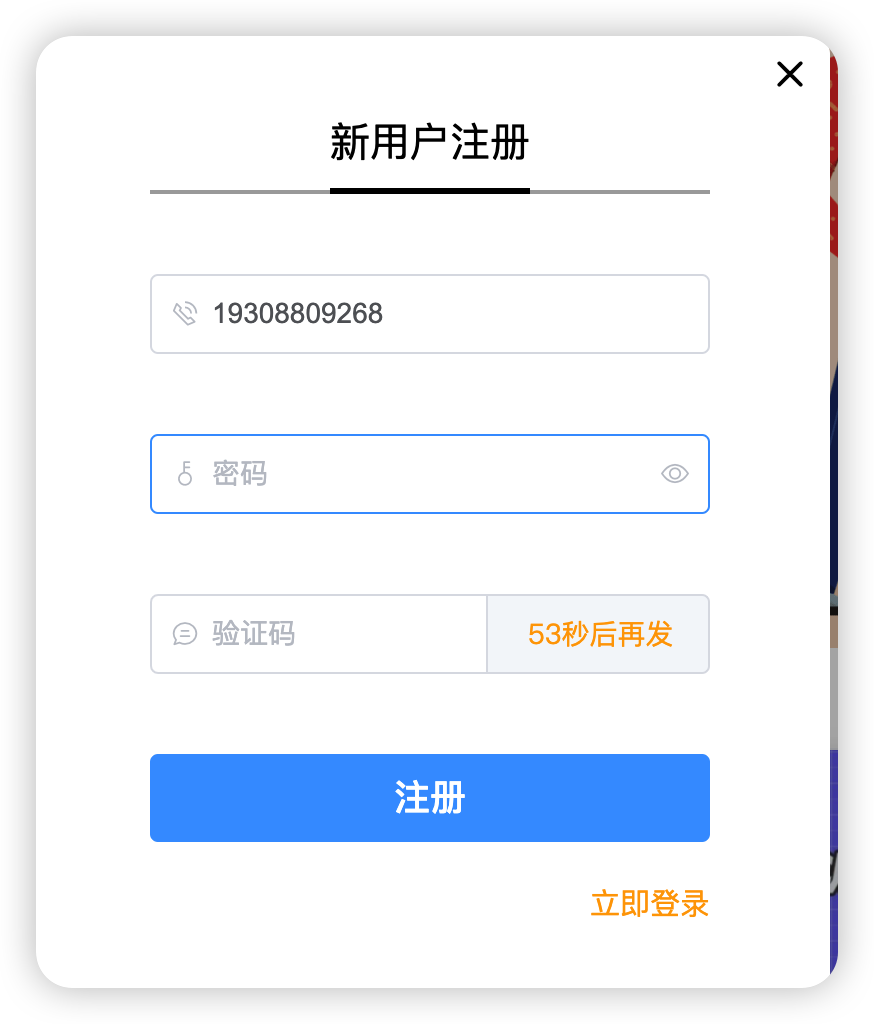
Register.vue
<template>
  <div class="register">
    <div class="box">
      <i class="el-icon-close" @click="close_register"></i>
      <div class="content">
        <div class="nav">
          <span class="active">新用户注册</span>
        </div>
        <el-form>
          <el-input
              placeholder="手机号"
              prefix-icon="el-icon-phone-outline"
              v-model="mobile"
              clearable
              @blur="check_mobile">
          </el-input>
          <el-input
              placeholder="密码"
              prefix-icon="el-icon-key"
              v-model="password"
              clearable
              show-password>
          </el-input>
          <el-input
              placeholder="验证码"
              prefix-icon="el-icon-chat-line-round"
              v-model="sms"
              clearable>
            <template slot="append">
              <span class="sms" @click="send_sms">{{ sms_interval }}</span>
            </template>
          </el-input>
          <el-button @click="register" type="primary">注册</el-button>
        </el-form>
        <div class="foot">
          <span @click="go_login">立即登录</span>
        </div>
      </div>
    </div>
  </div>
</template>

<script>
export default {
  name: "Register",
  data() {
    return {
      mobile: '',
      password: '',
      sms: '',
      sms_interval: '获取验证码',
      is_send: false,
    }
  },
  methods: {
    close_register() {
      this.$emit('close', false)
    },
    go_login() {
      this.$emit('go')
    },
    check_mobile() {
      if (!this.mobile) return;
      // js正则:/正则语法/
      // '字符串'.match(/正则语法/)
      if (!this.mobile.match(/^1[3-9][0-9]{9}$/)) {
        this.$message({
          message: '手机号有误',
          type: 'warning',
          duration: 1000,
          onClose: () => {
            this.mobile = '';
          }
        });
        return false;
      }
      // 后台校验手机号是否已存在
      this.$axios({
        url: this.$settings.BASE_URL + 'user/mobile/check_mobile/?mobile='+this.mobile,
        method: 'get',
      }).then(response => {
        if (response.data.code!==100) {
          this.$message({
            message: '欢迎注册我们的平台',
            type: 'success',
            duration: 1500,
          });
          // 发生验证码按钮才可以被点击
          this.is_send = true;
        } else {
          this.$message({
            message: '账号已存在,请直接登录',
            type: 'warning',
            duration: 1500,
          })
        }
      }).catch(() => {
      });
    },
    send_sms() {
      // this.is_send必须允许发生验证码,才可以往下执行逻辑
      if (!this.is_send) return;
      // 按钮点一次立即禁用
      this.is_send = false;

      let sms_interval_time = 60;
      this.sms_interval = "发送中...";

      // 定时器: setInterval(fn, time, args)

      // 往后台发送验证码
      this.$axios({
        url: this.$settings.BASE_URL + 'user/mobile/send_sms/',
        method: 'post',
        data: {
          mobile: this.mobile
        }
      }).then(response => {
        if (response.data.code==100) { // 发送成功
          let timer = setInterval(() => {
            if (sms_interval_time <= 1) {
              clearInterval(timer);
              this.sms_interval = "获取验证码";
              this.is_send = true; // 重新回复点击发送功能的条件
            } else {
              sms_interval_time -= 1;
              this.sms_interval = `${sms_interval_time}秒后再发`;
            }
          }, 1000);
        } else {  // 发送失败
          this.sms_interval = "重新获取";
          this.is_send = true;
          this.$message({
            message: '短信发送失败',
            type: 'warning',
            duration: 3000
          });
        }
      }).catch(() => {
        this.sms_interval = "频率过快";
        this.is_send = true;
      })


    },
    register() {
      if (!(this.mobile && this.sms && this.password)) {
        this.$message({
          message: '请填好手机、密码与验证码',
          type: 'warning',
          duration: 1500
        });
        return false  // 直接结束逻辑
      }

      this.$axios({
        url: this.$settings.BASE_URL + 'user/register/register/',
        method: 'post',
        data: {
          mobile: this.mobile,
          code: this.sms,
          password: this.password
        }
      }).then(response => {
        this.$message({
          message: '注册成功,3秒跳转登录页面',
          type: 'success',
          duration: 3000,
          showClose: true,
          onClose: () => {
            // 去向成功页面
            this.$emit('success')
          }
        });
      }).catch(error => {
        this.$message({
          message: '注册失败,请重新注册',
          type: 'warning',
          duration: 1500,
          showClose: true,
          onClose: () => {
            // 清空所有输入框
            this.mobile = '';
            this.password = '';
            this.sms = '';
          }
        });
      })
    }
  }
}
</script>

<style scoped>
.register {
  width: 100vw;
  height: 100vh;
  position: fixed;
  top: 0;
  left: 0;
  z-index: 10;
  background-color: rgba(0, 0, 0, 0.3);
}

.box {
  width: 400px;
  height: 480px;
  background-color: white;
  border-radius: 10px;
  position: relative;
  top: calc(50vh - 240px);
  left: calc(50vw - 200px);
}

.el-icon-close {
  position: absolute;
  font-weight: bold;
  font-size: 20px;
  top: 10px;
  right: 10px;
  cursor: pointer;
}

.el-icon-close:hover {
  color: darkred;
}

.content {
  position: absolute;
  top: 40px;
  width: 280px;
  left: 60px;
}

.nav {
  font-size: 20px;
  height: 38px;
  border-bottom: 2px solid darkgrey;
}

.nav > span {
  margin-left: 90px;
  color: darkgrey;
  user-select: none;
  cursor: pointer;
  padding-bottom: 10px;
  border-bottom: 2px solid darkgrey;
}

.nav > span.active {
  color: black;
  border-bottom: 3px solid black;
  padding-bottom: 9px;
}

.el-input, .el-button {
  margin-top: 40px;
}

.el-button {
  width: 100%;
  font-size: 18px;
}

.foot > span {
  float: right;
  margin-top: 20px;
  color: orange;
  cursor: pointer;
}

.sms {
  color: orange;
  cursor: pointer;
  display: inline-block;
  width: 70px;
  text-align: center;
  user-select: none;
}
</style>
注意:新用户注册界面,有用到校验手机号是否存在的接口,返回的code状态码逻辑
class MobileView(ViewSet):  # ViewSet = ViewSetMixin + APIView
    @action(methods=['GET'], detail=False)
    def check_mobile(self, request, *args, **kwargs):
        try:
            # 取出前端传入手机号
            mobile = request.query_params['mobile']
            User.objects.get(mobile=mobile)  # 有且只有一个才不报错,否则报错
        except MultiValueDictKeyError as e:
            return APIResponse(code=101, msg='xxx')
        except Exception as e:
            return APIResponse(code=102, msg='yyy')
        return APIResponse(msg='手机号存在')
四、课程相关
1、课程列表页前端
三种课程类型设置为三个组件
#1 前端  新建三个组件
	LightCourse.vue
    FreeCourse.vue
    ActualCourse.vue

# 2 配置路由
	import FreeCourse from "@/views/FreeCourse";
    import ActualCourse from "@/views/ActualCourse";
    import LightCourse from "@/views/LightCourse";

     {
        path: '/free-course',
        name: 'free-course',
        component: FreeCourse
    },
    {
        path: '/actual-course',
        name: 'actual-course',
        component: ActualCourse
    },
    {
        path: '/light-course',
        name: 'light-course',
        component: LightCourse
    },
ActualCourse
<template>
    <div class="course">
        <Header></Header>
        <div class="main">
            <!-- 筛选条件 -->
            <div class="condition">
                <ul class="cate-list">
                    <li class="title">课程分类:</li>
                    <li class="this">全部</li>
                    <li>Python</li>
                    <li>Linux运维</li>
                    <li>Python进阶</li>
                    <li>开发工具</li>
                    <li>Go语言</li>
                    <li>机器学习</li>
                    <li>技术生涯</li>
                </ul>

                <div class="ordering">
                    <ul>
                        <li class="title">筛        选:</li>
                        <li class="default this">默认</li>
                        <li class="hot">人气</li>
                        <li class="price">价格</li>
                    </ul>
                    <p class="condition-result">共21个课程</p>
                </div>

            </div>
            <!-- 课程列表 -->
            <div class="course-list">
                <div class="course-item">
                    <div class="course-image">
                        <img src="@/assets/img/course-cover.jpeg" alt="">
                    </div>
                    <div class="course-info">
                        <h3>Python开发21天入门 <span><img src="@/assets/img/avatar1.svg" alt="">100人已加入学习</span></h3>
                        <p class="teather-info">Alex 金角大王 老男孩Python教学总监 <span>共154课时/更新完成</span></p>
                        <ul class="lesson-list">
                            <li><span class="lesson-title">01 | 第1节:初识编码</span> <span class="free">免费</span></li>
                            <li><span class="lesson-title">01 | 第1节:初识编码初识编码</span> <span class="free">免费</span></li>
                            <li><span class="lesson-title">01 | 第1节:初识编码</span></li>
                            <li><span class="lesson-title">01 | 第1节:初识编码初识编码</span></li>
                        </ul>
                        <div class="pay-box">
                            <span class="discount-type">限时免费</span>
                            <span class="discount-price">¥0.00元</span>
                            <span class="original-price">原价:9.00元</span>
                            <span class="buy-now">立即购买</span>
                        </div>
                    </div>
                </div>
                <div class="course-item">
                    <div class="course-image">
                        <img src="@/assets/img/course-cover.jpeg" alt="">
                    </div>
                    <div class="course-info">
                        <h3>Python开发21天入门 <span><img src="@/assets/img/avatar1.svg" alt="">100人已加入学习</span></h3>
                        <p class="teather-info">Alex 金角大王 老男孩Python教学总监 <span>共154课时/更新完成</span></p>
                        <ul class="lesson-list">
                            <li><span class="lesson-title">01 | 第1节:初识编码</span> <span class="free">免费</span></li>
                            <li><span class="lesson-title">01 | 第1节:初识编码初识编码</span> <span class="free">免费</span></li>
                            <li><span class="lesson-title">01 | 第1节:初识编码</span></li>
                            <li><span class="lesson-title">01 | 第1节:初识编码初识编码</span></li>
                        </ul>
                        <div class="pay-box">
                            <span class="discount-type">限时免费</span>
                            <span class="discount-price">¥0.00元</span>
                            <span class="original-price">原价:9.00元</span>
                            <span class="buy-now">立即购买</span>
                        </div>
                    </div>
                </div>
                <div class="course-item">
                    <div class="course-image">
                        <img src="@/assets/img/course-cover.jpeg" alt="">
                    </div>
                    <div class="course-info">
                        <h3>Python开发21天入门 <span><img src="@/assets/img/avatar1.svg" alt="">100人已加入学习</span></h3>
                        <p class="teather-info">Alex 金角大王 老男孩Python教学总监 <span>共154课时/更新完成</span></p>
                        <ul class="lesson-list">
                            <li><span class="lesson-title">01 | 第1节:初识编码</span> <span class="free">免费</span></li>
                            <li><span class="lesson-title">01 | 第1节:初识编码初识编码</span> <span class="free">免费</span></li>
                            <li><span class="lesson-title">01 | 第1节:初识编码</span></li>
                            <li><span class="lesson-title">01 | 第1节:初识编码初识编码</span></li>
                        </ul>
                        <div class="pay-box">
                            <span class="discount-type">限时免费</span>
                            <span class="discount-price">¥0.00元</span>
                            <span class="original-price">原价:9.00元</span>
                            <span class="buy-now">立即购买</span>
                        </div>
                    </div>
                </div>
                <div class="course-item">
                    <div class="course-image">
                        <img src="@/assets/img/course-cover.jpeg" alt="">
                    </div>
                    <div class="course-info">
                        <h3>Python开发21天入门 <span><img src="@/assets/img/avatar1.svg" alt="">100人已加入学习</span></h3>
                        <p class="teather-info">Alex 金角大王 老男孩Python教学总监 <span>共154课时/更新完成</span></p>
                        <ul class="lesson-list">
                            <li><span class="lesson-title">01 | 第1节:初识编码</span> <span class="free">免费</span></li>
                            <li><span class="lesson-title">01 | 第1节:初识编码初识编码</span> <span class="free">免费</span></li>
                            <li><span class="lesson-title">01 | 第1节:初识编码</span></li>
                            <li><span class="lesson-title">01 | 第1节:初识编码初识编码</span></li>
                        </ul>
                        <div class="pay-box">
                            <span class="discount-type">限时免费</span>
                            <span class="discount-price">¥0.00元</span>
                            <span class="original-price">原价:9.00元</span>
                            <span class="buy-now">立即购买</span>
                        </div>
                    </div>
                </div>
            </div>
        </div>
        <!--<Footer></Footer>-->
    </div>
</template>

<script>
    import Header from "@/components/Header"
    // import Footer from "@/components/Footer"

    export default {
        name: "Course",
        data() {
            return {
                category: 0,
            }
        },
        components: {
            Header,
            // Footer,
        }
    }
</script>

<style scoped>
    .course {
        background: #f6f6f6;
    }

    .course .main {
        width: 1100px;
        margin: 35px auto 0;
    }

    .course .condition {
        margin-bottom: 35px;
        padding: 25px 30px 25px 20px;
        background: #fff;
        border-radius: 4px;
        box-shadow: 0 2px 4px 0 #f0f0f0;
    }

    .course .cate-list {
        border-bottom: 1px solid #333;
        border-bottom-color: rgba(51, 51, 51, .05);
        padding-bottom: 18px;
        margin-bottom: 17px;
    }

    .course .cate-list::after {
        content: "";
        display: block;
        clear: both;
    }

    .course .cate-list li {
        float: left;
        font-size: 16px;
        padding: 6px 15px;
        line-height: 16px;
        margin-left: 14px;
        position: relative;
        transition: all .3s ease;
        cursor: pointer;
        color: #4a4a4a;
        border: 1px solid transparent; /* transparent 透明 */
    }

    .course .cate-list .title {
        color: #888;
        margin-left: 0;
        letter-spacing: .36px;
        padding: 0;
        line-height: 28px;
    }

    .course .cate-list .this {
        color: #ffc210;
        border: 1px solid #ffc210 !important;
        border-radius: 30px;
    }

    .course .ordering::after {
        content: "";
        display: block;
        clear: both;
    }

    .course .ordering ul {
        float: left;
    }

    .course .ordering ul::after {
        content: "";
        display: block;
        clear: both;
    }

    .course .ordering .condition-result {
        float: right;
        font-size: 14px;
        color: #9b9b9b;
        line-height: 28px;
    }

    .course .ordering ul li {
        float: left;
        padding: 6px 15px;
        line-height: 16px;
        margin-left: 14px;
        position: relative;
        transition: all .3s ease;
        cursor: pointer;
        color: #4a4a4a;
    }

    .course .ordering .title {
        font-size: 16px;
        color: #888;
        letter-spacing: .36px;
        margin-left: 0;
        padding: 0;
        line-height: 28px;
    }

    .course .ordering .this {
        color: #ffc210;
    }

    .course .ordering .price {
        position: relative;
    }

    .course .ordering .price::before,
    .course .ordering .price::after {
        cursor: pointer;
        content: "";
        display: block;
        width: 0px;
        height: 0px;
        border: 5px solid transparent;
        position: absolute;
        right: 0;
    }

    .course .ordering .price::before {
        border-bottom: 5px solid #aaa;
        margin-bottom: 2px;
        top: 2px;
    }

    .course .ordering .price::after {
        border-top: 5px solid #aaa;
        bottom: 2px;
    }

    .course .course-item:hover {
        box-shadow: 4px 6px 16px rgba(0, 0, 0, .5);
    }

    .course .course-item {
        width: 1100px;
        background: #fff;
        padding: 20px 30px 20px 20px;
        margin-bottom: 35px;
        border-radius: 2px;
        cursor: pointer;
        box-shadow: 2px 3px 16px rgba(0, 0, 0, .1);
        /* css3.0 过渡动画 hover 事件操作 */
        transition: all .2s ease;
    }

    .course .course-item::after {
        content: "";
        display: block;
        clear: both;
    }

    /* 顶级元素 父级元素  当前元素{} */
    .course .course-item .course-image {
        float: left;
        width: 423px;
        height: 210px;
        margin-right: 30px;
    }

    .course .course-item .course-image img {
        width: 100%;
    }

    .course .course-item .course-info {
        float: left;
        width: 596px;
    }

    .course-item .course-info h3 {
        font-size: 26px;
        color: #333;
        font-weight: normal;
        margin-bottom: 8px;
    }

    .course-item .course-info h3 span {
        font-size: 14px;
        color: #9b9b9b;
        float: right;
        margin-top: 14px;
    }

    .course-item .course-info h3 span img {
        width: 11px;
        height: auto;
        margin-right: 7px;
    }

    .course-item .course-info .teather-info {
        font-size: 14px;
        color: #9b9b9b;
        margin-bottom: 14px;
        padding-bottom: 14px;
        border-bottom: 1px solid #333;
        border-bottom-color: rgba(51, 51, 51, .05);
    }

    .course-item .course-info .teather-info span {
        float: right;
    }

    .course-item .lesson-list::after {
        content: "";
        display: block;
        clear: both;
    }

    .course-item .lesson-list li {
        float: left;
        width: 44%;
        font-size: 14px;
        color: #666;
        padding-left: 22px;
        /* background: url("路径") 是否平铺 x轴位置 y轴位置 */
        background: url("/src/assets/img/play-icon-gray.svg") no-repeat left 4px;
        margin-bottom: 15px;
    }

    .course-item .lesson-list li .lesson-title {
        /* 以下3句,文本内容过多,会自动隐藏,并显示省略符号 */
        text-overflow: ellipsis;
        overflow: hidden;
        white-space: nowrap;
        display: inline-block;
        max-width: 200px;
    }

    .course-item .lesson-list li:hover {
        background-image: url("/src/assets/img/play-icon-yellow.svg");
        color: #ffc210;
    }

    .course-item .lesson-list li .free {
        width: 34px;
        height: 20px;
        color: #fd7b4d;
        vertical-align: super;
        margin-left: 10px;
        border: 1px solid #fd7b4d;
        border-radius: 2px;
        text-align: center;
        font-size: 13px;
        white-space: nowrap;
    }

    .course-item .lesson-list li:hover .free {
        color: #ffc210;
        border-color: #ffc210;
    }

    .course-item .pay-box::after {
        content: "";
        display: block;
        clear: both;
    }

    .course-item .pay-box .discount-type {
        padding: 6px 10px;
        font-size: 16px;
        color: #fff;
        text-align: center;
        margin-right: 8px;
        background: #fa6240;
        border: 1px solid #fa6240;
        border-radius: 10px 0 10px 0;
        float: left;
    }

    .course-item .pay-box .discount-price {
        font-size: 24px;
        color: #fa6240;
        float: left;
    }

    .course-item .pay-box .original-price {
        text-decoration: line-through;
        font-size: 14px;
        color: #9b9b9b;
        margin-left: 10px;
        float: left;
        margin-top: 10px;
    }

    .course-item .pay-box .buy-now {
        width: 120px;
        height: 38px;
        background: transparent;
        color: #fa6240;
        font-size: 16px;
        border: 1px solid #fd7b4d;
        border-radius: 3px;
        transition: all .2s ease-in-out;
        float: right;
        text-align: center;
        line-height: 38px;
    }

    .course-item .pay-box .buy-now:hover {
        color: #fff;
        background: #ffc210;
        border: 1px solid #ffc210;
    }
</style>
2、课程相关表设计
新建一个course app 并注册到配置中
五个表
#1  课程分类表:跟课程一对多:一个课程分类,有多个课程
#2  课程表(实战课课表)
	-多种课程:免费,实战,轻课---》使用同一个表?使用三个表
    -多种课程,字段可能有一样的,也有不一样的
    -我们的设计是:多个课程,多个表,以后再加别的课程,再加表即可
# 3 章节表:一个课程,有多个章节
# 4 课时表:一个章节,有多个课时
# 5 老师表:实战课,一门课,就是一个老师讲, 一对多,一个老师可以讲多门课
models
# 创建表
from django.db import models
from utils.common_model import BaseModel


# Create your models here.
## 课程分类
class CourseCategory(BaseModel):
    """分类"""
    name = models.CharField(max_length=64, unique=True, verbose_name="分类名称")

    class Meta:
        db_table = "luffy_course_category"
        verbose_name = "分类"
        verbose_name_plural = verbose_name

    def __str__(self):
        return "%s" % self.name


### 课程表
class Course(BaseModel):
    """课程"""
    course_type = (
        (0, '付费'),
        (1, 'VIP专享'),
        (2, '学位课程')
    )
    level_choices = (
        (0, '初级'),
        (1, '中级'),
        (2, '高级'),
    )
    status_choices = (
        (0, '上线'),
        (1, '下线'),
        (2, '预上线'),
    )
    name = models.CharField(max_length=128, verbose_name="课程名称")
    course_img = models.ImageField(upload_to="courses", max_length=255, verbose_name="封面图片", blank=True, null=True)
    course_type = models.SmallIntegerField(choices=course_type, default=0, verbose_name="付费类型")
    brief = models.TextField(max_length=2048, verbose_name="详情介绍", null=True, blank=True)
    level = models.SmallIntegerField(choices=level_choices, default=0, verbose_name="难度等级")
    pub_date = models.DateField(verbose_name="发布日期", auto_now_add=True)
    period = models.IntegerField(verbose_name="建议学习周期(day)", default=7)
    attachment_path = models.FileField(upload_to="attachment", max_length=128, verbose_name="课件路径", blank=True,null=True)
    status = models.SmallIntegerField(choices=status_choices, default=0, verbose_name="课程状态")
    students = models.IntegerField(verbose_name="学习人数", default=0)
    sections = models.IntegerField(verbose_name="总课时数量", default=0)
    pub_sections = models.IntegerField(verbose_name="课时更新数量", default=0)
    price = models.DecimalField(max_digits=6, decimal_places=2, verbose_name="课程原价", default=0)


    # 删除某个课程分类,如果使用models.CASCADE,所有课程都删除,很危险
    # 删除某个课程分类models.SET_NULL,跟它相关联的课程,置为空
    # db_constraint=False  逻辑外键,不建立物理外键  没有外键约束
    course_category = models.ForeignKey("CourseCategory", on_delete=models.SET_NULL, db_constraint=False, null=True, blank=True,verbose_name="课程分类")
    teacher = models.ForeignKey("Teacher", on_delete=models.DO_NOTHING, null=True, blank=True, verbose_name="授课老师")

    class Meta:
        db_table = "luffy_course"
        verbose_name = "课程"
        verbose_name_plural = "课程"

    def __str__(self):
        return "%s" % self.name


### 章节表
class CourseChapter(BaseModel):
    """章节"""
    course = models.ForeignKey("Course", related_name='coursechapters', on_delete=models.CASCADE, verbose_name="课程名称")
    chapter = models.SmallIntegerField(verbose_name="第几章", default=1)
    name = models.CharField(max_length=128, verbose_name="章节标题")
    summary = models.TextField(verbose_name="章节介绍", blank=True, null=True)
    pub_date = models.DateField(verbose_name="发布日期", auto_now_add=True)

    class Meta:
        db_table = "luffy_course_chapter"
        verbose_name = "章节"
        verbose_name_plural = verbose_name

    def __str__(self):
        return "%s:(第%s章)%s" % (self.course, self.chapter, self.name)


#课时表
class CourseSection(BaseModel):
    """课时"""
    section_type_choices = (
        (0, '文档'),
        (1, '练习'),
        (2, '视频')
    )
    chapter = models.ForeignKey("CourseChapter", related_name='coursesections', on_delete=models.CASCADE,verbose_name="课程章节")
    name = models.CharField(max_length=128, verbose_name="课时标题")
    orders = models.PositiveSmallIntegerField(verbose_name="课时排序")
    section_type = models.SmallIntegerField(default=2, choices=section_type_choices, verbose_name="课时种类")
    section_link = models.CharField(max_length=255, blank=True, null=True, verbose_name="课时链接",help_text="若是video,填vid,若是文档,填link")
    duration = models.CharField(verbose_name="视频时长", blank=True, null=True, max_length=32)  # 仅在前端展示使用
    pub_date = models.DateTimeField(verbose_name="发布时间", auto_now_add=True)
    free_trail = models.BooleanField(verbose_name="是否可试看", default=False)

    class Meta:
        db_table = "luffy_course_section"
        verbose_name = "课时"
        verbose_name_plural = verbose_name

    def __str__(self):
        return "%s-%s" % (self.chapter, self.name)

#老师表
class Teacher(BaseModel):
    """导师"""
    role_choices = (
        (0, '讲师'),
        (1, '导师'),
        (2, '班主任'),
    )
    name = models.CharField(max_length=32, verbose_name="导师名")
    role = models.SmallIntegerField(choices=role_choices, default=0, verbose_name="导师身份")
    title = models.CharField(max_length=64, verbose_name="职位、职称")
    signature = models.CharField(max_length=255, verbose_name="导师签名", help_text="导师签名", blank=True, null=True)
    image = models.ImageField(upload_to="teacher", null=True, verbose_name="导师封面")
    brief = models.TextField(max_length=1024, verbose_name="导师描述")

    class Meta:
        db_table = "luffy_teacher"
        verbose_name = "导师"
        verbose_name_plural = verbose_name

    def __str__(self):
        return "%s" % self.name
补充:
#1  ForeignKey 的on_delete 参数
'''on_delete 可以选择的参数
    models.CASCADE    # 级联删除,注意使用时机,用户和用户详情   课程和课程章节
    models.SET_NULL  # 删除分类,课程这个字段设置为空,要有null=True参数的配合
    models.SET_DEFAULT      # 删除分类,课程这个字段设置为默认值,要有 defalut=xx参数的配合
    models.DO_NOTHING      # 删除分类,课程这个字段什么都不做
    models.SET(值,函数内存地址) # 删除分类,课程这个字段设置为写的值,或者执行内部传入的函数,函数返回值放在这
'''

# 2 ForeignKey 的db_constraint=False
	 如果 db_constraint=False  只有逻辑外键,不建立物理外键  没有外键约束,如果这样设置,修改,新增速度快,可能会出现脏数据(程序层面控制)
    连表查询没有任何区别,其他操作完全一致

# 3 ForeignKey 的 related_name='coursechapters'
	# 基于对象的跨表查:
    	正向: 对象.字段  course.course_category 根据课程拿到了课程分类对象, course_category在表内部,就是正向
      反向: 对象.表名小写  对象.表名小写_set.all()  字段在表中没有,但是有关联关系
	related_name:
    	为了替换原来基于对象的跨表查反向查询  表名小写 或 表名小写_set.all() 的
    related_query_name
    	为了替换原来__连表查询,中表名小写,现在直接用related_query_name指定的字符串即可
数据录入:
INSERT INTO luffy_teacher(id, orders, is_show, is_delete, created_time, updated_time, name, role, title, signature, image, brief) VALUES (1, 1, 1, 0, '2022-07-14 13:44:19.661327', '2022-07-14 13:46:54.246271', 'Alex', 1, '老男孩Python教学总监', '金角大王', 'teacher/alex_icon.png', '老男孩教育CTO & CO-FOUNDER 国内知名PYTHON语言推广者 51CTO学院2016\2017年度最受学员喜爱10大讲师之一 多款开源软件作者 曾任职公安部、飞信、中金公司、NOKIA中国研究院、华尔街英语、ADVENT、汽车之家等公司');

INSERT INTO luffy_teacher(id, orders, is_show, is_delete, created_time, updated_time, name, role, title, signature, image, brief) VALUES (2, 2, 1, 0, '2022-07-14 13:45:25.092902', '2022-07-14 13:45:25.092936', 'Mjj', 0, '前美团前端项目组架构师', NULL, 'teacher/mjj_icon.png', '是马JJ老师, 一个集美貌与才华于一身的男人,搞过几年IOS,又转了前端开发几年,曾就职于美团网任高级前端开发,后来因为不同意王兴(美团老板)的战略布局而出家做老师去了,有丰富的教学经验,开起车来也毫不含糊。一直专注在前端的前沿技术领域。同时,爱好抽烟、喝酒、烫头(锡纸烫)。 我的最爱是前端,因为前端妹子多。');

INSERT INTO luffy_teacher(id, orders, is_show, is_delete, created_time, updated_time, name, role, title, signature, image, brief) VALUES (3, 3, 1, 0, '2022-07-14 13:46:21.997846', '2022-07-14 13:46:21.997880', 'Lyy', 0, '老男孩Linux学科带头人', NULL, 'teacher/lyy_icon.png', 'Linux运维技术专家,老男孩Linux金牌讲师,讲课风趣幽默、深入浅出、声音洪亮到爆炸');


-- 分类表
INSERT INTO luffy_course_category(id, orders, is_show, is_delete, created_time, updated_time, name) VALUES (1, 1, 1, 0, '2022-07-14 13:40:58.690413', '2022-07-14 13:40:58.690477', 'Python');

INSERT INTO luffy_course_category(id, orders, is_show, is_delete, created_time, updated_time, name) VALUES (2, 2, 1, 0, '2022-07-14 13:41:08.249735', '2022-07-14 13:41:08.249817', 'Linux');


-- 课程表
INSERT INTO luffy_course(id, orders, is_show, is_delete, created_time, updated_time, name, course_img, course_type, brief, level, pub_date, period, attachment_path, status, students, sections, pub_sections, price, course_category_id, teacher_id) VALUES (1, 1, 1, 0, '2022-07-14 13:54:33.095201', '2022-07-14 13:54:33.095238', 'Python开发21天入门', 'courses/alex_python.png', 0, 'Python从入门到入土&&&Python从入门到入土&&&Python从入门到入土&&&Python从入门到入土&&&Python从入门到入土&&&Python从入门到入土&&&Python从入门到入土&&&Python从入门到入土&&&Python从入门到入土&&&Python从入门到入土&&&Python从入门到入土&&&Python从入门到入土', 0, '2022-07-14', 21, '', 0, 231, 120, 120, 0.00, 1, 1);

INSERT INTO luffy_course(id, orders, is_show, is_delete, created_time, updated_time, name, course_img, course_type, brief, level, pub_date, period, attachment_path, status, students, sections, pub_sections, price, course_category_id, teacher_id) VALUES (2, 2, 1, 0, '2022-07-14 13:56:05.051103', '2022-07-14 13:56:05.051142', 'Python项目实战', 'courses/mjj_python.png', 0, '', 1, '2022-07-14', 30, '', 0, 340, 120, 120, 99.00, 1, 2);

INSERT INTO luffy_course(id, orders, is_show, is_delete, created_time, updated_time, name, course_img, course_type, brief, level, pub_date, period, attachment_path, status, students, sections, pub_sections, price, course_category_id, teacher_id) VALUES (3, 3, 1, 0, '2022-07-14 13:57:21.190053', '2022-07-14 13:57:21.190095', 'Linux系统基础5周入门精讲', 'courses/lyy_linux.png', 0, '', 0, '2022-07-14', 25, '', 0, 219, 100, 100, 39.00, 2, 3);


-- 章节表
INSERT INTO luffy_course_chapter(id, orders, is_show, is_delete, created_time, updated_time, chapter, name, summary, pub_date, course_id) VALUES (1, 1, 1, 0, '2022-07-14 13:58:34.867005', '2022-07-14 14:00:58.276541', 1, '计算机原理', '', '2022-07-14', 1);

INSERT INTO luffy_course_chapter(id, orders, is_show, is_delete, created_time, updated_time, chapter, name, summary, pub_date, course_id) VALUES (2, 2, 1, 0, '2022-07-14 13:58:48.051543', '2022-07-14 14:01:22.024206', 2, '环境搭建', '', '2022-07-14', 1);

INSERT INTO luffy_course_chapter(id, orders, is_show, is_delete, created_time, updated_time, chapter, name, summary, pub_date, course_id) VALUES (3, 3, 1, 0, '2022-07-14 13:59:09.878183', '2022-07-14 14:01:40.048608', 1, '项目创建', '', '2022-07-14', 2);

INSERT INTO luffy_course_chapter(id, orders, is_show, is_delete, created_time, updated_time, chapter, name, summary, pub_date, course_id) VALUES (4, 4, 1, 0, '2022-07-14 13:59:37.448626', '2022-07-14 14:01:58.709652', 1, 'Linux环境创建', '', '2022-07-14', 3);


-- 课时表
INSERT INTO luffy_course_Section(id, is_show, is_delete, created_time, updated_time, name, orders, section_type, section_link, duration, pub_date, free_trail, chapter_id) VALUES (1, 1, 0, '2022-07-14 14:02:33.779098', '2022-07-14 14:02:33.779135', '计算机原理上', 1, 2, NULL, NULL, '2022-07-14 14:02:33.779193', 1, 1);

INSERT INTO luffy_course_Section(id, is_show, is_delete, created_time, updated_time, name, orders, section_type, section_link, duration, pub_date, free_trail, chapter_id) VALUES (2, 1, 0, '2022-07-14 14:02:56.657134', '2022-07-14 14:02:56.657173', '计算机原理下', 2, 2, NULL, NULL, '2022-07-14 14:02:56.657227', 1, 1);

INSERT INTO luffy_course_Section(id, is_show, is_delete, created_time, updated_time, name, orders, section_type, section_link, duration, pub_date, free_trail, chapter_id) VALUES (3, 1, 0, '2022-07-14 14:03:20.493324', '2022-07-14 14:03:52.329394', '环境搭建上', 1, 2, NULL, NULL, '2022-07-14 14:03:20.493420', 0, 2);

INSERT INTO luffy_course_Section(id, is_show, is_delete, created_time, updated_time, name, orders, section_type, section_link, duration, pub_date, free_trail, chapter_id) VALUES (4, 1, 0, '2022-07-14 14:03:36.472742', '2022-07-14 14:03:36.472779', '环境搭建下', 2, 2, NULL, NULL, '2022-07-14 14:03:36.472831', 0, 2);

INSERT INTO luffy_course_Section(id, is_show, is_delete, created_time, updated_time, name, orders, section_type, section_link, duration, pub_date, free_trail, chapter_id) VALUES (5, 1, 0, '2022-07-14 14:04:19.338153', '2022-07-14 14:04:19.338192', 'web项目的创建', 1, 2, NULL, NULL, '2022-07-14 14:04:19.338252', 1, 3);

INSERT INTO luffy_course_Section(id, is_show, is_delete, created_time, updated_time, name, orders, section_type, section_link, duration, pub_date, free_trail, chapter_id) VALUES (6, 1, 0, '2022-07-14 14:04:52.895855', '2022-07-14 14:04:52.895890', 'Linux的环境搭建', 1, 2, NULL, NULL, '2022-07-14 14:04:52.895942', 1, 4);
3、课程列表页接口
# 1 课程分类接口

# 2 查询所有课程
    -1 可以按人气(学生人数)和价格排序
    -2 可以按课程分类过滤
    -3 带分页(基本分页)
查询所有分类接口
#### 路由
router.register('category', CourseCategoryView, 'category')

### 视图类
class CourseCategoryView(GenericViewSet, CommonListModelMixin):
    queryset = CourseCategory.objects.filter(is_delete=False, is_show=True).order_by('orders')
    serializer_class = CourseCategorySerializer

### 序列化类
class BannerSerializer(serializers.ModelSerializer):
    class Meta:
        model = Banner
        fields = ['id', 'image', 'link']
路由
# http://127.0.0.1:8000/api/v1/courses/actual/--- get
router.register('actual', CourseView, 'actual')
视图类
class CourseView(GenericViewSet, CommonListModelMixin):
    queryset = Course.objects.filter(is_delete=False, is_show=True).order_by('orders')
    serializer_class = CourseSerializer

    filter_backends = [OrderingFilter, DjangoFilterBackend]
    ordering_fields = ['students', 'price']
    filterset_fields = ['course_category']
    # 分页
    pagination_class = CommonPageNumberPagination
序列化类
class TeacherSerializer(serializers.ModelSerializer):
    class Meta:
        model = Teacher
        fields = ['id', 'name', 'role_name', 'title', 'signature', 'image', 'brief']
class CourseSerializer(serializers.ModelSerializer):
    class Meta:
        model = Course
        fields = [
            'id',
            'name',
            'course_img',
            'brief',
            'attachment_path',
            'pub_sections',
            'price',
            'students',
            'period',
            'sections',

            'course_type_name',
            'level_name',
            'status_name',

            'teacher',
            'section_list',
        ]

    # 定制,返回课程的老师,课程章节及章节下的课时(总共课时最多显示4条,不足4条,就全部显示)
    # 子序列化      表模型中写,在序列化类中
    teacher = TeacherSerializer()
表模型
class Course(BaseModel):
    """课程"""
    course_type = (
        (0, '付费'),
        (1, 'VIP专享'),
        (2, '学位课程')
    )
    level_choices = (
        (0, '初级'),
        (1, '中级'),
        (2, '高级'),
    )
    status_choices = (
        (0, '上线'),
        (1, '下线'),
        (2, '预上线'),
    )
    name = models.CharField(max_length=128, verbose_name="课程名称")
    course_img = models.ImageField(upload_to="courses", max_length=255, verbose_name="封面图片", blank=True, null=True)
    course_type = models.SmallIntegerField(choices=course_type, default=0, verbose_name="付费类型")
    brief = models.TextField(max_length=2048, verbose_name="详情介绍", null=True, blank=True)
    level = models.SmallIntegerField(choices=level_choices, default=0, verbose_name="难度等级")
    pub_date = models.DateField(verbose_name="发布日期", auto_now_add=True)
    period = models.IntegerField(verbose_name="建议学习周期(day)", default=7)
    attachment_path = models.FileField(upload_to="attachment", max_length=128, verbose_name="课件路径", blank=True,
                                       null=True)
    status = models.SmallIntegerField(choices=status_choices, default=0, verbose_name="课程状态")
    students = models.IntegerField(verbose_name="学习人数", default=0)
    sections = models.IntegerField(verbose_name="总课时数量", default=0)
    pub_sections = models.IntegerField(verbose_name="课时更新数量", default=0)
    price = models.DecimalField(max_digits=6, decimal_places=2, verbose_name="课程原价", default=0)

    # 删除某个课程分类,如果使用models.CASCADE,所有课程都删除,很危险
    # 删除某个课程分类models.SET_NULL,跟它相关联的课程,置为空
    '''on_delete 可以选择的参数
    models.CASCADE    # 级联删除,注意使用时机,用户和用户详情   课程和课程章节
    models.SET_NULL  # 删除分类,课程这个字段设置为空,要有null=True参数的配合
    models.SET_DEFAULT      # 删除分类,课程这个字段设置为默认值,要有 defalut=xx参数的配合
    models.DO_NOTHING      # 删除分类,课程这个字段什么都不做
    models.SET(值,函数内存地址) # 删除分类,课程这个字段设置为写的值,或者执行内部传入的函数,函数返回值放在这
    '''

    # db_constraint=False  逻辑外键,不建立物理外键  没有外键约束,如果这样设置,修改,新增速度快,可能会出现脏数据(程序层面控制)
    # 连表查询没有任何区别,其他操作完全一致
    course_category = models.ForeignKey("CourseCategory", on_delete=models.SET_NULL, db_constraint=False, null=True,
                                        blank=True, verbose_name="课程分类")
    teacher = models.ForeignKey("Teacher", on_delete=models.DO_NOTHING, null=True, blank=True, verbose_name="授课老师")

    class Meta:
        db_table = "luffy_course"
        verbose_name = "课程"
        verbose_name_plural = "课程"

    def __str__(self):
        return "%s" % self.name

    # choice字段,返回中文
    def course_type_name(self):
        return self.get_course_type_display()

    def level_name(self):
        return self.get_level_display()

    def status_name(self):
        return self.get_status_display()

    def section_list(self):
        l = []
        # 先取出课程下所有章节
        course_chapter_list = self.coursechapters.all()
        for course_chapter in course_chapter_list:
            # 拿出这个章节下所有课时
            course_section_list = course_chapter.coursesections.all()
            for course_section in course_section_list:
                l.append({'id': course_section.id,
                          'name': course_section.name,
                          'section_type': course_section.section_type,
                          'section_link': course_section.section_link,
                          'duration': course_section.duration,
                          'free_trail': course_section.free_trail,

                          })
                if len(l) >= 4:
                    return l
            # 循环章节,取出每个章节下的课时,追加到l中,如果超过4条,就结束了
        return l
分页
class CommonPageNumberPagination(PageNumberPagination):
    page_size = 2
    page_query_param = 'page'
    page_size_query_param = 'size'
    max_page_size = 5

 浙公网安备 33010602011771号