
ansible循环
一、ansible迭代(循环)
loop循环语句
在写 playbook 的时候发现了很多 task 都要重复引用某个相同的模块,比如一次启动10个服务,或者一次拷贝10个文件,如果按照传统的写法最少要写10次,这样会使得 playbook很臃肿。Ansible提供了两个用于创建循环的关键字:loop和with_ (除了with_items,还有其他可用于循环的比如with_dict)
目前我们习惯于用loop替代with_*
格式:
- 对迭代项的引用,固定变量名为
"item"; - 要在
task中使用with_items或loop关键字给定要迭代的元素列表;
实操:
1、使用循环批量安装软件
方式1
cat loop.yml
- hosts: web
  remote_user: root

  tasks:
    - name: Install Packages
      yum:
        name: "{{ item }}"
        state: present
      loop:
        - rsync
        - glances
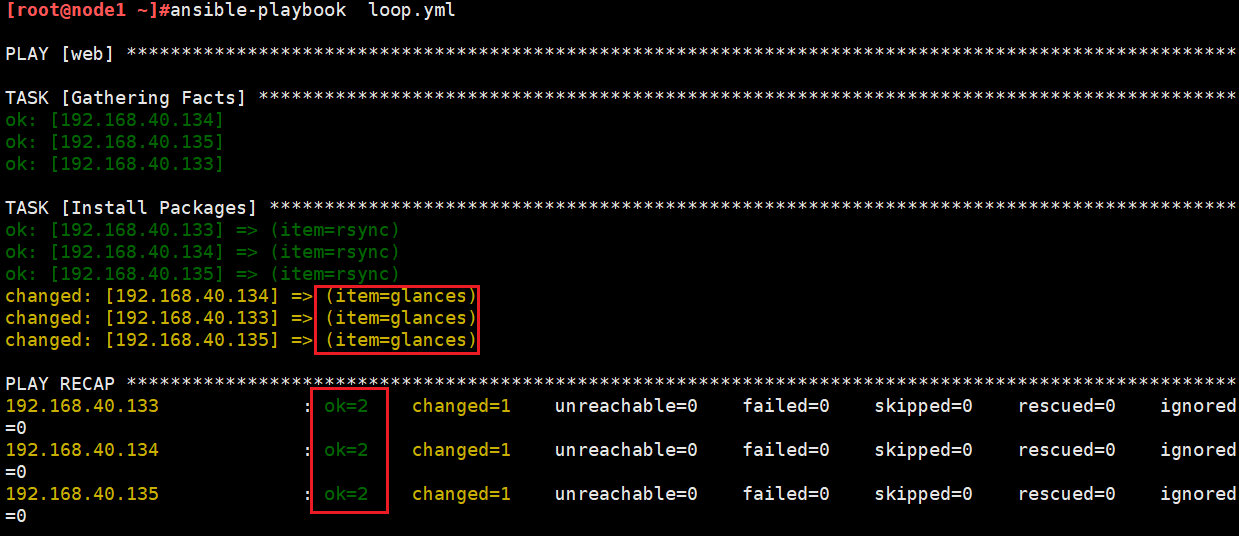
有执行结果可知,glances安装成功,rsync没有改变是因为软件已经安装有了。
方式2:
cat loop1.yml
- hosts: web
  remote_user: root
  vars:
    packages:
      - httpd
      - glances

  tasks:
    - name: Install Packages
      yum:
        name: "{{ packages }}"
        state: present

方式采用变量方方式,显示上不如loop直观
方式3:loop调用vars的变量
---
- hosts: web
  vars:
     test_name:
       - test1
       - test2
       - test3
  tasks:
    - name: delete user
      user:
        name: "{{ item }}"
        state: present
      loop: "{{ test_name }}"
2、使用循环批量启动服务
 cat loop_service.yml
- hosts: NginxWebs
  remote_user: root

  tasks:
    - name: Start Service
      service:
        name: "{{ item }}"
        state: started
      loop:
        - httpd
        - mariadb-server
3、使用循环批量创建用户
注:此处将loop换成with_items也是一样
- hosts: web
  tasks:
    - name: Create Groups
      group:
        name:  "{{ item }}"
        state: present
      loop:
          - group1
          - group2
          - group3
    - name: Create Users
      user:
        name:  "{{ item.user }}"
        group:  "{{ item.group }}"
        uid:  "{{ item.uid }}"
        state: present
        create_home: yes
      loop:
        - { user: user1,group: group1, uid: 2001 }
        - { user: user2,group: group2, uid: 2002 }
        - { user: user3,group: group3, uid: 2003 }
4、使用循环批量拷贝文件
- hosts: web
  tasks:
    - name: Copy Configuer File
      template:
        src: "{{ item.src }}"
        dest: "{{ item.dest }}"
        owner: "{{ item.owner }}"
        group: "{{ item.group }}"
        mode: "{{ item.mode }}"
      loop:
        - { src: "/root/conf/nginx.conf.j2", dest: "/etc/nginx/nginx.conf", owner: "root", group: "root", mode: "0644" }
        - { src: "/root/conf/example.com.conf.j2", dest: "/etc/nginx/conf.d/example.con.conf", owner: "root", group: "root", mode: "0644" }
        - { src: "/root/file/index.html", dest: "/data/nginx/example/index.html", owner: "nginx", group: "nginx", mode: 0644 }
注意:应用template时用法和copy一致,但是此处dest目标路径需要自己提前创建好、属主(组)都要有
copy是这样介绍的:
= dest
        Remote absolute path where the file should be copied to.
        If `src' is a directory, this must be a directory too.   #如果 `src' 是一个目录,dest也必须是一个目录。
        If `dest' is a non-existent path and if either `dest' ends with "/" or `src' is a directory, `dest' is created.  #如果 `dest' 是不存在的路径,并且如果 `dest' 以“/”结尾或 `src' 是目录,则创建 `dest'。
        If `dest' is a relative path, the starting directory is determined by the remote host.  #如果“dest”是相对路径,则起始目录由远程主机确定。
        If `src' and `dest' are files, the parent directory of `dest' is not created and the task fails if it does not already exist. #如果 `src' 和 `dest' 是文件,则不创建 `dest' 的父目录,如果不存在则任务失败。

        type: path
5、嵌套循环with_nested、with_cartesian
cat loop6.yml
---
- hosts: web
  remote_user: root
  gather_facts: no
  tasks:
  - file:
      state: directory
      path: "/testdir/{{item.0}}/{{item.1}}"
    with_nested:
      - [ a, b, c ]
      - [ test1, test2 ]
效果
tree /testdir/
/testdir/
|-- a
|   |-- test1
|   `-- test2
|-- b
|   |-- test1
|   `-- test2
`-- c
    |-- test1
    `-- test2

9 directories, 0 files
分别给用户授予3个数据库的所有权限
- name: give users access to multiple databases
  mysql_user: name={{ item[0] }} priv={{ item[1] }}.*:ALL append_privs=yes password=foo
  with_nested:
    - [ 'alice', 'bob' ]
    - [ 'clientdb', 'employeedb', 'providerdb' ]
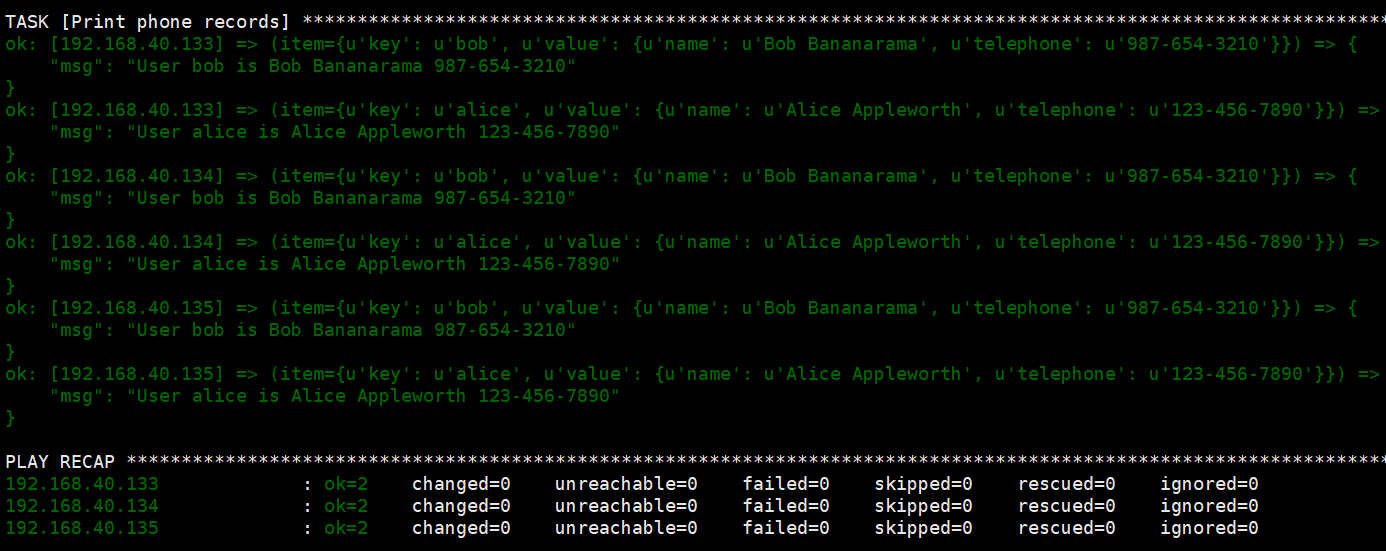
6、对哈希表循环(key:value)
---
- hosts: web
  vars:
    users:
      alice:
        name: Alice Appleworth
        telephone: 123-456-7890
      bob:
        name: Bob Bananarama
        telephone: 987-654-3210
  tasks:
    - name: Print phone records
      debug:
        msg: "User {{ item.key }} is {{ item.value.name }} {{ item.value.telephone }}"
      with_dict: "{{users}}"
7、对文件列表使用循环
cat loop7.yml
---
- hosts: web
  tasks:
    - copy:
        src: "{{ item }}"
        dest: /etc/fooapp/
        owner: root
        mode: 600
      with_fileglob:
        - /playbooks/files/fooapp/*
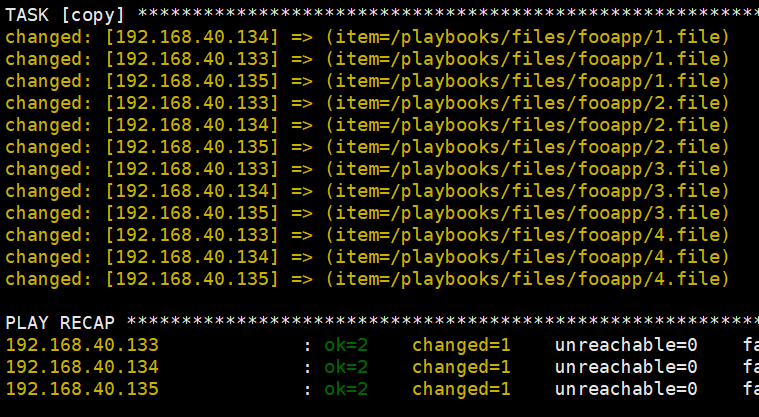
效果
8、对列表循环
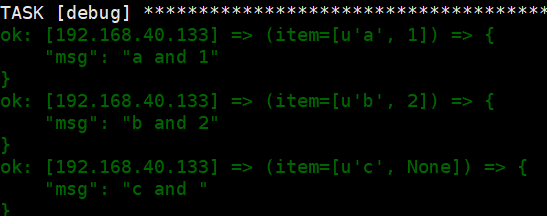
如果列表数目不匹配,用None补全
---
- hosts: web
  tasks:
  - debug:
      msg: "{{ item.0 }} and {{ item.1 }}"
    with_together:
      - [ 'a', 'b', 'c' ]
      - [ 1, 2 ]
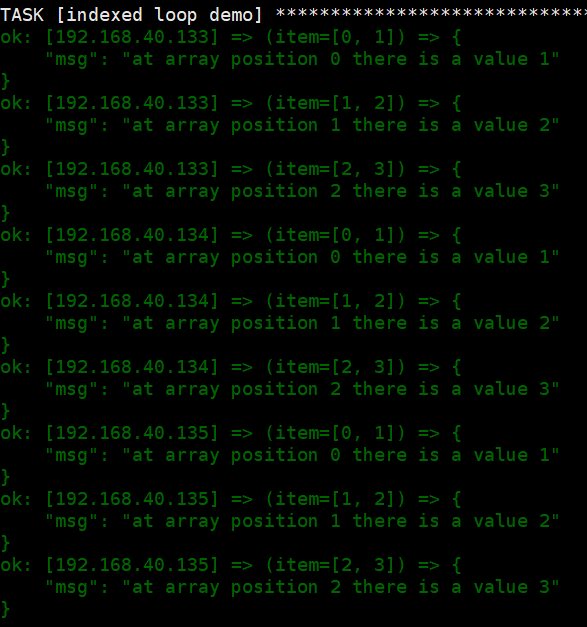
9、遍历列表和索引:with_indexed_items
---
- hosts: web
  tasks:
  - name: indexed loop demo
    debug: "msg='at array position {{ item.0 }} there is a value {{ item.1 }}'"
    with_indexed_items: [1,2,3]
10、重试循环
---
- hosts: web
  tasks:
    - action: shell /usr/bin/foo
      register: result
      until: result.stdout.find("all systems go") != -1
      retries: 5
      delay: 10
"重试次数retries" 的默认值为3,"delay"为5
二、循环与when
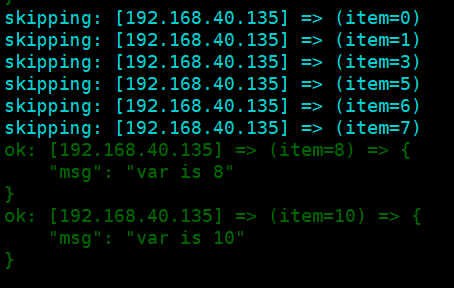
如果将when与循环一起使用时,ansible会为每个循环项都执行单独的条件判断,不满足条件的项就会跳过。
1、打印大于5的数字
cat loop8.yml
---
- hosts: web
  debugger: on_failed
  tasks:
     - name: print items greater than 5
       debug:
         msg: var is {{ item }}
       loop: [0,1,3,5,6,7,8,10]
       when: item > 7
效果:大于7的数字被执行
2、指定默认值default,当该集合未定义时,可以按条件跳过
---
- hosts: web
  debugger: on_failed
  tasks:
  - name: print items greater than 5
    debug:
      msg: "mylist is {{item}}"
    loop: "{{ mylist|default([4,5,6]) }}"
    when: item > 5
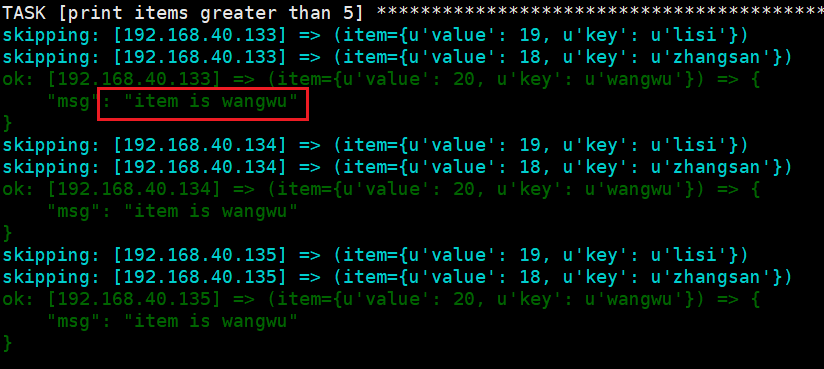
3、与字典循环
---
- hosts: web
  debugger: on_failed
  vars:
     mydict:  {"zhangsan":18,"lisi":19,"wangwu":20}
  tasks:
    - name: print items greater than 5
      debug:
        msg:  "item is {{item.key}}"
      loop:  "{{ query('dict', mydict|default({})) }}"
      when: item.value > 19
效果大于19岁的只有wangwu
三、注册变量与loop
---
- hosts: web
  gather_facts: no
  tasks:
    - name: delete user
      shell: echo '{{ item }}'
      loop:
        - test1
        - test2
      register: result
    - name: print
      debug:
        msg: "{{ result.results }}"
四、同步文件案例
需求:将各个节点指定路径下的文件(文件不一定全有)同步到备份节点
- hosts: all
  vars:
    node_map:
      node1: swarm-01
      node2: swarm-02
      node3: swarm-03
      node4: swarm-04
      node5: swarm-05
      node6: swarm-06
      node7: swarm-07
      node8: swarm-08
      node9: swarm-09
    services:
      - elasticsearch
      - minio
      - mysql
      - nacos
  tasks:
    - name: 'Find the backup node'
      shell: grep backup_node /healsci/scripts/archive_conf.yml | awk '{print $2}'
      register: backup_node
      run_once: true

    - name: 'Create destination directories on backup node'
      file:
        path: "/mnt/backup_data/{{ backup_node.stdout }}/config_backup/{{ inventory_hostname }}/{{ item }}"
        state: directory
      delegate_to: "{{ node_map[backup_node.stdout] }}"
      with_items: "{{ services }}"

    - name: 'Check config files exist'
      stat:
        path: "/backup/{{ item }}"
      register: file_exist
      with_items:
        - elasticsearch
        - minio
        - mysql
        - nacos

    - name: 'Archive if directory exists'
      archive:
        path: "/backup/{{ item.item }}"
        dest: "/tmp/{{ inventory_hostname }}_{{ item.item }}.tar.gz"
      when: item.stat.exists and item.stat.isdir
      with_items: "{{ file_exist.results }}"

    - name: 'Fetch archives to control node first, then copy to backup node'
      fetch:
        src: "/tmp/{{ inventory_hostname }}_{{ item.item }}.tar.gz"
        dest: "/tmp/"
        flat: yes
      when: item.stat.exists
      with_items: "{{ file_exist.results }}"

    - name: 'Copy archives to backup node'
      copy:
        src: "/tmp/{{ inventory_hostname }}_{{ item.item }}.tar.gz"
        dest: "/mnt/backup_data/{{ backup_node.stdout }}/config_backup/{{ inventory_hostname }}/{{ item.item | regex_search('(elasticsearch|minio|mysql|nacos)') }}/"
      delegate_to: "{{ node_map[backup_node.stdout] }}"
      when: item.stat.exists
      with_items: "{{ file_exist.results }}"

    - name: 'Check systemd files exist'
      find:
        paths: ["{{ item[0] }}"]
        patterns: ["{{ item[1] }}"]
        recurse: yes
      register: systemd_files
      with_nested:
        - ["/etc/systemd/system/", "/usr/lib/systemd/system/"]
        - ["es*", "minio*", "mysql*", "nacos*"]

    - name: 'Set systemd_files to a list of found files'
      set_fact:
        systemd_files_list: "{{ systemd_files.results | map(attribute='files') | list | sum(start=[]) }}"

    - name: 'Fetch systemd files to control node'
      fetch:
        src: "{{ item.path }}"
        dest: "/tmp/{{ inventory_hostname }}/{{ item.path | regex_search('(es|minio|mysql|nacos)') | replace('es','elasticsearch') }}/"
        flat: yes
      with_items: "{{ systemd_files_list }}"

    - name: 'Copy systemd files to backup node'
      copy:
        src: "/tmp/{{ inventory_hostname }}/{{ item.path | regex_search('(es|minio|mysql|nacos)') | replace('es','elasticsearch') }}/{{ item.path | basename }}"
        dest: "/mnt/backup_data/{{ backup_node.stdout }}/config_backup/{{ inventory_hostname }}/{{ item.path | regex_search('(es|minio|mysql|nacos)') | replace('es','elasticsearch') }}/"
      delegate_to: "{{ node_map[backup_node.stdout] }}"
      with_items: "{{ systemd_files_list }}"
注:
1、过滤器
"{{ item.path | regex_search('(es|minio|mysql|nacos)') | replace('es','elasticsearch') }}"
通过对当前的 item 施加一些过滤器,获得其路径。item 是 with_items 中当前迭代的那个元素,在这里即代表当前处理的那个系统文件。
2、嵌套循环的使用
 - name: 'Check systemd files exist'
      find:
        paths: ["{{ item[0] }}"]
        patterns: ["{{ item[1] }}"]
        recurse: yes
      register: systemd_files
      with_nested:
        - ["/etc/systemd/system/", "/usr/lib/systemd/system/"]
        - ["es*", "minio*", "mysql*", "nacos*"]
3、jinja2 模版表达式
set_fact 是一个 Ansible 的模块,它用于定义新的变量(facts)或修改现有变量。这里使用 set_fact 定义了一个新的变量 systemd_files_list。
表达式 systemd_files.results | map(attribute='files') | list | sum(start=[]) 是一个 jinja2 模版表达式,主要进行了以下的操作:
-
systemd_files.results:systemd_files是前一任务注册的变量,.results获取它的results属性。results属性通常为一个列表,包含了find模块为每个路径模式查找到文件的结果,其中每个元素是一个字典,包含了files和其它的属性。 -
map(attribute='files'):map是一个jinja2过滤器,用于从systemd_files.results列表的每个元素(字典)中提取files属性的值。这里attribute='files'将会提取每个字典中files键对应的值,值通常为查找到的文件相关信息组成的列表。 -
list:将map过滤器的结果(一个迭代器)转为列表。 -
sum(start=[]):sum用于计算列表的总和,因为此时列表的元素仍为列表(每个子列表包含查找到的文件信息),所以sum实际上执行的是将这些子列表合并为一个大列表。参数start=[]是初始值,表示结果应该是个列表。
Ansible 小手册系列 十四(条件判断和循环) - 简书 (jianshu.com)

 浙公网安备 33010602011771号