教你在canvas上绘制Base64格式的图片
现象描述
当前canvas组件只支持绘制本地图片和网络图片,暂不支持绘制Base64字符串表示的图片格式,下面介绍如何采取规避措施实现。
问题分析
当前image组件支持Base64字符串表示的图片格式,如下所示:
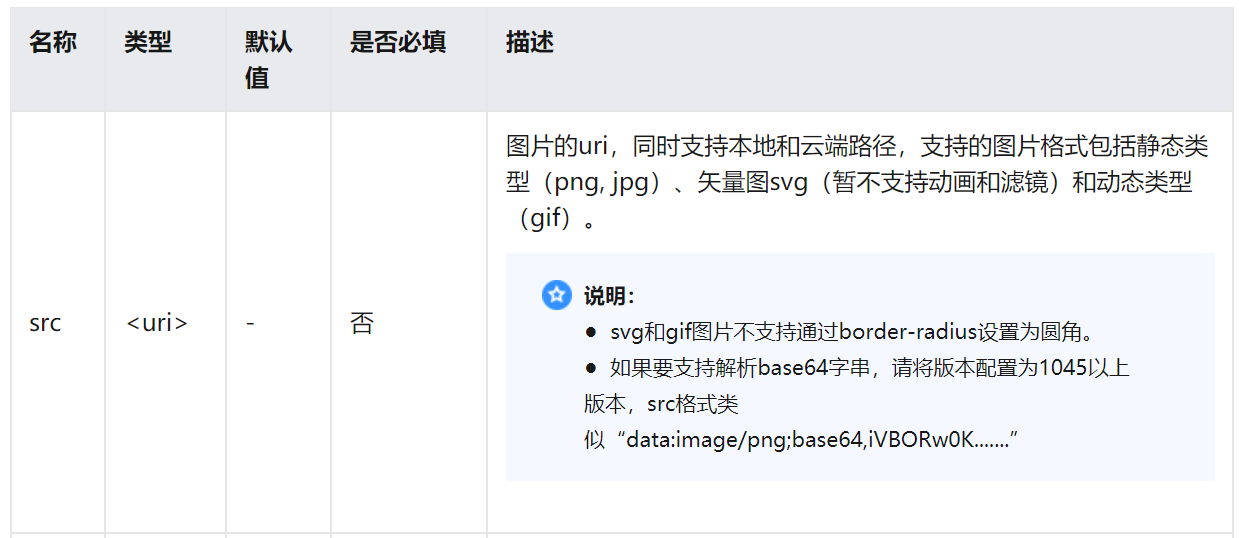
因此可以考虑通过image组件来表示Base64字符串表示的图片,然后用canvas组件绘制image元素来间接实现绘制Base64字符串表示的图片格式。
解决方法
代码如下:
|
1
2
3
4
5
6
7
8
9
10
11
12
13
14
15
16
17
18
19
20
21
22
23
24
25
26
27
28
29
30
31
32
33
34
35
36
37
38
39
40
41
42
43
|
<template> <div class="container"> <image id="Image" src={{imageSrc}} show="false"></image> <canvas id="Canvas" style=" margin-top:20px;width: 100%; height:50%;"></canvas> <input class="buttons" type="button" onclick="drawImageAll" value="saveImageAndShowCanvas"></input> </div></template> <style> .container { flex-direction: column; justify-content: center; align-content: center; align-items: center; } .title { font-size: 100px; } .text { font-size: 50px; color: #0000ff; border: 1px; }</style> <script> module.exports = { data: { imageSrc: "填写需要绘制的图片对应的base64字符串" //格式如:"data:image/png;base64,iVBORw0KGgoAAAA……" }, onInit() { this.$page.setTitleBar({text: 'Canvas'}) }, drawImageAll(){ var test = this.$element("Canvas"); var ctx = test.getContext("2d"); var img = this.$element('Image'); ctx.drawImage(img, 0,0); } }</script> |
原文链接:https://developer.huawei.com/consumer/cn/forum/topic/0201429219344610026?fid=18
原作者:Mayism

 浙公网安备 33010602011771号