
[异步]MVC项目开发中那些用到的知识点(Ajax.BeginForm)
文章转自:http://www.cnblogs.com/aehyok/archive/2013/03/30/2989393.html
Ajax.BeginForm可用于异步提交表单。
@using (Ajax.BeginForm("AjaxFormPost", "Home", new { ID="11", ClassName="FirstClass"}, new AjaxOptions { HttpMethod = "POST", OnBegin="OnBeginPost()", OnComplete="OnEndPost()", OnSuccess="OnSuccessPost", InsertionMode = InsertionMode.Replace })) |
AjaxFormPost为Action,Home为控制器,new {ID=“11”,ClassName="FirstClass"}为路由参数即Url参数
AjaxOptions
1.HttpMethod提交表单的方式。
2.onBegin表单提交前 客户端Js的操作。
3.OnSuccess表单提交后客户端在此可以返回的操作
4.OnComplete表单提交完成后的操作
5.InsertionMode
// 摘要:// Enumerates the AJAX script insertion modes.public enum InsertionMode{ // 摘要: // Replace the element. Replace = 0, // // 摘要: // Insert before the element. InsertBefore = 1, // // 摘要: // Insert after the element. InsertAfter = 2,} |
<div id="content"> <table> <tr> <td> @Html.Label("lblName", "姓名") </td> <td> @Html.TextBox("TxtName") </td> </tr> <tr> <td> @Html.Label("lblAge", "年龄") </td> <td> @Html.TextBox("TxtAge") </td> </tr> </table> <input type="submit" value="提交" /> </div> |
这是简单的表单控件,一个Name,一个Age,和一个提交按钮。
下面来看一下对应Home控制器中Action的操作,此处只做测试,所以只进行取表单数据
public string AjaxFormPost(string ID){ string ClassName = Request.QueryString["ClassName"]; string Name = Request.Form["TxtName"]; string Age = Request.Form["TxtAge"]; return "姓名" + Name + "年龄" + Age;} |
ID为路由机制的参数。TxtName,TxtAge是通过表单进行获取,前面设置为post方式,所以要用Request.Form的方式进行获取相应的值。
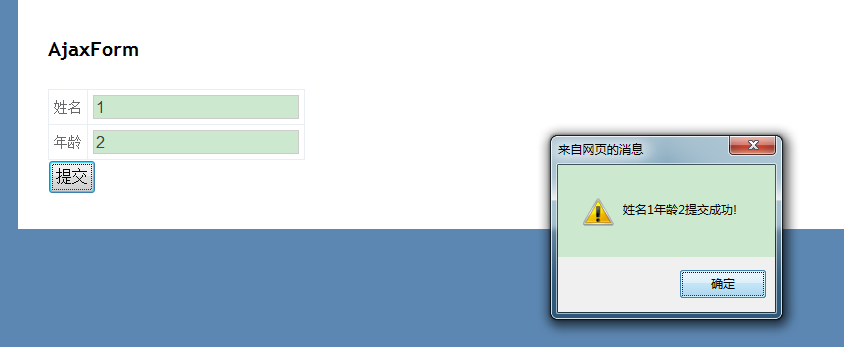
然后返回一个字符串string,如果想在客户端进行返回此字符串那么可以在上面AjaxOptions中的OnSuccess
<script type="text/javascript"> function OnSuccessPost(e) { alert(e+"提交成功!"); } </script>
当然如果想调用客户端JavaScript还需要引用一个JavaScript库。
<script src="@Url.Content("~/Scripts/jquery.unobtrusive-ajax.js")" type="text/javascript"></script>

这样就可以进行调用测试

 浙公网安备 33010602011771号