
[HtmlHelper拓展]c#扩展方法奇思妙用 ASP.NET MVC 篇:巧用扩展方法优先级,美化所有页面 TextBoxFor 文本框
如题所述,巧妙使用扩展方法的优先级,美化你网站(ASP.NET MVC)页面的 TextBoxFor 文本框;配合 js 脚本,还能限制用户录入。而且你甚至不需要修改任何一个前台页面...
先看个使用前后的对比图:
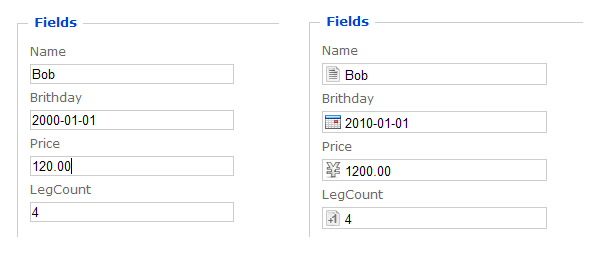
是不是右侧的更漂亮些?使用几个简单的扩展方法就可以让你的整个 ASP.NET MVC 网站的页面变成右面的效果。
TextBoxFor 扩展方法是ASP.NET MVC 2中 强类型 Html Helpers 中的一个,如果不是很了解,建议看 ScottGu's 的文章 ASP.NET MVC 2: Strongly Typed Html Helpers 后,再来看本文。
让我们步入正题,看如何来实现。我们再为 HtmlHelper类 定义几个名称为 TextBoxFor 的扩展方法。我没有crazy!名称必须为 TextBoxFor。如下:
namespace Mvc_TextBoxFor.HtmlHelpers { public static class TextBoxForExtension { public static MvcHtmlString TextBoxFor<TModel>(this HtmlHelper<TModel> htmlHelper, Expression<Func<TModel, uint>> expression) { return htmlHelper.TextBoxFor(expression, new { @class = "uint" }); }
public static MvcHtmlString TextBoxFor<TModel>(this HtmlHelper<TModel> htmlHelper, Expression<Func<TModel, DateTime>> expression) { return htmlHelper.TextBoxFor(expression, new { @class = "date" }); }
public static MvcHtmlString TextBoxFor<TModel>(this HtmlHelper<TModel> htmlHelper, Expression<Func<TModel, string>> expression) { return htmlHelper.TextBoxFor(expression, new { @class = "string" }); }
public static MvcHtmlString TextBoxFor<TModel>(this HtmlHelper<TModel> htmlHelper, Expression<Func<TModel, decimal>> expression) { return htmlHelper.TextBoxFor(expression, new { @class = "rmb" }); } } }
会不会与 MVC2中原有的 TextBoxFor 冲突呢?当然不会的!MVC2 中的 TextBoxFor 扩展定义如下:
原 TextBoxFor 扩展有两个泛型参数,上面我定义的四个都是只有一个泛型参数。
不会出现命名冲突,但在执行时会调用那个呢?这就涉及到到扩展方法调用优先级的问题(这个问题有时间专门写篇随笔讨论),就泛型扩展方法而言,越“泛”(泛型参数多且不明确),其优先级就越低。
MVC2 中原有 TextBoxFor 泛型参数比我定义的多,所以优先级就要低一些。因此,页面上的 Html.TextBoxFor 含义就变了,不再去调用原来的扩展方法,而是去调用我新定义的几个。当然前提是要引用我定义的扩展方法所在类的命名空间(不必多说,想用扩展必须引用相应命名空间)。
引用命名空间最简单的方法是在Web.config中引用,如下:
我定义的几个扩展方法比较简单,调用了 MVC2 中原有的 TextBoxFor 方法,只是根据不同的类型加了不同的 css 样式。
.uint { background-image: url(/images/uint.png) ;}.date { background-image: url(/images/date.png);}.rmb { background-image: url(/images/rmb.png);}.string {background-image: url(/images/string.png);}
再配合上 js 脚本,还能限制用户录入。
实现就这么简单! 天不早了,留下代码供大家参考:点击下载(70KB)
巧妙的使用扩展方法的优先级,会给我们带来意想不到的效果,希望对大家有帮助。
本人系列文章《c#扩展方法奇思妙用》,敬请关注!

 浙公网安备 33010602011771号