template模板详解
效果图如下:
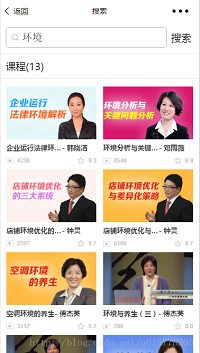
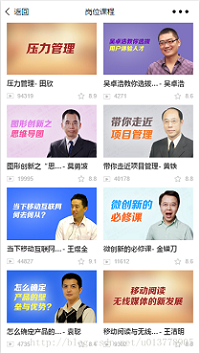
一、定义模板步骤
1、新建一个template文件夹用来管理项目中所有的模板;
2、新建一个courseList.wxml文件来定义模板;
3、使用name属性,作为模板的名字。然后在<template> </template>内定义代码片段。
注意:
a.可以看到一个.wxml文件中可以定义多个模板,只需要通过name来区分;
b.模板中的数据都是展开之后的属性。
<template name="courseLeft">
  <navigator url="../play/play?courseUuid={{courseUuid}}&isCompany={{isCompany}}">
    <view class="item mr26">
      <image src="{{imagePath}}" mode="aspectFill"></image>
      <view class="course-title">
        <text class="title">{{courseName}}</text>
        <text class="author">- {{teacherName}}</text>
      </view>
      <view class="course-info clearfix">
        <view class="fl"><text class="play">{{playCount}}</text></view>
        <view class="fr"><text class="grade">{{score}}</text></view>
      </view>
      <view wx:if="{{studyProgress}}" class="tip-completed">{{studyProgress}}</view>
    </view>
  </navigator>
</template>
<template name="courseRight">
  <navigator url="../play/play?courseUuid={{courseUuid}}&isCompany={{isCompany}}">
    <view class="item">
      <image src="{{imagePath}}" mode="aspectFill"></image>
      <view class="course-title">
        <text class="title">{{courseName}}</text>
        <text class="author">- {{teacherName}}</text>
      </view>
      <view class="course-info clearfix">
        <text class="play fl">{{playCount}}</text>
        <text class="grade fr">{{score}}</text>
      </view>
      <view wx:if="{{studyProgress}}" class="tip-completed">{{studyProgress}}</view>
    </view>
  </navigator>
</template>
二、使用模板
1、使用 is 属性,声明需要的使用的模板
<import src="../../templates/courseList.wxml"/>
WXML 提供两种文件引用方式import和include。include可以将目标文件整个代码引入,相当于是拷贝到include位置。
2、将模板所需要的 data 传入,一般我们都会使用列表渲染
<block wx:for="{{courseList}}">
  <template is="{{index%2 === 0 ? 'courseLeft' : 'courseRight'}}" data="{{...item}}"></template>
</block>
注意:
a.可以通过表达式来确定使用哪个模板is="{{index%2 === 0 ? 'courseLeft' : 'courseRight'}}" 或者通过wx:if来确定。index是数组当前项的下标。
<template wx:if="{{index%2 === 0}}" is="courseLeft" data="{{...item}}"></template>
<template wx:else is="courseRight" data="{{...item}}"></template>
b. data 是要模板渲染的数据,data="{{...item}}" 写法是ES6的写法,item是wx:for当前项,... 是展开运算符,在模板中不需要再{{item.courseName}} 而是直接{{courseName}}
三、模板样式
1、在新建模板的时候同时新建一个courseList.wxss 的文件,与CSS同样的写法控制样式。
2、在需要使用模板的页面 .wxss文件中import进来;或者直接在app.wxss中引入,这样只需要一次引入,其他文件就不用引入了。
@import url("../template/courseList.wxss");
没有坚守就没有事业,没有执着就没有未来!

 浙公网安备 33010602011771号