
ThinkPHP5.0集成微信扫码支付
首先,下载微信支付的php版本demo。
下载demo,目录结构如下:
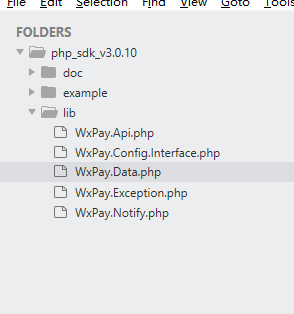
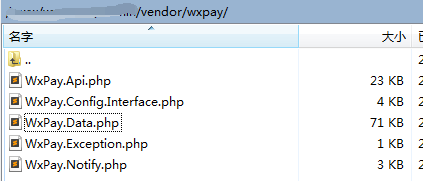
把 lib 文件夹拿出来,放到tp5根目录 vendor 文件夹下,重命名为wxpay:
把 example 文件夹下的 WxPay.Config.php 拿出来,放到wxpay目录下,修改require_once,并配置支付参数:
<?php
require_once "WxPay.Config.Interface.php";


class WxPayConfig extends WxPayConfigInterface
{
    //=======【基本信息设置】=====================================
    /**
     * TODO: 修改这里配置为您自己申请的商户信息
     * 微信公众号信息配置
     *
     * APPID:绑定支付的APPID(必须配置,开户邮件中可查看)
     *
     * MCHID:商户号(必须配置,开户邮件中可查看)
     *
     */
    public function GetAppId()
    {
        return '';
    }
    public function GetMerchantId()
    {
        return '';
    }

    //=======【支付相关配置:支付成功回调地址/签名方式】===================================
    /**
    * TODO:支付回调url
    * 签名和验证签名方式, 支持md5和sha256方式
    **/
    public function GetNotifyUrl()
    {
        return "";
    }
    public function GetSignType()
    {
        return "HMAC-SHA256";
    }

    //=======【curl代理设置】===================================
    /**
     * TODO:这里设置代理机器,只有需要代理的时候才设置,不需要代理,请设置为0.0.0.0和0
     * 本例程通过curl使用HTTP POST方法,此处可修改代理服务器,
     * 默认CURL_PROXY_HOST=0.0.0.0和CURL_PROXY_PORT=0,此时不开启代理(如有需要才设置)
     * @var unknown_type
     */
    public function GetProxy(&$proxyHost, &$proxyPort)
    {
        $proxyHost = "0.0.0.0";
        $proxyPort = 0;
    }


    //=======【上报信息配置】===================================
    /**
     * TODO:接口调用上报等级,默认紧错误上报(注意:上报超时间为【1s】,上报无论成败【永不抛出异常】,
     * 不会影响接口调用流程),开启上报之后,方便微信监控请求调用的质量,建议至少
     * 开启错误上报。
     * 上报等级,0.关闭上报; 1.仅错误出错上报; 2.全量上报
     * @var int
     */
    public function GetReportLevenl()
    {
        return 1;
    }


    //=======【商户密钥信息-需要业务方继承】===================================
    /*
     * KEY:商户支付密钥,参考开户邮件设置(必须配置,登录商户平台自行设置), 请妥善保管, 避免密钥泄露
     * 设置地址:https://pay.weixin.qq.com/index.php/account/api_cert
     *
     * APPSECRET:公众帐号secert(仅JSAPI支付的时候需要配置, 登录公众平台,进入开发者中心可设置), 请妥善保管, 避免密钥泄露
     * 获取地址:https://mp.weixin.qq.com/advanced/advanced?action=dev&t=advanced/dev&token=2005451881&lang=zh_CN
     * @var string
     */
    public function GetKey()
    {
        return '';
    }
    public function GetAppSecret()
    {
        return '';
    }


    //=======【证书路径设置-需要业务方继承】=====================================
    /**
     * TODO:设置商户证书路径
     * 证书路径,注意应该填写绝对路径(仅退款、撤销订单时需要,可登录商户平台下载,
     * API证书下载地址:https://pay.weixin.qq.com/index.php/account/api_cert,下载之前需要安装商户操作证书)
     * 注意:
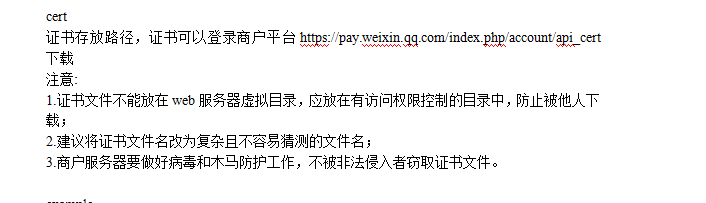
     * 1.证书文件不能放在web服务器虚拟目录,应放在有访问权限控制的目录中,防止被他人下载;
     * 2.建议将证书文件名改为复杂且不容易猜测的文件名;
     * 3.商户服务器要做好病毒和木马防护工作,不被非法侵入者窃取证书文件。
     * @var path
     */
    public function GetSSLCertPath(&$sslCertPath, &$sslKeyPath)
    {
        $sslCertPath = '../cert/apiclient_cert.pem';
        $sslKeyPath = '../cert/apiclient_key.pem';
    }
}
关于证书存放位置:
修改 WxPay.Api.php 第二个require_once:
require_once "WxPay.Config.php";
Wxpay.php控制器:
<?php
namespace app\index\controller;
use think\Controller;
class Wxpay extends Controller
{
    public function index(){
        header("Content-type:text/html;charset=utf-8");

        require VENDOR_PATH.'/wxpay/WxPay.Api.php'; //引入微信支付
        $input = new \WxPayUnifiedOrder();//统一下单
        $config = new \WxPayConfig();//配置参数

        //$paymoney = input('post.paymoney'); //支付金额
        $paymoney = 1; //测试写死
        $out_trade_no = 'WXPAY'.date("YmdHis"); //商户订单号(自定义)
        $goods_name = '扫码支付'.$paymoney.'元'; //商品名称(自定义)
        $input->SetBody($goods_name);
        $input->SetAttach($goods_name);
        $input->SetOut_trade_no($out_trade_no);
        $input->SetTotal_fee($paymoney*100);//金额乘以100
        $input->SetTime_start(date("YmdHis"));
        $input->SetTime_expire(date("YmdHis", time() + 600));
        $input->SetGoods_tag("test");
        $input->SetNotify_url("http://www.xxx.com/wxpaynotify"); //回调地址
        $input->SetTrade_type("NATIVE");
        $input->SetProduct_id("123456789");//商品id
        $result = \WxPayApi::unifiedOrder($config, $input);

        if($result['result_code']=='SUCCESS' && $result['return_code']=='SUCCESS') {
            $url = $result["code_url"];
            $this->assign('url',$url);
        }else{
            $this->error('参数错误');
        }
        return view();
    }
}
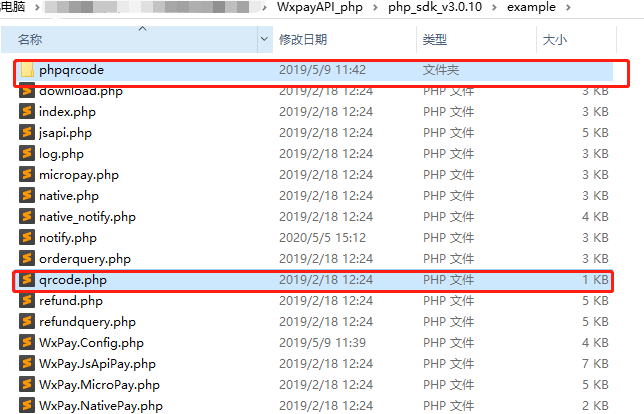
前台要生成扫码支付的二维码。把demo中 example 文件夹下的 phpqrcode文件夹 和 qrcode.php 拿出来,我放到了项目根目录/public下面:
然后页面中使用img标签加载二维码即可:
<img alt="扫码支付" src="/qrcode.php?data=<?php echo urlencode($url);?>" style="width:300px;height:300px;"/>
测试生成了一个二维码:
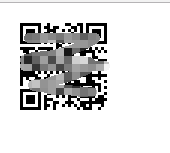
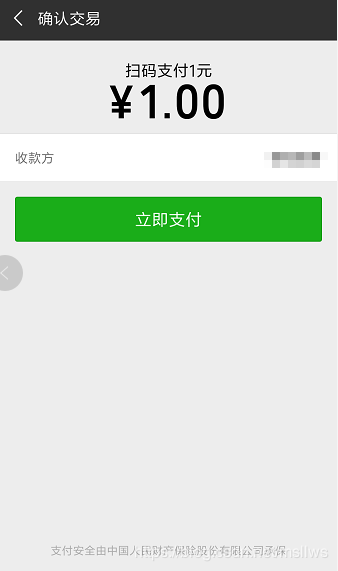
扫码支付测试:
支付成功回调:
public function wxpaynotify() {

        $xml = file_get_contents("php://input");

        //xml数据转数组
        $data = json_decode(json_encode(simplexml_load_string($xml,'SimpleXMLElement',LIBXML_NOCDATA)),true);

        //保存微信服务器返回的签名sign
        $data_sign = $data['sign'];
        //sign不参与签名算法
        unset($data['sign']);
        $sign = $this->makeSign($data);
        //判断签名是否正确,判断支付状态
        if (($sign===$data_sign) && ($data['return_code'] == 'SUCCESS') && ($data['result_code'] == 'SUCCESS')) {
            $results = $data;
            //获取服务器返回的数据
            $trade_no = $data['out_trade_no']; //商户自定义订单号

            //处理订单等信息

        } else {
            $results = false;
        }

        //返回状态给微信服务器
        if ($results) {
            $str = '<xml><return_code><![CDATA[SUCCESS]]></return_code><return_msg><![CDATA[OK]]></return_msg></xml>';
        } else {
            $str = '<xml><return_code><![CDATA[FAIL]]></return_code><return_msg><![CDATA[签名失败]]></return_msg></xml>';
        }
        echo $str;
        return $results;
    }
页面定时确认是否支付成功:
<script>
    function pay_status(){

        var orderid = $("#orderid").val();
        $.ajax({
            type: "post",
            url:"判断支付状态的后台方法地址" ,
            data: {orderid:orderid},
            dataType: "json",
            success: function (res) {
                console.log(res);
                if (res == 1) {
                    layer.msg('支付成功',{icon: 2, time: 4000},function(index){
                        window.clearInterval(int); //销毁定时器
                         //跳转到结果页面,并传递状态
                         window.location.href="跳转地址";
                    });

                }
                else if(res == 2)
                {
                    layer.msg('支付失败',{icon: 2, time: 2000});
                }
                else if(res ==3)
                {

                    layer.msg('支付取消',{icon: 2, time: 4000},function(index){
                        window.clearInterval(int); //销毁定时器
                         //跳转到结果页面,并传递状态
                         window.location.href="跳转地址";
                    });
                }

            }
        });
    }
//启动定时器
    var int=self.setInterval(function(){pay_status()},1000);
</script>
众生皆苦,喜从何来。心有极乐,则身处极乐,心有地狱,则身处地狱

 浙公网安备 33010602011771号