windows下查看端口等常用命令
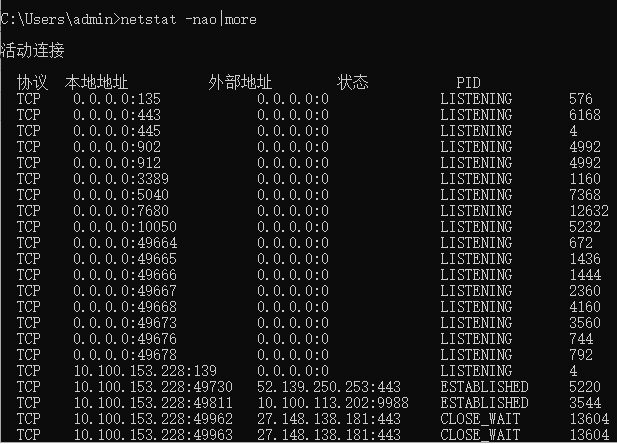
1.Windows查看所有的端口 netstat -nao|more
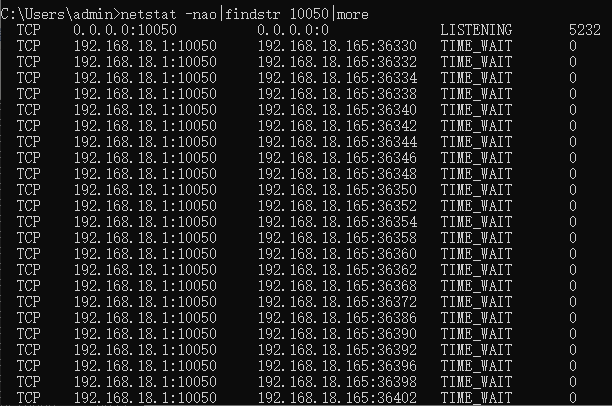
2.查询指定的端口占用 语法 netstat -aon|findstr "提示的端口", 如 netstat -nao|findstr 10050|more
3.查询PID对应的进程
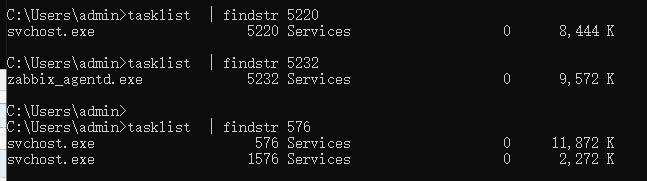
在上面步骤之后,我们得到的PID为5220,那么我们就可以输入命令【tasklist|findstr "5220"】,如下图
职称
1.Windows查看所有的端口 netstat -nao|more
2.查询指定的端口占用 语法 netstat -aon|findstr "提示的端口", 如 netstat -nao|findstr 10050|more
3.查询PID对应的进程
在上面步骤之后,我们得到的PID为5220,那么我们就可以输入命令【tasklist|findstr "5220"】,如下图

 浙公网安备 33010602011771号