

linux CentOS7忘记root登录密码,如何重置密码
重启,进入Grub时,上下方向键选择第一项,按e,进入编辑。
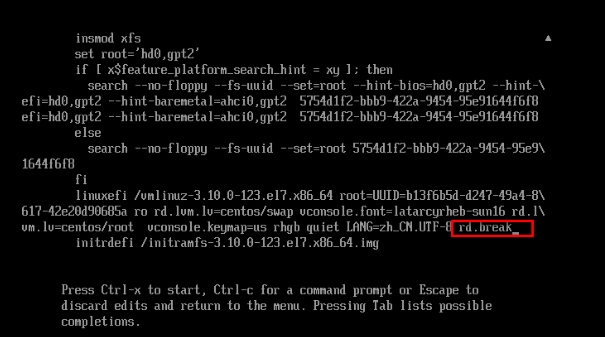
在倒数第二行最后,输入rd.break,使用快捷键Ctrl+x启动。
执行如下命令:
switch_root # mount -o rw,remount /sysroot/
switch_root # chroot /sysroot/
sh-4.2 # passwd root
sh-4.2 # touch /.autorelabel
sh-4.2 # exit
switch_root # exit
若系统启动了SELinux,touch /.autorelabel会保证不出错。最后一个exit之后,SELinux会重新设定文件的Context,需要等待一会,之后就可以正常运行了。

 浙公网安备 33010602011771号