
QT串口通信编程
QT串口编程
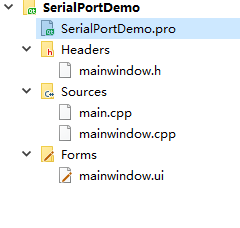
文件夹目录结构如下图所示
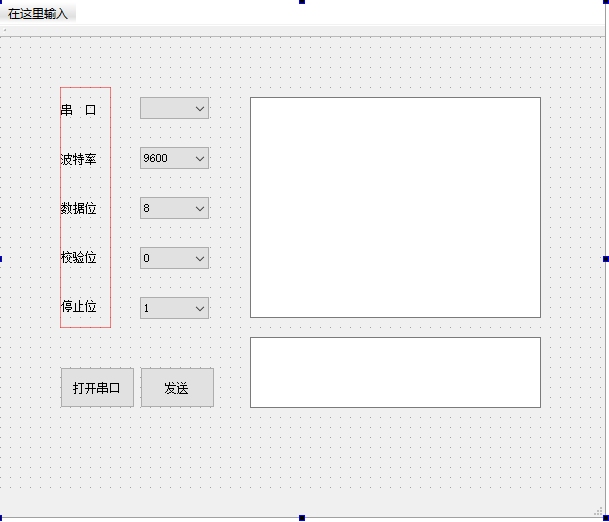
设计的示例界面如下图所示
首先在项目文件里面添加一句
QT += serialport
SerialPortDemo.pro文件如下:
-------------------------------------------------
Project created by QtCreator 2019-02-21T13:23:59
-------------------------------------------------
QT += core gui
QT += serialport
greaterThan(QT_MAJOR_VERSION, 4): QT += widgets
TARGET = SerialPortDemo
TEMPLATE = app
The following define makes your compiler emit warnings if you use
any feature of Qt which has been marked as deprecated (the exact warnings
depend on your compiler). Please consult the documentation of the
deprecated API in order to know how to port your code away from it.
DEFINES += QT_DEPRECATED_WARNINGS
You can also make your code fail to compile if you use deprecated APIs.
In order to do so, uncomment the following line.
You can also select to disable deprecated APIs only up to a certain version of Qt.
DEFINES += QT_DISABLE_DEPRECATED_BEFORE=0x060000# disables all the APIs deprecated before Qt 6.0.0
CONFIG += c++11
SOURCES +=
main.cpp
mainwindow.cpp
HEADERS +=
mainwindow.h
FORMS +=
mainwindow.ui
Default rules for deployment.
qnx: target.path = /tmp/$${TARGET}/bin
else: unix:!android: target.path = /opt/$${TARGET}/bin
!isEmpty(target.path): INSTALLS += target
在头文件mainwindow.h中引入qt串口通信所需要的头文件,mainwindow.h文件代码如下:
ifndef MAINWINDOW_H
define MAINWINDOW_H
include
include
//引入qt中串口通信需要的头文件
#include <QtSerialPort/QSerialPort>
#include <QtSerialPort/QSerialPortInfo>
namespace Ui {
class MainWindow;
}
class MainWindow : public QMainWindow
{
Q_OBJECT
public:
explicit MainWindow(QWidget *parent = nullptr);
~MainWindow();
private slots:
void on_OpenSerialButton_clicked();
void ReadData();
void on_btnSend_clicked();
private:
Ui::MainWindow *ui;
QSerialPort *serial;//全局的串口对象
};
endif // MAINWINDOW_H
实现效果的mainwindow.cpp代码如下:
include "mainwindow.h"
include "ui_mainwindow.h"
//添加串口通信需要用到的两个串口头文件
#include "QtSerialPort/QSerialPort"
#include "QtSerialPort/QSerialPortInfo"
MainWindow::MainWindow(QWidget *parent) :
QMainWindow(parent),
ui(new Ui::MainWindow)
{
ui->setupUi(this);
//查找可用的串口
foreach(const QSerialPortInfo &info,QSerialPortInfo::availablePorts())
{
QSerialPort serial;
serial.setPort(info);
if(serial.open(QIODevice::ReadWrite))
{
ui->portBox->addItem(serial.portName());
serial.close();
}
}
//设置波特率下拉菜单的第0项默认值
ui->baudBox->setCurrentIndex(0);
}
MainWindow::~MainWindow()
{
delete ui;
}
void MainWindow::on_OpenSerialButton_clicked()
{
if(ui->OpenSerialButton->text()==tr("打开串口"))
{
serial=new QSerialPort;
//设置串口名
serial->setPortName(ui->portBox->currentText());
//打开串口
serial->open(QIODevice::ReadWrite);
//设置波特率
serial->setBaudRate(QSerialPort::Baud115200);
//设置数据为
switch(ui->dataBox->currentIndex())
{
case 0:
serial->setDataBits(QSerialPort::Data8);
break;
default:
break;
}
//设置校验位
switch (ui->checkBox->currentIndex())
{
case 0:
serial->setParity(QSerialPort::NoParity);
break;
default:
break;
}
//设置停止为
switch(ui->stopBox->currentIndex())
{
case 0:
serial->setStopBits(QSerialPort::OneStop);
break;
case 1:
serial->setStopBits(QSerialPort::TwoStop);
break;
default:
break;
}
//设置流控制
serial->setFlowControl(QSerialPort::NoFlowControl);//设置为无流控制
//关闭设置菜单使能
ui->portBox->setEnabled(false);
ui->dataBox->setEnabled(false);
ui->checkBox->setEnabled(false);
ui->stopBox->setEnabled(false);
ui->baudBox->setEnabled(false);
ui->OpenSerialButton->setText("关闭串口");
QObject::connect(serial,&QSerialPort::readyRead,this,&MainWindow::ReadData);
}
else
{
//关闭串口
serial->clear();
serial->close();
serial->deleteLater();
//恢复使能
ui->portBox->setEnabled(true);
ui->baudBox->setEnabled(true);
ui->dataBox->setEnabled(true);
ui->checkBox->setEnabled(true);
ui->stopBox->setEnabled(true);
ui->OpenSerialButton->setText("打开串口");
}
}
void MainWindow::on_btnSend_clicked()
{
serial->write(ui->txtWrite->toPlainText().toLatin1());
}
//读取接收到的消息
void MainWindow::ReadData()
{
QByteArray buf;
buf=serial->readAll();
if(!buf.isEmpty())
{
QString str = buf;
ui->txtRead->appendPlainText(str);
}
buf.clear();
}
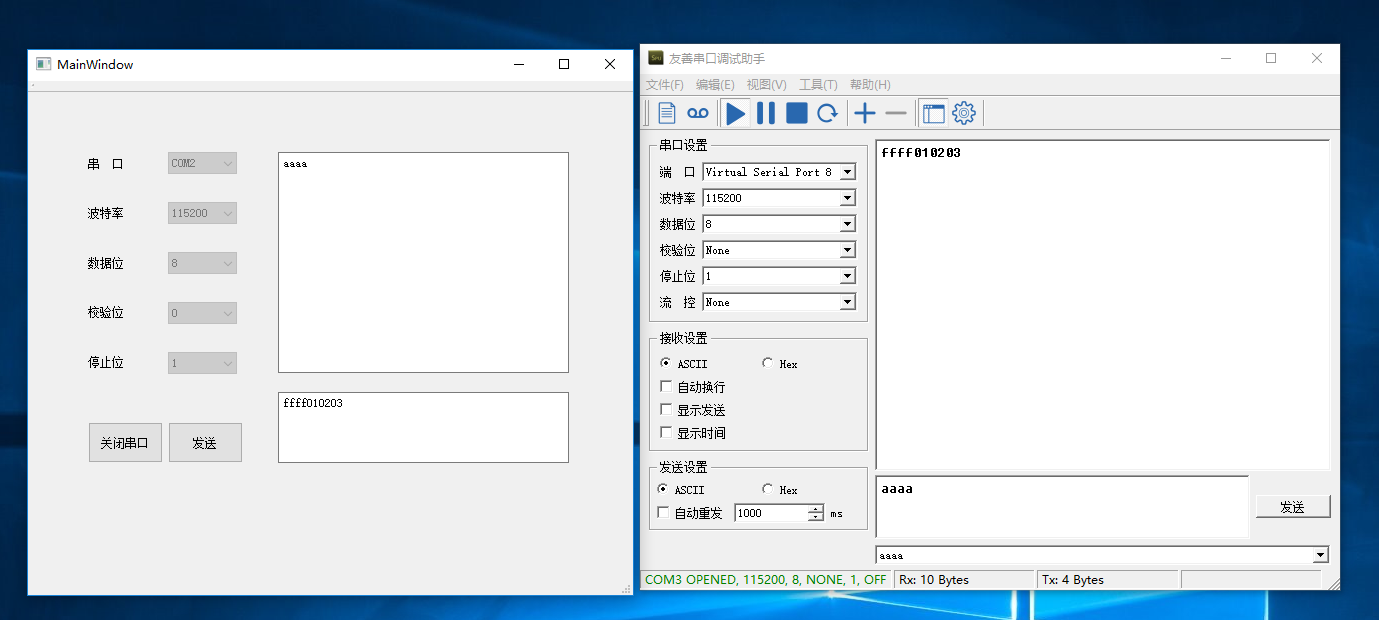
最终运行效果如下图所示:

 浙公网安备 33010602011771号