
jdbc连接mysql的五种方式
//第一种方式,静态连接
    public static void connect01() throws SQLException {
        //注册驱动
        Driver driver = new Driver(); //创建一个driver对象
        //获取连接
        // jdbc:mysql:// 规定好表示协议,通过jdbc的方式连接
        // localhost:3306表示本机 的 3306 端口号
        // db01 表示需要连接到的数据库
        String url = "jdbc:mysql://localhost:3306/db01";

        Properties properties = new Properties();
        properties.setProperty("user", "root"); //连接到的用户
        properties.setProperty("password", "123456"); //连接的的密码
        Connection connect = driver.connect(url, properties);  //链接到了数据库

        System.out.println("第一种方式拿到了连接:" + connect);
        connect.close();
    }
//方式二:动态记载,减少依赖性
    public static void connect02() throws ClassNotFoundException, InstantiationException, IllegalAccessException, SQLException {
        Class cls = Class.forName("com.mysql.jdbc.Driver");
        Driver driver = (Driver) cls.newInstance();
        String url = "jdbc:mysql://localhost:3306/db01";
        Properties properties = new Properties();
        properties.setProperty("user", "root");
        properties.setProperty("password", "123456");
        Connection connect = driver.connect(url, properties);
        System.out.println("第二种方式拿到了连接:" + connect);
        connect.close();
    }
    //方式4:使用Class.forName自动完成注册驱动,简化代码
    //开发中使用较多
    //Driver当中的静态代码块中完成了驱动的注册
    public static void connect04() throws ClassNotFoundException, InstantiationException, IllegalAccessException, SQLException {
        Class<?> aClass = Class.forName("com.mysql.jdbc.Driver");
        Driver driver = (Driver) aClass.newInstance();
        //上面两句话可以不写
        //在mysql-connector-java-5.1.6-bin.jar 之后,可以自动加载驱动


        String user = "root";
        String password = "123456";
        String url = "jdbc:mysql://localhost:3306/db01";
        Connection connection = DriverManager.getConnection(url, user, password);
        System.out.println("第四种方式拿到了连接:" + connection);

        connection.close();
    }
    //第五种方式
    //写入到配置文件,连接数据库更加灵活
    public static void connect05() throws ClassNotFoundException, InstantiationException, IllegalAccessException, SQLException, IOException {
        Properties properties = new Properties();
        properties.load(new FileInputStream("src\\mysql.properties"));
        String user = properties.get("user").toString();
        String password = properties.get("password").toString();
        String url = properties.get("url").toString();
        String drive = properties.get("drive").toString();
     //加载驱动,建议写上,在mysql-connector-java-5.1.6-bin.jar 之后可以省略不写
     //service中有个文件java.sql.Driver 当中进行了配置

        Class.forName(drive);
        Connection connection = DriverManager.getConnection(url, user, password);
        System.out.println("第五种方式拿到了连接:" + connection);

        connection.close();
    }
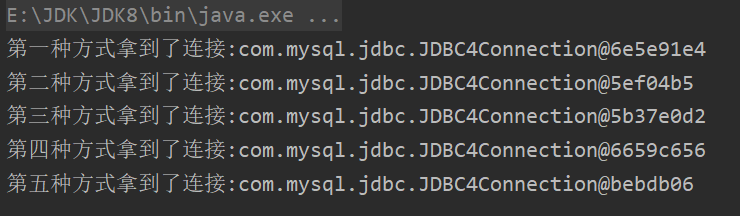
运行结果:

 浙公网安备 33010602011771号