
第一节:服务注册与服务发现
前言
大宇也是第一次学习SpringCloud哦,难免遇到很多困难。想必很多同学也会跟我一样。
看了方志朋 史上最简单的 SpringCloud 教程,被方老师的文风深深吸引,在此特别感谢方老师。
俗话说,纸上得来终觉浅,绝知此事要躬行。学编程,自己手撸一遍代码不失为一种好方法,所以,让我们开始吧。
一、环境准备
首先创建了一个Maven环境。修改Pom文件,导入SpringCloud的依赖。用Eureka作为服务注册与发现的组件。
<?xml version="1.0" encoding="UTF-8"?>

<project xmlns="http://maven.apache.org/POM/4.0.0" xmlns:xsi="http://www.w3.org/2001/XMLSchema-instance"
         xsi:schemaLocation="http://maven.apache.org/POM/4.0.0 http://maven.apache.org/xsd/maven-4.0.0.xsd">
    <modelVersion>4.0.0</modelVersion>

    <groupId>com.safesoft</groupId>
    <artifactId>main</artifactId>
    <version>1.0-SNAPSHOT</version>

    <name>main</name>
    <url>http://www.example.com</url>

    <parent>
        <groupId>org.springframework.boot</groupId>
        <artifactId>spring-boot-starter-parent</artifactId>
        <version>2.0.3.RELEASE</version>
        <relativePath/>
    </parent>

    <properties>
        <project.build.sourceEncoding>UTF-8</project.build.sourceEncoding>
        <project.reporting.outputEncoding>UTF-8</project.reporting.outputEncoding>
        <java.version>1.8</java.version>
        <spring-cloud.version>Finchley.RELEASE</spring-cloud.version>
    </properties>

    <dependencies>
        <dependency>
            <groupId>org.springframework.boot</groupId>
            <artifactId>spring-boot-starter-test</artifactId>
            <scope>test</scope>
        </dependency>
    </dependencies>

    <dependencyManagement>
        <dependencies>
            <dependency>
                <groupId>org.springframework.cloud</groupId>
                <artifactId>spring-cloud-dependencies</artifactId>
                <version>${spring-cloud.version}</version>
                <type>pom</type>
                <scope>import</scope>
            </dependency>
        </dependencies>
    </dependencyManagement>

    <build>
        <plugins>
            <plugin>
                <groupId>org.springframework.boot</groupId>
                <artifactId>spring-boot-maven-plugin</artifactId>
            </plugin>
        </plugins>
    </build>
</project>
二、创建服务注册中心 Eureka -- Server
右击项目,选择New--Module,选择Maven,点击next,再输入模块名server即可。
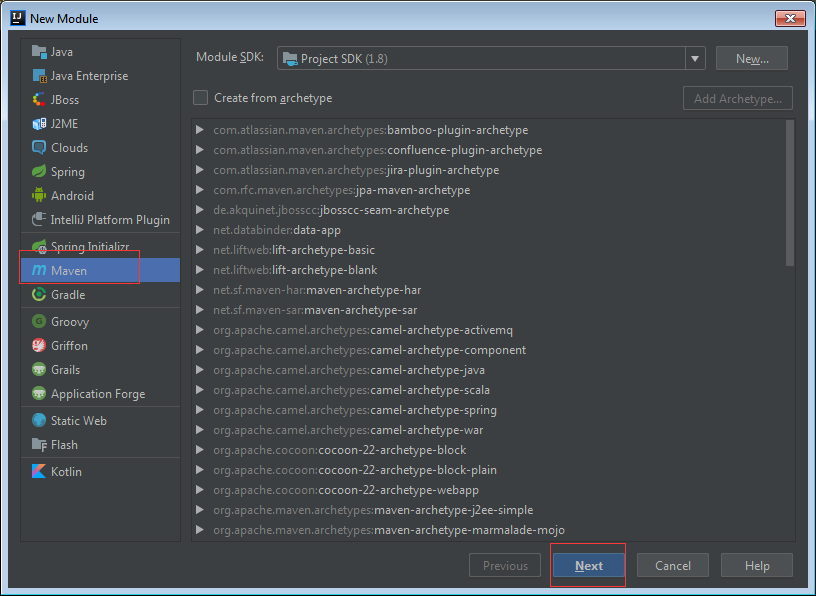
2.1 注册中心导入依赖
<?xml version="1.0" encoding="UTF-8"?>
<project xmlns="http://maven.apache.org/POM/4.0.0"
         xmlns:xsi="http://www.w3.org/2001/XMLSchema-instance"
         xsi:schemaLocation="http://maven.apache.org/POM/4.0.0 http://maven.apache.org/xsd/maven-4.0.0.xsd">
    <parent>
        <artifactId>main</artifactId>
        <groupId>com.safesoft</groupId>
        <version>1.0-SNAPSHOT</version>
    </parent>
    <modelVersion>4.0.0</modelVersion>

    <artifactId>server</artifactId>

    <dependencies>
        <dependency>
            <groupId>org.springframework.cloud</groupId>
            <artifactId>spring-cloud-starter-netflix-eureka-server</artifactId>
        </dependency>
    </dependencies>

</project>
2.2 编写配置文件
eureka server的配置文件application.yml。
#使用8761端口
server:
  port: 8761

eureka:
  instance:
    hostname: localhost
  client:
    #下面两个false说明自己是一个 Eureka Server
    registerWithEureka: false
    fetchRegistry: false
    #服务中心的地址
    serviceUrl:
      defaultZone: http://${eureka.instance.hostname}:${server.port}/eureka/

#此服务器名称
spring:
  application:
    name: eurka-server
2.3 编写启动类
@SpringBootApplication表明这个类是SpringBoot启动的入口。
@EnableEurekaServer 表明这是一个注册中心。
package com.safesoft.server;

import org.springframework.boot.SpringApplication;
import org.springframework.boot.autoconfigure.SpringBootApplication;
import org.springframework.cloud.netflix.eureka.server.EnableEurekaServer;

/**
 * @author jay.zhou
 * @date 2019/1/24
 * @time 14:04
 */
@SpringBootApplication
@EnableEurekaServer
public class ApplicationServer {
    public static void main(String[] args) {
        SpringApplication.run(ApplicationServer.class, args);
    }
}
2.4 启动注册中心
启动后,在浏览器访问http://localhost:8761/,就能看到注册中心。

三、服务提供者 Eureka - Client
刚才的注册中心项目不要关。然后再创建一个新的Module,同样右击项目最上级目录。New -- Module -- 选择Maven ,点击next -- 输入提供者名字 client。然后就是这样的目录了。
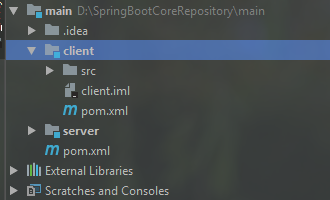
3.1 导入服务提供者项目的依赖
<?xml version="1.0" encoding="UTF-8"?>
<project xmlns="http://maven.apache.org/POM/4.0.0"
         xmlns:xsi="http://www.w3.org/2001/XMLSchema-instance"
         xsi:schemaLocation="http://maven.apache.org/POM/4.0.0 http://maven.apache.org/xsd/maven-4.0.0.xsd">
    <parent>
        <artifactId>main</artifactId>
        <groupId>com.safesoft</groupId>
        <version>1.0-SNAPSHOT</version>
    </parent>
    <modelVersion>4.0.0</modelVersion>

    <artifactId>client</artifactId>

    <dependencies>
        <!-- 客户端依赖 -->
        <dependency>
            <groupId>org.springframework.cloud</groupId>
            <artifactId>spring-cloud-starter-netflix-eureka-client</artifactId>
        </dependency>
        <dependency>
            <groupId>org.springframework.boot</groupId>
            <artifactId>spring-boot-starter-web</artifactId>
        </dependency>
    </dependencies>
</project>
3.2 编写配置文件
为服务提供者 Eureka - Client 编写 application.yml。
#当前项目部署的端口
server:
  port: 8762

#配置注册中心的位置,并把自己注册进去
eureka:
  client:
    serviceUrl:
      defaultZone: http://localhost:8761/eureka/

#当前项目名字
spring:
  application:
    name: service-client
3.3 编写启动类
@SpringBootApplication注解是SpirngBoot项目启动的入口。
@EnableEurekaClient注解说明这是一个服务提供者Eureka--Client。
package com.safesoft.client;

import org.springframework.boot.SpringApplication;
import org.springframework.boot.autoconfigure.SpringBootApplication;
import org.springframework.cloud.netflix.eureka.EnableEurekaClient;

/**
 * @author jay.zhou
 * @date 2019/1/24
 * @time 14:51
 */
@SpringBootApplication
@EnableEurekaClient
public class ApplicationClient {
    public static void main(String[] args) {
        SpringApplication.run(ApplicationClient.class, args);
    }
}
3.4 编写一个Controller
package com.safesoft.client.web;

import org.springframework.beans.factory.annotation.Value;
import org.springframework.web.bind.annotation.RequestMapping;
import org.springframework.web.bind.annotation.RestController;

/**
 * @author jay.zhou
 * @date 2019/1/24
 * @time 16:16
 */
@RestController
public class IndexController {

    @Value("${server.port}")
    private String port;

    @RequestMapping("/hi")
    public String hi(String name) {
        return "hi " + name + " , l am " + port + " port";
    }
}
3.5 启动服务提供者
启动以后,访问浏览器http://localhost:8761/,就能在注册中心中,找到刚才注册的服务提供者项目了。注意哦,注册中心项目Eureka--Server 与 服务提供者项目 Eureka--Client 这两个项目都要启动哦,先启动注册中心,再启动服务提供者。

四、源码下载
GitHub - hairdryre/Study_SpringCloud
参考文章:史上最简单的 SpringCloud 教程 | 第一篇: 服务的注册与发现Eureka(Finchley版本)
----------------------------------------------------分割线-------------------------------------------------------
阅读更多
如果本文对你有帮助,不妨请我喝瓶可乐吧!
你的打赏是对我最好的支持!


 浙公网安备 33010602011771号