
Python开发【第九章】:线程、进程和协程
一、线程
线程是操作系统能够进行运算调度的的最小单位,它被包含在进程之中,是进程中的实际运作单位。一条线程指的是进程中的一个单一顺序的控制流,一个进程中可以并发多个线程
,每条线程并执行不同的任务
1、threading模块
线程创建有2种方式:如下
直接调用
import threading,time
def run(n):
    print('test...',n)
    time.sleep(2)

if __name__ =='__main__':
    t1=threading.Thread(target=run,args=('t1',))
    t2=threading.Thread(target=run,args=('t2',))

    t1.start()
    t2.start()

#程序输出
#test... t1
#test... t2
继承式调用
import threading,time
class MyThread(threading.Thread):
    def __init__(self,num):
        #threading.Thread.__init__(self)
        super(MyThread, self).__init__()
        self.num=num
    def run(self):   #定义每个线程要运行的函数
        print("running on number:%s"%self.num)
        time.sleep(2)

if __name__ == "__main__":
    #两个同时执行,然后等待两秒结束
    t1=MyThread(1)
    t2=MyThread(2)
    t1.start()
    t2.start()
#程序输出
#running on number:1
#running on number:2
2.join
join是等待线程完成后,其他线程再继续执行(串行)
import threading,time

def run(n,sleep_time):
    print("test...",n)
    time.sleep(sleep_time)
    print("test...done",n)
if __name__ == '__main__':
    t1=threading.Thread(target=run,args=('t1',2))
    t2=threading.Thread(target=run,args=('t2',3))

    #两个同时执行,然后等待t2执行完成后,主线程和子线程开始执行
    t1.start()
    t2.start()
    t2.join()       #等待t2

    print('main thread')

#程序输出
#test... t1
#test... t2
#test...done t2
#main thread
#test...done t1
3.Daemon
Daemon守护进程,主程序执行完毕后,守护进程会同时退出,不管是否执行完任务
import threading,time

def run(n):
    print('[%s]------running----\n' % n)
    time.sleep(2)
    print('--done--')


def main():
    for i in range(5):
        t = threading.Thread(target=run, args=[i, ])
        t.start()
        t.join(1)
        print('starting thread', t.getName())


m = threading.Thread(target=main, args=[])
m.setDaemon(True)  # 将main线程设置为Daemon线程,它做为程序主线程的守护线程,当主线程退出时,
                    # m线程也会退出,由m启动的其它子线程会同时退出,不管是否执行完任务
m.start()
m.join(timeout=2)
print("---main thread done----")

# 程序输出
# [0]------running----
# starting thread Thread-2
# [1]------running----
# --done--
# ---main thread done----
4、Mutex 线程锁(互斥锁)
一个进程下可以启动多个线程,多个线程共享父进程的内存空间,也就意味着每个线程可以访问同一份数据,此时,如果2个线程同时要修改同一份数据,会出现什么状况?
import time
import threading


def addNum():
    global num  # 在每个线程中都获取这个全局变量
    print('--get num:', num)
    time.sleep(1)
    num -= 1  # 对此公共变量进行-1操作


num = 100  # 设定一个共享变量
thread_list = []
for i in range(100):
    t = threading.Thread(target=addNum)
    t.start()
    thread_list.append(t)

for t in thread_list:  # 等待所有线程执行完毕
    t.join()

print('final num:', num)
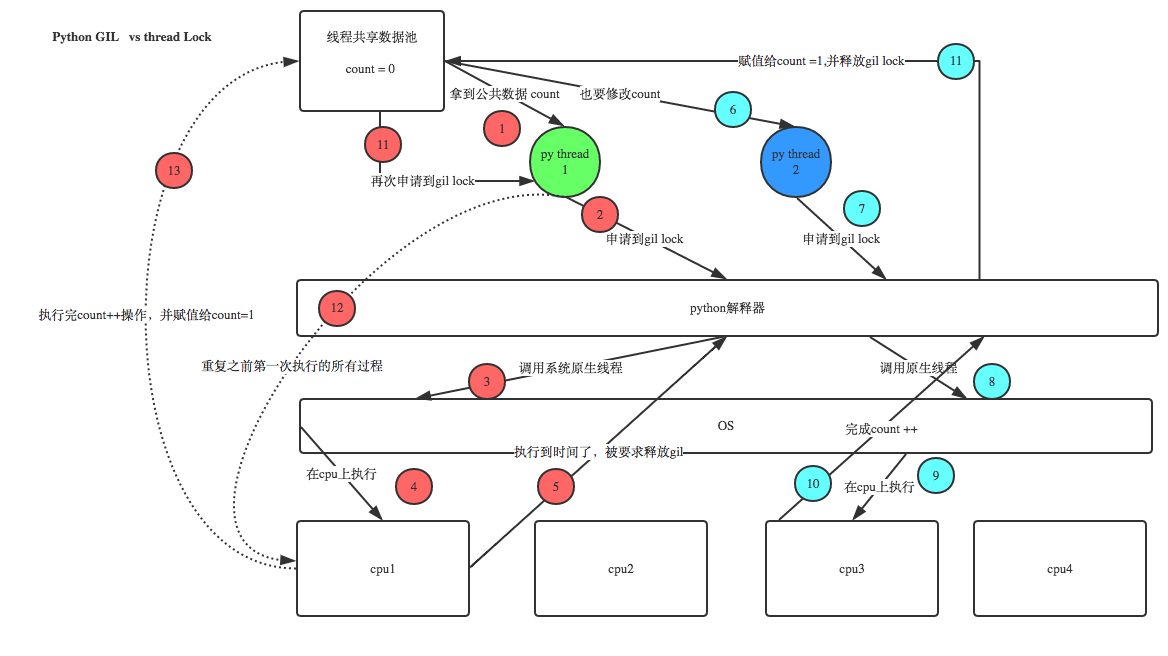
正常来讲,这个num结果应该是0, 但在python 2.7上多运行几次,会发现,最后打印出来的num结果不总是0,为什么每次运行的结果不一样呢? 哈,很简单,假设你有A,B两个线程,此时都 要对num 进行减1操作, 由于2个线程是并发同时运行的,所以2个线程很有可能同时拿走了num=100这个初始变量交给cpu去运算,当A线程去处完的结果是99,但此时B线程运算完的结果也是99,两个线程同时CPU运算的结果再赋值给num变量后,结果就都是99。那怎么办呢? 很简单,每个线程在要修改公共数据时,为了避免自己在还没改完的时候别人也来修改此数据,可以给这个数据加一把锁, 这样其它线程想修改此数据时就必须等待你修改完毕并把锁释放掉后才能再访问此数据。
*注:不要在3.x上运行,不知为什么,3.x上的结果总是正确的,可能是自动加了锁
对程序进行加锁
import time
import threading


def addNum():
    global num  # 在每个线程中都获取这个全局变量
    print('--get num:', num)
    time.sleep(1)
    lock.acquire()  # 修改数据前加锁
    num -= 1  # 对此公共变量进行-1操作
    lock.release()  # 修改后释放


num = 100  # 设定一个共享变量
thread_list = []
lock = threading.Lock()  # 生成全局锁
for i in range(100):
    t = threading.Thread(target=addNum)
    t.start()
    thread_list.append(t)

for t in thread_list:  # 等待所有线程执行完毕
    t.join()

print('final num:', num)
机智的同学可能会问到这个问题,就是既然你之前说过了,Python已经有一个GIL来保证同一时间只能有一个线程来执行了,为什么这里还需要lock? 注意啦,这里的lock是用户级的lock,跟那个GIL没关系 ,具体我们通过下图来看一下
5、RLock 递归锁
当一个大锁中还要再包含子锁的时候,如果再用threading.Lock的话,程序锁和钥匙会出现对不上的情况,这时候就需要用到递归锁
import threading, time


def run1():
    print("grab the first part data")
    lock.acquire()
    global num
    num += 1
    lock.release()
    return num


def run2():
    print("grab the second part data")
    lock.acquire()
    global num2
    num2 += 1
    lock.release()
    return num2


def run3():
    lock.acquire()
    res = run1()
    print('--------between run1 and run2-----')
    res2 = run2()
    lock.release()
    print(res, res2)


if __name__ == '__main__':

    num, num2 = 0, 0
    lock = threading.RLock()
    for i in range(10):
        t = threading.Thread(target=run3)
        t.start()

while threading.active_count() != 1:
    print(threading.active_count())
else:
    print('----all threads done---')
    print(num, num2)
递归锁实现原理其实很简单,只是把每次锁和钥匙对应记录起来,就不是出现锁死的情况
6、Semaphore 信号量
Mutex 同时只允许一个线程更改数据,而Semaphore是同时允许一定数量的线程更改数据 ,比如厕所有3个坑,那最多只允许3个人上厕所,后面的人只能等里面有人出来了才能再进去。
import threading, time


def run(n):
    semaphore.acquire()
    time.sleep(1)
    print("run the thread: %s\n" % n)
    semaphore.release()


if __name__ == '__main__':

    num = 0
    semaphore = threading.BoundedSemaphore(5)  # 最多允许5个线程同时运行
    for i in range(20):
        t = threading.Thread(target=run, args=(i,))
        t.start()

while threading.active_count() != 1:
    pass  # print threading.active_count()
else:
    print('----all threads done---')
    print(num)
实现效果,每次同时执行5个线程
7、Event
通过Event来实现两个或多个线程间的交互,下面是一个红绿灯的例子,即起动一个线程做交通指挥灯,生成几个线程做车辆,车辆行驶按红灯停,绿灯行的规则。
import threading,time

def light():
    count = 0
    while True:
        if count < 10:      #红灯
            print("\033[41;1m红灯\033[0m",10-count)
        elif count >= 10 and count < 30:    #绿灯
            event.set() # 设置标志位
            print("\033[42;1m绿灯\033[0m",30-count)
        else:
            event.clear() #把标志位清空
            count = 0
        time.sleep(1)
        count +=1

def car(n):
    while True:
        if event.is_set():
            print("\033[32;0m[%s]在路上飞奔.....\033[0m"%n)
        else:
            print("\033[31;0m[%s]等红灯等的花都谢了.....\033[0m" % n)
        time.sleep(1)

if __name__ == "__main__":
    event = threading.Event()
    light = threading.Thread(target=light)
    light.start()
    car = threading.Thread(target=car,args=("tesla",))
    car.start()
8、queue
实现解耦、队列;先进先出,后进后出(当get不到数据时,会一直卡着等待数据)
import queue


q = queue.Queue()
for i in range(10):
    q.put(i)

for t in range(10):
    print(q.get())

# 0
# 1
# 2
# 3
# 4
# 5
# 6
# 7
# 8
# 9


queue is especially useful in threaded programming when information must be exchanged safely between multiple threads.

class queue.Queue(maxsize=0) #先入先出
class queue.LifoQueue(maxsize=0) #last in fisrt out
class queue.PriorityQueue(maxsize=0) #存储数据时可设置优先级的队列
Constructor for a priority queue. maxsize is an integer that sets the upperbound limit on the number of items that can be placed in the queue. Insertion will block once this size has been reached, until queue items are consumed. If maxsize is less than or equal to zero, the queue size is infinite.

The lowest valued entries are retrieved first (the lowest valued entry is the one returned by sorted(list(entries))[0]). A typical pattern for entries is a tuple in the form: (priority_number, data).

exception queue.Empty
Exception raised when non-blocking get() (or get_nowait()) is called on a Queue object which is empty.

exception queue.Full
Exception raised when non-blocking put() (or put_nowait()) is called on a Queue object which is full.

Queue.qsize()
Queue.empty() #return True if empty
Queue.full() # return True if full
Queue.put(item, block=True, timeout=None)
Put item into the queue. If optional args block is true and timeout is None (the default), block if necessary until a free slot is available. If timeout is a positive number, it blocks at most timeout seconds and raises the Full exception if no free slot was available within that time. Otherwise (block is false), put an item on the queue if a free slot is immediately available, else raise the Full exception (timeout is ignored in that case).

Queue.put_nowait(item)
Equivalent to put(item, False).

Queue.get(block=True, timeout=None)
Remove and return an item from the queue. If optional args block is true and timeout is None (the default), block if necessary until an item is available. If timeout is a positive number, it blocks at most timeout seconds and raises the Empty exception if no item was available within that time. Otherwise (block is false), return an item if one is immediately available, else raise the Empty exception (timeout is ignored in that case).

Queue.get_nowait()
Equivalent to get(False).

Two methods are offered to support tracking whether enqueued tasks have been fully processed by daemon consumer threads.

Queue.task_done()
Indicate that a formerly enqueued task is complete. Used by queue consumer threads. For each get() used to fetch a task, a subsequent call to task_done() tells the queue that the processing on the task is complete.

If a join() is currently blocking, it will resume when all items have been processed (meaning that a task_done() call was received for every item that had been put() into the queue).

Raises a ValueError if called more times than there were items placed in the queue.

Queue.join() block直到queue被消费完毕

更多..
二、进程
要以一个整体的形式暴露给操作系统管理,里面包含了对各种资源的调用,内存的管理,网络接口的调用等;对各种资源的管理集合,就可以称为进程
进程与线程详细对比-》 点击
|
1
2
3
4
5
6
7
8
9
10
11
12
13
14
15
16
17
18
19
20
21
22
23
24
25
26
27
28
29
|
import threading,timedef run(n): print('[%s]------running----\n' % n) time.sleep(2) print('--done--')def main(): for i in range(5): t = threading.Thread(target=run, args=[i, ]) t.start() t.join(1) print('starting thread', t.getName())m = threading.Thread(target=main, args=[])m.setDaemon(True) # 将main线程设置为Daemon线程,它做为程序主线程的守护线程,当主线程退出时, # m线程也会退出,由m启动的其它子线程会同时退出,不管是否执行完任务m.start()m.join(timeout=2)print("---main thread done----")# 程序输出# [0]------running----# starting thread Thread-2# [1]------running----# --done--# ---main thread done---- |

 浙公网安备 33010602011771号