SQL Server AlwaysON无法配置侦听器报错的常见问题解决
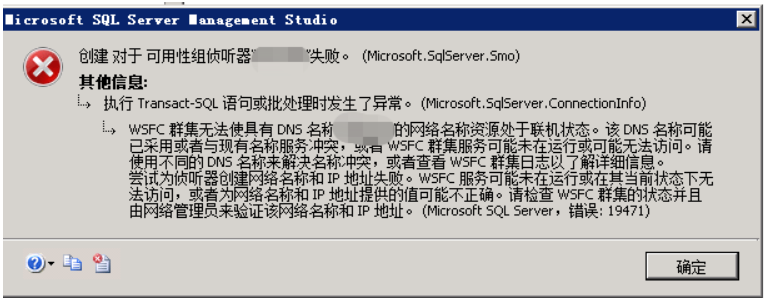
报错信息如下:
Msg 19471, Level 16, State 0, Line 2
The WSFC cluster could not bring the Network Name resource with DNS name '<DNS name>' online. The DNS name may have been taken or have a conflict with existing name services, or the WSFC cluster service may not be running or may be inaccessible. Use a different DNS name to resolve name conflicts, or check the WSFC cluster log for more information.
Msg 19476, Level 16, State 4, Line 2
The attempt to create the network name and IP address for the listener failed. The WSFC service may not be running or may be inaccessible in its current state, or the values provided for the network name and IP address may be incorrect. Check the state of the WSFC cluster and validate the network name and IP address with the network administrator.
主要失败原因的诊断:
1.用Powershell运行;get-clusterlog
2.参考这两篇文章查看群集日志:
如果有类使用以下记录,就是CNO权限问题:
00000be0.00001a4c::2014/03/18-15:32:06.068 INFO [RES] Network Name <ag_aglisten>: Using domain controller\DC.AGDC.COM.
00000be0.00001a4c::2014/03/18-15:32:06.237 INFO [RES] Network Name <ag_aglisten>: Failed to find a computer account for aglisten. Attempting to create one on DC \DC.AGDC.COM.
00000be0.00001a4c::2014/03/18-15:32:06.237 INFO [RES] Network Name <ag_aglisten>: Trying NetUserAdd() to create computer account aglisten on DC \DC.AGDC.COM in default Computers container
00000be0.00001a4c::2014/03/18-15:32:06.295 ERR [RES] Network Name <ag_aglisten>: Unable to create computer account aglisten on DC \\DC.AGDC.COM, in default Computers container, status 5
000004f8.00002154::2014/03/18-15:32:06.491 INFO [RCM] rcm::RcmGum::SetDependencies(ag_aglisten)
00000be0.00001a4c::2014/03/18-15:32:06.492 ERR [RHS] Online for resource ag_aglisten failed.
CNO权限问题的解决方法:
1.在域控端打开Active Directory Users and Computers
2.右击''查看’ 选中’高级功能‘
3.找到‘Cumputer'文件夹或者用了创建侦听器的文件夹
4.右击‘Computer' 选择’ 属性‘ ,到’安全性‘页面,点击’添加‘
5.点击’对象类型‘,把’Computer'选上,然后输入CNO,点击‘确定’
6.返回‘安全性’页面,选中刚添加的CNO,然后点击右下角’高级‘,然后添加’读取所有属性‘,’创建计算机对象‘
7.尝试重新创建侦听器

 浙公网安备 33010602011771号