
Linux release 7.9+nginx/1.18.0+PHP 7.1.20+mysql-5.5.32+discuz3.4完美搭建(SSL+http重定向需要扩展)
最近搭建了一个公司自己的BBS论坛。纯属学习。希望大家多多支持我的BBS。
http://bbs.dgpm.co:8800
这个是试用网址。
-------------------------------------------------------------------------------------------------------------------------
好了,不闲聊了,说说我是怎么搭建的吧!
我的环境是LNMP架构。
Linux release 7.9+nginx/1.18.0+mysql-5.5.32+PHP 7.1.20
linux的搭建,我就不说了吧!我是按的传统分区,空间也不是很大。
sawp /boot / 就三个分区,没有分/home 。
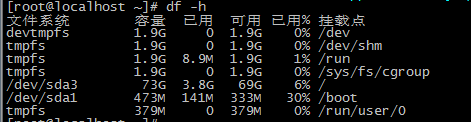


大概就是这样。
-------------------------------------------------------------------------------------------------------------------------------
wget ftp://mcrypt.hellug.gr/pub/crypto/mcrypt/libmcrypt/libmcrypt-2.5.7.tar.gz
wget https://gitee.com/3dming/DiscuzL/attach_files/644299/download

这里面要的一些软件,大家自己去下载。
nginx我是源码安装的。
tar xf nginx-1.18.0.tar.gz
cd nginx-1.18.0/
useradd nginx -s /sbin/nologin -M
这是nginx编译安装的参数。
./configure --prefix=/application/nginx-1.6.2 --user=nginx --group=nginx --with-http_ssl_module --with-http_stub_status_module
开始编译和安装
make && make install
echo $?
没问题nginx就安装好了。
具体安装参考我这篇博文吧。https://www.cnblogs.com/davidz/p/14626957.html
我把nginx里的一些配置文件发布出来。

nginx.conf
worker_processes  2;
events {
    worker_connections  1024;
}
http {
    include       mime.types;
    default_type  application/octet-stream;
    error_log logs/error.log error;
    log_format  main  '$remote_addr - $remote_user [$time_local] "$request" '
                      '$status $body_bytes_sent "$http_referer" '
                      '"$http_user_agent" "$http_x_forwarded_for"';
    sendfile        on;
    keepalive_timeout  65;
    #nginx vhosts config
    include extra/www.conf;
    include extra/bbs.conf;
    include extra/blog.conf;
    include extra/status.conf;
}
然后就是bbs.conf

server {
        listen  8800;
        server_name 域名;
        root   html/bbs;
        location / {
            index index.php index.html index.htm;
        }
        location ~ .*\.(php|php5)?$ {
            fastcgi_pass 127.0.0.1:9000;
            fastcgi_index index.php;
            include fastcgi.conf;
        }
        access_log  logs/access_bbs.log  main;
        error_page   500 502 503 504  /50x.html;
        location = /50x.html {
            root   html;
        }
    }
nginx就安装好了,到这里大家就测试一下。

然后就是mysql.
大家参考博文https://www.cnblogs.com/davidz/p/14628145.html
最后是php。
php还是挺麻烦的,我找了好多资料,因为安装的7.1.20的版本还比较新吧!
先安装php一些必要安装的组件 libiconv-1.14。
tar xf libiconv-1.14.tar.gz
ls
mv libiconv-1.14 /application/
ln -s /application/libiconv-1.14/ /application/libiconv
cd /application/
cd libiconv
./configure --prefix=/usr/local/libiconv
echo $?
make && make install
echo $?
-------------------------------------------------------------------------------------
yum install zlib-devel libxml2-devel libjpeg-devel libiconv-devel
yum install freetype-devel libpng-devel gd-devel curl-devel libxslt-devel
yum install libcurl-devdel libmcrypt-devel mhash mcrypt
yum install libxslt-devel libmcrypt-devel
yum install libtool-ltdl.x86_64 libtool-ltdl-devel.x86_64
yum install libxslt-devel libmcrypt-devel
yum install libcurl-devdel libmcrypt-devel mhash mcrypt
yum install libxslt-devel libmcrypt-devel
yum install libcurl-devdel libmcrypt-devel mhash mcrypt
差不多行了。
tar xf php-7.1.20.tar.gz
cd php-7.1.20/
cd ext/phar/
touch /software/php-7.1.20/ext/phar/phar.phar
echo "/application/mysql/lib" >>/etc/ld.so.conf.d/mysql.conf
cat /etc/ld.so.conf.d/mysql.conf
ldconfig
yum install glibc-headers
yum install gcc-c++
yum install libxslt-devel libjpeg libjpeg-devel libpng libpng-devel freetype freetype-devel libxml2 libxml2-devel zlib zlib-devel glibc glibc-devel glib2 glib2-devel bzip2 bzip2-devel ncurses ncurses-devel curl curl-devel e2fspro
gs e2fsprogs-devel krb5 krb5-devel libidn libidn-devel openssl openssl-devel mhash autoconf
wget ftp://mcrypt.hellug.gr/pub/crypto/mcrypt/libmcrypt/libmcrypt-2.5.7.tar.gz
cd libmcrypt-2.5.7
./configure --prefix=/usr/local/lib/libmcrypt
echo $?
make && make install
源码安装php7.1.20
cd php-7.1.20/
./configure --prefix=/application/php-7.1.20 --with-config-file-path=/etc --with-mysql=/application/mysql --enable-fpm --enable-inline-optimization --disable-debug --disable-rpath --enable-shared --enable-soap --with-libxml-dir -
-with-xmlrpc --with-openssl --with-mcrypt --with-mhash --with-pcre-regex --with-sqlite3 --with-zlib --enable-bcmath --with-iconv --with-bz2 --enable-calendar --with-curl --with-cdb --enable-dom --enable-exif --enable-fileinfo --enable-fi
lter --with-pcre-dir --enable-ftp --with-gd --with-openssl-dir --with-jpeg-dir --with-png-dir --with-zlib-dir --with-freetype-dir --enable-gd-native-ttf --enable-gd-jis-conv --with-gettext --with-gmp --with-mhash --enable-json --enable-
mbstring --enable-mbregex --enable-mbregex-backtrack --with-libmbfl --with-onig --enable-pdo --with-mysqli=mysqlnd --with-pdo-mysql=mysqlnd --with-zlib-dir --with-pdo-sqlite --with-readline --enable-session --enable-shmop --enable-simple
xml --enable-sockets --enable-sysvmsg --enable-sysvsem --enable-sysvshm --enable-wddx --with-libxml-dir --with-xsl --enable-zip --enable-mysqlnd-compression-support --with-pear --enable-opcache=yes
echo $?
make && make install
cd /application/php/
cd etc
cp php-fpm.conf.default php-fpm.conf
cd php-fpm.d/
ls
cp www.conf.default www.conf
启动php
/application/php/sbin/php-fpm
lsof -i:9000
检查。
设置nginx和php开机启动。
ls /lib/systemd/system/nginx.service
touch /lib/systemd/system/nginx.service
vim
systemctl start nginx.service
lsof -i:80
systemctl enable nginx.service
以下是nginx.service
[Unit]
Description=nginx service
After=network.target

[Service]
Type=forking
ExecStart=/application/nginx/sbin/nginx
ExecReload=/application/nginx/sbin/nginx -s reload
ExecStop=/application/nginx/sbin/nginx -s quit
PrivateTmp=true

[Install]
WantedBy=multi-user.target
php开机启动
which php-fpm
find / -name php-fpm.conf
cat /application/php-7.1.20/etc/php-fpm.conf|grep pid
ls /etc/systemd/system/php-fpm.service
vim /etc/systemd/system/php-fpm.service
systemctl stop php-fpm
lsof -i:9000
systemctl stop php-fpm.service
ls /etc/systemd/system/php-fpm.service
cat /etc/systemd/system/php-fpm.service
lsof -i:9000
killall php-fpm
lsof -i:9000
systemctl start php-fpm.service
lsof -i:9000
systemctl enable php-fpm.service
lsof -i:9000
以下是php-fpm.service
[Unit]
Description=The PHP FastCGI Process Manager
After=syslog.target network.target

[Service]
Type=simple
PIDFile=run/php-fpm.pid
ExecStart=/application/php/sbin/php-fpm --nodaemonize --fpm-config /application/php/etc/php-fpm.conf
ExecReload=/bin/kill -USR2 $MAINPID
ExecStop=/bin/kill -SIGINT $MAINPID

[Install]
WantedBy=multi-user.target
lnmp环境搭建好,没有了问题,就可以安装discuz了。
discuz安装好了,就要做一些简单的优化。比如伪静态。
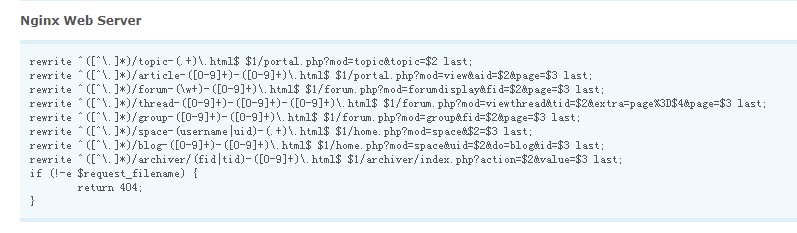
添加到bbs.conf
server {
        listen  8800;
        server_name 你的域名;
        root   html/bbs;
        location / {
            index index.php index.html index.htm;

rewrite ^([^\.]*)/topic-(.+)\.html$ $1/portal.php?mod=topic&topic=$2 last;
rewrite ^([^\.]*)/article-([0-9]+)-([0-9]+)\.html$ $1/portal.php?mod=view&aid=$2&page=$3 last;
rewrite ^([^\.]*)/forum-(\w+)-([0-9]+)\.html$ $1/forum.php?mod=forumdisplay&fid=$2&page=$3 last;
rewrite ^([^\.]*)/thread-([0-9]+)-([0-9]+)-([0-9]+)\.html$ $1/forum.php?mod=viewthread&tid=$2&extra=page%3D$4&page=$3 last;
rewrite ^([^\.]*)/group-([0-9]+)-([0-9]+)\.html$ $1/forum.php?mod=group&fid=$2&page=$3 last;
rewrite ^([^\.]*)/space-(username|uid)-(.+)\.html$ $1/home.php?mod=space&$2=$3 last;
rewrite ^([^\.]*)/blog-([0-9]+)-([0-9]+)\.html$ $1/home.php?mod=space&uid=$2&do=blog&id=$3 last;
rewrite ^([^\.]*)/archiver/(fid|tid)-([0-9]+)\.html$ $1/archiver/index.php?action=$2&value=$3 last;
if (!-e $request_filename) {
        return 404;
}
}
        location ~ .*\.(php|php5)?$ {
            fastcgi_pass 127.0.0.1:9000;
            fastcgi_index index.php;
            include fastcgi.conf;
        }
        access_log  logs/access_bbs.log  main;
        error_page   500 502 503 504  /50x.html;
        location = /50x.html {
            root   html;
        }
    }
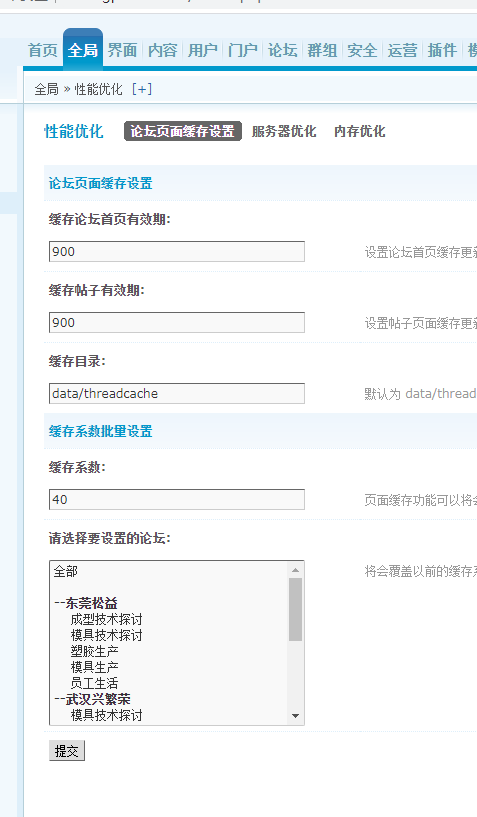
全局性能优化一下。

 浙公网安备 33010602011771号