
windows使用jupyter notebook读取文件路径的几种方法和设置默认打开路径
简单分享小虎这段时间以来学到的jupyter notebook操作技巧。
读取特定路径
r表示当前路径recent。
plt.savefig(r"Graphics/B06162_08_17.png")
以下是实例:
data_folder = "C:/Users/Anthony Dave/Desktop/Complier/Learning-Data-Mining-with-Python-Second-Edition-master/Chapter05"
adult_filename = os.path.join(data_folder, "adult.data")
或者
data_folder = "C:\\Users\\Anthony Dave\\Desktop\\Complier\\Learning-Data-Mining-with-Python-Second-Edition-master\\Chapter05"
adult_filename = os.path.join(data_folder, "adult.data")
或者
data_folder = os.path.join(os.path.expanduser("~"), "Desktop/Complier/Learning-Data-Mining-with-Python-Second-Edition-master", "Chapter05")
adult_filename = os.path.join(data_folder, "adult.data")
或者
adult_filename = os.path.join(r"adult.data")
设置默认打开路径
cmd中输入jupyter notebook --generate-config查看路径,显示如下
C:\Users\Anthony Dave\.jupyter\jupyter_notebook_config.py with default config?
打开上述路径文件,Ctrl+F搜索#c.NotebookApp.notebook_dir = '',改成如下
c.NotebookApp.notebook_dir = '/the/path/to/home/folder/' (forwardslash)
比如小虎的:
c.NotebookApp.notebook_dir = "C:/Users/Anthony Dave/Desktop/Complier/"
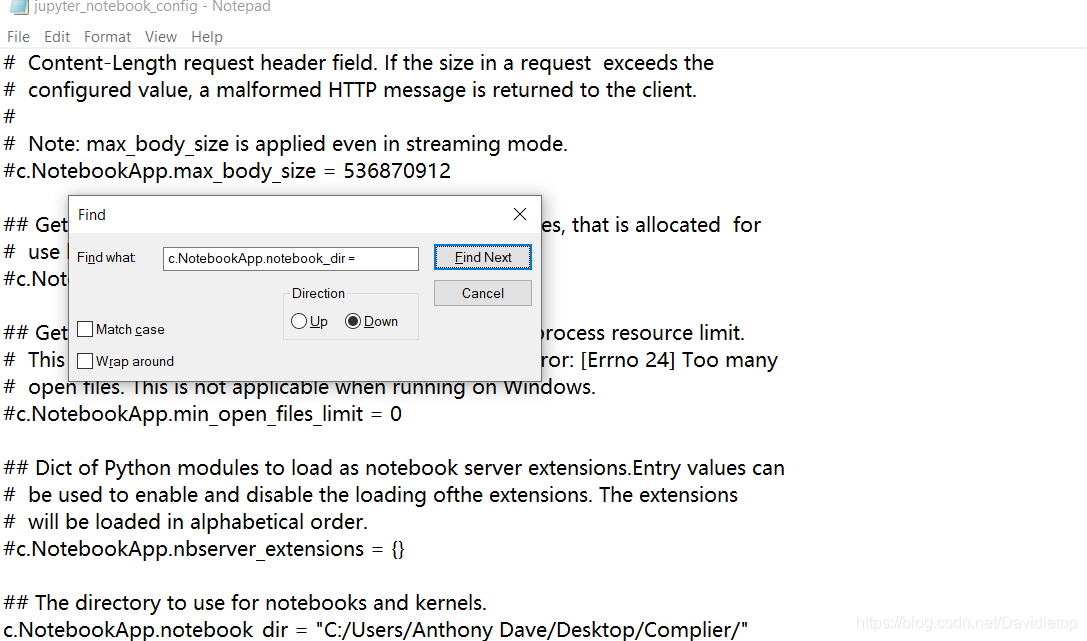
设置路径翻译自How to change the Jupyter start-up folder
其他操作技巧
按路径打开
将目录移到工作文件夹
cd your directory
然后输入下面代码打开。
jupyter notebook
注释
注释 Ctrl + /
程序块
创建一个新程序块 Alt + Enter
运行当前程序块Shift + Enter
对齐
左对齐Shift + Tap/Ctrl + [
右对齐Shift + Tap/Ctrl + [

 浙公网安备 33010602011771号