
部署docker 及docker 部署应用
docker 安装步骤
1.确定你是CentOS7及以上版本,yum安装gcc相关环境(需要确保 虚拟机可以上外网 )
yum -y install gcc
yum -y install gcc-c++
2.卸载旧版本
yum remove docker \
docker-client \
docker-client-latest \
docker-common \
docker-latest \
docker-latest-logrotate \
docker-logrotate \
docker-engine
3.安装需要的软件包
yum install -y yum-utils
4.设置镜像仓库
# 正确推荐使用国内的
yum-config-manager --add-repo http://mirrors.aliyun.com/docker-ce/linux/centos/docker-ce.repo
5.更新yum软件包索引
yum makecache fast
6.安装 Docker CE
yum install docker-ce docker-ce-cli containerd.io
7.启动 Docker
systemctl start docker && systemctl enable docker
8.测试命令
docker version
9.卸载
systemctl stop docker
yum -y remove docker-ce docker-ce-cli containerd.io
rm -rf /var/lib/docker
10.阿里云镜像加速 ----https://www.aliyun.com/product/acr

配置镜像加速
sudo mkdir -p /etc/docker
sudo tee /etc/docker/daemon.json <<-'EOF'
{
"registry-mirrors": ["https://qiyb9988.mirror.aliyuncs.com"]
}
EOF
sudo systemctl daemon-reload
sudo systemctl restart docker3
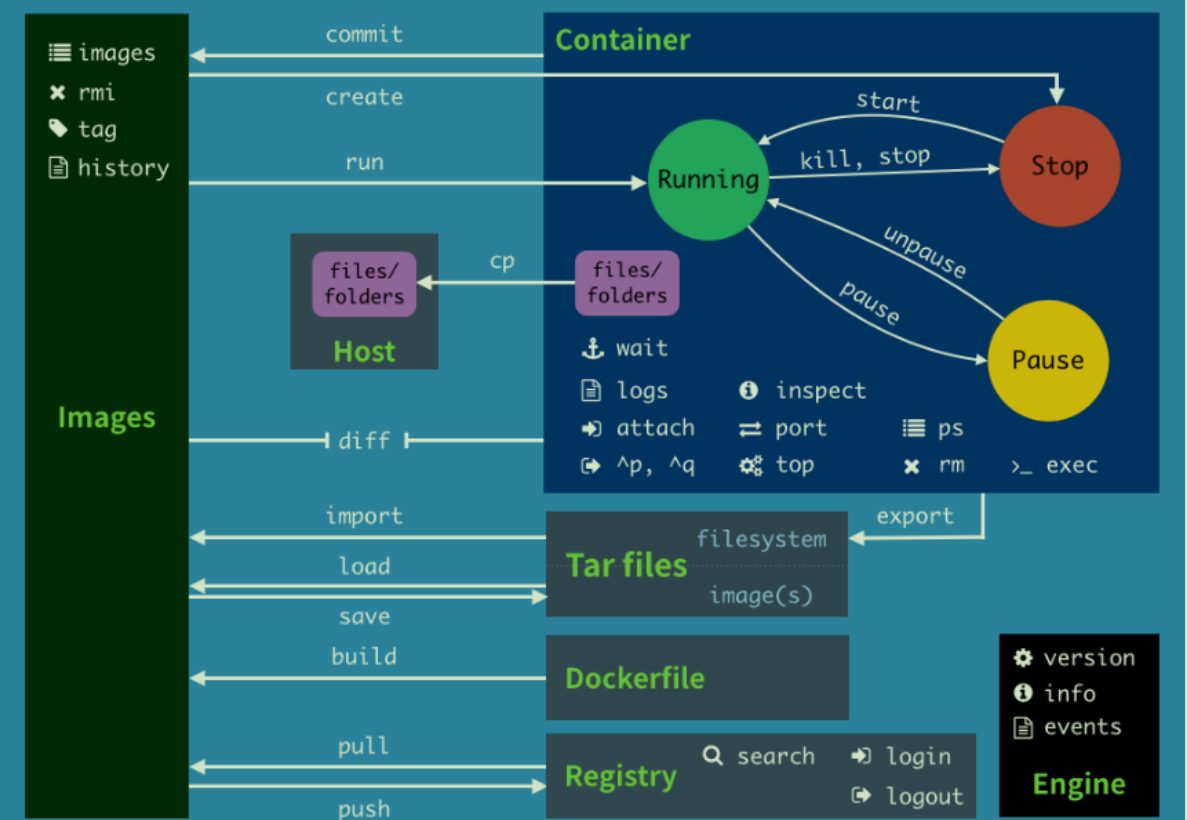
attach Attach to a running container # 当前 shell 下attach 连接指定运行镜像
build Build an image from a Dockerfile # 通过 Dockerfile 定制镜像
commit Create a new image from a container changes # 提交当前容器为新的镜像
cp Copy files/folders from the containers filesystem to the host path #从容器中拷贝指定文件或者目录到宿主机中
create Create a new container # 创建一个新的容器,同run,但不启动容器
diff Inspect changes on a container's filesystem # 查看 docker 容器变化
events Get real time events from the server # 从 docker 服务获取容器实时事件
exec Run a command in an existing container # 在已存在的容器上运行命令
export Stream the contents of a container as a tar archive # 导出容器的内容流作为一个 tar 归档文件[对应 import ]
history Show the history of an image # 展示一个镜像形成历史
images List images # 列出系统当前镜像
import Create a new filesystem image from the contents of a tarball # 从tar包中的内容创建一个新的文件系统映像[对应export]
info Display system-wide information # 显示系统相关信息
inspect Return low-level information on a container # 查看容器详细信息
kill Kill a running container # kill 指定 docker 容器
load Load an image from a tar archive # 从一个 tar 包中加载一个镜像[对应 save]
login Register or Login to the docker registry server # 注册或者登陆一个docker 源服务器
logout Log out from a Docker registry server # 从当前 Docker registry 退出
logs Fetch the logs of a container # 输出当前容器日志信息
port Lookup the public-facing port which is NAT-ed to PRIVATE_PORT #查看映射端口对应的容器内部源端口
pause Pause all processes within a container # 暂停容器
ps List containers # 列出容器列表
pull Pull an image or a repository from the docker registry server #从docker镜像源服务器拉取指定镜像或者库镜像
push Push an image or a repository to the docker registry server #推送指定镜像或者库镜像至docker源服务器
restart Restart a running container # 重启运行的容器
rm Remove one or more containers # 移除一个或者多个容器
rmi Remove one or more images # 移除一个或多个镜像[无容器使用该镜像才可删除,否则需删除相关容器才可继续或 -f 强制删除]
run Run a command in a new container # 创建一个新的容器并运行一个命令
save Save an image to a tar archive # 保存一个镜像为一个tar 包[对应 load]
search Search for an image on the Docker Hub # 在 docker hub 中搜索镜像
start Start a stopped containers # 启动容器
stop Stop a running containers # 停止容器
tag Tag an image into a repository # 给源中镜像打标签
top Lookup the running processes of a container # 查看容器中运行的进程信息
unpause Unpause a paused container # 取消暂停容器
version Show the docker version information # 查看 docker 版本号
wait Block until a container stops, then print its exit code # 截取容器停止时的退出状态值
查看网络流向节点命令 traceroute +IP
docker 部署portainer 图形化docker单机版
docker run -d -p 8088:9000 --restart=always -v /var/run/docker.sock:/var/run/docker.sock --privileged=true portainer/portainer
Compose :重要的概念
curl -L https://get.daocloud.io/docker/compose/releases/download/1.25.5/docker-compose-`uname -s`-`uname -m` > /usr/local/bin/docker-compose
授权
sudo chmod +x /usr/local/bin/docker-compose
docker-compose YAML文件编写规则
https://docs.docker.com/compose/compose-file/#compose-file-structure-and-examples
官网文档
https://docs.docker.com/compose/compose-file/#specifying-durations
YMAL总共分位 3层!
version: '' # 版本
services: # 服务
服务1: web
# 服务配置
images
build
network
.....
服务2: redis
....
服务3: redis
# 其他配置 网络/卷、全局规则
volumes:
networks:
configs:
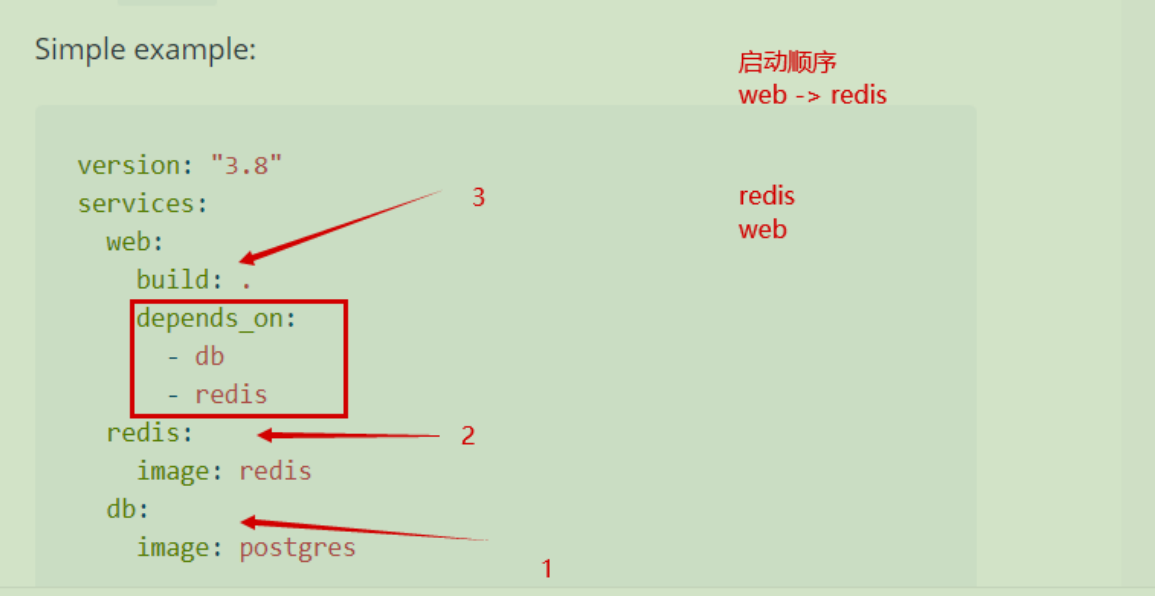
depends_on的用法

 浙公网安备 33010602011771号