
模块(2)
一、时间模块
- 时间戳(timestamp):通常来说,时间戳表示的是从1970年1月1日00:00:00开始按秒计算的偏移量。我们运行“type(time.time())”,返回的是float类型。
- 格式化的时间字符串(Format String)
- 结构化的时间(struct_time):struct_time元组共有9个元素共九个元素:(年,月,日,时,分,秒,一年中第几周,一年中第几天,夏令时)
import time
#--------------------------我们先以当前时间为准,让大家快速认识三种形式的时间
print(time.time()) # 时间戳:1487130156.419527
print(time.strftime("%Y-%m-%d %X")) #格式化的时间字符串:'2017-02-15 11:40:53'

print(time.localtime()) #本地时区的struct_time
print(time.gmtime())    #UTC时区的struct_time
%a    Locale’s abbreviated weekday name.
%A    Locale’s full weekday name.
%b    Locale’s abbreviated month name.
%B    Locale’s full month name.
%c    Locale’s appropriate date and time representation.
%d    Day of the month as a decimal number [01,31].
%H    Hour (24-hour clock) as a decimal number [00,23].
%I    Hour (12-hour clock) as a decimal number [01,12].
%j    Day of the year as a decimal number [001,366].
%m    Month as a decimal number [01,12].
%M    Minute as a decimal number [00,59].
%p    Locale’s equivalent of either AM or PM.    (1)
%S    Second as a decimal number [00,61].    (2)
%U    Week number of the year (Sunday as the first day of the week) as a decimal number [00,53]. All days in a new year preceding the first Sunday are considered to be in week 0.    (3)
%w    Weekday as a decimal number [0(Sunday),6].
%W    Week number of the year (Monday as the first day of the week) as a decimal number [00,53]. All days in a new year preceding the first Monday are considered to be in week 0.    (3)
%x    Locale’s appropriate date representation.
%X    Locale’s appropriate time representation.
%y    Year without century as a decimal number [00,99].
%Y    Year with century as a decimal number.
%z    Time zone offset indicating a positive or negative time difference from UTC/GMT of the form +HHMM or -HHMM, where H represents decimal hour digits and M represents decimal minute digits [-23:59, +23:59].
%Z    Time zone name (no characters if no time zone exists).
%%    A literal '%' character.

格式化字符串的时间格式


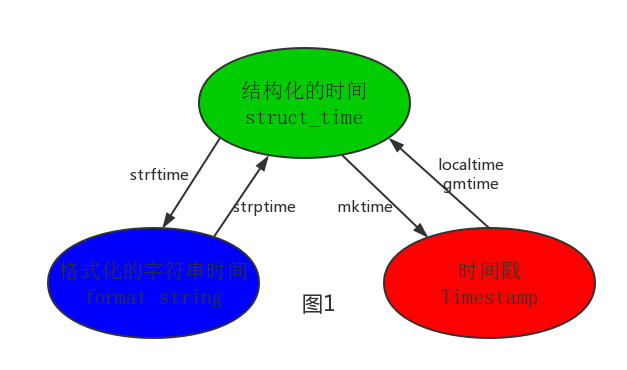
#--------------------------按图1转换时间
# localtime([secs])
# 将一个时间戳转换为当前时区的struct_time。secs参数未提供,则以当前时间为准。
time.localtime()
time.localtime(1473525444.037215)

# gmtime([secs]) 和localtime()方法类似,gmtime()方法是将一个时间戳转换为UTC时区(0时区)的struct_time。

# mktime(t) : 将一个struct_time转化为时间戳。
print(time.mktime(time.localtime()))#1473525749.0


# strftime(format[, t]) : 把一个代表时间的元组或者struct_time(如由time.localtime()和
# time.gmtime()返回)转化为格式化的时间字符串。如果t未指定,将传入time.localtime()。如果元组中任何一个
# 元素越界,ValueError的错误将会被抛出。
print(time.strftime("%Y-%m-%d %X", time.localtime()))#2016-09-11 00:49:56

# time.strptime(string[, format])
# 把一个格式化时间字符串转化为struct_time。实际上它和strftime()是逆操作。
print(time.strptime('2011-05-05 16:37:06', '%Y-%m-%d %X'))
#time.struct_time(tm_year=2011, tm_mon=5, tm_mday=5, tm_hour=16, tm_min=37, tm_sec=6,
#  tm_wday=3, tm_yday=125, tm_isdst=-1)
#在这个函数中,format默认为:"%a %b %d %H:%M:%S %Y"。
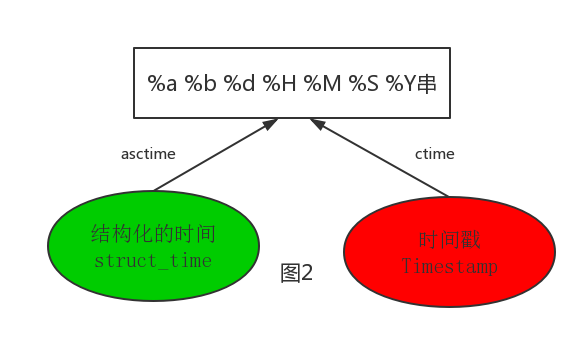
#--------------------------按图2转换时间
# asctime([t]) : 把一个表示时间的元组或者struct_time表示为这种形式:'Sun Jun 20 23:21:05 1993'。
# 如果没有参数,将会将time.localtime()作为参数传入。
print(time.asctime())#Sun Sep 11 00:43:43 2016

# ctime([secs]) : 把一个时间戳(按秒计算的浮点数)转化为time.asctime()的形式。如果参数未给或者为
# None的时候,将会默认time.time()为参数。它的作用相当于time.asctime(time.localtime(secs))。
print(time.ctime())  # Sun Sep 11 00:46:38 2016
print(time.ctime(time.time()))  # Sun Sep 11 00:46:38 2016
时间加减:
#时间加减
import datetime

# print(datetime.datetime.now()) #返回 2016-08-19 12:47:03.941925
#print(datetime.date.fromtimestamp(time.time()) )  # 时间戳直接转成日期格式 2016-08-19
# print(datetime.datetime.now() )
# print(datetime.datetime.now() + datetime.timedelta(3)) #当前时间+3天
# print(datetime.datetime.now() + datetime.timedelta(-3)) #当前时间-3天
# print(datetime.datetime.now() + datetime.timedelta(hours=3)) #当前时间+3小时
# print(datetime.datetime.now() + datetime.timedelta(minutes=30)) #当前时间+30分


#
# c_time  = datetime.datetime.now()
# print(c_time.replace(minute=3,hour=2)) #时间替换

datetime模块
二、random模块
import random

print(random.random())#(0,1)----float    大于0且小于1之间的小数

print(random.randint(1,3))  #[1,3]    大于等于1且小于等于3之间的整数

print(random.randrange(1,3)) #[1,3)    大于等于1且小于3之间的整数

print(random.choice([1,'23',[4,5]]))#1或者23或者[4,5]

print(random.sample([1,'23',[4,5]],2))#列表元素任意2个组合

print(random.uniform(1,3))#大于1小于3的小数,如1.927109612082716


item=[1,3,5,7,9]
random.shuffle(item) #打乱item的顺序,相当于"洗牌"
print(item)
import random
def make_code(n):
    res=''
    for i in range(n):
        s1=chr(random.randint(65,90))
        s2=str(random.randint(0,9))
        res+=random.choice([s1,s2])
    return res

print(make_code(9))

生成随机验证码
三、OS模块
1.os模块是与操作系统交互的一个接口
os.getcwd() 获取当前工作目录,即当前python脚本工作的目录路径
os.chdir("dirname")  改变当前脚本工作目录;相当于shell下cd
os.curdir  返回当前目录: ('.')
os.pardir  获取当前目录的父目录字符串名:('..')
os.makedirs('dirname1/dirname2')    可生成多层递归目录
os.removedirs('dirname1')    若目录为空,则删除,并递归到上一级目录,如若也为空,则删除,依此类推
os.mkdir('dirname')    生成单级目录;相当于shell中mkdir dirname
os.rmdir('dirname')    删除单级空目录,若目录不为空则无法删除,报错;相当于shell中rmdir dirname
os.listdir('dirname')    列出指定目录下的所有文件和子目录,包括隐藏文件,并以列表方式打印
os.remove()  删除一个文件
os.rename("oldname","newname")  重命名文件/目录
os.stat('path/filename')  获取文件/目录信息
os.sep    输出操作系统特定的路径分隔符,win下为"\\",Linux下为"/"
os.linesep    输出当前平台使用的行终止符,win下为"\t\n",Linux下为"\n"
os.pathsep    输出用于分割文件路径的字符串 win下为;,Linux下为:
os.name    输出字符串指示当前使用平台。win->'nt'; Linux->'posix'
os.system("bash command")  运行shell命令,直接显示
os.environ  获取系统环境变量
os.path.abspath(path)  返回path规范化的绝对路径
os.path.split(path)  将path分割成目录和文件名二元组返回
os.path.dirname(path)  返回path的目录。其实就是os.path.split(path)的第一个元素
os.path.basename(path)  返回path最后的文件名。如何path以/或\结尾,那么就会返回空值。即os.path.split(path)的第二个元素
os.path.exists(path)  如果path存在,返回True;如果path不存在,返回False
os.path.isabs(path)  如果path是绝对路径,返回True
os.path.isfile(path)  如果path是一个存在的文件,返回True。否则返回False
os.path.isdir(path)  如果path是一个存在的目录,则返回True。否则返回False
os.path.join(path1[, path2[, ...]])  将多个路径组合后返回,第一个绝对路径之前的参数将被忽略
os.path.getatime(path)  返回path所指向的文件或者目录的最后存取时间
os.path.getmtime(path)  返回path所指向的文件或者目录的最后修改时间
os.path.getsize(path) 返回path的大小
2.
在Linux和Mac平台上,该函数会原样返回path,在windows平台上会将路径中所有字符转换为小写,并将所有斜杠转换为饭斜杠。
>>> os.path.normcase('c:/windows\\system32\\')
'c:\\windows\\system32\\'


规范化路径,如..和/
>>> os.path.normpath('c://windows\\System32\\../Temp/')
'c:\\windows\\Temp'

>>> a='/Users/jieli/test1/\\\a1/\\\\aa.py/../..'
>>> print(os.path.normpath(a))
/Users/jieli/test1
3.OS路径处理
os路径处理
#方式一:推荐使用
import os
#具体应用
import os,sys
possible_topdir = os.path.normpath(os.path.join(
    os.path.abspath(__file__),
    os.pardir, #上一级
    os.pardir,
    os.pardir
))
sys.path.insert(0,possible_topdir)


#方式二:不推荐使用
os.path.dirname(os.path.dirname(os.path.dirname(os.path.abspath(__file__))))
四、sys模块
1 sys.argv 命令行参数List,第一个元素是程序本身路径
2 sys.exit(n) 退出程序,正常退出时exit(0)
3 sys.version 获取Python解释程序的版本信息
4 sys.maxint 最大的Int值
5 sys.path 返回模块的搜索路径,初始化时使用PYTHONPATH环境变量的值
6 sys.platform 返回操作系统平台名称
#=========知识储备==========
#进度条的效果
[#             ]
[##            ]
[###           ]
[####          ]

#指定宽度
print('[%-15s]' %'#')
print('[%-15s]' %'##')
print('[%-15s]' %'###')
print('[%-15s]' %'####')

#打印%
print('%s%%' %(100)) #第二个%号代表取消第一个%的特殊意义

#可传参来控制宽度
print('[%%-%ds]' %50) #[%-50s]
print(('[%%-%ds]' %50) %'#')
print(('[%%-%ds]' %50) %'##')
print(('[%%-%ds]' %50) %'###')


#=========实现打印进度条函数==========
import sys
import time

def progress(percent,width=50):
    if percent >= 1:
        percent=1
    show_str=('[%%-%ds]' %width) %(int(width*percent)*'#')
    print('\r%s %d%%' %(show_str,int(100*percent)),file=sys.stdout,flush=True,end='')


#=========应用==========
data_size=1025
recv_size=0
while recv_size < data_size:
    time.sleep(0.1) #模拟数据的传输延迟
    recv_size+=1024 #每次收1024

    percent=recv_size/data_size #接收的比例
    progress(percent,width=70) #进度条的宽度70

打印进度条
五、shutil模块
高级的 文件、文件夹、压缩包 处理模块
shutil.copyfileobj(fsrc, fdst[, length])
将文件内容拷贝到另一个文件中
1 import shutil
2
3 shutil.copyfileobj(open('old.xml','r'), open('new.xml', 'w'))
shutil.copyfile(src, dst)
拷贝文件
1 shutil.copyfile('f1.log', 'f2.log') #目标文件无需存在
shutil.copymode(src, dst)
仅拷贝权限。内容、组、用户均不变
1 shutil.copymode('f1.log', 'f2.log') #目标文件必须存在
shutil.copystat(src, dst)
仅拷贝状态的信息,包括:mode bits, atime, mtime, flags
1 shutil.copystat('f1.log', 'f2.log') #目标文件必须存在
shutil.copy(src, dst)
拷贝文件和权限
1 import shutil
2
3 shutil.copy('f1.log', 'f2.log')
shutil.copy2(src, dst)
拷贝文件和状态信息
1 import shutil
2
3 shutil.copy2('f1.log', 'f2.log')
shutil.ignore_patterns(*patterns)
shutil.copytree(src, dst, symlinks=False, ignore=None)
递归的去拷贝文件夹
1 import shutil
2
3 shutil.copytree('folder1', 'folder2', ignore=shutil.ignore_patterns('*.pyc', 'tmp*')) #目标目录不能存在,注意对folder2目录父级目录要有可写权限,ignore的意思是排除


import shutil

shutil.copytree('f1', 'f2', symlinks=True, ignore=shutil.ignore_patterns('*.pyc', 'tmp*'))

'''
通常的拷贝都把软连接拷贝成硬链接,即对待软连接来说,创建新的文件
'''
shutil.rmtree(path[, ignore_errors[, onerror]])
递归的去删除文件
1 import shutil
2
3 shutil.rmtree('folder1')
shutil.move(src, dst)
递归的去移动文件,它类似mv命令,其实就是重命名。
1 import shutil
2
3 shutil.move('folder1', 'folder3')
shutil.make_archive(base_name, format,...)
创建压缩包并返回文件路径,例如:zip、tar
创建压缩包并返回文件路径,例如:zip、tar
- base_name: 压缩包的文件名,也可以是压缩包的路径。只是文件名时,则保存至当前目录,否则保存至指定路径,
如 data_bak =>保存至当前路径
如:/tmp/data_bak =>保存至/tmp/ - format: 压缩包种类,“zip”, “tar”, “bztar”,“gztar”
- root_dir: 要压缩的文件夹路径(默认当前目录)
- owner: 用户,默认当前用户
- group: 组,默认当前组
- logger: 用于记录日志,通常是logging.Logger对象

1 #将 /data 下的文件打包放置当前程序目录
2 import shutil
3 ret = shutil.make_archive("data_bak", 'gztar', root_dir='/data')
4
5
6 #将 /data下的文件打包放置 /tmp/目录
7 import shutil
8 ret = shutil.make_archive("/tmp/data_bak", 'gztar', root_dir='/data')
shutil 对压缩包的处理是调用 ZipFile 和 TarFile 两个模块来进行的,详细:
import zipfile

# 压缩
z = zipfile.ZipFile('laxi.zip', 'w')
z.write('a.log')
z.write('data.data')
z.close()

# 解压
z = zipfile.ZipFile('laxi.zip', 'r')
z.extractall(path='.')
z.close()
import tarfile

# 压缩
>>> t=tarfile.open('/tmp/egon.tar','w')
>>> t.add('/test1/a.py',arcname='a.bak')
>>> t.add('/test1/b.py',arcname='b.bak')
>>> t.close()


# 解压
>>> t=tarfile.open('/tmp/egon.tar','r')
>>> t.extractall('/egon')
>>> t.close()
六、configparser模块
1、配置文件如下:
# 注释1
; 注释2

[section1]
k1 = v1
k2:v2
user=egon
age=18
is_admin=true
salary=31
[section2]
k1 = v1
2.读取
import configparser

config=configparser.ConfigParser()
config.read('a.cfg')

#查看所有的标题
res=config.sections() #['section1', 'section2']
print(res)

#查看标题section1下所有key=value的key
options=config.options('section1')
print(options) #['k1', 'k2', 'user', 'age', 'is_admin', 'salary']

#查看标题section1下所有key=value的(key,value)格式
item_list=config.items('section1')
print(item_list) #[('k1', 'v1'), ('k2', 'v2'), ('user', 'egon'), ('age', '18'), ('is_admin', 'true'), ('salary', '31')]

#查看标题section1下user的值=>字符串格式
val=config.get('section1','user')
print(val) #egon

#查看标题section1下age的值=>整数格式
val1=config.getint('section1','age')
print(val1) #18

#查看标题section1下is_admin的值=>布尔值格式
val2=config.getboolean('section1','is_admin')
print(val2) #True

#查看标题section1下salary的值=>浮点型格式
val3=config.getfloat('section1','salary')
print(val3) #31.0
3.改写
import configparser

config=configparser.ConfigParser()
config.read('a.cfg',encoding='utf-8')


#删除整个标题section2
config.remove_section('section2')

#删除标题section1下的某个k1和k2
config.remove_option('section1','k1')
config.remove_option('section1','k2')

#判断是否存在某个标题
print(config.has_section('section1'))

#判断标题section1下是否有user
print(config.has_option('section1',''))


#添加一个标题
config.add_section('egon')

#在标题egon下添加name=egon,age=18的配置
config.set('egon','name','egon')
config.set('egon','age',18) #报错,必须是字符串


#最后将修改的内容写入文件,完成最终的修改
config.write(open('a.cfg','w'))
4.讲解
import configparser

config=configparser.ConfigParser()
config.read('my.ini')

# print(config.sections())
# res=config.get("section1","k2")
# print(res,type(res))

print(config.items('section1'))

# res=config.get("section1","age")
# res=config.get("section1","is_admin")
# print(res,type(res))
# res=config.getboolean('section1','is_admin')
# res=config.getint('section1','age')
# res=config.getfloat('section1','salary')
# print(res,type(res))
七、hashlib模块
主要提供 SHA1, SHA224, SHA256, SHA384, SHA512 ,MD5 算法),该算法接受传入的内容,经过运算得到一串hash值 # 2、hash值的特点是: #2.1 只要传入的内容一样,得到的hash值必然一样=====>要用明文传输密码文件完整性校验 #2.2 不能由hash值返解成内容=======》把密码做成hash值,不应该在网络传输明文密码 #2.3 只要使用的hash算法不变,无论校验的内容有多大,得到的hash值长度是固定的
hash算法就像一座工厂,工厂接收你送来的原材料(可以用m.update()为工厂运送原材料),经过加工返回的产品就是hash值

 1 import hashlib
 2
 3 m=hashlib.md5()# m=hashlib.sha256()
 4
 5 m.update('hello'.encode('utf8'))
 6 print(m.hexdigest())  #5d41402abc4b2a76b9719d911017c592
 7
 8 m.update('alvin'.encode('utf8'))
 9
10 print(m.hexdigest())  #92a7e713c30abbb0319fa07da2a5c4af
11
12 m2=hashlib.md5()
13 m2.update('helloalvin'.encode('utf8'))
14 print(m2.hexdigest()) #92a7e713c30abbb0319fa07da2a5c4af
15
16 '''
17 注意:把一段很长的数据update多次,与一次update这段长数据,得到的结果一样
18 但是update多次为校验大文件提供了可能。
19 '''
以上加密算法虽然依然非常厉害,但时候存在缺陷,即:通过撞库可以反解。所以,有必要对加密算法中添加自定义key再来做加密。
1 import hashlib
2
3 # ######## 256 ########
4
5 hash = hashlib.sha256('898oaFs09f'.encode('utf8'))
6 hash.update('alvin'.encode('utf8'))
7 print (hash.hexdigest())#e79e68f070cdedcfe63eaf1a2e92c83b4cfb1b5c6bc452d214c1b7e77cdfd1c7
import hashlib
passwds=[
    'alex3714',
    'alex1313',
    'alex94139413',
    'alex123456',
    '123456alex',
    'a123lex',
    ]
def make_passwd_dic(passwds):
    dic={}
    for passwd in passwds:
        m=hashlib.md5()
        m.update(passwd.encode('utf-8'))
        dic[passwd]=m.hexdigest()
    return dic

def break_code(cryptograph,passwd_dic):
    for k,v in passwd_dic.items():
        if v == cryptograph:
            print('密码是===>\033[46m%s\033[0m' %k)

cryptograph='aee949757a2e698417463d47acac93df'
break_code(cryptograph,make_passwd_dic(passwds))
python 还有一个 hmac 模块,它内部对我们创建 key 和 内容 进行进一步的处理然后再加密:
import hmac
h1=hmac.new('hello'.encode('utf-8'),digestmod='md5')
h1.update('world'.encode('utf-8'))

print(h1.hexdigest())
#要想保证hmac最终结果一致,必须保证:
#1:hmac.new括号内指定的初始key一样
#2:无论update多少次,校验的内容累加到一起是一样的内容

# 操作一
import hmac
h1=hmac.new('hello'.encode('utf-8'),digestmod='md5')
h1.update('world'.encode('utf-8'))

print(h1.hexdigest()) # 0e2564b7e100f034341ea477c23f283b

# 操作二
import hmac
h2=hmac.new('hello'.encode('utf-8'),digestmod='md5')
h2.update('w'.encode('utf-8'))
h2.update('orld'.encode('utf-8'))

print(h1.hexdigest()) # 0e2564b7e100f034341ea477c23f283b
八、suprocess模块
import  subprocess

'''
sh-3.2# ls /Users/egon/Desktop |grep txt$
mysql.txt
tt.txt
事物.txt
'''

res1=subprocess.Popen('ls /Users/jieli/Desktop',shell=True,stdout=subprocess.PIPE)
res=subprocess.Popen('grep txt$',shell=True,stdin=res1.stdout,
                 stdout=subprocess.PIPE)

print(res.stdout.read().decode('utf-8'))


#等同于上面,但是上面的优势在于,一个数据流可以和另外一个数据流交互,可以通过爬虫得到结果然后交给grep
res1=subprocess.Popen('ls /Users/jieli/Desktop |grep txt$',shell=True,stdout=subprocess.PIPE)
print(res1.stdout.read().decode('utf-8'))


#windows下:
# dir | findstr 'test*'
# dir | findstr 'txt$'
import subprocess
res1=subprocess.Popen(r'dir C:\Users\Administrator\PycharmProjects\test\函数备课',shell=True,stdout=subprocess.PIPE)
res=subprocess.Popen('findstr test*',shell=True,stdin=res1.stdout,
                 stdout=subprocess.PIPE)

print(res.stdout.read().decode('gbk')) #subprocess使用当前系统默认编码,得到结果为bytes类型,在windows下需要用gbk解码
九、Re模块
一:什么是正则?
正则就是用一些具有特殊含义的符号组合到一起(称为正则表达式)来描述字符或者字符串的方法。或者说:正则就是用来描述一类事物的规则。(在Python中)它内嵌在Python中,并通过 re 模块实现。正则表达式模式被编译成一系列的字节码,然后由用 C 编写的匹配引擎执行。
生活中处处都是正则:
比如我们描述:4条腿
你可能会想到的是四条腿的动物或者桌子,椅子等
继续描述:4条腿,活的
就只剩下四条腿的动物这一类了
二:常用匹配模式(元字符)
http://blog.csdn.net/yufenghyc/article/details/51078107

# =================================匹配模式=================================
#一对一的匹配
# 'hello'.replace(old,new)
# 'hello'.find('pattern')

#正则匹配
import re
#\w与\W
print(re.findall('\w','hello egon 123')) #['h', 'e', 'l', 'l', 'o', 'e', 'g', 'o', 'n', '1', '2', '3']
print(re.findall('\W','hello egon 123')) #[' ', ' ']

#\s与\S
print(re.findall('\s','hello  egon  123')) #[' ', ' ', ' ', ' ']
print(re.findall('\S','hello  egon  123')) #['h', 'e', 'l', 'l', 'o', 'e', 'g', 'o', 'n', '1', '2', '3']

#\n \t都是空,都可以被\s匹配
print(re.findall('\s','hello \n egon \t 123')) #[' ', '\n', ' ', ' ', '\t', ' ']

#\n与\t
print(re.findall(r'\n','hello egon \n123')) #['\n']
print(re.findall(r'\t','hello egon\t123')) #['\n']

#\d与\D
print(re.findall('\d','hello egon 123')) #['1', '2', '3']
print(re.findall('\D','hello egon 123')) #['h', 'e', 'l', 'l', 'o', ' ', 'e', 'g', 'o', 'n', ' ']

#\A与\Z
print(re.findall('\Ahe','hello egon 123')) #['he'],\A==>^
print(re.findall('123\Z','hello egon 123')) #['he'],\Z==>$

#^与$
print(re.findall('^h','hello egon 123')) #['h']
print(re.findall('3$','hello egon 123')) #['3']

# 重复匹配:| . | * | ? | .* | .*? | + | {n,m} |
#.
print(re.findall('a.b','a1b')) #['a1b']
print(re.findall('a.b','a1b a*b a b aaab')) #['a1b', 'a*b', 'a b', 'aab']
print(re.findall('a.b','a\nb')) #[]
print(re.findall('a.b','a\nb',re.S)) #['a\nb']
print(re.findall('a.b','a\nb',re.DOTALL)) #['a\nb']同上一条意思一样

#*
print(re.findall('ab*','bbbbbbb')) #[]
print(re.findall('ab*','a')) #['a']
print(re.findall('ab*','abbbb')) #['abbbb']

#?
print(re.findall('ab?','a')) #['a']
print(re.findall('ab?','abbb')) #['ab']
#匹配所有包含小数在内的数字
print(re.findall('\d+\.?\d*',"asdfasdf123as1.13dfa12adsf1asdf3")) #['123', '1.13', '12', '1', '3']

#.*默认为贪婪匹配
print(re.findall('a.*b','a1b22222222b')) #['a1b22222222b']

#.*?为非贪婪匹配:推荐使用
print(re.findall('a.*?b','a1b22222222b')) #['a1b']

#+
print(re.findall('ab+','a')) #[]
print(re.findall('ab+','abbb')) #['abbb']

#{n,m}
print(re.findall('ab{2}','abbb')) #['abb']
print(re.findall('ab{2,4}','abbb')) #['abb']
print(re.findall('ab{1,}','abbb')) #'ab{1,}' ===> 'ab+'
print(re.findall('ab{0,}','abbb')) #'ab{0,}' ===> 'ab*'

#[]
print(re.findall('a[1*-]b','a1b a*b a-b')) #[]内的都为普通字符了,且如果-没有被转意的话,应该放到[]的开头或结尾
print(re.findall('a[^1*-]b','a1b a*b a-b a=b')) #[]内的^代表的意思是取反,所以结果为['a=b']
print(re.findall('a[0-9]b','a1b a*b a-b a=b')) #[]内的^代表的意思是取反,所以结果为['a=b']
print(re.findall('a[a-z]b','a1b a*b a-b a=b aeb')) #[]内的^代表的意思是取反,所以结果为['a=b']
print(re.findall('a[a-zA-Z]b','a1b a*b a-b a=b aeb aEb')) #[]内的^代表的意思是取反,所以结果为['a=b']

#\# print(re.findall('a\\c','a\c')) #对于正则来说a\\c确实可以匹配到a\c,但是在python解释器读取a\\c时,会发生转义,然后交给re去执行,所以抛出异常
print(re.findall(r'a\\c','a\c')) #r代表告诉解释器使用rawstring,即原生字符串,把我们正则内的所有符号都当普通字符处理,不要转义
print(re.findall('a\\\\c','a\c')) #同上面的意思一样,和上面的结果一样都是['a\\c']

#():分组
print(re.findall('ab+','ababab123')) #['ab', 'ab', 'ab']
print(re.findall('(ab)+123','ababab123')) #['ab'],匹配到末尾的ab123中的ab
print(re.findall('(?:ab)+123','ababab123')) #findall的结果不是匹配的全部内容,而是组内的内容,?:可以让结果为匹配的全部内容
print(re.findall('href="(.*?)"','<a href="http://www.baidu.com">点击</a>'))#['http://www.baidu.com']
print(re.findall('href="(?:.*?)"','<a href="http://www.baidu.com">点击</a>'))#['href="http://www.baidu.com"']

#|
print(re.findall('compan(?:y|ies)','Too many companies have gone bankrupt, and the next one is my company'))
# ===========================re模块提供的方法介绍===========================
import re
#1
print(re.findall('e','alex make love') )   #['e', 'e', 'e'],返回所有满足匹配条件的结果,放在列表里
#2
print(re.search('e','alex make love').group()) #e,只到找到第一个匹配然后返回一个包含匹配信息的对象,该对象可以通过调用group()方法得到匹配的字符串,如果字符串没有匹配,则返回None。

#3
print(re.match('e','alex make love'))    #None,同search,不过在字符串开始处进行匹配,完全可以用search+^代替match

#4
print(re.split('[ab]','abcd'))     #['', '', 'cd'],先按'a'分割得到''和'bcd',再对''和'bcd'分别按'b'分割

#5
print('===>',re.sub('a','A','alex make love')) #===> Alex mAke love,不指定n,默认替换所有
print('===>',re.sub('a','A','alex make love',1)) #===> Alex make love
print('===>',re.sub('a','A','alex make love',2)) #===> Alex mAke love
print('===>',re.sub('^(\w+)(.*?\s)(\w+)(.*?\s)(\w+)(.*?)$',r'\5\2\3\4\1','alex make love')) #===> love make alex

print('===>',re.subn('a','A','alex make love')) #===> ('Alex mAke love', 2),结果带有总共替换的个数


#6
obj=re.compile('\d{2}')

print(obj.search('abc123eeee').group()) #12
print(obj.findall('abc123eeee')) #['12'],重用了obj
import re
print(re.findall("<(?P<tag_name>\w+)>\w+</(?P=tag_name)>","<h1>hello</h1>")) #['h1']
print(re.search("<(?P<tag_name>\w+)>\w+</(?P=tag_name)>","<h1>hello</h1>").group()) #<h1>hello</h1>
print(re.search("<(?P<tag_name>\w+)>\w+</(?P=tag_name)>","<h1>hello</h1>").groupdict()) #<h1>hello</h1>

print(re.search(r"<(\w+)>\w+</(\w+)>","<h1>hello</h1>").group())
print(re.search(r"<(\w+)>\w+</\1>","<h1>hello</h1>").group())
#补充二
import re

#使用|,先匹配的先生效,|左边是匹配小数,而findall最终结果是查看分组,所有即使匹配成功小数也不会存入结果
#而不是小数时,就去匹配(-?\d+),匹配到的自然就是,非小数的数,在此处即整数
#
print(re.findall(r"-?\d+\.\d*|(-?\d+)","1-2*(60+(-40.35/5)-(-4*3))")) #找出所有整数['1', '-2', '60', '', '5', '-4', '3']

#找到所有数字:
print(re.findall('\D?(\-?\d+\.?\d*)',"1-2*(60+(-40.35/5)-(-4*3))")) # ['1','2','60','-40.35','5','-4','3']
#计算器作业参考:http://www.cnblogs.com/wupeiqi/articles/4949995.html
expression='1-2*((60+2*(-3-40.0/5)*(9-2*5/3+7/3*99/4*2998+10*568/14))-(-4*3)/(16-3*2))'

content=re.search('\(([\-\+\*\/]*\d+\.?\d*)+\)',expression).group() #(-3-40.0/5)
#为何同样的表达式search与findall却有不同结果:
print(re.search('\(([\+\-\*\/]*\d+\.?\d*)+\)',"1-12*(60+(-40.35/5)-(-4*3))").group()) #(-40.35/5)
print(re.findall('\(([\+\-\*\/]*\d+\.?\d*)+\)',"1-12*(60+(-40.35/5)-(-4*3))")) #['/5', '*3']

#看这个例子:(\d)+相当于(\d)(\d)(\d)(\d)...,是一系列分组
print(re.search('(\d)+','123').group()) #group的作用是将所有组拼接到一起显示出来
print(re.findall('(\d)+','123')) #findall结果是组内的结果,且是最后一个组的结果
#_*_coding:utf-8_*_
__author__ = 'Linhaifeng'
#在线调试工具:tool.oschina.net/regex/#
import re
s='''
http://www.baidu.com
egon@oldboyedu.com
你好
010-3141
'''
#最常规匹配
# content='Hello 123 456 World_This is a Regex Demo'
# res=re.match('Hello\s\d\d\d\s\d{3}\s\w{10}.*Demo',content)
# print(res)
# print(res.group())
# print(res.span())
#泛匹配
# content='Hello 123 456 World_This is a Regex Demo'
# res=re.match('^Hello.*Demo',content)
# print(res.group())
#匹配目标,获得指定数据
# content='Hello 123 456 World_This is a Regex Demo'
# res=re.match('^Hello\s(\d+)\s(\d+)\s.*Demo',content)
# print(res.group()) #取所有匹配的内容
# print(res.group(1)) #取匹配的第一个括号内的内容
# print(res.group(2)) #去陪陪的第二个括号内的内容
#贪婪匹配:.*代表匹配尽可能多的字符
# import re
# content='Hello 123 456 World_This is a Regex Demo'
#
# res=re.match('^He.*(\d+).*Demo$',content)
# print(res.group(1)) #只打印6,因为.*会尽可能多的匹配,然后后面跟至少一个数字
#非贪婪匹配:?匹配尽可能少的字符
# import re
# content='Hello 123 456 World_This is a Regex Demo'
#
# res=re.match('^He.*?(\d+).*Demo$',content)
# print(res.group(1)) #只打印6,因为.*会尽可能多的匹配,然后后面跟至少一个数字
#匹配模式:.不能匹配换行符
content='''Hello 123456 World_This
is a Regex Demo
'''
# res=re.match('He.*?(\d+).*?Demo$',content)
# print(res) #输出None
# res=re.match('He.*?(\d+).*?Demo$',content,re.S) #re.S让.可以匹配换行符
# print(res)
# print(res.group(1))
#转义:\
# content='price is $5.00'
# res=re.match('price is $5.00',content)
# print(res)
#
# res=re.match('price is \$5\.00',content)
# print(res)
#总结:尽量精简,详细的如下
# 尽量使用泛匹配模式.*
# 尽量使用非贪婪模式:.*?
# 使用括号得到匹配目标:用group(n)去取得结果
# 有换行符就用re.S:修改模式
#re.search:会扫描整个字符串,不会从头开始,找到第一个匹配的结果就会返回
# import re
# content='Extra strings Hello 123 456 World_This is a Regex Demo Extra strings'
#
# res=re.match('Hello.*?(\d+).*?Demo',content)
# print(res) #输出结果为None
#
# import re
# content='Extra strings Hello 123 456 World_This is a Regex Demo Extra strings'
#
# res=re.search('Hello.*?(\d+).*?Demo',content) #
# print(res.group(1)) #输出结果为
#re.search:只要一个结果,匹配演练,
import re
content='''
<tbody>
<tr id="4766303201494371851675" class="even "><td><div class="hd"><span class="num">1</span><div class="rk "><span class="u-icn u-icn-75"></span></div></div></td><td class="rank"><div class="f-cb"><div class="tt"><a href="/song?id=476630320"><img class="rpic" src="http://p1.music.126.net/Wl7T1LBRhZFg0O26nnR2iQ==/19217264230385030.jpg?param=50y50&quality=100"></a><span data-res-id="476630320" "
# res=re.search('<a\shref=.*?<b\stitle="(.*?)".*?b>',content)
# print(res.group(1))
#re.findall:找到符合条件的所有结果
# res=re.findall('<a\shref=.*?<b\stitle="(.*?)".*?b>',content)
# for i in res:
# print(i)
#re.sub:字符串替换
import re
content='Extra strings Hello 123 456 World_This is a Regex Demo Extra strings'
# content=re.sub('\d+','',content)
# print(content)
#用\1取得第一个括号的内容
#用法:将123与456换位置
# import re
# content='Extra strings Hello 123 456 World_This is a Regex Demo Extra strings'
#
# # content=re.sub('(Extra.*?)(\d+)(\s)(\d+)(.*?strings)',r'\1\4\3\2\5',content)
# content=re.sub('(\d+)(\s)(\d+)',r'\3\2\1',content)
# print(content)
# import re
# content='Extra strings Hello 123 456 World_This is a Regex Demo Extra strings'
#
# res=re.search('Extra.*?(\d+).*strings',content)
# print(res.group(1))
# import requests,re
# respone=requests.get('https://book.douban.com/').text
# print(respone)
# print('======'*1000)
# print('======'*1000)
# print('======'*1000)
# print('======'*1000)
# res=re.findall('<li.*?cover.*?href="(.*?)".*?title="(.*?)">.*?more-meta.*?author">(.*?)</span.*?year">(.*?)</span.*?publisher">(.*?)</span.*?</li>',respone,re.S)
# # res=re.findall('<li.*?cover.*?href="(.*?)".*?more-meta.*?author">(.*?)</span.*?year">(.*?)</span.*?publisher">(.*?)</span>.*?</li>',respone,re.S)
#
#
# for i in res:
# print('%s %s %s %s' %(i[0].strip(),i[1].strip(),i[2].strip(),i[3].strip()))
十、shelve模块(了解)
shelve模块比pickle模块简单,只有一个open函数,返回类似字典的对象,可读可写;key必须为字符串,而值可以是python所支持的数据类型

import shelve

f=shelve.open(r'sheve.txt')
# f['stu1_info']={'name':'egon','age':18,'hobby':['piao','smoking','drinking']}
# f['stu2_info']={'name':'gangdan','age':53}
# f['school_info']={'website':'http://www.pypy.org','city':'beijing'}

print(f['stu1_info']['hobby'])
f.close()

 浙公网安备 33010602011771号