
这是要逆天么,看我控制台程序玩Microsoft XPS Document 打印
主要是想试试Microsoft XPS Document 打印时怎样去掉那个“将打印输出另存为”对话框
using System;
using System.Drawing;
using System.Drawing.Printing;
using System.Printing;
using System.Runtime.InteropServices;

namespace ConsoleApplication4
{
    /// <summary>
    /// 控制台玩 Microsoft XPS Document 打印
    /// </summary>
    class Program
    {
        //Win32 Api定义
        [DllImport("user32.dll")]
        static extern IntPtr FindWindow(string lpClassName, string lpWindowName);
        [DllImport("user32.dll")]
        static extern IntPtr FindWindowEx(IntPtr hwndParent, IntPtr hwndChildAfeter, string lpszClass, string lpszWindow);
        [DllImport("user32.dll")]
        static extern IntPtr SendMessage(IntPtr hWnd, uint Msg, IntPtr wParam, String lParam);
        [DllImport("user32.dll")]
        static extern bool PostMessage(IntPtr hWnd, uint Msg, IntPtr wParam, IntPtr lParam);
        //Win32消息定义
        const uint WM_SETTEXT = 0x000c;
        const uint WM_IME_KEYDOWN = 0x0290;
        const uint WM_LBUTTONDOWN = 0x0201;
        const uint WM_LBUTTONUP = 0x0202;
        static void Main(string[] args)
        {
            PrintDocument pd = new PrintDocument();
            pd.PrinterSettings.PrinterName = "Microsoft XPS Document Writer";
            pd.PrintController = new StandardPrintController();
            pd.BeginPrint += Pd_BeginPrint;
            pd.PrintPage += Pd_PrintPage;
            pd.EndPrint += Pd_EndPrint;
            Action printTask = () =>
            {
                System.Threading.Thread t = new System.Threading.Thread(() =>
                {
                    while (true)
                    {
                        IntPtr hWnd = FindWindow("#32770", "将打印输出另存为");
                        if (hWnd != IntPtr.Zero)
                        {
                            IntPtr hChild;
                            // 由于输入框被多个控件嵌套,因此需要一级一级的往控件内找到输入框
                            hChild = FindWindowEx(hWnd, IntPtr.Zero, "DUIViewWndClassName", String.Empty);
                            hChild = FindWindowEx(hChild, IntPtr.Zero, "DirectUIHWND", String.Empty);
                            hChild = FindWindowEx(hChild, IntPtr.Zero, "FloatNotifySink", String.Empty);
                            hChild = FindWindowEx(hChild, IntPtr.Zero, "ComboBox", String.Empty);
                            hChild = FindWindowEx(hChild, IntPtr.Zero, "Edit", String.Empty);
                            SendMessage(hChild, WM_SETTEXT, IntPtr.Zero, AppDomain.CurrentDomain.BaseDirectory + Guid.NewGuid().ToString().Replace("-", "") + ".xps");
                            System.Threading.Thread.Sleep(100);
                            // 找到对话框内的保存按钮
                            hChild = IntPtr.Zero;
                            hChild = FindWindowEx(hWnd, IntPtr.Zero, "Button", "保存(&S)");
                            // 向保存按钮发送2个消息,以模拟click消息,借此来按下保存按钮
                            PostMessage(hChild, WM_LBUTTONDOWN, IntPtr.Zero, IntPtr.Zero);
                            PostMessage(hChild, WM_LBUTTONUP, IntPtr.Zero, IntPtr.Zero);
                        }
                        System.Threading.Thread.Sleep(100);
                    }
                });
                t.Start();
                int index = 0;
                while (index < 10)
                {
                    pd.Print();
                    LocalPrintServer prtSrv = new LocalPrintServer();
                    PrintQueue queue = prtSrv.GetPrintQueue("Microsoft XPS Document Writer");
                    do
                    {
                        System.Threading.Thread.Sleep(1000);
                        queue.Refresh();
                    } while (queue.NumberOfJobs > 0);
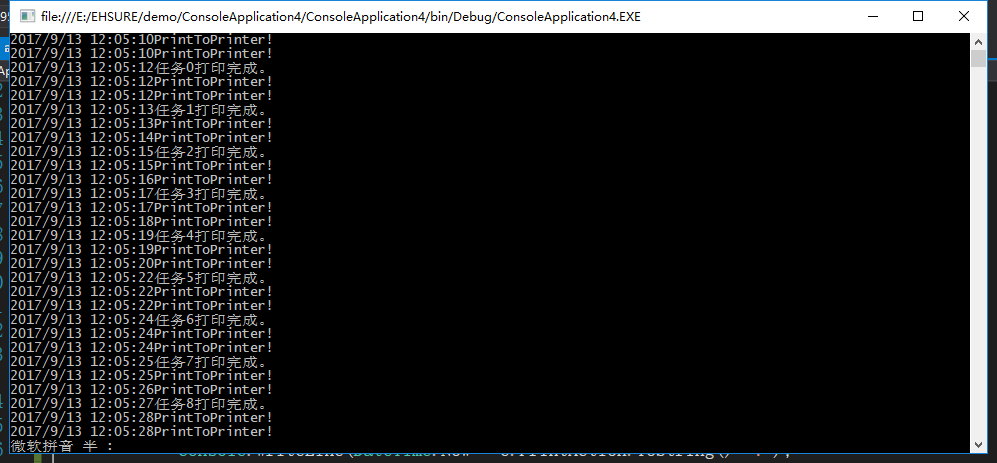
                    Console.WriteLine(DateTime.Now +string.Format( "任务{0}打印完成。",index));
                    index++;
                }
            };
            printTask.BeginInvoke(null, null);
            Console.ReadLine();
        }

        private static void Pd_EndPrint(object sender, PrintEventArgs e)
        {
            Console.WriteLine(DateTime.Now + e.PrintAction.ToString()+"!");
        }

        private static void Pd_PrintPage(object sender, PrintPageEventArgs e)
        {
            var g = e.Graphics;
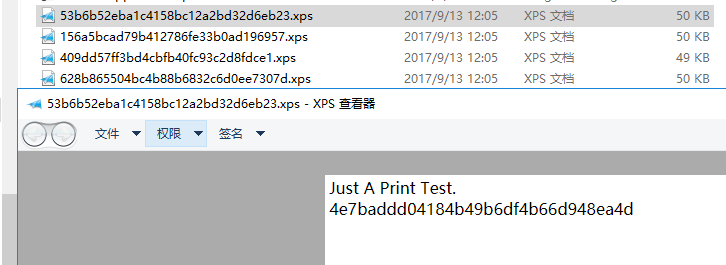
            g.DrawString("Just A Print Test." +
                        Environment.NewLine +
                        Guid.NewGuid().ToString().Replace("-", ""),new System.Drawing.Font("微软雅黑", 12F), new SolidBrush(Color.Black), new Point(2, 2));
        }

        private static void Pd_BeginPrint(object sender, PrintEventArgs e)
        {
            Console.WriteLine(DateTime.Now + e.PrintAction.ToString() + "!");
        }
    }
}
作者:数据酷软件
出处:https://www.cnblogs.com/datacool/p/datacool_2017_xps.html
关于作者:20年编程从业经验,持续关注工业自动化
本文版权归作者和博客园共有,欢迎转载,但未经作者同意必须保留此段声明。
联系方式: qq:71008973;wx:6857740733
基于人脸识别的考勤系统 地址: https://gitee.com/afeng124/viewface_attendance_ext
自己开发安卓应用框架 地址: https://gitee.com/afeng124/android-app-frame
WPOS(warehouse+pos) 后台演示地址: http://47.239.106.75:8080/

 浙公网安备 33010602011771号