
flink安装及standalone模式启动、idea中项目开发
安装
环境
- Ubuntu 18
- jdk8
- flink-1.8.1
安装步骤
-
安装jdk(略)
-
下载flink-1.8.1-bin-scala_2.12.tgz,解压到指定目录
wget http://mirror.bit.edu.cn/apache/flink/flink-1.8.1/flink-1.8.1-bin-scala_2.12.tgz
sudo mkdir /opt/flink
sudo chown test flink
sudo chgrp test flink
tar -zxvf flink-1.8.1-bin-scala_2.12.tgz -C /opt/flink -
单机资源有限,修改配置文件flink-conf.yaml
The heap size for the JobManager JVM
jobmanager.heap.size: 256m
The heap size for the TaskManager JVM
taskmanager.heap.size: 256m
standalone模式启动
启动
bin目录下执行./start-cluster.sh
jps进程查看
3857 TaskManagerRunner
3411 StandaloneSessionClusterEntrypoint
3914 Jps
查看web页面

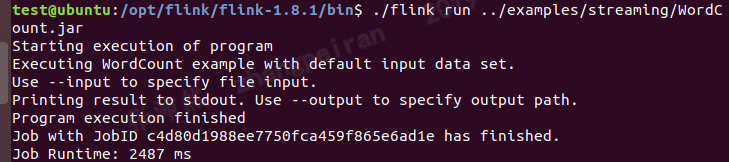
运行example
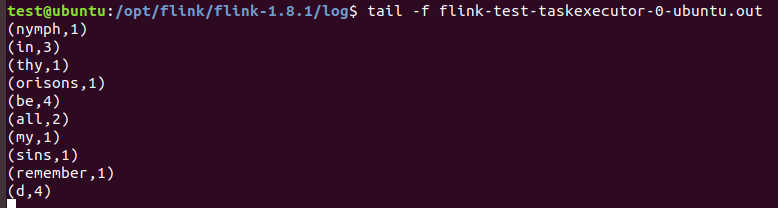
查看结果文件
IDEA中编写flink项目
在idea中会启动一个本地的flink,适合作为开发环境
maven中添加依赖
example代码
package test;
import org.apache.flink.api.common.functions.FlatMapFunction;
import org.apache.flink.api.common.functions.ReduceFunction;
import org.apache.flink.streaming.api.datastream.DataStream;
import org.apache.flink.streaming.api.environment.StreamExecutionEnvironment;
import org.apache.flink.streaming.api.windowing.time.Time;
import org.apache.flink.util.Collector;
public class StreamingWindowWordCountJava {
public static void main(String[] args) throws Exception {
// the port to connect to
final int port = 9000;
// get the execution environment
final StreamExecutionEnvironment env = StreamExecutionEnvironment.getExecutionEnvironment();
// get input data by connecting to the socket
DataStream
// parse the data, group it, window it, and aggregate the counts
DataStream
.flatMap(new FlatMapFunction<String, WordWithCount>() {
//@Override
public void flatMap(String value, Collector
for (String word : value.split("\s")) {
out.collect(new WordWithCount(word, 1L));
}
}
})
.keyBy("word")
.timeWindow(Time.seconds(5), Time.seconds(1))
.reduce(new ReduceFunction
//@Override
public WordWithCount reduce(WordWithCount a, WordWithCount b) {
return new WordWithCount(a.word, a.count + b.count);
}
});
// print the results with a single thread, rather than in parallel
windowCounts.print().setParallelism(1);
env.execute("Socket Window WordCount");
}
// Data type for words with count
public static class WordWithCount {
public String word;
public long count;
public WordWithCount() {}
public WordWithCount(String word, long count) {
this.word = word;
this.count = count;
}
@Override
public String toString() {
return word + " : " + count;
}
}
}
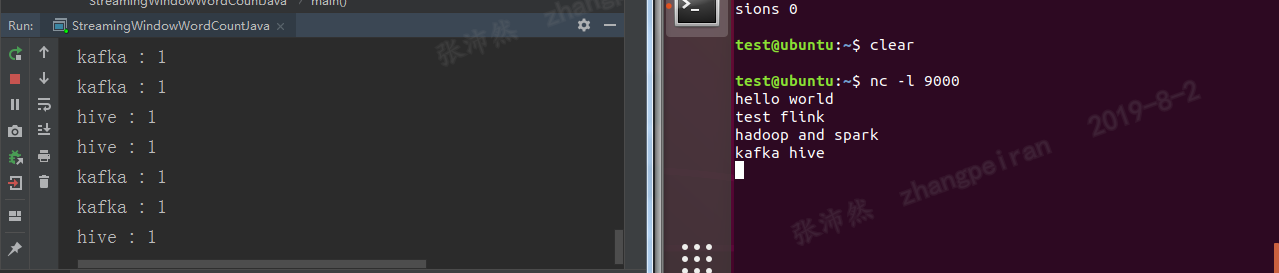
IDEA中运行结果
代码打包运行
上述代码,打包成simple-flink-code.jar
在flink的bin目录下执行:
./flink run -c test.StreamingWindowWordCountJava /home/test/Desktop/simple-flink-code.jar(注意运行类前面写上package名,-c参数顺序在jar包前面,否则报错)

 浙公网安备 33010602011771号