

作业九
请同学们完成作业后,将本周博客作业提交地址:https://www.wjx.top/jq/85988108.aspx
1、通过 RPM 安装 docker 17.03.0 版本并且配置 docker 阿里加速
[root@centos7 ~]#yum install -y yum-utils device-mapper-persistent-data lvm2

[root@centos7 ~]#yum-config-manager --add-repo https://mirrors.aliyun.com/docker-ce/linux/centos/docker-ce.repo
Loaded plugins: fastestmirror
adding repo from: https://mirrors.aliyun.com/docker-ce/linux/centos/docker-ce.repo
grabbing file https://mirrors.aliyun.com/docker-ce/linux/centos/docker-ce.repo to /etc/yum.repos.d/docker-ce.repo
repo saved to /etc/yum.repos.d/docker-ce.repo

[root@centos7 ~]#yum makecache fast

[root@centos7 yum.repos.d]#yum list docker-ce.x86_64 --showduplicates | sort -r

[root@centos7 ~]#yum -y install https://mirrors.aliyun.com/docker-ce/linux/centos/7/x86_64/stable/Packages/docker-ce-selinux-17.03.2.ce-1.el7.centos.noarch.rpm

[root@centos7 ~]#yum -y install docker-ce-17.03.0.ce-1.el7.centos

[root@centos7 ~]#mkdir /etc/docker

[root@centos7 ~]#tee /etc/docker/daemon.json <<-'EOF'
> {
>   "registry-mirrors": ["https://2rzau3o7.mirror.aliyuncs.com"]
> }
> EOF
{
  "registry-mirrors": ["https://2rzau3o7.mirror.aliyuncs.com"]
}

[root@centos7 ~]#systemctl daemon-reload

[root@centos7 ~]#systemctl restart docker
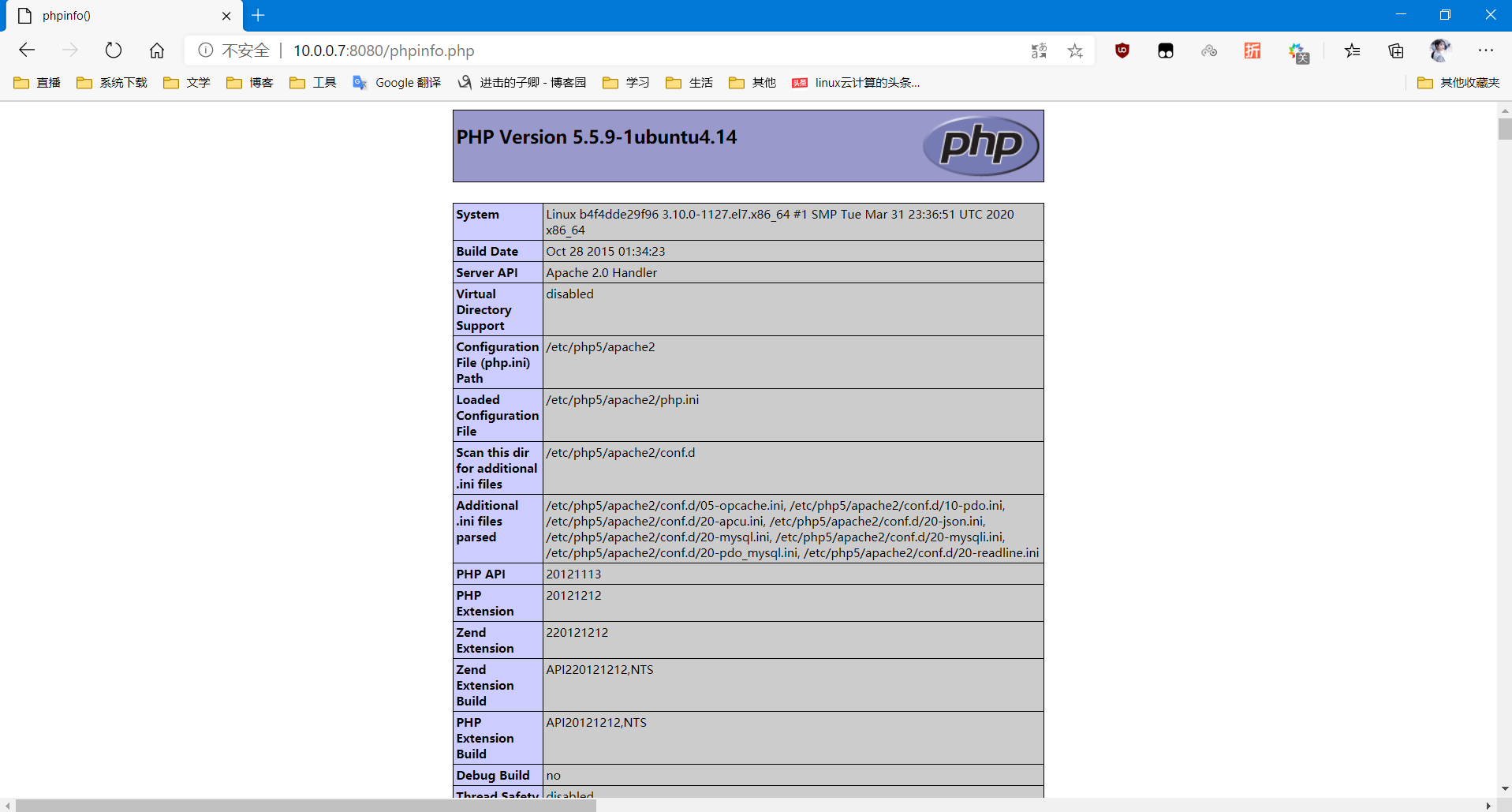
2、通过 docker 安装一个 LAPM 架构
[root@centos7 ~]#docker search -s 10 lamp
Flag --stars has been deprecated, use --filter=stars=3 instead
NAME              DESCRIPTION                                     STARS     OFFICIAL   AUTOMATED
mattrayner/lamp   A simple LAMP docker image running the pre...   240                  [OK]
linode/lamp       LAMP on Ubuntu 14.04.1 LTS Container            178
tutum/lamp        Out-of-the-box LAMP image (PHP+MySQL)           141
greyltc/lamp      a super secure, up-to-date and lightweight...   100                  [OK]
fauria/lamp       Modern, developer friendly LAMP stack. Inc...   93                   [OK]
lioshi/lamp       Docker image for LAMP under debian              15                   [OK]
dgraziotin/lamp                                                   11                   [OK]

[root@centos7 ~]#docker pull tutum/lamp
Using default tag: latest
latest: Pulling from tutum/lamp
8387d9ff0016: Pull complete
3b52deaaf0ed: Pull complete
4bd501fad6de: Pull complete
a3ed95caeb02: Pull complete
790f0e8363b9: Pull complete
11f87572ad81: Pull complete
341e06373981: Pull complete
709079cecfb8: Pull complete
55bf9bbb788a: Pull complete
b41f3cfd3d47: Pull complete
70789ae370c5: Pull complete
43f2fd9a6779: Pull complete
6a0b3a1558bd: Pull complete
934438c9af31: Pull complete
1cfba20318ab: Pull complete
de7f3e54c21c: Pull complete
596da16c3b16: Pull complete
e94007c4319f: Pull complete
3c013e645156: Pull complete
Digest: sha256:d332e7e97606ac6407b0ba9ae9e9383c89d7e04c6f4853332e98f7d326408329
Status: Downloaded newer image for tutum/lamp:latest

[root@centos7 ~]#docker images
REPOSITORY          TAG                 IMAGE ID            CREATED             SIZE
tutum/lamp          latest              3d49e175ec00        4 years ago         427 MB

[root@centos7 ~]#mkdir /mysql_data

[root@centos7 ~]#docker run -d --name=lamp -p 8080:80 -p 3306:3306  -v /mysql_data:/var/lib/mysql docker.io/tutum/lamp
b4f4dde29f96e170499883d34ff890453a71d289a4941b39857271e171e2ce18

[root@centos7 ~]#docker exec -it lamp /bin/bash
root@b4f4dde29f96:/# mysql_secure_installation


NOTE: RUNNING ALL PARTS OF THIS SCRIPT IS RECOMMENDED FOR ALL MySQL
      SERVERS IN PRODUCTION USE!  PLEASE READ EACH STEP CAREFULLY!


In order to log into MySQL to secure it, we'll need the current
password for the root user.  If you've just installed MySQL, and
you haven't set the root password yet, the password will be blank,
so you should just press enter here.

Enter current password for root (enter for none):
OK, successfully used password, moving on...

Setting the root password ensures that nobody can log into the MySQL
root user without the proper authorisation.

Set root password? [Y/n] y
New password:
Re-enter new password:
Password updated successfully!
Reloading privilege tables..
 ... Success!


By default, a MySQL installation has an anonymous user, allowing anyone
to log into MySQL without having to have a user account created for
them.  This is intended only for testing, and to make the installation
go a bit smoother.  You should remove them before moving into a
production environment.

Remove anonymous users? [Y/n] y
 ... Success!

Normally, root should only be allowed to connect from 'localhost'.  This
ensures that someone cannot guess at the root password from the network.

Disallow root login remotely? [Y/n] y
 ... Success!

By default, MySQL comes with a database named 'test' that anyone can
access.  This is also intended only for testing, and should be removed
before moving into a production environment.

Remove test database and access to it? [Y/n] y
 - Dropping test database...
ERROR 1008 (HY000) at line 1: Can't drop database 'test'; database doesn't exist
 ... Failed!  Not critical, keep moving...
 - Removing privileges on test database...
 ... Success!

Reloading the privilege tables will ensure that all changes made so far
will take effect immediately.

Reload privilege tables now? [Y/n] y
 ... Success!

Cleaning up...


All done!  If you've completed all of the above steps, your MySQL
installation should now be secure.

Thanks for using MySQL!
3、写出 docker run 命令的延申指令,如怎么在停止一个 docker 容器的时候自动删除该容器
docker run -it --rm centos bash
4、写出 docker run 命令在自动启动 docker 服务时通过什么参数能够启动 docker 中的容器,从而实现容器随着 docker 服务的启动而自动启动
docker run -d --name centos1 --restart=always centos

 浙公网安备 33010602011771号