

作业八
请同学们完成作业后,将本周博客作业提交地址:https://www.wjx.top/jq/85988108.aspx
1、DR模式下vip不在同一网段上实现过程(夸网段)
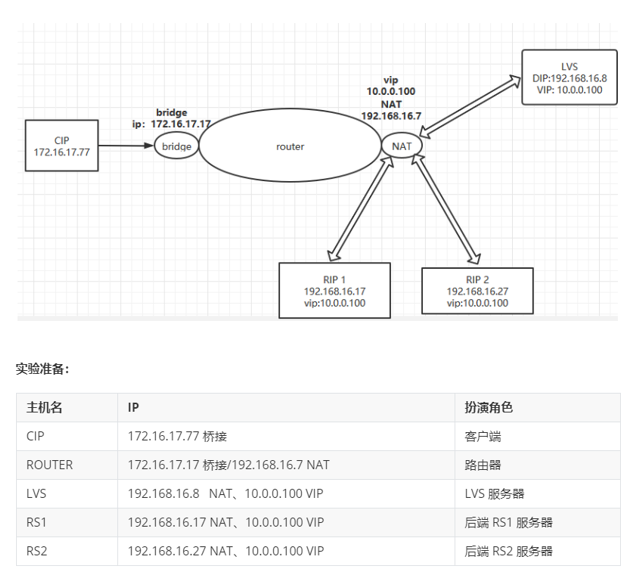
#CIP配置
[root@centos8 ~]#cat /etc/sysconfig/network-scripts/ifcfg-eth0
# Generated by dracut initrd
NAME="eth0"
DEVICE="eth0"
ONBOOT=yes
NETBOOT=yes
BOOTPROTO=static
IPADDR=172.16.17.77
REFIX=24
GATEWAY=172.16.17.17
TYPE=Ethernet

#ROUTER配置
[root@centos8 ~]#cat /etc/sysconfig/network-scripts/ifcfg-eth0
# Generated by dracut initrd
NAME="eth0"
DEVICE="eth0"
ONBOOT=yes
NETBOOT=yes
BOOTPROTO=static
IPADDR=172.16.17.17
PREFIX=24
TYPE=Ethernet
[root@centos8 ~]#cat /etc/sysconfig/network-scripts/ifcfg-eth1
# Generated by dracut initrd
NAME="eth1"
DEVICE="eth1"
ONBOOT=yes
NETBOOT=yes
BOOTPROTO=static
IPADDR=192.168.16.7
PREFIX=24
TYPE=Ethernet

[root@centos8 ~]#echo 'net.ipv4.ip_forward=1' >> /etc/sysctl.conf
[root@centos8 ~]#sysctl -p
net.ipv4.ip_forward = 1

#RS1配置
[root@centos7 ~]#yum -y install httpd

[root@centos7 ~]#cat /etc/sysconfig/network-scripts/ifcfg-eth0
# Generated by dracut initrd
NAME="eth0"
DEVICE="eth0"
ONBOOT=yes
NETBOOT=yes
BOOTPROTO=static
IPADDR=192.168.16.17
PREFIX=24
GATEWAY=192.168.16.7
TYPE=Ethernet

[root@centos7 ~]#ip a a 10.0.0.100/32 dev lo label lo:1

[root@centos7 ~]#echo '192.168.16.17 RS1' > /var/www/html/index.html
[root@centos7 ~]#systemctl enable --now httpd.service
Created symlink from /etc/systemd/system/multi-user.target.wants/httpd.service to /usr/lib/systemd/system/httpd.service.
[root@centos7 ~]#curl 192.168.16.17
192.168.16.17 RS1

[root@centos7 ~]#echo 1 > /proc/sys/net/ipv4/conf/all/arp_ignore
[root@centos7 ~]#echo 2 > /proc/sys/net/ipv4/conf/lo/arp_announce
[root@centos7 ~]#echo 2 > /proc/sys/net/ipv4/conf/all/arp_announce
[root@centos7 ~]#echo 1 > /proc/sys/net/ipv4/conf/lo/arp_ignore

#RS2配置
[root@centos7 ~]#yum -y install httpd

[root@centos7 ~]#cat /etc/sysconfig/network-scripts/ifcfg-eth0
# Generated by dracut initrd
NAME="eth0"
DEVICE="eth0"
ONBOOT=yes
NETBOOT=yes
BOOTPROTO=static
IPADDR=192.168.16.27
PREFIX=24
GATEWAY=192.168.16.7
TYPE=Ethernet

[root@centos7 ~]#ip a a 10.0.0.100/32 dev lo label lo:1

[root@centos7 ~]#echo '192.168.16.27 RS2' > /var/www/html/index.html
[root@centos7 ~]#systemctl enable --now httpd.service
Created symlink from /etc/systemd/system/multi-user.target.wants/httpd.service to /usr/lib/systemd/system/httpd.service.
[root@centos7 ~]#curl 192.168.16.27
192.168.16.27 RS2

[root@centos7 ~]#echo 1 > /proc/sys/net/ipv4/conf/all/arp_ignore
[root@centos7 ~]#echo 1 > /proc/sys/net/ipv4/conf/lo/arp_ignore
[root@centos7 ~]#echo 2 > /proc/sys/net/ipv4/conf/all/arp_announce
[root@centos7 ~]#echo 2 > /proc/sys/net/ipv4/conf/lo/arp_announce

#LVS主机的配置
[root@centos8 ~]#ip a a 10.0.0.100/32 dev lo label lo:1
[root@centos8 ~]#ipvsadm -A -t 10.0.0.100:80 -s rr
[root@centos8 ~]#ipvsadm -a -t 10.0.0.100:80 -r 192.168.16.17:80 -g
[root@centos8 ~]#ipvsadm -a -t 10.0.0.100:80 -r 192.168.16.27:80 -g
[root@centos8 ~]#ipvsadm -Ln
IP Virtual Server version 1.2.1 (size=4096)
Prot LocalAddress:Port Scheduler Flags
  -> RemoteAddress:Port           Forward Weight ActiveConn InActConn
TCP  10.0.0.100:80 rr
  -> 192.168.16.17:80             Route   1      0          0
  -> 192.168.16.27:80             Route   1      0          0

#测试访问
[root@centos8 ~]#curl 10.0.0.100
192.168.16.27 RS2
[root@centos8 ~]#curl 10.0.0.100
192.168.16.17 RS1
2、CentOS7.6 中 nfs 客户端使用 /etc/fatab 实现开机自动挂载
#nfs服务器端配置
[root@nfs ~]#yum -y install nfs-utils rpcbind

[root@nfs ~]#mkdir /data/wwwbase

[root@nfs ~]#cat /etc/exports.d/www.exports
/data/wwwbase 10.0.0.18(rw)

[root@nfs ~]#systemctl enable --now nfs-server.service
Created symlink /etc/systemd/system/multi-user.target.wants/nfs-server.service → /usr/lib/systemd/system/nfs-server.service.

#nfs客户端配置
[root@www ~]#yum -y install nfs-utils

[root@www ~]#mkdir /data/www

[root@www ~]#cat /etc/fstab

#
# /etc/fstab
# Created by anaconda on Wed Sep 16 21:14:32 2020
#
# Accessible filesystems, by reference, are maintained under '/dev/disk/'.
# See man pages fstab(5), findfs(8), mount(8) and/or blkid(8) for more info.
#
# After editing this file, run 'systemctl daemon-reload' to update systemd
# units generated from this file.
#
UUID=f67120cf-bcf2-4493-ae9f-742b6e5c4f75 /                       xfs     defaults        0 0
UUID=2de3d35e-5cdc-4491-947b-92cb73b37724 /boot                   ext4    defaults        1 2
UUID=5d09360a-5d62-4092-8413-229e25d5e209 /data                   xfs     defaults        0 0
UUID=4f11cf07-d2a6-4f16-bada-5627efccdfb3 swap                    swap    defaults        0 0
10.0.0.8:/data/wwwbase                    /data/www                nfs    defaults,_netdev 0 0

[root@www ~]#mount -a

[root@www ~]#df -h
Filesystem              Size  Used Avail Use% Mounted on
devtmpfs                888M     0  888M   0% /dev
tmpfs                   904M     0  904M   0% /dev/shm
tmpfs                   904M  8.7M  895M   1% /run
tmpfs                   904M     0  904M   0% /sys/fs/cgroup
/dev/sda2               100G  2.1G   98G   3% /
/dev/sda3                50G  390M   50G   1% /data
/dev/sda1               976M  128M  781M  15% /boot
tmpfs                   181M     0  181M   0% /run/user/0
10.0.0.8:/data/wwwbase   50G  390M   50G   1% /data/www
3、CentOS7.6 中 nfs 客户端使用 autofs 实现使用 nfs 时实时挂载
#nfs服务器端配置
[root@nfs ~]#yum -y install nfs-utils rpcbind

[root@nfs ~]#mkdir -pv /data/home

[root@nfs ~]#useradd -d /data/home/user1 -u 2000 user1

[root@nfs ~]#cat /etc/exports.d/test.exports
/data/home 10.0.0.18(rw)

[root@nfs ~]#systemctl enable --now nfs-server.service
Created symlink /etc/systemd/system/multi-user.target.wants/nfs-server.service → /usr/lib/systemd/system/nfs-server.service.

#autofs端配置
[root@www ~]#yum -y install nfs-utils autofs

[root@www ~]#useradd -d /data/home/user1 -u 2000 user1

[root@www ~]#cat /etc/auto.master
/- /etc/auto.home

[root@www ~]#cat /etc/auto.home
/home/user1  -fstype=nfs,vers=3 nfsserver:/data/home/user1

[root@www ~]#systemctl start autofs

[root@www ~]#su - user1
Last login: Sun Nov  8 03:52:36 CST 2020 on pts/0

[user1@www user1]$pwd
/home/user1

 浙公网安备 33010602011771号