python 自制登录系统,excel保存本地
import sys
import random,math
import pandas as pd
# import pymssql
from openpyxl import Workbook,load_workbook
from PyQt5.QtWidgets import QApplication, QWidget, QMessageBox
from Ui_untitled import Ui_Form

# 定义一个字典,用来储存ID和密码
name_list = {}

# 添加用户名与密码
def name_list_add(self,self_1):
    name_list[self] = self_1

# 把excel中的用户名与密码发到字典name_list中
def name_list_Exceladd():
    excel = load_workbook('C:/Users/18041/Desktop/test_GUI/denglv/name_list.xlsx')
    table = excel.get_sheet_by_name('Sheet1')
    for i in range(1,table.max_row+1):
        a = table.cell(i,1).value
        b = table.cell(i,2).value
        name_list_add(a,b)
    excel.close

# 把name_list中的用户名与密码发到excel中
def name_list_Excelend():
    excel = load_workbook('C:/Users/18041/Desktop/test_GUI/denglv/name_list.xlsx')
    table = excel.get_sheet_by_name('Sheet1')
    i = 1
    for key in name_list:
        table.cell(i, 1).value = key
        table.cell(i, 2).value = name_list[key]
        i = i + 1
    excel.save('C:/Users/18041/Desktop/test_GUI/denglv/name_list.xlsx')
    excel.close


class mywindow(Ui_Form,QWidget):
    def __init__(self):
        super(mywindow, self).__init__()
        self.setupUi(self)
        self.setWindowTitle('登录')
        self.pushButton_Dl.clicked.connect(self.pushbutton_Dl)
        self.pushButton_ZC.clicked.connect(self.pushbutton_ZC)

    def pushbutton_Dl(self):
        if self.lineEdit_ID.text() in name_list:
            if self.lineEdit_Password.text() == name_list[self.lineEdit_ID.text()]:
                reply = QMessageBox.question(self, '提示', '恭喜登录成功', QMessageBox.Yes|QMessageBox.No)
            else:
                reply = QMessageBox.question(self, '提示', '密码错误', QMessageBox.Yes|QMessageBox.No)
        else:
            reply = QMessageBox.question(self, '提示', '用户不存在', QMessageBox.Yes|QMessageBox.No)

        # 下面这个问题就是会跳很多的提示,每个key都跳一个提示,哈哈哈哈哈哈
        # for key in name_list:
        #     if self.lineEdit_ID.text() == key:
        #         if self.lineEdit_Password.text() == name_list[key]:
        #             reply = QMessageBox.question(self, '提示', '恭喜登录成功', QMessageBox.Yes|QMessageBox.No)
        #         else:
        #             reply = QMessageBox.question(self, '提示', '密码错误', QMessageBox.Yes|QMessageBox.No)
        #     else:
        #         reply = QMessageBox.question(self, '提示', '用户不存在', QMessageBox.Yes|QMessageBox.No)
        print(name_list)


    def pushbutton_ZC(self):
        # for key in name_list:
        #     if self.lineEdit_ID.text() == key:
        #         reply = QMessageBox.question(self, '提示', '该用户已存在', QMessageBox.Yes|QMessageBox.No)
        #     else:
        if self.lineEdit_ID.text() not in name_list:
            name_list_add(self.lineEdit_ID.text(),self.lineEdit_Password.text())
            reply = QMessageBox.question(self, '提示', '注册成功', QMessageBox.Yes|QMessageBox.No)
        else:
            reply = QMessageBox.question(self, '提示', '用户名已存在', QMessageBox.Yes|QMessageBox.No)
        name_list_Excelend()
        print(name_list)

if __name__ == '__main__':
    name_list_Exceladd()
    print(name_list)
    app = QApplication(sys.argv)
    w = mywindow()
    w.show()
    sys.exit(app.exec_())
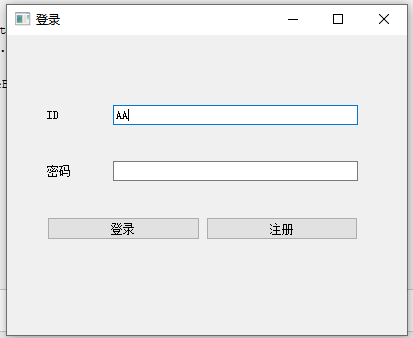
# -*- coding: utf-8 -*-

# Form implementation generated from reading ui file 'c:\Users\18041\Desktop\test_GUI\denglv\untitled.ui'
#
# Created by: PyQt5 UI code generator 5.13.0
#
# WARNING! All changes made in this file will be lost!


from PyQt5 import QtCore, QtGui, QtWidgets


class Ui_Form(object):
    def setupUi(self, Form):
        Form.setObjectName("Form")
        Form.resize(400, 300)
        self.layoutWidget = QtWidgets.QWidget(Form)
        self.layoutWidget.setGeometry(QtCore.QRect(40, 40, 311, 181))
        self.layoutWidget.setObjectName("layoutWidget")
        self.gridLayout_2 = QtWidgets.QGridLayout(self.layoutWidget)
        self.gridLayout_2.setContentsMargins(0, 0, 0, 0)
        self.gridLayout_2.setObjectName("gridLayout_2")
        self.gridLayout = QtWidgets.QGridLayout()
        self.gridLayout.setObjectName("gridLayout")
        self.label = QtWidgets.QLabel(self.layoutWidget)
        self.label.setMinimumSize(QtCore.QSize(60, 50))
        self.label.setObjectName("label")
        self.gridLayout.addWidget(self.label, 0, 0, 1, 1)
        self.lineEdit_ID = QtWidgets.QLineEdit(self.layoutWidget)
        self.lineEdit_ID.setObjectName("lineEdit_ID")
        self.gridLayout.addWidget(self.lineEdit_ID, 0, 1, 1, 1)
        self.label_2 = QtWidgets.QLabel(self.layoutWidget)
        self.label_2.setMinimumSize(QtCore.QSize(60, 50))
        self.label_2.setObjectName("label_2")
        self.gridLayout.addWidget(self.label_2, 1, 0, 1, 1)
        self.lineEdit_Password = QtWidgets.QLineEdit(self.layoutWidget)
        self.lineEdit_Password.setObjectName("lineEdit_Password")
        self.gridLayout.addWidget(self.lineEdit_Password, 1, 1, 1, 1)
        self.gridLayout_2.addLayout(self.gridLayout, 0, 0, 1, 2)
        self.pushButton_Dl = QtWidgets.QPushButton(self.layoutWidget)
        self.pushButton_Dl.setObjectName("pushButton_Dl")
        self.gridLayout_2.addWidget(self.pushButton_Dl, 1, 0, 1, 1)
        self.pushButton_ZC = QtWidgets.QPushButton(self.layoutWidget)
        self.pushButton_ZC.setObjectName("pushButton_ZC")
        self.gridLayout_2.addWidget(self.pushButton_ZC, 1, 1, 1, 1)

        self.retranslateUi(Form)
        QtCore.QMetaObject.connectSlotsByName(Form)

    def retranslateUi(self, Form):
        _translate = QtCore.QCoreApplication.translate
        Form.setWindowTitle(_translate("Form", "Form"))
        self.label.setText(_translate("Form", "ID"))
        self.label_2.setText(_translate("Form", "密码"))
        self.pushButton_Dl.setText(_translate("Form", "登录"))
        self.pushButton_ZC.setText(_translate("Form", "注册"))
posted on 2020-03-26 15:37 dandanduba 阅读(470) 评论(0) 收藏 举报


 浙公网安备 33010602011771号