
WebRTC NAT穿透服务器 coturn服务搭建
文章目录
参考:
安装需要的环境
联网安装
安装gcc
[root@2227b264a137 run_env]# yum -y install gcc gcc-c++ zlib-devel
安装make
[root@2227b264a137 run_env]# yum -y install automake autoconf libtool make
安装openssl
[root@2227b264a137 opt]# yum -y install openssl-devel
安装wget
[root@2227b264a137 opt]# yum -y install wget
编译安装libevent(手动安装)
[root@2227b264a137 run_env]# wget https://github.com/libevent/libevent/releases/download/release-2.1.10-stable/libevent-2.1.10-stable.tar.gz
[root@2227b264a137 run_env]# tar -zxvf libevent-2.1.10-stable.tar.gz
[root@2227b264a137 run_env]# cd libevent-2.1.10-stable
[root@2227b264a137 libevent-2.1.10-stable]# ./configure
[root@2227b264a137 libevent-2.1.10-stable]# make & make install
linux无法编译libevent,一直报错,但是我有装openssl
当指定openssl安装目录,而不是默认安装路径时,需要指定以下指令:
在
/etc/profile文件添加export PKG_CONFIG_PATH=/usr/local/openssl/lib/pkgconfig在安装目录下执行
./configure CFLAGS="$(pkg-config --cflags openssl)" LDFLAGS="$(pkg-config --libs openssl)"
安装sqlite或mysql
[root@2227b264a137 run_env]# yum -y install sqlite sqlite-devel
Centos7安装最新的sqlite3
#更新SQLite 3
#获取源代码(在主目录中运行)
[root@djangoServer ~]# cd ~
[root@djangoServer ~]# wget https://www.sqlite.org/2019/sqlite-autoconf-3270200.tar.gz
[root@djangoServer ~]# tar -zxvf sqlite-autoconf-3270200.tar.gz

#构建并安装
[root@djangoServer ~]# cd sqlite-autoconf-3270200
[root@djangoServer sqlite-autoconf-3270200]# ./configure --prefix=/usr/local/sqlite
[root@djangoServer sqlite-autoconf-3270200]# make && make install

#检查版本
## 最新安装的sqlite3版本
[root@djangoServer ~]# /usr/local/sqlite/bin/sqlite3 --version
3.27.2 2019-02-25 16:06:06 bd49a8271d650fa89e446b42e513b595a717b9212c91dd384aab871fc1d0f6d7
[root@djangoServer ~]#

## Centos7自带的sqlite3版本
[root@djangoServer ~]# /usr/bin/sqlite3 --version
3.7.17 2013-05-20 00:56:22 118a3b35693b134d56ebd780123b7fd6f1497668
[root@djangoServer ~]#

## 可以看到sqlite3的版本还是旧版本,那么需要更新一下。
[root@djangoServer ~]# sqlite3 --version
3.7.17 2013-05-20 00:56:22 118a3b35693b134d56ebd780123b7fd6f1497668
[root@djangoServer ~]#

## 更改旧的sqlite3
[root@djangoServer ~]# mv /usr/bin/sqlite3  /usr/bin/sqlite3_old

## 软链接将新的sqlite3设置到/usr/bin目录下
[root@djangoServer ~]# ln -s /usr/local/sqlite/bin/sqlite3   /usr/bin/sqlite3

## 查看当前全局sqlite3的版本
[root@djangoServer ~]# sqlite3 --version
3.27.2 2019-02-25 16:06:06 bd49a8271d650fa89e446b42e513b595a717b9212c91dd384aab871fc1d0f6d7
[root@djangoServer ~]#

#将路径传递给共享库
# 设置开机自启动执行,可以将下面的export语句写入 ~/.bashrc 文件中,如果如果你想立即生效,可以执行source 〜/.bashrc 将在每次启动终端时执行
[root@djangoServer ~]# export LD_LIBRARY_PATH=/usr/local/sqlite/lib
注:coturn的用户信息等,默认是持久化保存在sqlite中,如果想保存到mysql中,上面的sqlite安装选项,需要改成mysql相关的依赖项。
yum -y install mysql-server	 #可选(安装mysql)
yum -y install mysql-client
yum -y install libmysqlcppconn-dev libmysqlclient-dev libmysql++-dev
下载coturn源码并编译
使用 wget https://github.com/coturn/coturn/archive/4.5.1.3.tar.gz下载安装包,或是使用 git clone https://github.com/coturn/coturn 下载源码:
[root@2227b264a137 run_env]# wget https://github.com/coturn/coturn/archive/4.5.1.3.tar.gz
[root@2227b264a137 run_env]# tar -zxvf 4.5.1.3.tar.gz
[root@2227b264a137 run_env]# cd coturn-4.5.1.3/
注意:一定要在
./configure前,把sqlite或mysql依赖项安装好,否则./configure时无法识别出sqlite或mysql。
[root@2227b264a137 coturn-4.5.1.3]# ./configure -prefix=/usr/local/coturn
sqlite/mysql安装失败时,
./configure会有类似下面的显示:
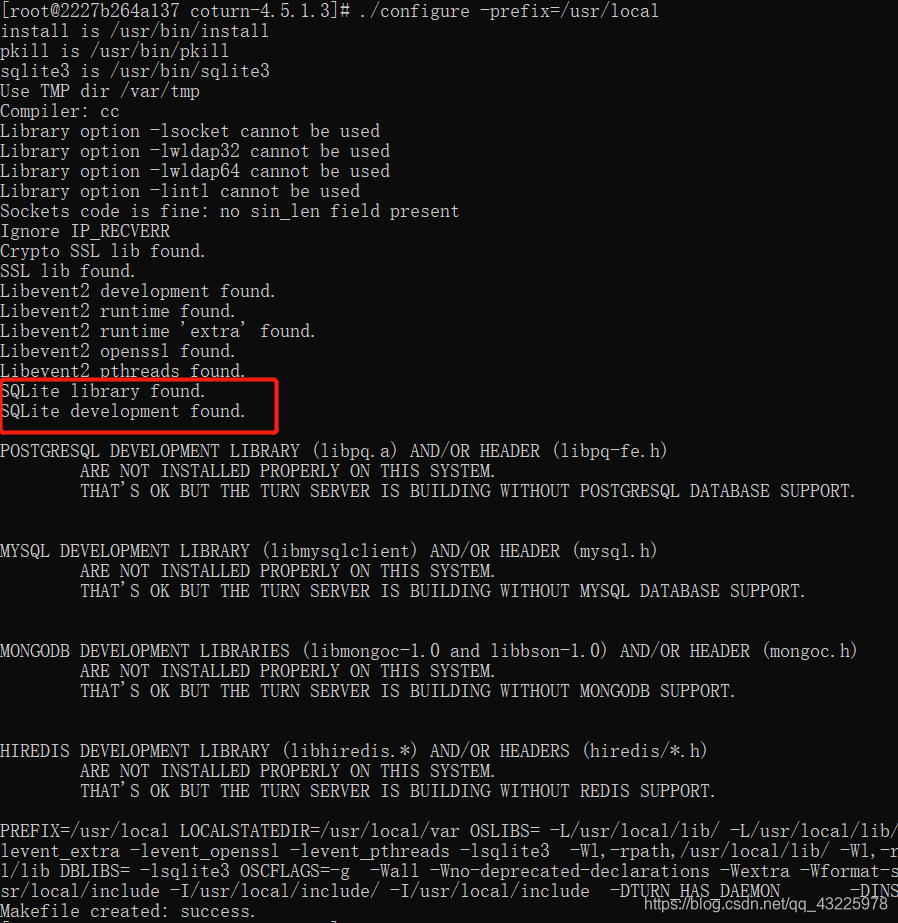
sqlite/mysql安装成功时,
./configure会有类似下面的显示:

[root@2227b264a137 coturn-4.5.1.3]# make & make install
检验coturn是否安装成功,出现turnserver程序的详细路径则表示安装成功。
[root@2227b264a137 coturn-4.5.1.3]# whereis which turnserver
which:turnserver: /usr/local/bin/turnserver
使用openssl创建密钥文件
[root@2227b264a137 coturn-4.5.1.3]# openssl req -x509 -newkey rsa:2048 -keyout /etc/turn_server_pkey.pem -out /etc/turn_server_cert.pem -days 99999 -nodes
设置用户名和密码
创建用户ytest,密码为123,同时指定realm为realmtest,请根据实际情况修改。
[root@2227b264a137 coturn-4.5.1.3]# turnadmin -k -u ytest -p 123 -r realmtest
执行命令后会显示一串加密的密码字符串,在/etc目录下新建turnuserdb.conf文件,用于保存用户名和密码。
[root@2227b264a137 coturn-4.5.1.3]# vi /etc/turnuserdb.conf
用户名:密码 的格式
ytest:0x9da593d9d802bae2e1225717b8774253
修改turnserver.conf配置文件
将默认配置模式文件复制一份到/usr/local/etc/下
[root@2227b264a137 coturn-4.5.1.3]# cp /usr/local/etc/turnserver.conf.default /usr/local/etc/turnserver.conf
进入编辑模式:
[root@2227b264a137 coturn-4.5.1.3]# vi /usr/local/etc/turnserver.conf
修改下面几个关键项:
#监听端口
listening-port=3478
#监听的网卡
listening-device=eth0
# 中转网卡
relay-device=eth0
listening-ip=内网ip
tls-listening-port=5349
relay-ip=内网ip
external-ip=外网ip
relay-threads=50
lt-cred-mech
cert=/etc/turn_server_cert.pem
pkey=/etc/turn_server_pkey.pem
min-port=49152
max-port=65535
userdb=/etc/turnuserdb.conf
#turnuserdb.conf中的用户名和密码,可以有多个
user=ytest:0x36f65151a0636f98c27dc77e50836675
#一般与turnadmin创建用户时指定的realm一致,不指定realm时,默认为: 外网地址:3478
#realm=realmtest
启用coturn并验证
[root@2227b264a137 coturn-4.5.1.3]# turnserver -v -r realmtest -a -o -c /usr/local/etc/turnserver.conf
-r realmtest —— 意为指定realm,要与创建用户时指定的realm一致。
可用
lsof -i:3478校验下是否启动成功,如果看到类似下面的输出,说明3478监听正常。

有问题可以参考: https://github.com/coturn/coturn/issues?q=Cannot+complete+Allocation
离线安装
安装gcc
https://blog.csdn.net/qq_43225978/article/details/88998755#_29
安装openssl
https://blog.csdn.net/qq_43225978/article/details/88998755#_105
编译安装libevent(手动安装)
[root@2227b264a137 run_env]# wget https://github.com/libevent/libevent/releases/download/release-2.1.10-stable/libevent-2.1.10-stable.tar.gz
[root@2227b264a137 run_env]# tar -zxvf libevent-2.1.10-stable.tar.gz
[root@2227b264a137 run_env]# cd libevent-2.1.10-stable
[root@2227b264a137 libevent-2.1.10-stable]# ./configure
[root@2227b264a137 libevent-2.1.10-stable]# make & make install
linux无法编译libevent,一直报错,但是我有装openssl
当指定openssl安装目录,而不是默认安装路径时,需要指定以下指令:
在
/etc/profile文件添加export PKG_CONFIG_PATH=/usr/local/openssl/lib/pkgconfig在安装目录下执行
./configure CFLAGS="$(pkg-config --cflags openssl)" LDFLAGS="$(pkg-config --libs openssl)"
安装sqlite或mysql
https://blog.csdn.net/qq_43225978/article/details/88998755#_161
下载coturn源码并编译
http://turnserver.open-sys.org/downloads/ 通过此处下载编译后安装包
使用 wget https://github.com/coturn/coturn/archive/4.5.1.3.tar.gz 或 http://turnserver.open-sys.org/downloads/下载安装包,或使用 git clone https://github.com/coturn/coturn 下载源码:
[root@2227b264a137 run_env]# wget https://github.com/coturn/coturn/archive/4.5.1.3.tar.gz
[root@2227b264a137 run_env]# tar -zxvf 4.5.1.3.tar.gz
[root@2227b264a137 run_env]# cd coturn-4.5.1.3/
注意:一定要在
./configure前,把sqlite或mysql依赖项安装好,否则./configure时无法识别出sqlite或mysql。
[root@2227b264a137 coturn-4.5.1.3]# ./configure -prefix=/usr/local/coturn
sqlite/mysql安装失败时,
./configure会有类似下面的显示:

sqlite/mysql安装成功时,
./configure会有类似下面的显示:

[root@2227b264a137 coturn-4.5.1.3]# make & make install
编译安装后:
......

==================================================================

1) If your system supports automatic start-up system daemon services,
then to enable the turnserver as a system service that is automatically
started, you have to:

	a) Create and edit /etc/turnserver.conf or
	/usr/local/etc/turnserver.conf .
	Use /usr/local/etc/turnserver.conf.default as an example.

	b) For user accounts settings: set up SQLite or PostgreSQL or
	MySQL or MongoDB or Redis database for user accounts.
	Use /usr/local/share/turnserver/schema.sql as SQL database schema,
	or use /usr/local/share/turnserver/schema.userdb.redis as Redis
	database schema description and/or
	/usr/local/share/turnserver/schema.stats.redis
	as Redis status & statistics database schema description.

	If you are using SQLite, the default database location is in
	/var/db/turndb or in /usr/local/var/db/turndb or in /var/lib/turn/turndb.

	c) add whatever is necessary to enable start-up daemon for the
	/usr/local/bin/turnserver.

2) If you do not want the turnserver to be a system service,
   then you can start/stop it "manually", using the "turnserver"
   executable with appropriate options (see the documentation).

3) To create database schema, use schema in file
/usr/local/share/turnserver/schema.sql.

4) For additional information, run:

   $ man turnserver
   $ man turnadmin
   $ man turnutils

==================================================================

[1]+  退出 2                make
检验coturn是否安装成功,出现turnserver程序的详细路径则表示安装成功。
[root@2227b264a137 coturn-4.5.1.3]# whereis which turnserver
which:turnserver: /usr/local/bin/turnserver
使用openssl创建密钥文件
[root@2227b264a137 coturn-4.5.1.3]# openssl req -x509 -newkey rsa:2048 -keyout /usr/local/coturn/cert/turn_server_pkey.pem -out /usr/local/coturn/cert/turn_server_cert.pem -days 99999 -nodes
设置用户名和密码
创建用户ytest,密码为123,同时指定realm为realmtest,请根据实际情况修改。
[root@2227b264a137 coturn-4.5.1.3]# turnadmin -k -u ytest -p 123 -r stun.realmtest.cn
执行命令后会显示一串加密的密码字符串,在/etc目录下新建turnuserdb.conf文件,用于保存用户名和密码。
[root@2227b264a137 coturn-4.5.1.3]# vi/usr/local/coturn/etc/turnuserdb.conf
用户名:密码 的格式
ytest:0x9da593d9d802bae2e1225717b8774253
修改turnserver.conf配置文件
将默认配置模式文件复制一份到/usr/local/etc/下
[root@2227b264a137 coturn-4.5.1.3]# cp /usr/local/coturn/etc/turnserver.conf.default /usr/local/coturn/etc/turnserver.conf
进入编辑模式:
[root@2227b264a137 coturn-4.5.1.3]# vi /usr/local/coturn/etc/turnserver.conf
修改下面几个关键项:
#监听端口
listening-port=3478
#监听的网卡
listening-device=eth0
# 中转网卡
relay-device=eth0
listening-ip=内网ip
tls-listening-port=5349
relay-ip=内网ip
external-ip=外网ip
relay-threads=50
lt-cred-mech
cert=/etc/turn_server_cert.pem
pkey=/etc/turn_server_pkey.pem
min-port=49152
max-port=65535
userdb=/usr/local/coturn/etc/turnuserdb.conf
#turnuserdb.conf中的用户名和密码,可以有多个
user=ytest:0x36f65151a0636f98c27dc77e50836675
#一般与turnadmin创建用户时指定的realm一致,不指定realm时,默认为: 外网地址:3478
#realm=stun.realmtest.cn
cli-password=123456
启用coturn并验证
[root@2227b264a137 coturn-4.5.1.3]# turnserver -v -r stun.realmtest.cn -a -o -c /usr/local/etc/turnserver.conf
-r stun.realmtest.cn—— 意为指定realm,要与创建用户时指定的realm一致。
-o(此命令为后台启动,不占用窗口)
可用
lsof -i:3478校验下是否启动成功,如果看到类似下面的输出,说明3478监听正常。

验证coturn服务
turnutils_uclient coturn服务所在服务器公网IP -u 用户名 -w 密码
turnutils_uclient 182.132.2.3 -u ytest -w 123


 浙公网安备 33010602011771号