
Android高工(二)——事件分发机制
一、事件分发机制简介
对于Android的交互过程来说,除了页面展示,还有页面的点击场景,而一个页面,从外层的Activity到容器ViewGroup再到内部的View,一个事件是如何从Activity->ViewGroup->View的分发过程,以及在这个过程中父View与View之间产生了滑动冲突的处理,都需要了解事件分发机制的整体流程
二、事件分类
事件,从总的分类上来说,分为:
- 按键事件:KeyEvent
- 触摸事件:TouchEvent
- 鼠标事件:MouseEvent
- 轨迹球:TouchEvent
对于手机设备来说,一般的点击、滑动等都是触摸事件,对于音量键等的控制,通常属于按键事件
对于其他嵌入式的设备来说,例如智能电视,通过遥控器来操作,一般都是按键事件
三、触摸事件的分发流程
在View体系章节中,我们分析了Activity的onCreate构建ViewTree的过程
https://www.yuque.com/go/doc/65265049
1、事件采集
由触摸屏触摸行为的产生,到分析汇总产生成触摸事件,之后分发到对应的前台Activity
2、触摸事件的分类
(1)ACTION_DOWN
在屏幕上按下时就会产生这个事件,它是触摸事件序列的开始
(2)ACTION_MOVE
当触发了ACTION_DOWN之后,手指在屏幕上滑动时,就会生成ACTION_MOVE事件
(3)ACTION_UP
当ACTION_DOWN之后,手指直接抬起或者滑动一段距离再抬起,就会触发ACTION_UP
(4)ACTION_CANCEL
取消事件,一般是非认为的发出,由系统内部发出的
常见的触发场景就是:当Down事件先由子View消费,之后的MOVE场景中,父View在dispatchTouchEvent中针对部分场景对MOVE、UP等进行拦截,就发送ACTION_CANCEL事件给子View,表示由它消费的事件已经取消了
它的作用在于,例如我们写一个滑块开关,放在某个父ViewGroup中,在滑动过程中,父View拦截了之后的事件,子View可以在ACITON_CANCEL根据当前滑动的距离等把开关置为开或者关,而不是停留在某个中间位置
3、触摸事件的分发
由于事件序列总是从DOWN事件开始到ACTION_UP结束,因此我们首先从ACTION_DOWN事件开始分析,在DOWN事件采集之后,分发到Activity中,会调用Activity的dispatchTouchEvent
(1)Activity#dispatchTouchEvent
    public boolean dispatchTouchEvent(MotionEvent ev) {
        if (ev.getAction() == MotionEvent.ACTION_DOWN) {
            onUserInteraction();
        }
        // 最终调用DecoreView的dispatchTouchEvent
        if (getWindow().superDispatchTouchEvent(ev)) {
            return true;
        }
        // 调用Activity的onTouchEvent
        return onTouchEvent(ev);
    }
在dispatchTouchEvent中,首先会执行getWindow().superDispatchTouchEvent()方法,该方法最终调用的是DecorView(是一个FrameLayout)的dispatchTouchEvent,如果该方法返回true,那么表示事件ViewTree的某个节点拦截了,因此交给对于View节点处理
对于Activity而言,一旦事件被拦截消费了,那么就不会执行它自身的onTouchEvent
(2)ViewGroup#dispatchTouchEvent
  @Override
    public boolean dispatchTouchEvent(MotionEvent ev) {
        if (mInputEventConsistencyVerifier != null) {
            mInputEventConsistencyVerifier.onTouchEvent(ev, 1);
        }

        // If the event targets the accessibility focused view and this is it, start
        // normal event dispatch. Maybe a descendant is what will handle the click.
        if (ev.isTargetAccessibilityFocus() && isAccessibilityFocusedViewOrHost()) {
            ev.setTargetAccessibilityFocus(false);
        }

        boolean handled = false;
        if (onFilterTouchEventForSecurity(ev)) {
            final int action = ev.getAction();
            final int actionMasked = action & MotionEvent.ACTION_MASK;

            // 从Down事件开始
            if (actionMasked == MotionEvent.ACTION_DOWN) {
				// Down事件到来后清理之前设置的消费事件的mFristTarget对象
                cancelAndClearTouchTargets(ev);
                // 清除FLAG_DISALLOW_INTERCEPT标志
                resetTouchState();
            }

            // 判断事件是否被当前ViewGroup拦截
            final boolean intercepted;
            // DOWN事件并且消费事件的View为空
            if (actionMasked == MotionEvent.ACTION_DOWN
                    || mFirstTouchTarget != null) {
                // 对应我们处理事件冲突中的内部拦截法中parent.requestDisAllowInterceptor(true),默认走ViewGroup的(true)
                final boolean disallowIntercept = (mGroupFlags & FLAG_DISALLOW_INTERCEPT) != 0;			// 如果子View没有requestDisAllowInterceptor(true),默认走ViewGroup的onInterceptTouchEvent,这个方法如果不重写的话,默认为false
                if (!disallowIntercept) {
                    intercepted = onInterceptTouchEvent(ev);
                    ev.setAction(action); // restore action in case it was changed
                } else {
                    intercepted = false;
                }
            } else {
                // There are no touch targets and this action is not an initial down
                // so this view group continues to intercept touches.
                intercepted = true;
            }

            // If intercepted, start normal event dispatch. Also if there is already
            // a view that is handling the gesture, do normal event dispatch.
            if (intercepted || mFirstTouchTarget != null) {
                ev.setTargetAccessibilityFocus(false);
            }

            // Check for cancelation.
            final boolean canceled = resetCancelNextUpFlag(this)
                    || actionMasked == MotionEvent.ACTION_CANCEL;

            // Update list of touch targets for pointer down, if needed.
            final boolean isMouseEvent = ev.getSource() == InputDevice.SOURCE_MOUSE;
            final boolean split = (mGroupFlags & FLAG_SPLIT_MOTION_EVENTS) != 0
                    && !isMouseEvent;
            TouchTarget newTouchTarget = null;
            boolean alreadyDispatchedToNewTouchTarget = false;
            if (!canceled && !intercepted) {
                // If the event is targeting accessibility focus we give it to the
                // view that has accessibility focus and if it does not handle it
                // we clear the flag and dispatch the event to all children as usual.
                // We are looking up the accessibility focused host to avoid keeping
                // state since these events are very rare.
                View childWithAccessibilityFocus = ev.isTargetAccessibilityFocus()
                        ? findChildWithAccessibilityFocus() : null;

                if (actionMasked == MotionEvent.ACTION_DOWN
                        || (split && actionMasked == MotionEvent.ACTION_POINTER_DOWN)
                        || actionMasked == MotionEvent.ACTION_HOVER_MOVE) {
                    final int actionIndex = ev.getActionIndex(); // always 0 for down
                    final int idBitsToAssign = split ? 1 << ev.getPointerId(actionIndex)
                            : TouchTarget.ALL_POINTER_IDS;

                    // Clean up earlier touch targets for this pointer id in case they
                    // have become out of sync.
                    removePointersFromTouchTargets(idBitsToAssign);

                    final int childrenCount = mChildrenCount;
                    if (newTouchTarget == null && childrenCount != 0) {
                        final float x =
                                isMouseEvent ? ev.getXCursorPosition() : ev.getX(actionIndex);
                        final float y =
                                isMouseEvent ? ev.getYCursorPosition() : ev.getY(actionIndex);
                        // Find a child that can receive the event.
                        // Scan children from front to back.
                        final ArrayList<View> preorderedList = buildTouchDispatchChildList();
                        final boolean customOrder = preorderedList == null
                                && isChildrenDrawingOrderEnabled();
                        final View[] children = mChildren;
                        for (int i = childrenCount - 1; i >= 0; i--) {
                            final int childIndex = getAndVerifyPreorderedIndex(
                                    childrenCount, i, customOrder);
                            final View child = getAndVerifyPreorderedView(
                                    preorderedList, children, childIndex);
                            if (!child.canReceivePointerEvents()
                                    || !isTransformedTouchPointInView(x, y, child, null)) {
                                continue;
                            }

                            newTouchTarget = getTouchTarget(child);
                            if (newTouchTarget != null) {
                                // Child is already receiving touch within its bounds.
                                // Give it the new pointer in addition to the ones it is handling.
                                newTouchTarget.pointerIdBits |= idBitsToAssign;
                                break;
                            }

                            resetCancelNextUpFlag(child);
                            if (dispatchTransformedTouchEvent(ev, false, child, idBitsToAssign)) {
                                // Child wants to receive touch within its bounds.
                                mLastTouchDownTime = ev.getDownTime();
                                if (preorderedList != null) {
                                    // childIndex points into presorted list, find original index
                                    for (int j = 0; j < childrenCount; j++) {
                                        if (children[childIndex] == mChildren[j]) {
                                            mLastTouchDownIndex = j;
                                            break;
                                        }
                                    }
                                } else {
                                    mLastTouchDownIndex = childIndex;
                                }
                                mLastTouchDownX = ev.getX();
                                mLastTouchDownY = ev.getY();
                                newTouchTarget = addTouchTarget(child, idBitsToAssign);
                                alreadyDispatchedToNewTouchTarget = true;
                                break;
                            }

                            // The accessibility focus didn't handle the event, so clear
                            // the flag and do a normal dispatch to all children.
                            ev.setTargetAccessibilityFocus(false);
                        }
                        if (preorderedList != null) preorderedList.clear();
                    }

                    if (newTouchTarget == null && mFirstTouchTarget != null) {
                        // Did not find a child to receive the event.
                        // Assign the pointer to the least recently added target.
                        newTouchTarget = mFirstTouchTarget;
                        while (newTouchTarget.next != null) {
                            newTouchTarget = newTouchTarget.next;
                        }
                        newTouchTarget.pointerIdBits |= idBitsToAssign;
                    }
                }
            }

            // 没有子View消费Down事件,因此交给ViewGroup的onTouchEvent来处理
            if (mFirstTouchTarget == null) {
                // No touch targets so treat this as an ordinary view.
                handled = dispatchTransformedTouchEvent(ev, canceled, null,
                        TouchTarget.ALL_POINTER_IDS);
            } else {
                // 有子View消费Down事件后,后续事件都会发送到该View
                // Dispatch to touch targets, excluding the new touch target if we already
                // dispatched to it.  Cancel touch targets if necessary.
                TouchTarget predecessor = null;
                TouchTarget target = mFirstTouchTarget;
                while (target != null) {
                    final TouchTarget next = target.next;
                    if (alreadyDispatchedToNewTouchTarget && target == newTouchTarget) {
                        handled = true;
                    } else {
                        final boolean cancelChild = resetCancelNextUpFlag(target.child)
                                || intercepted;
                        if (dispatchTransformedTouchEvent(ev, cancelChild,
                                target.child, target.pointerIdBits)) {
                            handled = true;
                        }
                        if (cancelChild) {
                            if (predecessor == null) {
                                mFirstTouchTarget = next;
                            } else {
                                predecessor.next = next;
                            }
                            target.recycle();
                            target = next;
                            continue;
                        }
                    }
                    predecessor = target;
                    target = next;
                }
            }

            // Update list of touch targets for pointer up or cancel, if needed.
            if (canceled
                    || actionMasked == MotionEvent.ACTION_UP
                    || actionMasked == MotionEvent.ACTION_HOVER_MOVE) {
                resetTouchState();
            } else if (split && actionMasked == MotionEvent.ACTION_POINTER_UP) {
                final int actionIndex = ev.getActionIndex();
                final int idBitsToRemove = 1 << ev.getPointerId(actionIndex);
                removePointersFromTouchTargets(idBitsToRemove);
            }
        }

        if (!handled && mInputEventConsistencyVerifier != null) {
            mInputEventConsistencyVerifier.onUnhandledEvent(ev, 1);
        }
        return handled;
    }
对于ViewGroup来说,在dispatchTouchEvent中主要流程如下:
1> 对于Down事件的到来,会首先清空之前事件的数据,例如mFirstTarget等,判断是否为Down事件,如果是,或者是之前Down事件已经被子View消费了,那么判断子View是否有调用parent.requestDisAllowInterceptor(true)
对于Down事件来说,由于会调用resetTouchState清除FLAG_DISALLOW_INTERCEPT标志,因此无论子View在任何时机调用parent.requestDisAllowInterceptor(true)或者是父View在它自己内部初始化时调用this.requestDisAllowInterceptor(true),都是无效的,都会走onInterceptor方法。
而通常我们说的内部拦截法也是在子View的dispatchTouchEvent方法中调用parent.requestDisAllowInterceptor(true),从源码中可以看到对于Down事件来说,当执行到子View的dispatchTouchEvent时,父View已经执行过了onInterceptor方法
因此我们可以得出结论:在不重写父View的dispatchTouchEvent的情况下,对于Down事件来说,父View的onInterceptor方法一定会调用的
而对于事件序列中的其他事件,则可以根据我们的内部或者外部拦截法进行对应的处理,例如内部拦截法中我们在子View的dispatchTouchEvent中调用parent.requestDisAllowInterceptor(true),可以让后续的move、up事件不经过父View的onInterceptor方法;对于外部拦截法,如果我们在父View的onInterceptor中拦截了DOWN事件,那么之后的MOVE与UP事件来说,if (actionMasked == MotionEvent.ACTION_DOWN || mFirstTouchTarget != null)不成立,那么就不会再调用onInterceptor方法
2> 当所有的子View中对Down事件不返回true即不消费,那么事件最终会回调父View中,对于ViewTree来说,如果所有的ViewTree都不处理该事件,那么最终就会回到Activity的onTouchEvent方法中,如果Activity也不处理该事件,那么这个事件就丢弃了
3> 当某个子View消费了DOWN事件,那么对应的ViewGroup中mFirstTouchTarget就不为空,if (actionMasked == MotionEvent.ACTION_DOWN || mFirstTouchTarget != null)判断成立,后续的MOVE与UP事件会调用onInterceptor方法,之后直接将MOVE、UP事件传递到mFirstTouchTarget的dispatchTouchEvent中
(3)View#dispatchTouchEvent
    public boolean dispatchTouchEvent(MotionEvent event) {
        // If the event should be handled by accessibility focus first.
        if (event.isTargetAccessibilityFocus()) {
            // We don't have focus or no virtual descendant has it, do not handle the event.
            if (!isAccessibilityFocusedViewOrHost()) {
                return false;
            }
            // We have focus and got the event, then use normal event dispatch.
            event.setTargetAccessibilityFocus(false);
        }
        boolean result = false;

        if (mInputEventConsistencyVerifier != null) {
            mInputEventConsistencyVerifier.onTouchEvent(event, 0);
        }

        final int actionMasked = event.getActionMasked();
        if (actionMasked == MotionEvent.ACTION_DOWN) {
            // Defensive cleanup for new gesture
            stopNestedScroll();
        }

        if (onFilterTouchEventForSecurity(event)) {
            if ((mViewFlags & ENABLED_MASK) == ENABLED && handleScrollBarDragging(event)) {
                result = true;
            }
            //noinspection SimplifiableIfStatement
            ListenerInfo li = mListenerInfo;
            if (li != null && li.mOnTouchListener != null
                    && (mViewFlags & ENABLED_MASK) == ENABLED
                    && li.mOnTouchListener.onTouch(this, event)) {
                result = true;
            }

            if (!result && onTouchEvent(event)) {
                result = true;
            }
        }

        if (!result && mInputEventConsistencyVerifier != null) {
            mInputEventConsistencyVerifier.onUnhandledEvent(event, 0);
        }

        // Clean up after nested scrolls if this is the end of a gesture;
        // also cancel it if we tried an ACTION_DOWN but we didn't want the rest
        // of the gesture.
        if (actionMasked == MotionEvent.ACTION_UP ||
                actionMasked == MotionEvent.ACTION_CANCEL ||
                (actionMasked == MotionEvent.ACTION_DOWN && !result)) {
            stopNestedScroll();
        }

        return result;
    }
对于View来说,在dispatchTouchEvent中,如果View设置了onTouchListener,那么事件由onTouchListener回调处理;如果没有则交给onTouchEvent来处理
而在onTouchEvent方法中,对于ACTION_UP事件来说,如果我们设置了ClickListener监听,那么就响应我们的点击事件
4、滑动冲突问题的解决
(1)为什么产生了滑动冲突
1> 两者都响应了滑动
从事件分发机制来看,既然产生了冲突,意味着两个View都响应了MOVE事件进行了处理,那就意味着两个View都没有消费掉DOWN事件,所以后续MOVE事件的可以正常传递到两个View
例如:ViewPager2+RecyclerView的组合中,RecyclerView上下滑动时,就会触发ViewPager2的左右滑动切Tab的问题
2> 子View的滑动被父ViewGroup拦截处理了,导致子View无法滑动
(2)解决滑动冲突
1> 外部拦截法
根据上面的分析中,我们在父ViewGroup的onInterceptor中,根据自己的需求对MOVE事件进行处理,某些情况下拦截,某些情况下不拦截,把MOVE事件交给子View处理
2> 内部拦截法
在子View的dispatchTouchEvent中,在DOWN事件中传入parent.requestDisAllowInterceptor(true),表示后续事件不希望父容器拦截,在MOVE事件中根据自己的需要选择拦截
例如,我们以ViewPager2+RecyclerView的场景为例,垂直滑动会导致水平方向也产生滑动而产生冲突
由于ViewPager2是final类无法被继承,因此也无法重写onInterceptor方法,这里我们只能采用内部拦截法
我们可以定义一个FrameLayout的自定义View,在onInterceptor中,Down事件记录下按下那一刻的坐标,在move事件中,我们记录移动的过程是否大小最小移动距离以及是否水平方向移动大于垂直方向移动,如果水平大于垂直,则不拦截,交给ViewPager2的move处理,如果是垂直大于水平,则 parent.requestDisallowInterceptTouchEvent(true),则后续的move事件不允许ViewPager2处理,而是传递到子View中处理,即可以响应子View的垂直滑动
5、特殊的ACTION_CANCEL
ACTION_CANCEL并不是认为产生的事件,从它的定义上来说,是表示子View的事件序列被拦截了
例如:子View消费了DOWN事件,后续的事件应该由它处理,但是父View中在dispatchTouchEvent中拦截了MOVE与UP,那么就会导致事件无法到达子View,从而触发ACTION_CANCEL
三、多点触控
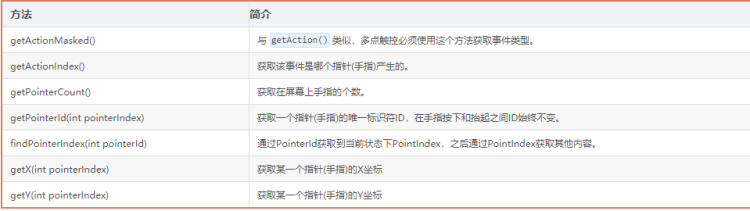
对于一般的点击、滑动事件来说,我们通过一根手指就可以完成,但是对于某些场景下,例如放大图库图片等,一个手指是无法精确的执行放大操作的,但是对于多个手指操作屏幕来说,我们就需要对每个手指的触摸事件进行处理
多点触控的事件机制和普通事件基本一样
下面列举一些常用的方法
面试问题
1、基础原理
(1)简述事件分发机制
(2)onTouchListner中的onTouch与onTouchEvent区别,调用顺序
(3)dispatchTouchEvent, onTouchEvent, onInterceptTouchEvent 方法顺序以及使用场景
2、结合项目问题
(1)阅读器中的事件分发是如何处理的?有哪些事件冲突?

 浙公网安备 33010602011771号