
常常看我的置顶,随时更新。https://www.cnblogs.com/dalgleish/p/18967204
最后的项目打包代码里,会有很多抽象通用StoreDB类等,用于加载SQLite,Json和Xml。通过动态解析类名,来匹配数据。由于代码太长,我就放到最后完结时,项目打包里。
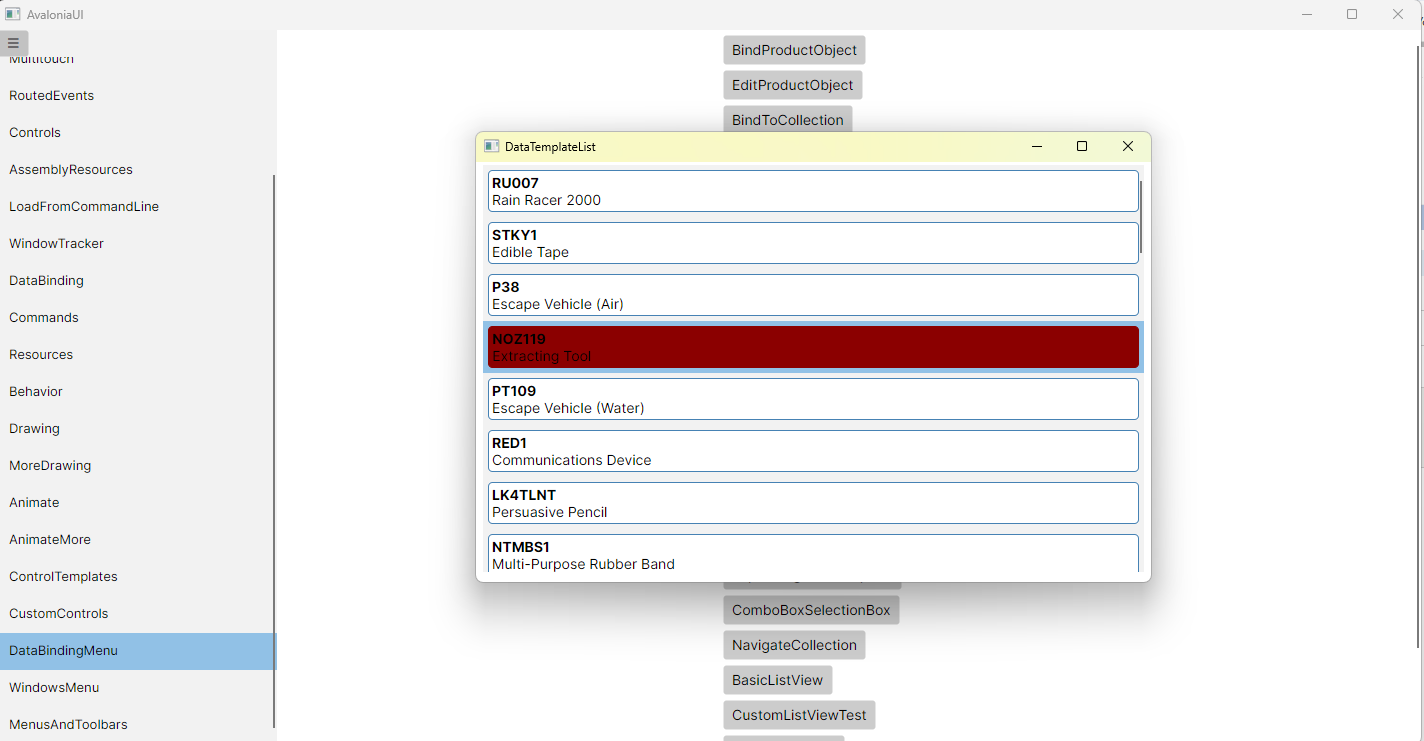
DataTemplateList.axaml代码
<Window xmlns="https://github.com/avaloniaui"
        xmlns:x="http://schemas.microsoft.com/winfx/2006/xaml"
        xmlns:d="http://schemas.microsoft.com/expression/blend/2008"
        xmlns:mc="http://schemas.openxmlformats.org/markup-compatibility/2006"
        Height="420" Width="675"
         xmlns:local="using:AvaloniaUI.Demos.Book._19.StoreDatabase"
        x:Class="AvaloniaUI.DataTemplateList"
        Title="DataTemplateList">

    <Window.Styles>

        <Style Selector="ListBox#lstProducts ListBoxItem">
            <Setter Property="Padding" Value="0" />

            <Style Selector="^ Border.product-border">
                <Setter Property="Background" Value="White" />
                <Setter Property="BorderBrush" Value="SteelBlue" />
                <Setter Property="BorderThickness" Value="1" />
                <Setter Property="CornerRadius" Value="4" />
                <Setter Property="Margin" Value="5" />
            </Style>

            <Style Selector="^:selected Border.product-border">
            <Setter Property="Background" Value="DarkRed" />
            <Setter Property="BorderBrush" Value="DarkRed" />
        </Style>
        </Style>

    </Window.Styles>

    <ListBox Name="lstProducts"
                   Margin="7,3,7,10"
                   HorizontalAlignment="Stretch">

        <ListBox.ItemTemplate>
            <DataTemplate x:DataType="local:Product">
                <Grid Margin="0">
                    <Border Classes="product-border">
                        <Grid Margin="3">
                            <Grid.RowDefinitions>
                                <RowDefinition />
                                <RowDefinition />
                            </Grid.RowDefinitions>

                            <TextBlock Grid.Row="0"
                                       FontWeight="Bold"
                                       Text="{Binding ModelNumber}" />
                            <TextBlock Grid.Row="1"
                                       Text="{Binding ModelName}" />
                        </Grid>
                    </Border>
                </Grid>
            </DataTemplate>
        </ListBox.ItemTemplate>
    </ListBox>
</Window>
DataTemplateList.axaml.cs代码
using Avalonia;
using Avalonia.Controls;
using Avalonia.Markup.Xaml;
using AvaloniaUI.Demos.Book._19.StoreDatabase;

namespace AvaloniaUI;

public partial class DataTemplateList : Window
{
    private StoreDb1 db = new StoreDb1();
    public DataTemplateList()
    {
        InitializeComponent();
        lstProducts.ItemsSource = db.GetProducts();
    }
}
运行效果

 浙公网安备 33010602011771号