
BindToCollection.axaml代码
<Window xmlns="https://github.com/avaloniaui"
        xmlns:x="http://schemas.microsoft.com/winfx/2006/xaml"
        xmlns:d="http://schemas.microsoft.com/expression/blend/2008"
        xmlns:mc="http://schemas.openxmlformats.org/markup-compatibility/2006"
        Width="347.6" Height="500"
        xmlns:local="using:AvaloniaUI.Demos.Book._19.StoreDatabase"
        x:Class="AvaloniaUI.BindToCollection"
        Title="BindToCollection">

    <Grid RowDefinitions="*,auto,*">
        <!-- 上半 -->
        <Grid RowDefinitions="*,auto">
            <ListBox Name="lstProducts" x:DataType="local:Product" SelectionChanged="lstProducts_SelectionChanged"
                     Margin="5"
                     DisplayMemberBinding="{Binding ModelName}">
                <ListBox.Styles>
                    <!-- 默认样式 -->
                    <Style Selector="ListBoxItem">
                        <Setter Property="Background" Value="LightSteelBlue"/>
                        <Setter Property="Margin" Value="1"/>
                        <Setter Property="Padding" Value="5"/>
                        <Style Selector="^:nth-child(odd)">
                            <Setter Property="Background" Value="LightBlue"/>
                        </Style>
                        <!-- 选中项 -->
                        <Style Selector="^:selected">
                            <Setter Property="Background" Value="DarkRed"/>
                            <Setter Property="Foreground" Value="White"/>
                            <Setter Property="BorderBrush" Value="Black"/>
                            <Setter Property="BorderThickness" Value="1"/>
                        </Style>
                    </Style>
                </ListBox.Styles>
            </ListBox>

            <StackPanel Grid.Row="1"
                        HorizontalAlignment="Right"
                        Orientation="Horizontal"
                        Margin="5 2 5 10">

                <Button Margin="2 0 0 0"
                        Padding="2"
                        Click="cmdDeleteProduct_Click">
                    Delete Selected
                </Button>

                <Button Margin="2 0 0 0"
                        Padding="2"
                        Click="cmdAddProduct_Click">
                    Add New
                </Button>

            </StackPanel>
        </Grid>

        <!-- 分割条 -->
        <GridSplitter Grid.Row="1"
                      HorizontalAlignment="Stretch"
                      Height="5"
                      ResizeDirection="Rows"
                      Background="Gray" />

        <!-- 下半 -->
        <Border Grid.Row="2"
                Padding="7"
                Margin="7"
                Background="LightSteelBlue" >

            <Grid DataContext="{Binding #lstProducts.SelectedItem}"
                  TextInput="txt_TextChanged" ColumnDefinitions="auto,*" RowDefinitions="auto,auto,auto,auto,*" x:DataType="local:Product">

                <TextBlock Margin="7" Text="Model Number:"/>
                <TextBox Margin="5"
                         Grid.Column="1"
                         Text="{Binding ModelNumber}"/>

                <TextBlock Margin="7"
                           Grid.Row="1"
                           Text="Model Name:"/>
                <TextBox Margin="5"
                         Grid.Row="1"
                         Grid.Column="1"
                         Text="{Binding ModelName}"/>

                <TextBlock Margin="7"
                           Grid.Row="2"
                           Text="Unit Cost:"/>
                <TextBox Margin="5"
                         Grid.Row="2"
                         Grid.Column="1"
                         Text="{Binding UnitCost}"/>

                <TextBlock Margin="7 7 7 0"
                           Grid.Row="3"
                           Text="Description:"/>

                <ScrollViewer Grid.Row="4"
                         Grid.Column="0"
                         Grid.ColumnSpan="2">
                    <TextBox Margin="7"
                         AcceptsReturn="True"
                         TextWrapping="Wrap"
                         Text="{Binding Description}" />
                </ScrollViewer>

            </Grid>
        </Border>
    </Grid>
</Window>
BindToCollection.axaml.cs代码
using Avalonia;
using Avalonia.Controls;
using Avalonia.Input;
using Avalonia.Interactivity;
using Avalonia.Markup.Xaml;
using AvaloniaUI.Demos.Book._19.StoreDatabase;
using System.Collections.ObjectModel;

namespace AvaloniaUI;

public partial class BindToCollection : Window
{
    private ObservableCollection<Product> products = new();
    private StoreDb1 db = new StoreDb1();
    public BindToCollection()
    {
        InitializeComponent();
        products = db.GetProducts();
        lstProducts.ItemsSource = products;
    }

    private void cmdDeleteProduct_Click(object? sender, RoutedEventArgs e)
    {
        products.Remove((Product)lstProducts.SelectedItem!);
    }

    private void cmdAddProduct_Click(object? sender, RoutedEventArgs e)
    {
        products.Add(new Product("00000", "?", 0, "?"));
        lstProducts.SelectedIndex = lstProducts.ItemCount - 1;
    }

    private void txt_TextChanged(object? sender, TextInputEventArgs e)
    {

    }

    private void lstProducts_SelectionChanged(object? sender, SelectionChangedEventArgs e)
    {

    }
}
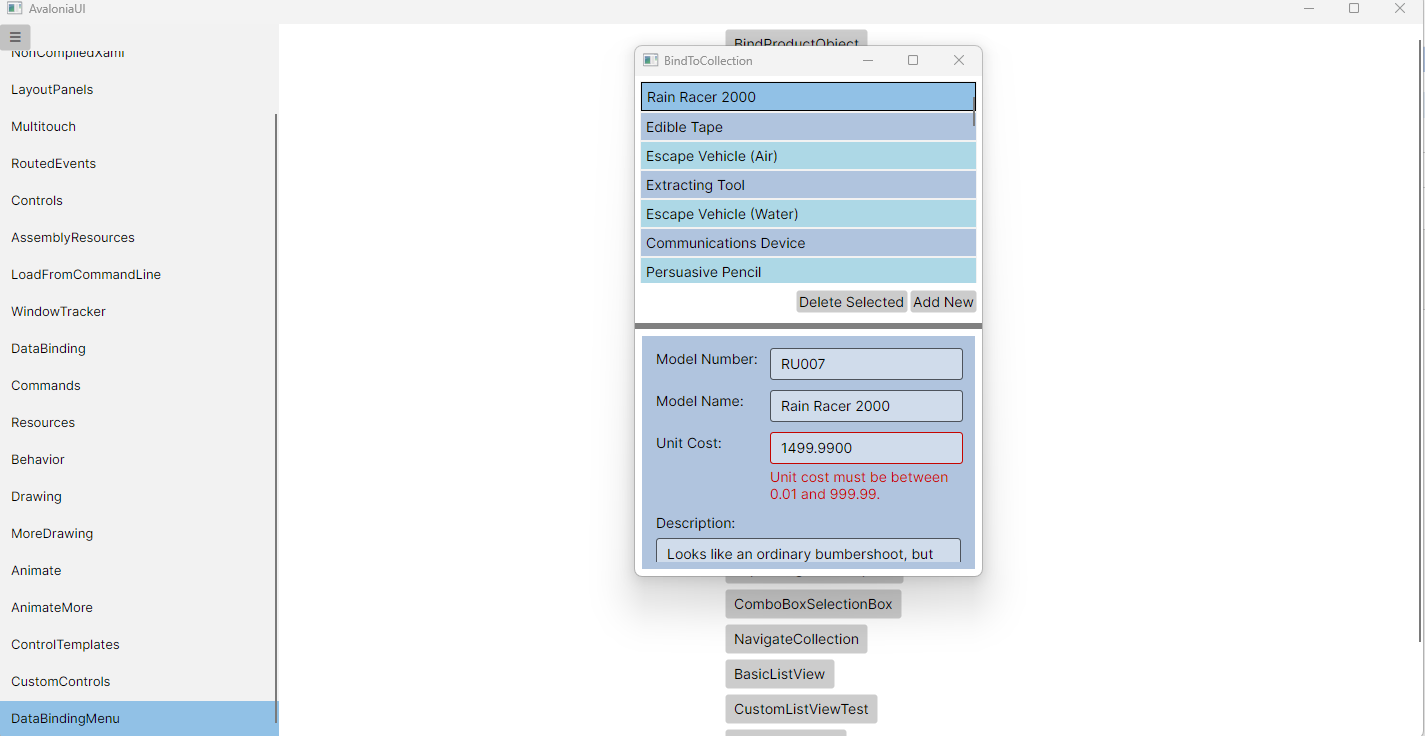
运行效果

 浙公网安备 33010602011771号