
EditProductObject.axaml代码
<Window xmlns="https://github.com/avaloniaui"
        xmlns:x="http://schemas.microsoft.com/winfx/2006/xaml"
        xmlns:d="http://schemas.microsoft.com/expression/blend/2008"
        xmlns:mc="http://schemas.openxmlformats.org/markup-compatibility/2006"
        Height="332" Width="355"
        x:Class="AvaloniaUI.EditProductObject"
        xmlns:local ="using:AvaloniaUI.Demos.Book._19.StoreDatabase"
        Title="EditProductObject">
    <Grid RowDefinitions="auto,*">

        <!-- 顶部输入区 -->
        <Grid ColumnDefinitions="auto,*,auto">
            <TextBlock Margin="7" Text="Product ID:"/>
            <TextBox x:Name="txtID" Margin="5" Grid.Column="1" Text="356"/>
            <Button Grid.Column="2" Margin="5" Padding="2"
                    Click="cmdGetProduct_Click"
                    Content="Get Product"/>
        </Grid>

        <!-- 产品详情 -->
        <Border Grid.Row="1" Padding="7" Margin="7" Background="LightSteelBlue">
            <Grid x:Name="gridProductDetails"
                  ColumnDefinitions="auto,*"
                  RowDefinitions="auto,auto,auto,auto,*,auto" x:DataType="local:Product">

                <TextBlock Margin="7" Text="Model Number:"/>
                <TextBox Margin="5" Grid.Column="1"
                         Text="{Binding ModelNumber}"/>

                <TextBlock Margin="7" Grid.Row="1" Text="Model Name:"/>
                <TextBox Margin="5" Grid.Row="1" Grid.Column="1"
                         Text="{Binding ModelName}"/>

                <TextBlock Margin="7" Grid.Row="2" Text="Unit Cost:"/>
                <TextBox Margin="5" Grid.Row="2" Grid.Column="1"
                         Text="{Binding UnitCost}"/>

                <TextBlock Margin="7,7,7,0" Grid.Row="3" Text="Description:"/>
                <ScrollViewer Grid.Row="4" Grid.Column="0" Grid.ColumnSpan="2">
                    <TextBox Margin="7"
                             TextWrapping="Wrap"
                             AcceptsReturn="True"
                             Text="{Binding Description}"/>
                </ScrollViewer>

                <StackPanel Orientation="Horizontal" Margin="3" Grid.Row="5" Grid.ColumnSpan="2" HorizontalAlignment="Right">
                    <Button Click="cmdIncreasePrice_Click"
                            Margin="2" Padding="10,2,10,2">Increase Price</Button>
                    <Button Click="cmdUpdateProduct_Click" IsDefault="True"
                            Margin="2" Padding="10,2,10,2">Update</Button>
                </StackPanel>
            </Grid>
        </Border>
    </Grid>
</Window>
EditProductObject.axaml.cs代码
using Avalonia;
using Avalonia.Controls;
using Avalonia.Interactivity;
using AvaloniaUI.Demos.Book._19.StoreDatabase;
using System;

namespace AvaloniaUI;

public partial class EditProductObject : Window
{
    StoreDb1 db1 = new StoreDb1();
    Product? product;
    public EditProductObject()
    {
        InitializeComponent();
    }

    private void cmdGetProduct_Click(object? sender, RoutedEventArgs e)
    {
        int ID;
        if (Int32.TryParse(txtID.Text, out ID))
        {
            try
            {
                product = db1.GetProduct(ID)!;
                gridProductDetails.DataContext = product;
            }
            catch
            {
                Console.WriteLine("Error contacting database.");
            }
        }
        else
        {
            Console.WriteLine("Invalid ID.");
        }
    }

    private void cmdIncreasePrice_Click(object? sender, RoutedEventArgs e)
    {
        product!.UnitCost *= 1.1M;
    }

    private void cmdUpdateProduct_Click(object? sender, RoutedEventArgs e)
    {
        //自己实现反写入
    }
}
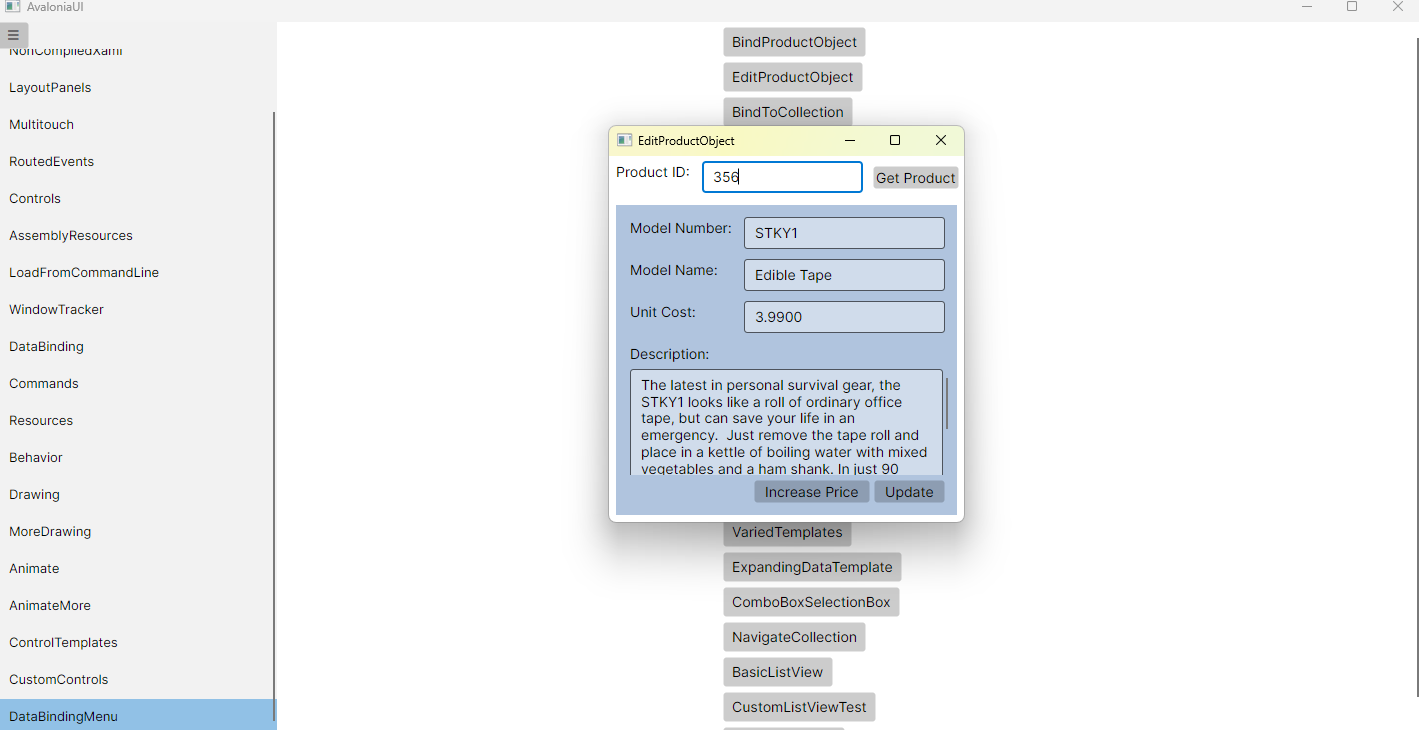
运行效果

 浙公网安备 33010602011771号