
GenerateBitmap.axaml代码
<Window xmlns="https://github.com/avaloniaui"
        xmlns:x="http://schemas.microsoft.com/winfx/2006/xaml"
        xmlns:d="http://schemas.microsoft.com/expression/blend/2008"
        xmlns:mc="http://schemas.openxmlformats.org/markup-compatibility/2006"
        Width="460" Height="472"
        x:Class="AvaloniaUI.GenerateBitmap"
        Title="GenerateBitmap">
    <Grid RowDefinitions="auto,*">
        <Button Content="Button" Grid.Row="1" Height="81" HorizontalAlignment="Left" Margin="106,90,0,0" Name="button1" VerticalAlignment="Top" Width="193" />
        <Button Content="Generate Bitmap" Margin="5" Padding="10" Click="cmdGenerate_Click" HorizontalAlignment="Center"></Button>
        <Image Grid.Row="1" Name="img" Margin="5" Width="400" Height="300" IsHitTestVisible="False"></Image>

    </Grid>
</Window>
GenerateBitmap.axaml.cs代码
using Avalonia;
using Avalonia.Controls;
using Avalonia.Interactivity;
using Avalonia.Markup.Xaml;
using Avalonia.Media.Imaging;
using Avalonia.Platform;
using System;
using System.Runtime.InteropServices;

namespace AvaloniaUI;

public partial class GenerateBitmap : Window
{
    public GenerateBitmap()
    {
        InitializeComponent();
    }

    private void cmdGenerate_Click(object? sender, RoutedEventArgs e)
    {
        // 确保图像尺寸有效
        if (img.Width <= 0 || img.Height <= 0) return;

        // 创建 WriteableBitmap
        var size = new PixelSize((int)img.Width, (int)img.Height);
        var dpi = new Vector(96, 96);
        var wb = new WriteableBitmap(size, dpi, PixelFormat.Bgra8888, AlphaFormat.Premul);

        // 使用 Lock() 获取帧缓冲区
        using (var buffer = wb.Lock())
        {
            int bytesPerPixel = PixelFormat.Bgra8888.BitsPerPixel / 8; // BGRA8888 格式每个像素4字节(32位)
            int stride = buffer.RowBytes;

            Random rand = new Random();

            // 创建像素数组
            byte[] pixels = new byte[stride * size.Height];

            for (int y = 0; y < size.Height; y++)
            {
                for (int x = 0; x < size.Width; x++)
                {
                    int alpha, red, green, blue;

                    if ((x % 5 == 0) || (y % 7 == 0))
                    {
                        red = (int)((double)y / size.Height * 255);
                        green = rand.Next(100, 255);
                        blue = (int)((double)x / size.Width * 255);
                        alpha = 255;
                    }
                    else
                    {
                        red = (int)((double)x / size.Width * 255);
                        green = rand.Next(100, 255);
                        blue = (int)((double)y / size.Height * 255);
                        alpha = 50;
                    }

                    int pixelOffset = y * stride + x * bytesPerPixel;
                    pixels[pixelOffset] = (byte)blue;     // B
                    pixels[pixelOffset + 1] = (byte)green; // G
                    pixels[pixelOffset + 2] = (byte)red;   // R
                    pixels[pixelOffset + 3] = (byte)alpha; // A
                }
            }

            // 使用 Marshal.Copy 将数据复制到缓冲区
            Marshal.Copy(pixels, 0, buffer.Address, pixels.Length);
        }

        img.Source = wb;
    }
}
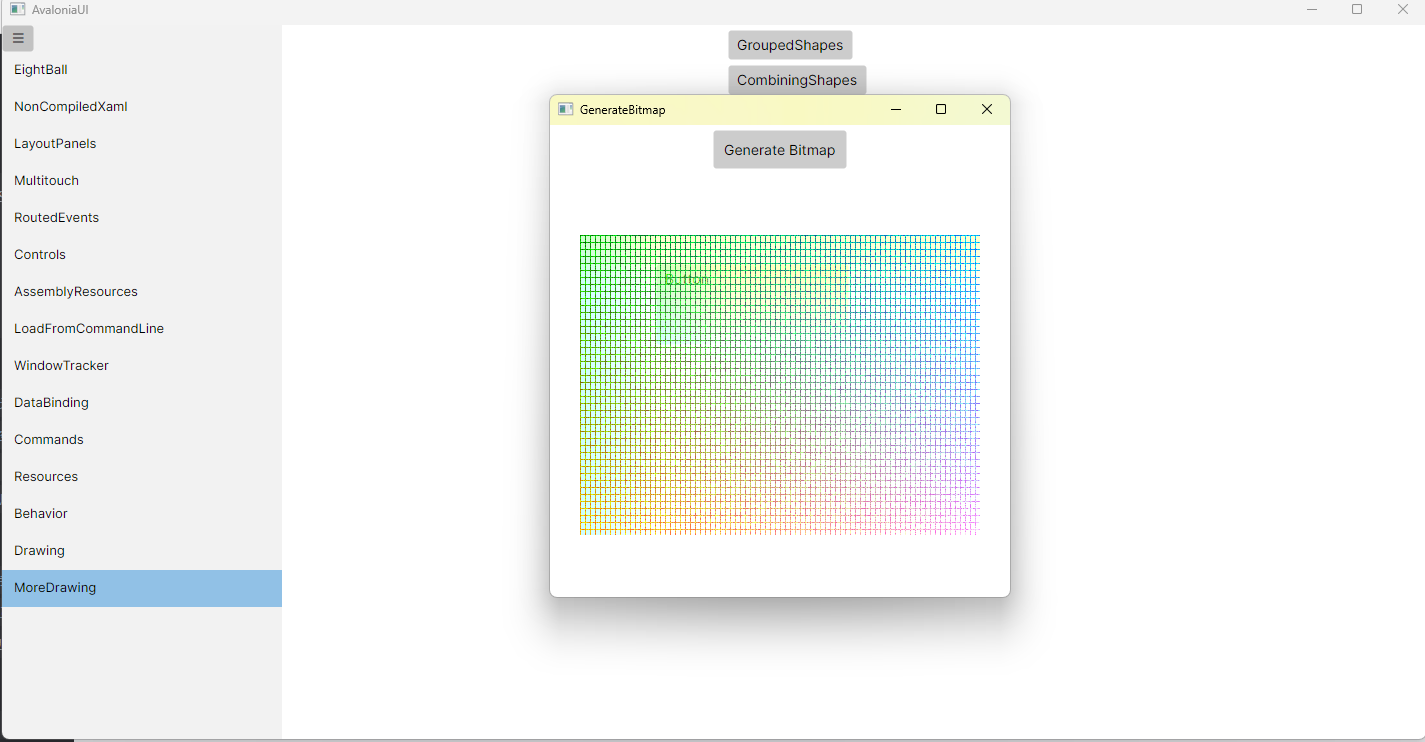
运行效果

 浙公网安备 33010602011771号