
DropShadowEffects.axaml代码
<Window xmlns="https://github.com/avaloniaui"
        xmlns:x="http://schemas.microsoft.com/winfx/2006/xaml"
        xmlns:d="http://schemas.microsoft.com/expression/blend/2008"
        xmlns:mc="http://schemas.openxmlformats.org/markup-compatibility/2006"
        Height="318" Width="354"
        x:Class="AvaloniaUI.DropShadowEffects"
        Title="DropShadowEffects">
    <StackPanel>
        <TextBlock FontSize="20" Margin="5">
            <TextBlock.Effect>
                <DropShadowEffect></DropShadowEffect>
            </TextBlock.Effect>
            <TextBlock.Text>Basic dropshadow</TextBlock.Text>
        </TextBlock>

        <TextBlock FontSize="20" Margin="5">
            <TextBlock.Effect>
                <DropShadowEffect Color="SlateBlue"></DropShadowEffect>
            </TextBlock.Effect>
            <TextBlock.Text>Light blue dropshadow</TextBlock.Text>
        </TextBlock>

        <TextBlock FontSize="20" Foreground="White" Margin="5">
            <TextBlock.Effect>
                <DropShadowEffect BlurRadius="15"></DropShadowEffect>
            </TextBlock.Effect>
            <TextBlock.Text>Blurred dropshadow with white text</TextBlock.Text>
        </TextBlock>

        <TextBlock FontSize="20" Foreground="LimeGreen" Margin="5">
            <TextBlock.Effect>
                <DropShadowEffect Color="Black"
                                  OffsetX="20"
                                  OffsetY="20"
                                  BlurRadius="3"
                                  Opacity="0.9"/>
            </TextBlock.Effect>
            <TextBlock.Text>Close dropshadow</TextBlock.Text>
        </TextBlock>
    </StackPanel>
</Window>
DropShadowEffects.axaml.cs代码
using Avalonia;
using Avalonia.Controls;
using Avalonia.Markup.Xaml;

namespace AvaloniaUI;

public partial class DropShadowEffects : Window
{
    public DropShadowEffects()
    {
        InitializeComponent();
    }
}
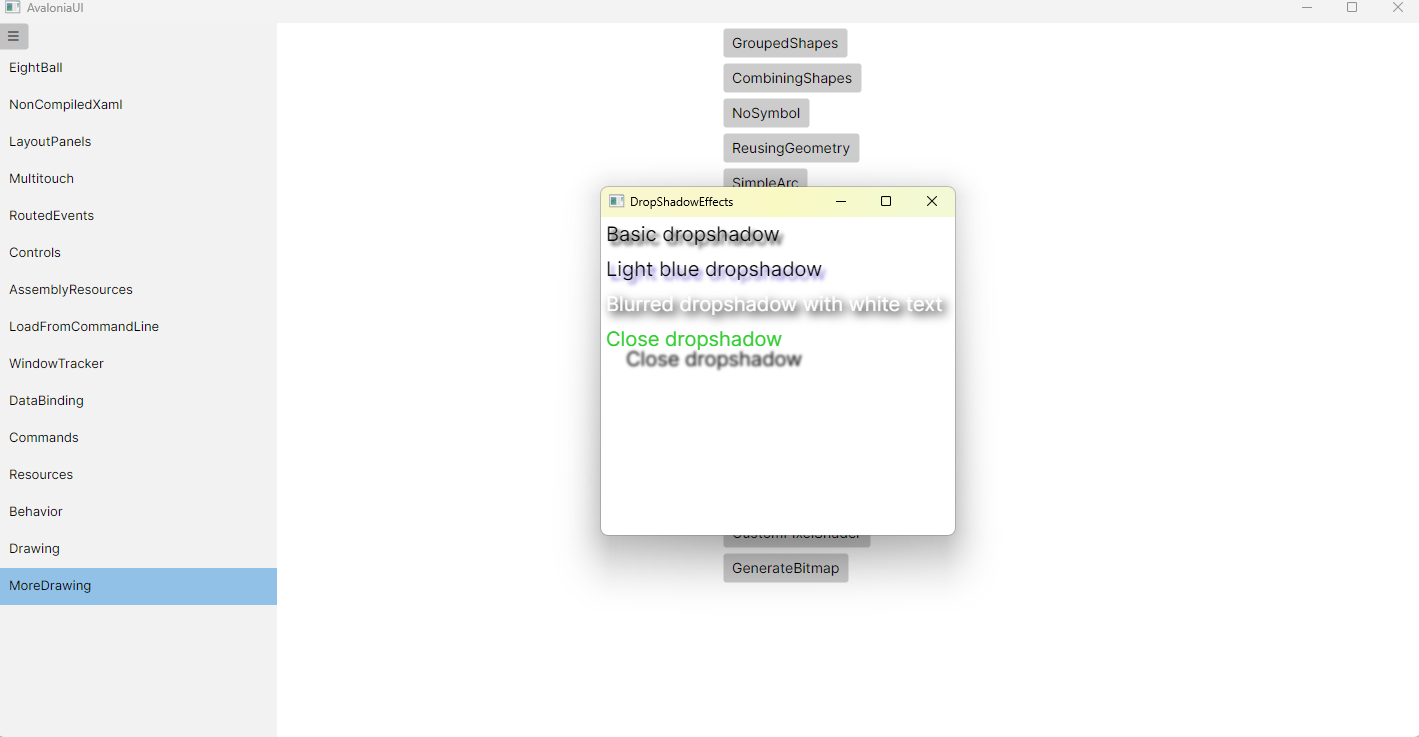
运行效果

 浙公网安备 33010602011771号