
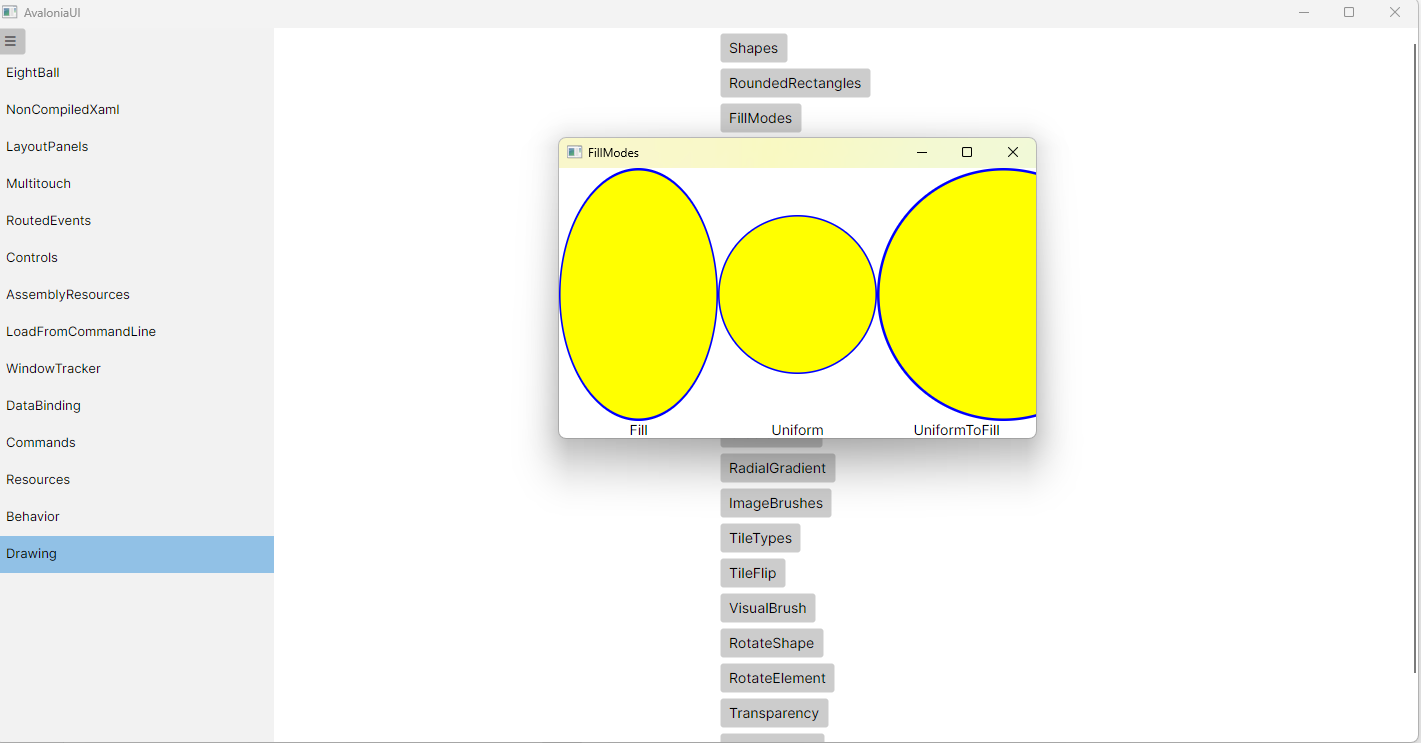
特别提醒,只有Ellipse的Stretch是无效的,需要用Viewbox。这是Avalonia的设计问题。使用Viewbox的Stretch,会缩放StokeThiness,所以边框会变粗,建议自己实现一个Ellipse类,实现Stretch功能。
FillModes.axaml代码
<Window xmlns="https://github.com/avaloniaui"
        xmlns:x="http://schemas.microsoft.com/winfx/2006/xaml"
        xmlns:d="http://schemas.microsoft.com/expression/blend/2008"
        xmlns:mc="http://schemas.openxmlformats.org/markup-compatibility/2006"
        Height="270" Width="477"
        x:Class="AvaloniaUI.FillModes"
        Title="FillModes">
    <Grid ColumnDefinitions="*,*,*" RowDefinitions="*,auto">
        <Viewbox Stretch="Fill">
            <Ellipse Fill="Yellow" Stroke="Blue" StrokeThickness="1"
                     Width="100" Height="100"/>
        </Viewbox>

        <!-- Uniform -->
        <Viewbox Stretch="Uniform" Grid.Column="1">
            <Ellipse Fill="Yellow" Stroke="Blue" StrokeThickness="1"
                     Width="100" Height="100"/>
        </Viewbox>

        <!-- UniformToFill -->
        <Viewbox Stretch="UniformToFill" Grid.Column="2">
            <Ellipse Fill="Yellow" Stroke="Blue" StrokeThickness="1"
                     Width="100" Height="100"/>
        </Viewbox>

        <TextBlock Grid.Row="1" TextAlignment="Center">Fill</TextBlock>
        <TextBlock Grid.Row="1" Grid.Column="1" TextAlignment="Center">Uniform</TextBlock>
        <TextBlock Grid.Row="1" Grid.Column="2" TextAlignment="Center">UniformToFill</TextBlock>

    </Grid>
</Window>
FillModes.axaml.cs代码
using Avalonia;
using Avalonia.Controls;
using Avalonia.Markup.Xaml;

namespace AvaloniaUI;

public partial class FillModes : Window
{
    public FillModes()
    {
        InitializeComponent();
    }
}
运行效果

 浙公网安备 33010602011771号