
为了展示调用动画的多种方法,这次用Behavior实现。可参考上例子IAction,更接近于wpf,但是不简洁。大家可以继承StyledElementBehavior,而不是Behavior。这样在xaml的绑定过程中,可以用x:Name命名FadeBehavior。我这里是为了测试附加属性和绑定,才这样写。
FadeInAndOutTest.axaml代码
<Window xmlns="https://github.com/avaloniaui"
        xmlns:x="http://schemas.microsoft.com/winfx/2006/xaml"
        xmlns:d="http://schemas.microsoft.com/expression/blend/2008"
        xmlns:mc="http://schemas.openxmlformats.org/markup-compatibility/2006"
        Height="296" Width="343"
         xmlns:local="using:AvaloniaUI"
        x:Class="AvaloniaUI.FadeInAndOutTest"
        Title="FadeInAndOutTest">
    <StackPanel Margin="10">
        <StackPanel Orientation="Horizontal" Margin="3,15">
            <Button Content="Click to Fade the Label" Padding="5">
                <Interaction.Behaviors>
                    <EventTriggerBehavior EventName="Click">
                        <CallMethodAction MethodName="FadeOut" TargetObject="{Binding #border.(local:FadeBehavior.Instance)}"/>
                    </EventTriggerBehavior>
                </Interaction.Behaviors>
            </Button>

            <Button Content="Click to Show the Label" Padding="5" Click="FadeInClick"/>
        </StackPanel>

        <Border Name="border" Background="Orange" BorderBrush="Black" BorderThickness="1" Margin="3,0" >
            <Interaction.Behaviors>
                <local:FadeBehavior Duration="0:0:0.4"/>
            </Interaction.Behaviors>
            <TextBlock Margin="5" FontSize="17" TextWrapping="Wrap"  Text="I'm the target of the FadeOutAction and FadeInAction."></TextBlock>
        </Border>
    </StackPanel>
</Window>
FadeInAndOutTest.axaml.cs代码
using Avalonia;
using Avalonia.Animation;
using Avalonia.Animation.Easings;
using Avalonia.Controls;
using Avalonia.Input;
using Avalonia.Interactivity;
using Avalonia.Markup.Xaml;
using Avalonia.Styling;
using Avalonia.Threading;
using Avalonia.Xaml.Interactions.Custom;
using Avalonia.Xaml.Interactivity;
using System;
using System.Linq;

namespace AvaloniaUI;

public class FadeBehavior : Behavior<Control>
{
    public static readonly AttachedProperty<FadeBehavior> InstanceProperty =
     AvaloniaProperty.RegisterAttached<FadeBehavior, Control, FadeBehavior>("Instance");

    public static readonly StyledProperty<TimeSpan> DurationProperty =
        AvaloniaProperty.Register<FadeBehavior, TimeSpan>(nameof(Duration), TimeSpan.FromMilliseconds(400));

    public TimeSpan Duration
    {
        get => GetValue(DurationProperty);
        set => SetValue(DurationProperty, value);
    }

    // 附加时可以做初始化
    protected override void OnAttached()
    {
        base.OnAttached();
        if (AssociatedObject != null)
        {
            AssociatedObject.SetValue(InstanceProperty, this);
        }
    }

    // 提供方法,供 CallMethodAction 调用
    public async void FadeOut()
    {

        if (AssociatedObject == null) return;

        var anim = new Animation
        {
            Duration = Duration,
            Children =
                {
                    new KeyFrame { KeyTime = TimeSpan.Zero, Setters = { new Setter(Visual.OpacityProperty, 1d) } },
                    new KeyFrame { KeyTime = Duration, Setters = { new Setter(Visual.OpacityProperty, 0d) } }
                },
            FillMode = FillMode.Forward
        };

        await anim.RunAsync(AssociatedObject);
    }

    public void FadeIn()
    {
        if (AssociatedObject == null) return;

        var anim = new Animation
        {
            Duration = Duration,
            Children =
                {
                    new KeyFrame { Cue = new Cue(0d), Setters = { new Setter(Visual.OpacityProperty, 0d) } },
                    new KeyFrame { Cue = new Cue(1d), Setters = { new Setter(Visual.OpacityProperty, 1d) } }
                },
            FillMode = FillMode.Forward
        };

        anim.RunAsync(AssociatedObject);
    }
}
public partial class FadeInAndOutTest : Window
{
    private FadeBehavior? fadeBehavior;
    public FadeInAndOutTest()
    {
        InitializeComponent();
        // 获取所有Behaviors
        var behaviors = Interaction.GetBehaviors(border);
        // 查找类型为 FadeBehavior 的行为
        fadeBehavior = behaviors.OfType<FadeBehavior>().FirstOrDefault();
    }
    private void FadeInClick(object? sender, RoutedEventArgs e)
    {
        fadeBehavior?.FadeIn();
    }
}
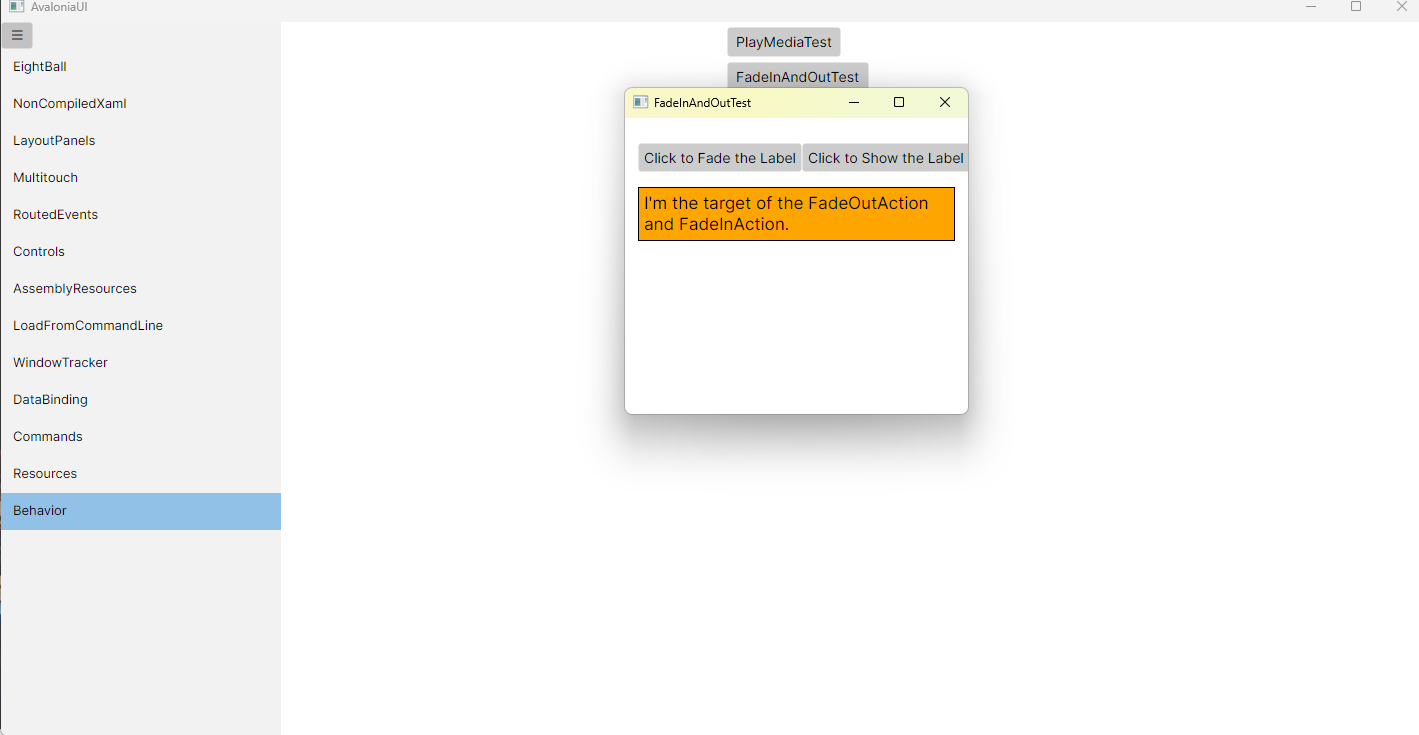
运行效果

 浙公网安备 33010602011771号