
基于自己写的Mdi控件。ToolBar之前有一章已经说明了开源库的地址。
https://www.cnblogs.com/dalgleish/p/19018101
TwoDocument.axaml代码
<Window xmlns="https://github.com/avaloniaui"
        xmlns:x="http://schemas.microsoft.com/winfx/2006/xaml"
        xmlns:d="http://schemas.microsoft.com/expression/blend/2008"
        xmlns:mc="http://schemas.openxmlformats.org/markup-compatibility/2006"
         xmlns:local="clr-namespace:AvaloniaUI;assembly=AvaloniaUI"
         x:DataType="local:TwoDocument"
        Height="421" Width="421"
        x:Class="AvaloniaUI.TwoDocument"
        Title="TwoDocument">
    <Grid RowDefinitions="auto, auto, *">
        <Menu Grid.Row="0">
            <MenuItem Header="_File">
                <MenuItem Header="_New"></MenuItem>
                <MenuItem Header="_Open"></MenuItem>
                <MenuItem Header="_Save" Command="{Binding SaveCommand}"></MenuItem>
                <MenuItem Header="Save _As"></MenuItem>
                <Separator></Separator>
                <MenuItem Header="Cl_ose"></MenuItem>
            </MenuItem>
        </Menu>

        <ToolBarTray Grid.Row="1" >
        <ToolBar>
            <Button Command="{Binding NewCommand}">New</Button>
            <Button>Open</Button>
            <Button Command="{Binding SaveCommand}">Save</Button>
        </ToolBar>
        <ToolBar>
            <Button Command="{Binding CopyCutCommand}">Cut</Button>
            <Button Command="{Binding CopyCutCommand}">Copy</Button>
            <Button Command="{Binding PasteCommand}">Paste</Button>
        </ToolBar>
        </ToolBarTray>

        <Mdi Grid.Row="2" Name="documents">

        </Mdi>
    </Grid>
</Window>
TwoDocument.axaml.cs代码
using Avalonia;
using Avalonia.Controls;
using Avalonia.Input;
using Avalonia.Markup.Xaml;
using CommunityToolkit.Mvvm.Input;
using Shares.Avalonia;
using System;
using System.Collections.Generic;
using System.Threading.Tasks;

namespace AvaloniaUI;

public partial class TwoDocument : Window
{
    public TwoDocument()
    {
        InitializeComponent();
        this.DataContext = this;
        _ = this.Clipboard?.ClearAsync();
    }
    [RelayCommand]
    private void New()
    {
        var tb = new TextBox();
        tb.GotFocus += Tb_GotFocus;
        tb.TextChanged += Tb_TextChanged;
        tb.GetObservable(TextBox.SelectionStartProperty).Subscribe(_ => CopyCutCommand.NotifyCanExecuteChanged());
        tb.GetObservable(TextBox.SelectionEndProperty).Subscribe(_ => CopyCutCommand.NotifyCanExecuteChanged());
        tb.GetObservable(TextBox.CanCopyProperty).Subscribe(_ => PasteCommand.NotifyCanExecuteChanged());
        documents.Add(new MdiChild() { Content = tb });
    }

    private Dictionary<object, bool> isDirty = new Dictionary<object, bool>();
    private void Tb_GotFocus(object? sender, GotFocusEventArgs e)
    {
        if (sender is TextBox tb)
        {
            isDirty[tb!] = tb.Text == null ? false : tb.Text.Length != 0;
        }
        saveCommand?.NotifyCanExecuteChanged();
    }
    private void Tb_TextChanged(object? sender, TextChangedEventArgs e)
    {
        if (sender is TextBox tb)
        {
            isDirty[tb!] = tb.Text == null ? false : tb.Text.Length != 0;
        }
        saveCommand?.NotifyCanExecuteChanged();
    }

    [RelayCommand(CanExecute = nameof(CanSave))]
    private void Save()
    {

    }
    private bool CanSave()
    {
        if (documents.SelectedItem?.Content is TextBox tb)
        {
            return isDirty[tb];
        }
        return false;
    }
    [RelayCommand(CanExecute = nameof(CanCopyCut))]
    private void CopyCut()
    {

    }
    private bool CanCopyCut()
    {
        if (documents.SelectedItem?.Content is TextBox tb)
        {
            return tb.CanCut | tb.CanCopy;
        }
        return false;
    }
    [RelayCommand(CanExecute = nameof(CanPaste))]
    private void Paste()
    {

    }
    private bool CanPaste()
    {
        if (documents.SelectedItem?.Content is TextBox tb)
        {
            var text = this.Clipboard?.GetTextAsync().Result;
            return !string.IsNullOrEmpty(text);
        }
        return false;
    }
}
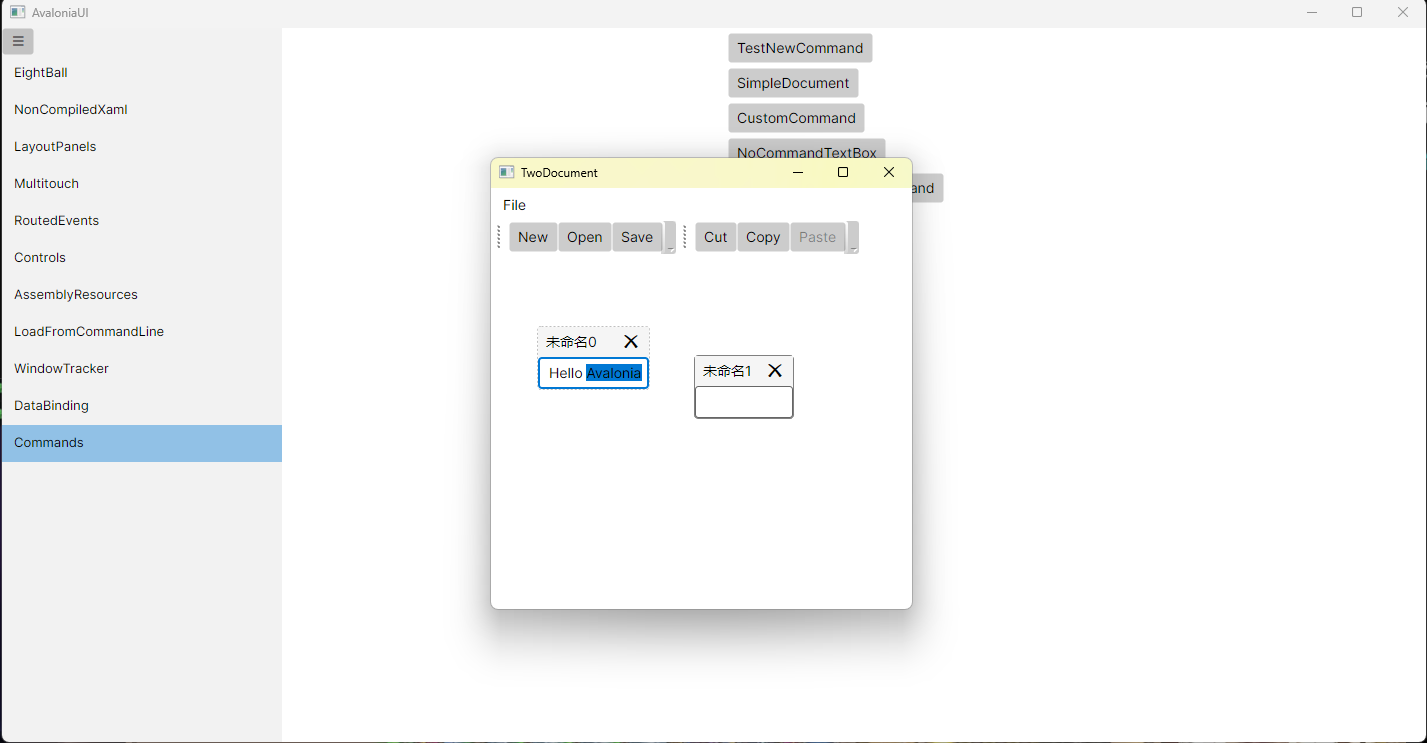
运行效果

 浙公网安备 33010602011771号