
CheckBoxList.axaml代码
<Window xmlns="https://github.com/avaloniaui"
        xmlns:x="http://schemas.microsoft.com/winfx/2006/xaml"
        xmlns:d="http://schemas.microsoft.com/expression/blend/2008"
        xmlns:mc="http://schemas.openxmlformats.org/markup-compatibility/2006"
        Height="300" Width="300"
        x:Class="AvaloniaUI.CheckBoxList"
        Title="CheckBoxList">
    <Grid Margin="10" RowDefinitions="*,auto">

        <ListBox Name="lst" SelectionChanged="lst_SelectionChanged">
            <CheckBox Margin="3" Content="Option 1"/>
            <CheckBox Margin="3" Content="Option 2" />
            <CheckBox Margin="3" Content="Option 3" />
        </ListBox>

        <StackPanel Grid.Row="1" Margin="0,10,0,0">
            <TextBlock>Current selection: </TextBlock>
            <TextBlock Name="txtSelection" TextWrapping="Wrap" />
            <Button Margin="0,10,0,0" Content="Examine All Items" Click="cmd_CheckAllItems" />
        </StackPanel>
    </Grid>
</Window>
CheckBoxList.axaml.cs代码
using Avalonia;
using Avalonia.Controls;
using Avalonia.Interactivity;
using Avalonia.Markup.Xaml;
using System;
using System.Text;

namespace AvaloniaUI;

public partial class CheckBoxList : Window
{
    public CheckBoxList()
    {
        InitializeComponent();
    }

    private void lst_SelectionChanged(object? sender, SelectionChangedEventArgs e)
    {
        var selectedItem = lst.SelectedItem as CheckBox;
        if (selectedItem != null)
        {
            txtSelection.Text = $"You chose item at position {lst.SelectedIndex}.\r\nChecked state is {((CheckBox)lst.SelectedItem!).IsChecked}.";
        }
    }

    private void cmd_CheckAllItems(object? sender, RoutedEventArgs e)
    {
        StringBuilder sb = new StringBuilder();
        foreach (CheckBox? item in lst.Items)
        {
            if (item?.IsChecked == true)
            {
                sb.Append(
                    item.Content + " is checked.");
                sb.Append("\r\n");
            }
        }
        txtSelection.Text = sb.ToString();
    }
}
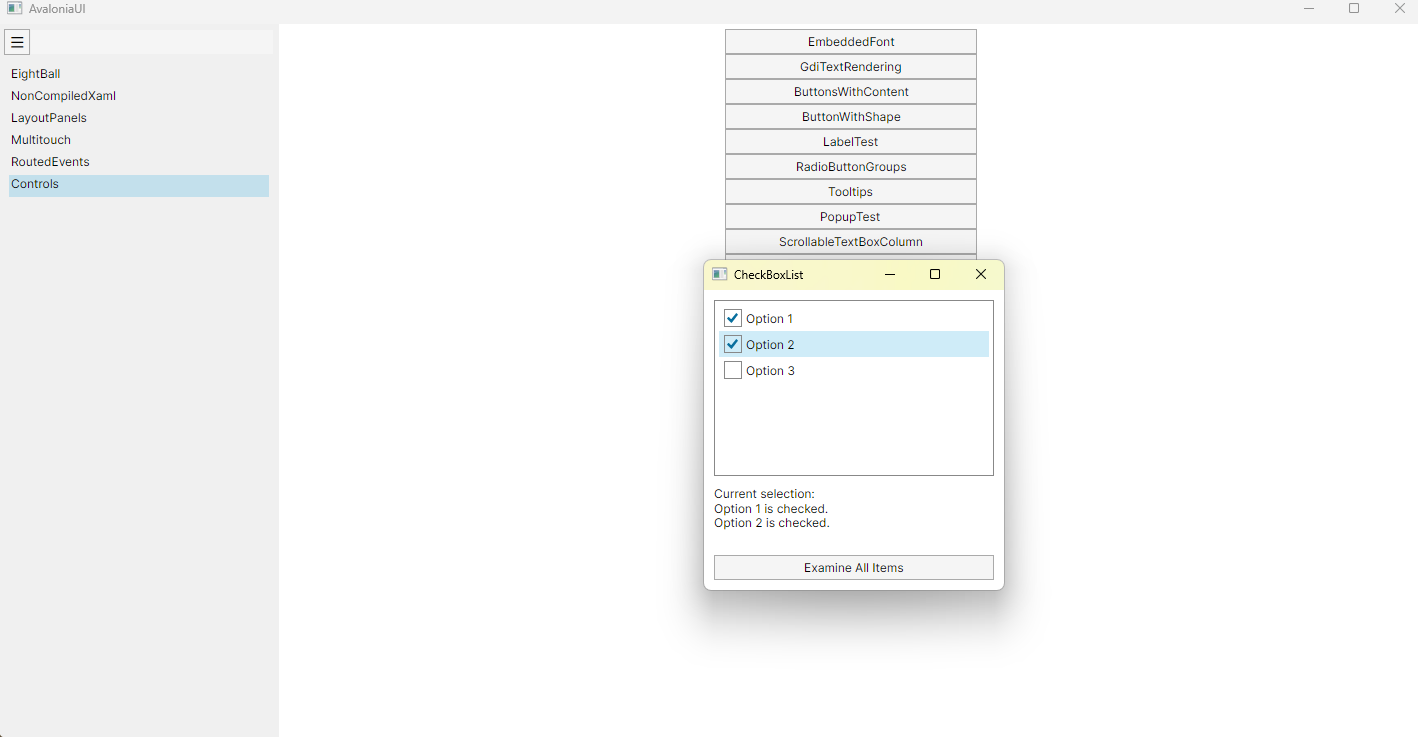
运行效果

 浙公网安备 33010602011771号