
TextBlock复杂的使用,请参考https://www.cnblogs.com/dalgleish/p/18995027
由于Avalonia没有内置Hyperlink,所以我们自己实现一个就行了。老规矩,留了一个坑,大家可以增加功能实现超链接。
Hyperlink类,移动端需要自己单独实现。(这个版本之后会被弃用)
 public class Hyperlink : InlineUIContainer
 {
     private readonly TextBlock textBlock;
     public event EventHandler<PointerPressedEventArgs>? Click;


     public static readonly StyledProperty<string> TextProperty =
         AvaloniaProperty.Register<Hyperlink, string>(
             nameof(Text), defaultBindingMode: BindingMode.TwoWay);

     public string Text
     {
         get => GetValue(TextProperty);
         set => SetValue(TextProperty, value);
     }

     public Hyperlink()
     {
         textBlock = new TextBlock
         {
             TextDecorations = new TextDecorationCollection
             {
                 new TextDecoration { Location = TextDecorationLocation.Underline }
             },
             Foreground = Brushes.Blue,
             Cursor = new Cursor(StandardCursorType.Hand)
         };

         // 绑定 Text 属性
         this.GetObservable(TextProperty).Subscribe(t => textBlock.Text = t ?? string.Empty);

         textBlock.PointerPressed += OnPointerPressed;

         this.Child = textBlock;
     }

     private void OnPointerPressed(object? sender, PointerPressedEventArgs e)
     {
         Click?.Invoke(this, e);
     }
     private bool IsValidHttpUrl()
     {
         if (Uri.TryCreate(Text, UriKind.Absolute, out var uri))
         {
             return uri.Scheme == Uri.UriSchemeHttp || uri.Scheme == Uri.UriSchemeHttps;
         }
         return false;
     }
     public void Navigate()
     {
         if (!IsValidHttpUrl())
             return;

         try
         {
             // Windows / Linux / macOS 通用跳转方式
             ProcessStartInfo psi = new ProcessStartInfo
             {
                 FileName = Text,
                 UseShellExecute = true
             };
             Process.Start(psi);
         }
         catch (Exception ex)
         {
             Console.WriteLine($"无法打开链接{Text}: {ex.Message}");
         }
     }
 }
PopupTest.axaml代码
<Window xmlns="https://github.com/avaloniaui"
        xmlns:x="http://schemas.microsoft.com/winfx/2006/xaml"
        xmlns:d="http://schemas.microsoft.com/expression/blend/2008"
        xmlns:mc="http://schemas.openxmlformats.org/markup-compatibility/2006"
        Height="300" Width="300"
        x:Class="AvaloniaUI.PopupTest"
        Title="PopupTest">
    <Grid Margin="10">
        <TextBlock TextWrapping="Wrap">
            You can use a Popup to provide a link for
            a specific
        <Hyperlink Text="term" Click="run_MouseClicked"/>
            of interest.
        </TextBlock>
        <Popup Name="popLink" IsOpen="False" Placement="Pointer" IsLightDismissEnabled="True">
            <Border Background="White" CornerRadius="5" Padding="10">
                <Border.Transitions>
                    <Transitions>
                        <DoubleTransition Property="Opacity" Duration="0:0:0.5" />
                    </Transitions>
                </Border.Transitions>
                <TextBlock TextWrapping="Wrap">
                    Welcome to C#  Avalonia:
                    <Hyperlink Text="https://www.cnblogs.com/dalgleish" Click="Hyperlink_Click"></Hyperlink>
                </TextBlock>
            </Border>
        </Popup>
    </Grid>
</Window>
PopupTest.axaml.cs代码
using Avalonia;
using Avalonia.Controls;
using Avalonia.Controls.Documents;
using Avalonia.Input;
using Avalonia.Markup.Xaml;
using Shares.Avalonia;

namespace AvaloniaUI;

public partial class PopupTest : Window
{
    public PopupTest()
    {
        InitializeComponent();
    }

    private void run_MouseClicked(object? sender, PointerPressedEventArgs e)
    {
        popLink.IsOpen = true;
    }

    private void Hyperlink_Click(object? sender, PointerPressedEventArgs e)
    {
        ((Hyperlink?)sender)?.Navigate();
    }
}
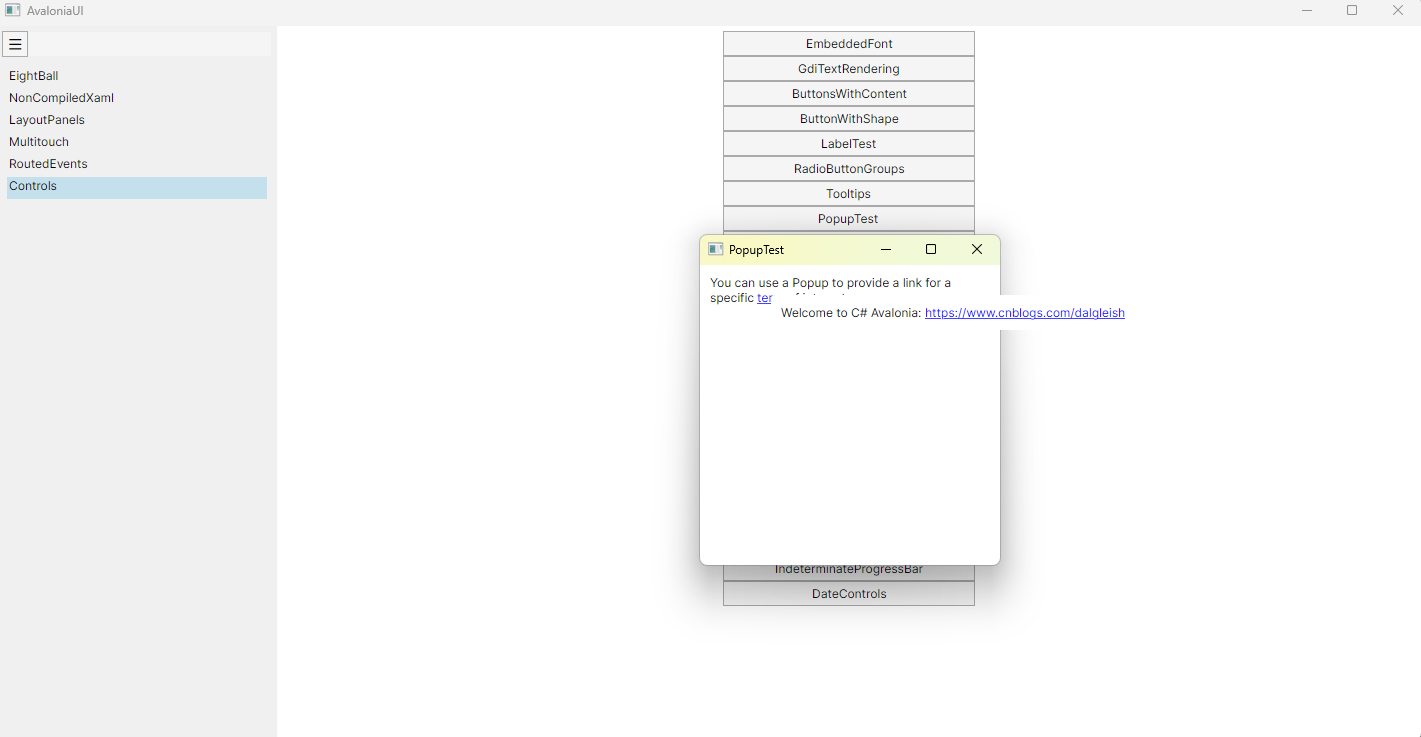
运行效果

 浙公网安备 33010602011771号