
增加了防止重复按键功能。
KeyPressEvents.axml代码
<Window xmlns="https://github.com/avaloniaui"
        xmlns:x="http://schemas.microsoft.com/winfx/2006/xaml"
        xmlns:d="http://schemas.microsoft.com/expression/blend/2008"
        xmlns:mc="http://schemas.openxmlformats.org/markup-compatibility/2006"
        Height="387" Width="368"
        x:Class="AvaloniaUI.KeyPressEvents"
        Title="KeyPressEvents">
    <Grid RowDefinitions="auto,*,auto,auto">
        <DockPanel Margin="5">
            <TextBlock Margin="3" >
                Type here:
            </TextBlock>
            <TextBox KeyDown="KeyEvent" KeyUp="KeyEvent"
                     TextChanged="TextChanged" Name="inputBox"/>
        </DockPanel>

        <ListBox Margin="5" Name="lstMessages" Grid.Row="1"></ListBox>
        <CheckBox Margin="5" Name="chkIgnoreRepeat" Grid.Row="2">Ignore Repeated Keys</CheckBox>
        <Button Click="cmdClear_Click" Grid.Row="3" HorizontalAlignment="Right" Margin="5" Padding="3">Clear List</Button>
    </Grid>
</Window>
KeyPressEvents.axaml.cs代码
using Avalonia;
using Avalonia.Controls;
using Avalonia.Input;
using Avalonia.Interactivity;
using Avalonia.Markup.Xaml;
using System;
using System.Collections.Generic;

namespace AvaloniaUI;

public partial class KeyPressEvents : Window
{
    public KeyPressEvents()
    {
        InitializeComponent();
        inputBox.AddHandler(KeyDownEvent, PreCheckKeyEvent, RoutingStrategies.Tunnel);
        inputBox.AddHandler(KeyUpEvent, PreCheckKeyEvent, RoutingStrategies.Tunnel);
    }
    private readonly HashSet<Key> pressedKeys = new();
    private void PreCheckKeyEvent(object? sender, KeyEventArgs e)
    {
        if (chkIgnoreRepeat.IsChecked!.Value)
        {
            switch (e.RoutedEvent)
            {
                case var evt when evt == KeyDownEvent:
                    {
                        if (!pressedKeys.Add(e.Key))
                            e.Handled = true;
                    }
                    break;

                case var evt when evt == KeyUpEvent:
                    {
                        pressedKeys.Remove(e.Key);
                    }
                    break;
            }
        }
    }
    private void KeyEvent(object? sender, KeyEventArgs e)
    {
        string message = $"Event: {e.RoutedEvent}, Key: {e.Key}";
        lstMessages.Items.Add(message);
    }

    private void TextChanged(object? sender, TextChangedEventArgs e)
    {
        string message = $"TextChanged Event: {e.RoutedEvent}";
        lstMessages.Items.Add(message);
    }

    private void cmdClear_Click(object? sender, RoutedEventArgs e)
    {
        lstMessages.Items.Clear();
    }
}
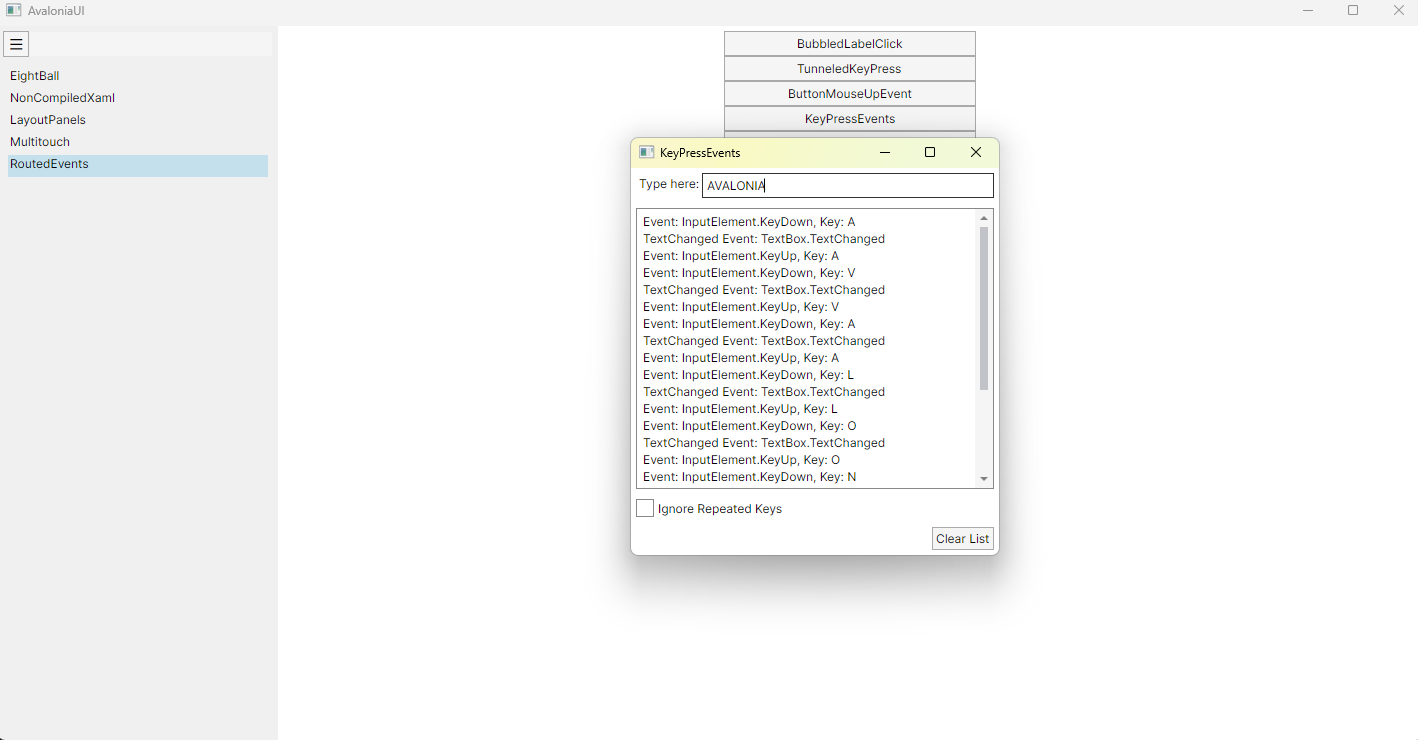
运行效果

 浙公网安备 33010602011771号