
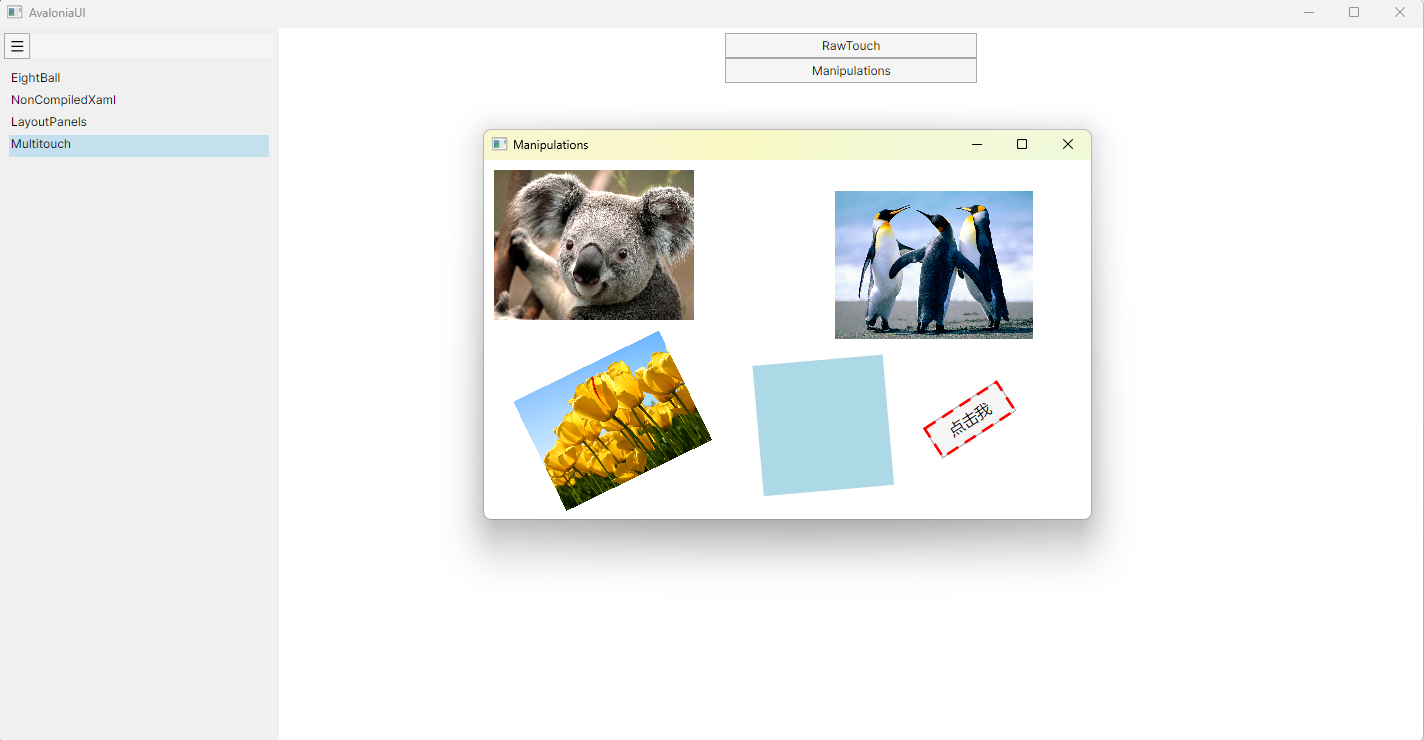
支持各种形状的旋转,平移和缩放。控件IsHitTestVisible = false,即可拖动,旋转和缩放。
Manipulations.axaml代码
<Window xmlns="https://github.com/avaloniaui"
        xmlns:x="http://schemas.microsoft.com/winfx/2006/xaml"
        xmlns:d="http://schemas.microsoft.com/expression/blend/2008"
        xmlns:mc="http://schemas.openxmlformats.org/markup-compatibility/2006"
        Height="359" Width="607"
        x:Class="AvaloniaUI.Manipulations"
        Title="Manipulations">
    <Grid>
        <Canvas Name="canvas" Background="Transparent">
            <Image Canvas.Top="10" Canvas.Left="10" Width="200" Source="avares://AvaloniaUI/Resources/Images/Koala.jpg"/>
            <Image Canvas.Top="30" Canvas.Left="350" Width="200" Source="avares://AvaloniaUI/Resources/Images/Penguins.jpg"/>
            <Image Canvas.Top="100" Canvas.Left="200" Width="200" Source="avares://AvaloniaUI/Resources/Images/Tulips.jpg"/>
            <Rectangle Canvas.Left="10" Canvas.Top="200" Stroke="White" StrokeThickness="2" Fill="LightBlue" Width="150" Height="150"/>
            <Button Canvas.Left="350" Canvas.Top="300" Width="68" Height="28" IsHitTestVisible="False">点击我</Button>
        </Canvas>
    </Grid>
</Window>
Manipulations.axaml.cs代码
using Avalonia;
using Avalonia.Collections;
using Avalonia.Controls;
using Avalonia.Controls.Shapes;
using Avalonia.Input;
using Avalonia.Interactivity;
using Avalonia.Markup.Xaml;
using Avalonia.Media;
using SkiaSharp;
using System;
using System.Collections.Generic;
using System.Linq;

namespace AvaloniaUI;

public partial class Manipulations : Window
{
    private Control? active;
    private Rectangle selectionBorder;
    private Point lastPoint;
    private int? activePointerId;
    private bool isLeftDragging = false;
    private bool isRightRotating = false;
    public Manipulations()
    {
        InitializeComponent();
        //初始化矩阵
        foreach (var c in canvas.Children)
        {
            if (c.RenderTransform is not MatrixTransform)
            {
                c.RenderTransform = new MatrixTransform(); // 初始化矩阵
            }
        }
        canvas.PointerPressed += OnPointerPressed;
        canvas.PointerReleased += OnPointerReleased;
        canvas.PointerMoved += OnPointerMoved;
        canvas.PointerWheelChanged += OnPointerWheelChanged;
        selectionBorder = new Rectangle()
        {
            Stroke=Brushes.Red,
            StrokeThickness=2,
            IsHitTestVisible=false,
            StrokeDashArray = new AvaloniaList<double> { 5, 3 },
            IsVisible = false,
        };
        canvas.Children.Add(selectionBorder);
    }
    private void OnPointerPressed(object? sender, PointerPressedEventArgs e)
    {
        var props = e.GetCurrentPoint(this).Properties;
        isLeftDragging = props.IsLeftButtonPressed;
        isRightRotating = props.IsRightButtonPressed;
        lastPoint = e.GetPosition(canvas);
        if (!canvas.Children.Any(c =>
        {
            var bounds = c.Bounds;

            // 本地矩形的四个顶点(未变换)
            var localPoints = new[]
            {
            new Point(0, 0),
            new Point(bounds.Width, 0),
            new Point(bounds.Width, bounds.Height),
            new Point(0, bounds.Height)
        };

            // 转换本地点到 canvas 坐标系
            var transform = c.TransformToVisual(canvas);//不要使用c.RenderTransform,此是视觉上的转换,忽略了内边距、Clip、阴影、形状裁剪等
            if (transform is null)
                return false;

            var transformedPoints = localPoints
                .Select(p => transform.Value.Transform(p))
                .ToArray();

            // 命中测试
            bool res = PointInPolygon(lastPoint, transformedPoints);

            //Console.WriteLine($"是否选中 {res},点击了 {lastPoint}, {string.Join(" ", transformedPoints)}");

            if (res)
                active = c;

            return res;
        }))
        {
            active = null;
            activePointerId = 0;
            selectionBorder.IsVisible = false;
            isLeftDragging = isRightRotating = false;
            return;
        }
        if (isLeftDragging)
        {
            //更新selectionBorder
            Canvas.SetLeft(selectionBorder, Canvas.GetLeft(active!));
            Canvas.SetTop(selectionBorder, Canvas.GetTop(active!));
            selectionBorder.Width = active!.Bounds.Width;
            selectionBorder.Height = active!.Bounds.Height;
            selectionBorder.RenderTransform = active!.RenderTransform;
            selectionBorder.IsVisible = true;
            activePointerId = e.Pointer.Id;
        }
    }

    private void OnPointerMoved(object? sender, PointerEventArgs e)
    {
        if (active is null ||
            e.Pointer.Id != activePointerId ||
            active.RenderTransform is not MatrixTransform mt)
            return;

        var current = e.GetPosition(canvas);
        var delta = current - lastPoint;

        if (isLeftDragging)
        {
            // 拖动(平移)
            mt.Matrix = mt.Matrix * Matrix.CreateTranslation(delta);
        }
        else if (isRightRotating)
        {
            // 计算图像本地中心点(未变换), 默认RenderTransformOrigin=RelativePoint.Center
            var localCenter = new Point(0,0);

            // 计算中心点经过当前矩阵变换后的画布坐标
            var transformedCenter = mt.Matrix.Transform(localCenter);

            // 绕变换后中心点旋转
            mt.Matrix = mt.Matrix
                * Matrix.CreateRotation(Math.PI * delta.X / 180, transformedCenter);
        }
        lastPoint = current;
    }

    private void OnPointerReleased(object? sender, PointerReleasedEventArgs e)
    {
        if (e.Pointer.Id != activePointerId)
            return;

        isLeftDragging = false;
        isRightRotating = false;
    }

    private void OnPointerWheelChanged(object? sender, PointerWheelEventArgs e)
    {
        if (active is null ||
            e.Pointer.Id != activePointerId ||
            active.RenderTransform is not MatrixTransform mt)
            return;

        var scale = e.Delta.Y > 0 ? 1.1 : 0.9;

        mt.Matrix = mt.Matrix
            * Matrix.CreateScale(scale, scale);
    }
    private bool PointInPolygon(Point p, Point[] polygon)
    {
        int n = polygon.Length;
        bool inside = false;

        for (int i = 0, j = n - 1; i < n; j = i++)
        {
            var pi = polygon[i];
            var pj = polygon[j];

            // 检查点在 Y 区间,并且是否在边的左侧
            if (((pi.Y > p.Y) != (pj.Y > p.Y)) &&
                (p.X < (pj.X - pi.X) * (p.Y - pi.Y) / (pj.Y - pi.Y) + pi.X))
            {
                inside = !inside;
            }
        }

        return inside;
    }
}
运行效果

 浙公网安备 33010602011771号